
Ymiko Ymiko3b1uwzhmge
Ymiko S900 LCD Display Control Panel User Manual
Model: Ymiko3b1uwzhmge
1. Product Overview
The Ymiko S900 LCD Display Control Panel is a multi-functional display designed for electric bicycles and scooters. It serves as a trip computer and controls the entire electric system after conversion. Compatible with both 36V and 48V voltage systems, it provides intelligent power display and real-time recording of power consumption to ensure accurate riding mileage.
This display makes it easier to view essential data such as remaining power, current speed, average speed, maximum speed, clock, and total one-way distance. When a PAS (Pedal Assist System) is installed, the display allows the user to select the desired level of assistance, enhancing the riding experience.

Image: The Ymiko S900 LCD Display Control Panel, showing its sleek black design and screen.
2. Setup and Installation
The S900 Display Control Panel is designed for easy installation on handlebars with a diameter of 22.2mm (0.9 inches). Ensure your electric bicycle or scooter's handlebars meet this specification.
2.1. Connection
The display connects to your electric system via a 5-pin interface. Ensure the meter socket of the display screen is securely connected to the instrument interface of your controller. This display is suitable for use with JN Controllers and Pasion Electric Motor Kits.

Image: The S900 LCD Display mounted on bicycle handlebars, demonstrating its typical installation position.
2.2. Wiring Diagram (5-pin Interface)
Refer to the following table and diagram for the standard connector sequence to ensure correct wiring:

Image: Detailed diagram of the JN WP PLUG 5-pin connector with a table outlining wire colors and their corresponding functions (VCC, K, GND, RX, TX).
| Sequence No. | Wire Color | Functions |
|---|---|---|
| 1 | Red (VCC) | Panel power cord |
| 2 | Blue (K) | Controller power cord |
| 3 | Black (GND) | Panel ground wire |
| 4 | Green (RX) | Panel data receiving wire |
| 5 | Yellow (TX) | Panel data sending wire |
3. Operating Instructions
The S900 display provides comprehensive information and control over your electric system. It features a user-friendly interface with dedicated buttons for navigation and settings.
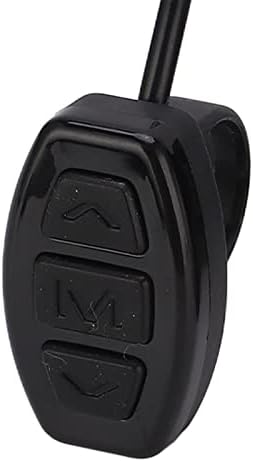
Image: A close-up view of the three control buttons (Up, M, Down) on the S900 LCD Display's remote panel.
3.1. Display Functions
- Speed Display: Shows current riding speed.
- Power Assisted Gear Display: Indicates the current level of pedal assistance.
- Power Indicator: Displays remaining battery level.
- Fault Prompt: Alerts to system errors.
- Total Mileage: Tracks cumulative distance traveled.
- Single Mileage: Tracks distance for the current trip.
- Headlight Display: Indicates headlight status.
- Single Driving Time Display: Shows duration of the current trip.
3.2. Control and Setting Functions
Use the control buttons (Up, Down, M) to navigate menus and adjust settings:
- Power Switch Control: Turn the system on/off.
- Headlight Switch Control: Toggle headlights.
- 6Km/h Jog Control: Activate a low-speed assist mode.
- Wheel Diameter Setting: Calibrate for accurate speed and distance readings.
- Maximum Speed Setting: Set the maximum assist speed.
- Idle Automatic Sleep Time Setting: Configure auto-shutdown time.
- Backlight Brightness Setting: Adjust display illumination.
- Voltage Level Setting: Configure for 36V or 48V systems.
- PAS Connect: Manage Pedal Assist System connection and levels.
4. Maintenance
To ensure the longevity and optimal performance of your Ymiko S900 LCD Display Control Panel, follow these maintenance guidelines:
- Cleaning: Wipe the display screen and body with a soft, damp cloth. Avoid using abrasive cleaners or solvents that could damage the plastic or screen.
- Environmental Protection: While the device has an International Protection Rating of IP07 (protected against temporary immersion in water up to 1 meter for 30 minutes), it is best to avoid prolonged exposure to heavy rain or direct water jets. Store in a dry place when not in use.
- Temperature: Avoid exposing the display to extreme temperatures, both hot and cold, as this can affect the LCD and internal components.
- Connections: Periodically check all cable connections to ensure they are secure and free from corrosion or damage.
5. Troubleshooting
If you encounter issues with your S900 LCD Display, refer to the following common problems and solutions:
5.1. Display Not Turning On / No Power
- Check Connections: Ensure the 5-pin interface cable is securely connected to both the display and the controller. A loose connection is a common cause of power issues.
- Battery Level: Verify that your e-bike/scooter battery has sufficient charge and is providing the correct voltage (36V or 48V) to the system.
- Controller Compatibility: Confirm that your controller is compatible with the S900 display (e.g., JN Controller).
5.2. Error Code 10 Displayed
- Refer to Controller Manual: Error codes are often generated by the main controller. Consult your e-bike/scooter's controller manual for specific definitions of error code 10 and recommended troubleshooting steps.
- Check Sensors: This error might relate to sensor malfunctions (e.g., speed sensor, motor sensor). Inspect sensor connections and ensure they are clean and undamaged.
5.3. Incorrect Speed or Distance Readings
- Wheel Diameter Setting: Ensure the wheel diameter setting in the display's menu is correctly calibrated to your wheel size. An incorrect setting will lead to inaccurate readings.
- Speed Sensor: Check the speed sensor for proper installation and function. Ensure it is clean and not obstructed.
5.4. Display Not Responding to Buttons
- Restart: Try turning the system off and on again.
- Physical Damage: Inspect the buttons and the remote control unit for any visible damage.
If problems persist after attempting these troubleshooting steps, please contact customer support for further assistance.
6. Specifications
| Feature | Specification |
|---|---|
| Brand | Ymiko |
| Model Name | Ymiko3b1uwzhmge |
| Color | Black |
| Display Type | LCD |
| Display Resolution | 160x128 |
| Sensor Type | Speed Sensor |
| Voltage Compatibility | 36V, 48V |
| Connectivity Technology | USB (for data transfer/firmware, not for power) |
| Interface | 5-pin Interface |
| Applicable Handlebar Diameter | 22.2mm / 0.9in |
| Mounting Type | Handlebar Mount |
| Human Interface Input | Buttons |
| International Protection Rating | IP07 |
| Item Package Dimensions (L x W x H) | 5.2 x 3.5 x 3.07 inches |
| Package Weight | 0.21 Kilograms (7.9 oz) |
| Included Components | LCD S900 Display Control Panel, 2 x Washer, 1 x Manual |
7. Warranty and Support
Your Ymiko S900 LCD Display Control Panel comes with a commitment to quality and customer satisfaction. While specific warranty terms are not detailed here, we are dedicated to providing better products and services.
If you have any questions, encounter issues, or require assistance with your product, please do not hesitate to contact us. Refer to the contact information provided with your purchase or visit the official Ymiko store for support.
Thank you for choosing Ymiko.
Ask a question about this manual
Ask about setup, troubleshooting, compatibility, parts, safety, or missing instructions. Manuals+ will review the question and use this page’s manual context to help answer it.