
1. Introduction and Overview
Thank you for choosing the BestFire Night Vision Goggles. These digital infrared binoculars are designed to provide clear and vivid images in various lighting conditions, from daytime to complete darkness. Equipped with advanced optical systems and infrared illumination, they are ideal for activities such as hunting, reconnaissance, security, surveillance, camping, boating, bird watching, wildlife observation, and search and rescue operations.
The device features 4K Full HD video recording and 36MP photo capture, an adjustable 850nm IR illuminator with 7 brightness levels, and a 3.2-inch HD TFT screen for instant viewing. It includes an 8X digital zoom and comes with a 32GB memory card and a rechargeable battery for extended use.
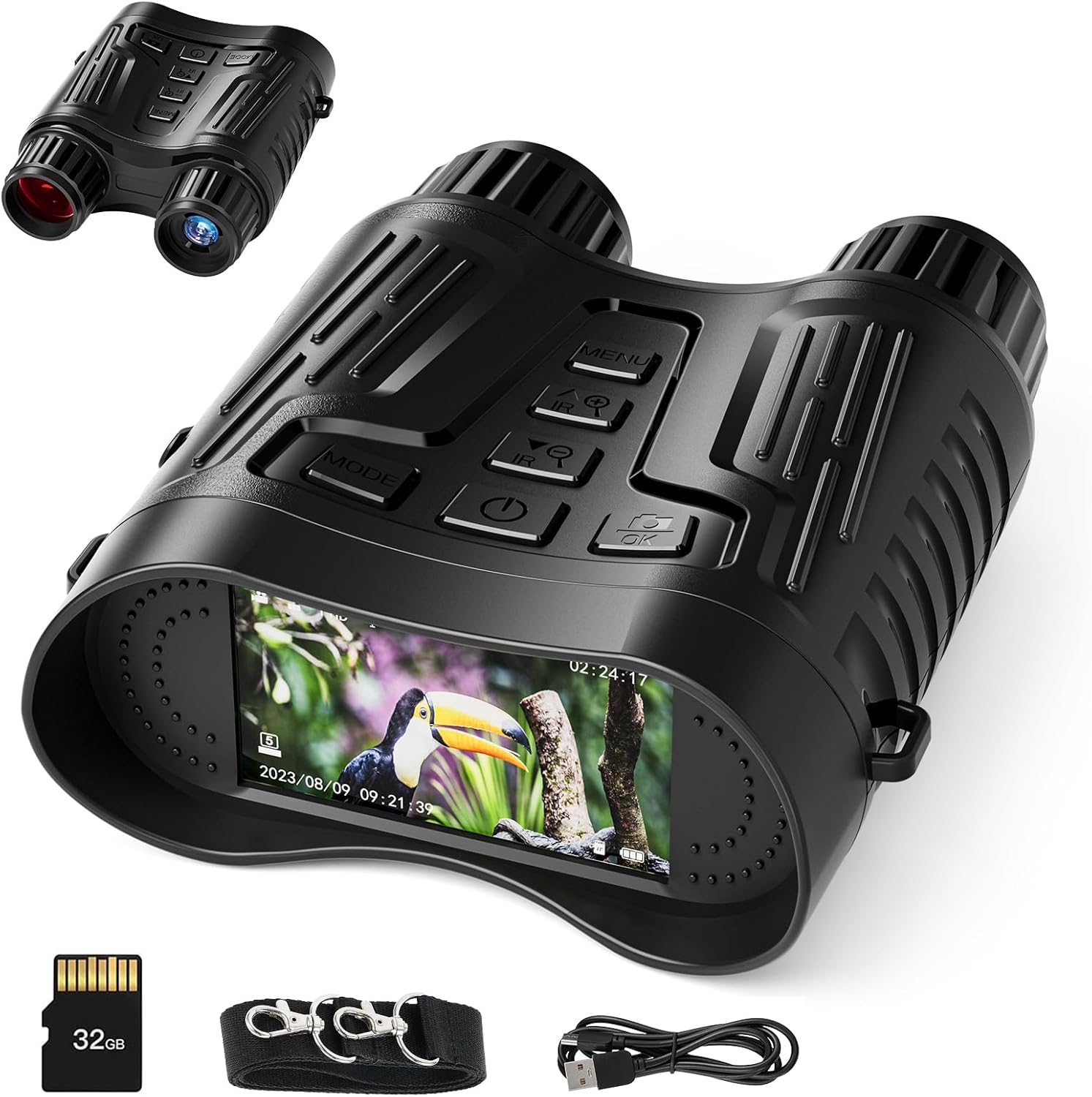
Figure 1.1: BestFire Night Vision Goggles and accessories.
2. Product Features
- Infrared Digital Night Vision: Adjustable 850nm IR brightness control (7 levels) for optimal illumination in varying light conditions.
- All-Optical System: Designed for clear and vivid images in complete darkness.
- High-Definition Capture: 4K Full HD video resolution and 36 million pixels photos.
- Large HD Screen: 3.2-inch TFT screen for instant viewing and playback.
- Optical Clarity: Outstanding clarity for both daytime and nighttime use.
- Extended Range: Observe targets up to 1000ft (300m) in complete darkness.
- Digital Zoom: 8X digital zoom for enhanced viewing of distant objects.
- Rechargeable Battery: Equipped with 2600 mAh Li-ion rechargeable batteries, offering 5-hour runtime with IR and 10-hour runtime without IR.
- Memory Card Included: Comes with a 32GB micro memory card for storage.

Figure 2.1: Overview of key product features.
3. Package Contents
Upon unpacking, please ensure all items listed below are present:
- 1 x Night Vision Goggles
- 1 x Data Cable (USB)
- 1 x Neck Strap
- 1 x User Manual
- 1 x Cleaning Cloth
- 1 x 32GB Memory Card
4. Setup
4.1 Charging the Device
Before first use, fully charge the night vision goggles. Connect the provided data cable to the USB port on the device and the other end to a compatible USB power source (e.g., computer, wall adapter). The battery indicator on the screen will show charging status.

Figure 4.1: USB charging port and TF card slot location.
4.2 Inserting the Memory Card
Locate the TF card slot on the side of the device (usually protected by a rubber cover). Gently insert the 32GB memory card into the slot until it clicks into place. Ensure the card is inserted in the correct orientation to avoid damage.
Video 4.1: Inserting the SD card and charging the device.
4.3 Attaching the Neck Strap
Attach the provided neck strap to the designated loops on the device. This allows for convenient carrying and quick access during use.
5. Operating Instructions
5.1 Powering On/Off
Press and hold the power button (usually centrally located) to turn the device on or off. The screen will illuminate upon power-on.
5.2 Adjusting Focus
Rotate the focus wheel (typically located near the objective lenses) clockwise or counter-clockwise to achieve a clear image based on your viewing distance. This manual focus ensures optimal clarity.
5.3 Changing Modes (Photo/Video/Playback)
Use the 'Mode' button to switch between different functions: photo capture, video recording, and playback. The current mode will be indicated on the screen.
5.4 Adjusting IR Brightness
In night vision mode, use the IR+ and IR- buttons to adjust the infrared illuminator's brightness. There are 7 levels of adjustment to suit various low-light conditions and viewing distances.

Figure 5.1: Adjusting IR brightness levels.
5.5 Digital Zoom
The device features an 8X digital zoom. Use the zoom buttons (often marked with '+' and '-') to magnify or reduce the image on the screen.
5.6 Day & Night Use
The binoculars can be used in both day and night conditions. In daylight, images will appear in full color. In low light or total darkness, the infrared mode will activate, displaying images in black and white or green hues for enhanced visibility.

Figure 5.2: Day and Night vision capabilities.
Video 5.1: Infrared Night Vision Binoculars & Goggles Overview.
Video 5.2: 4K Infrared Night Vision Goggles Features and UI.
6. Maintenance
6.1 Cleaning the Lenses
Use the provided cleaning cloth to gently wipe the lenses. Avoid using abrasive materials or harsh chemicals, as they may scratch or damage the optical surfaces.
6.2 Battery Care
To prolong battery life, avoid fully discharging the battery frequently. Recharge the device regularly, especially if it will not be used for an extended period.
6.3 Storage
Store the night vision goggles in a cool, dry place away from direct sunlight and extreme temperatures. Keep them in their original packaging or a protective case when not in use to prevent dust and damage.
7. Troubleshooting
| Problem | Possible Cause | Solution |
|---|---|---|
| Device does not power on. | Low or depleted battery. | Charge the device fully using the provided USB cable. |
| Image is blurry or out of focus. | Incorrect focus adjustment. | Rotate the focus wheel until the image becomes clear. |
| "No Card" message on screen. | Memory card not inserted or not recognized. | Ensure the 32GB memory card is correctly inserted into the TF slot. Reinsert if necessary. |
| Poor night vision performance. | IR brightness too low or too high for conditions. | Adjust the IR brightness levels using the IR+ and IR- buttons. |
| Cannot record photos/videos. | Memory card full or corrupted. | Delete old files or format the memory card (backup important data first). Ensure card is properly inserted. |
8. Specifications
| Feature | Detail |
|---|---|
| Picture Size | 36M (6912x5184), 12M (4000x3000), 8M (3264x2488), 5M (2592x1944), 3M (2048x1536), 2M (1600x1200) |
| Video Size | 4K/1080P/720P/VGA/QVGA |
| Digital Zoom | 8 times |
| Storage Medium | 32GB memory card (included) |
| Full Black Viewing Distance | 150~300M (approx. 492-984 ft) |
| Low Light/Daytime Sight Distance | 3.0m~infinity |
| Infrared Radiation LED | 3W, 850nm, Class 7 |
| USB Interface | Micro USB 2.0 |
| Battery | 2600mAh Li-ion rechargeable battery |
| Item Dimensions (LxWxH) | 4.7 x 1.8 x 5.8 inches |
| Item Weight | 0.75 lb |
| Material | Acrylonitrile Butadiene Styrene (ABS) |

Figure 8.1: Detailed product specifications.
9. Warranty and Support
For detailed warranty information and customer support, please refer to the separate User Manual included in your product package or contact BestFire customer service directly. Keep your purchase receipt for warranty claims.