
Ymiko Ymiko5pzdk9n17r
Ymiko BL2021 Digital Combination Door Lock Instruction Manual
Model: Ymiko5pzdk9n17r
Product Overview
The Ymiko BL2021 Digital Double Sided Back to Lock is a mechanical code lock designed for secure access to doors and gates. Constructed from durable zinc alloy and steel, it features a 14-button keypad for setting a 4-7 digit combination. This keyless deadbolt offers enhanced security against forced entry and is suitable for both indoor and outdoor applications, requiring no batteries for operation.
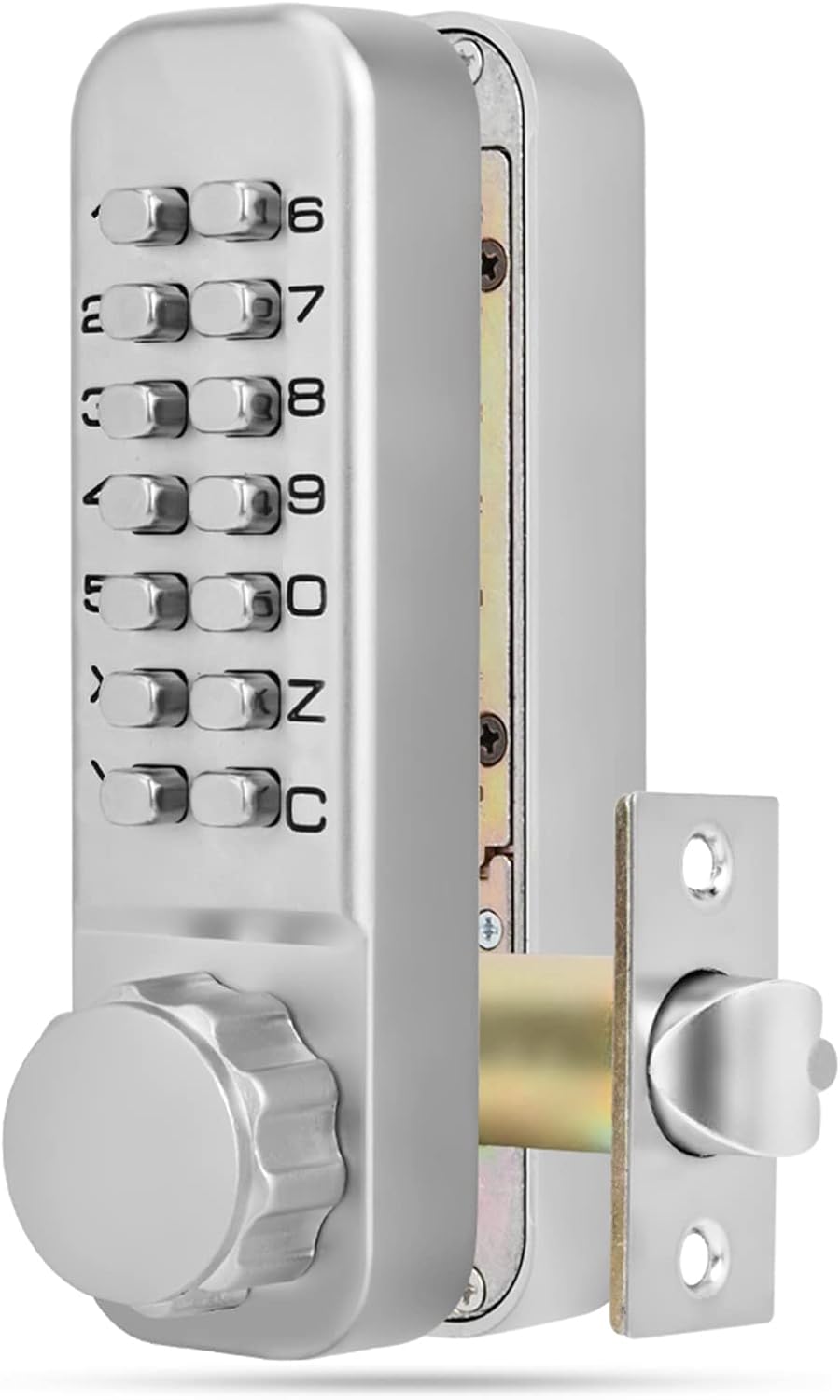
Figure 1: Front view of the Ymiko BL2021 Digital Combination Door Lock, showcasing the keypad and rotary knob.
Package Contents
Before beginning installation, please verify that all components are present in the package:
- 2 x Lock Body (Front and Rear Panels)
- 1 x Lock Tongue (Deadbolt mechanism)
- 2 x Lock Pad (Gaskets/Spacers)
- 1 x Installation Accessories (Screws, spindles, etc.)
- 1 x Instruction Manual (This document)

Figure 2: All components included with the Ymiko BL2021 lock, laid out for inspection.
Setup and Installation
This section provides general guidance for installing the Ymiko BL2021 mechanical code lock. For detailed, step-by-step instructions, refer to the specific installation diagrams and templates provided with your physical product. Ensure your door thickness is between 30mm and 60mm.
- Prepare the Door: Mark and drill holes for the lock body and deadbolt mechanism according to the provided template. Ensure precise alignment for smooth operation.
- Install the Lock Tongue: Insert the deadbolt mechanism (lock tongue) into the edge of the door and secure it with screws.
- Attach Lock Pads: Place the lock pads (gaskets) on both sides of the door where the lock bodies will be mounted.
- Mount Lock Bodies: Align the front and rear lock bodies with the drilled holes and secure them using the provided installation accessories (screws and spindles). Ensure the spindle correctly engages with the lock tongue.
- Set Initial Password (if not pre-set):
- Remove the back four screws from the front panel and carefully take off the cover plate.
- Hold down the 'C' key (clear/reset key).
- Using tweezers, remove the password chips from the slots you do NOT want to be part of the code.
- Insert the stainless copper password keys into the slots corresponding to your desired password digits.
- For non-password keys, ensure bronze chips are in their slots.
- Release the 'C' key and reattach the cover plate and screws.
- Note: The password digits can be entered in any order. The password cannot contain repeated numbers. Recommended password length is 4-7 digits.
- Test Operation: Before closing the door, test the lock mechanism with the newly set password to ensure it locks and unlocks smoothly.
Operating Instructions
The Ymiko BL2021 lock operates mechanically without the need for batteries.

Figure 3: Detailed view of the keypad on the Ymiko BL2021 lock.
- To Unlock:
- Press the digits of your set password in any order.
- Rotate the knob to retract the deadbolt.
- Open the door.
- To Lock:
- Close the door.
- Rotate the knob to extend the deadbolt into the door frame.
- Press the 'C' key to clear the entered code and secure the lock.
Maintenance
The Ymiko BL2021 mechanical code lock is designed for durability and requires minimal maintenance.
- Cleaning: Wipe the chrome-plated surface with a soft, damp cloth to remove dust and grime. Avoid abrasive cleaners or solvents that could damage the finish.
- Lubrication: Periodically, a small amount of graphite lubricant can be applied to the internal moving parts of the deadbolt mechanism to ensure smooth operation. Do not use oil-based lubricants as they can attract dust.
- Inspection: Regularly check all screws and mounting hardware to ensure they are tight. Loose components can affect the lock's security and functionality.
Troubleshooting
| Problem | Possible Cause | Solution |
|---|---|---|
| Lock does not open after entering code. | Incorrect password entered, or 'C' key not pressed after previous use. | Ensure the correct password is entered. Press the 'C' key before entering the code to clear any previous input. |
| Knob is stiff or difficult to turn. | Lack of lubrication, misaligned installation, or debris in mechanism. | Apply graphite lubricant to the deadbolt mechanism. Check installation for proper alignment. Clean any visible debris. |
| Cannot change password. | Incorrect procedure followed, or 'C' key not held down during chip removal/insertion. | Review the "Set Initial Password" steps in the Setup section. Ensure the 'C' key is held down firmly when manipulating password chips. Verify password digits are not repeated. |
| Lock feels loose on the door. | Mounting screws are loose. | Tighten all mounting screws on both the front and rear lock bodies. |
Specifications
| Brand | Ymiko |
| Model Name | Ymiko5pzdk9n17r |
| Material | Zinc Alloy, Steel |
| Color | Silver |
| Password Length | 4-7 digits (user settable) |
| Applicable Door Thickness | 30 - 60 mm |
| Lock Type | Mechanical Combination Lock, Keypad Deadbolt |
| Power Source | No battery required |
| Item Weight | 1439 g (approx. 3.17 lbs) |
| Recommended Uses | Indoor and Outdoor Doors, Gates |
Warranty and Support
Specific warranty details for the Ymiko BL2021 Digital Combination Door Lock are not provided within this manual. For information regarding warranty coverage, technical support, or service inquiries, please refer to the product packaging or contact Ymiko customer service directly through their official channels or the retailer from whom the product was purchased.
You may visit the Ymiko Store on Amazon for more information.
Ask a question about this manual
Ask about setup, troubleshooting, compatibility, parts, safety, or missing instructions. Manuals+ will review the question and use this page’s manual context to help answer it.