
1. Product Overview
The LINGDU V620 is a high-performance 4K dash camera system designed for comprehensive vehicle surveillance. It features dual recording capabilities, capturing 4K Ultra HD footage from the front and 1080P Full HD from the rear. Equipped with advanced technologies such as WiFi 6, GPS, ADAS (Advanced Driver Assistance System), HDR, and WDR, the V620 provides clear video evidence, smart driving assistance, and reliable parking monitoring. Voice control allows for hands-free operation, enhancing safety and convenience.
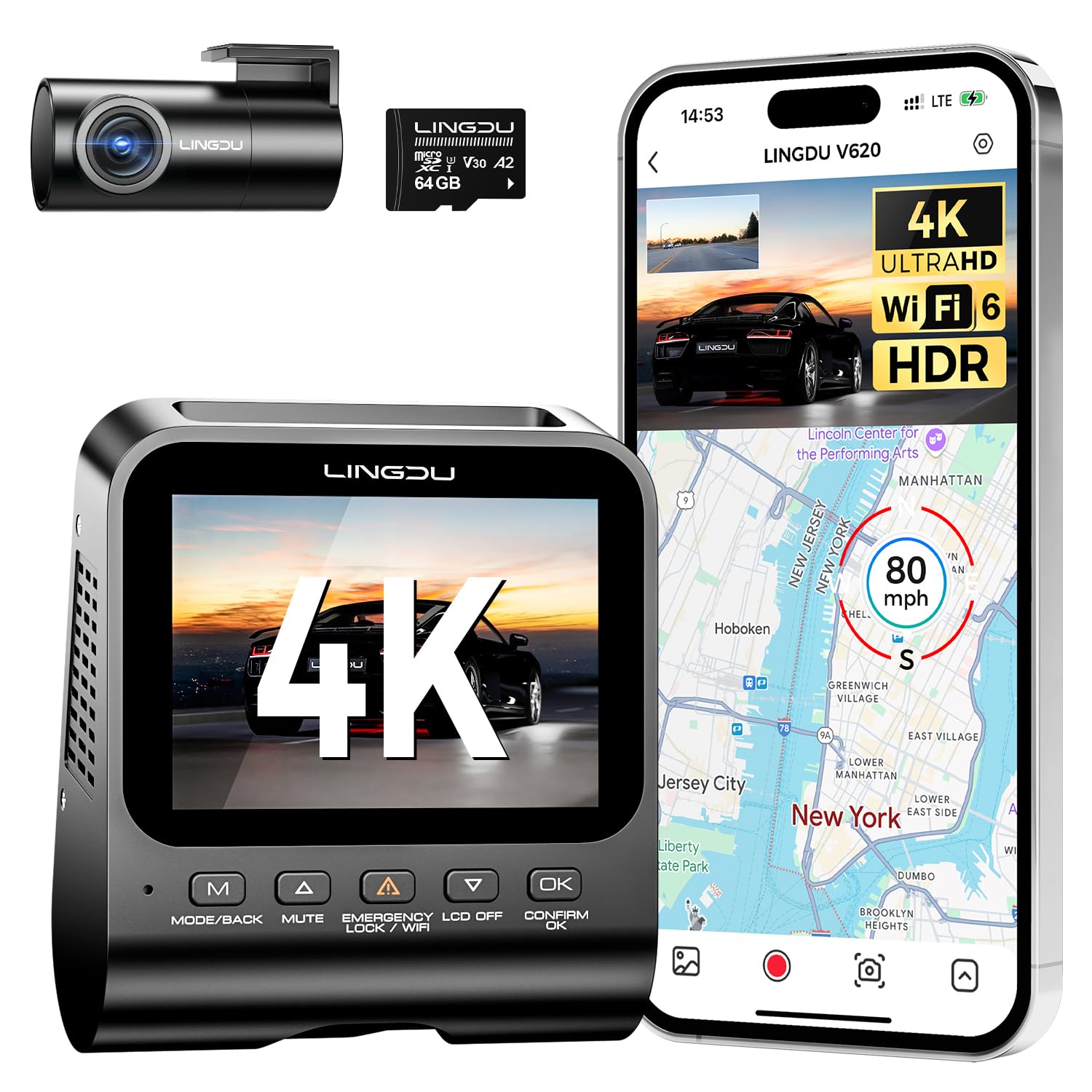
A clear view of the LINGDU V620 dash cam, showcasing its compact design and front camera lens.
2. What's in the Box
Upon opening your LINGDU V620 package, verify that all the following components are included:
- V620 Dash Cam Front Unit
- Rear Camera (6M/20ft cable)
- Type-C USB Car Charger (5V/2.5A)
- USB Power Cable (3.5M/12ft)
- Cable Clips (x5)
- Pry Tool
- 64GB SD Card (x1)
- User Manual (x1)
- Spare 3M Tapes (x1)
- Electrostatic Films (L Size x2, S Size x2)

A detailed layout of all items included in the LINGDU V620 dash cam package.
Unboxing Video
Video demonstrating the unboxing and contents of the LINGDU V620 dash cam package, including the main unit, rear camera, cables, and accessories.
3. Setup and Installation
3.1 Mounting the Dash Cam
The LINGDU V620 is designed for discreet installation. Use the provided electrostatic films and 3M adhesive tapes to securely mount the front dash cam on your windshield. The rear camera should be mounted on the rear window. Ensure both cameras have a clear, unobstructed view of the road.
- Clean the windshield area where the camera will be mounted.
- Apply an electrostatic film to the desired location on the windshield.
- Attach the 3M adhesive tape to the dash cam mount, then firmly press the mount onto the electrostatic film.
- Connect the rear camera cable to the main unit and route it discreetly along the vehicle's interior trim using the pry tool and cable clips.

An illustration showing the compact and hidden design of the LINGDU V620 dash cam, along with its easy installation process on the car's windshield.
3.2 Power Connection
Connect the USB power cable to the dash cam's Type-C port and plug the car charger into your vehicle's cigarette lighter socket. The dash cam will automatically power on and begin recording when the vehicle starts.
3.3 SD Card Insertion and Formatting
Insert the provided 64GB Micro SD card into the designated slot on the dash cam. It is recommended to format the SD card within the dash cam's settings menu before first use and periodically thereafter to ensure optimal performance and prevent recording issues.
3.4 App Installation and WiFi Connection
Download the LINGDU App from your smartphone's app store (Google Play or Apple App Store). Follow these steps to connect:
- Install the LINGDU App on your smartphone.
- Turn off cellular data on your phone and connect to the V620's built-in WiFi network (SSID and password can be found in the dash cam settings or manual).
- Open the LINGDU App. If prompted, format the Micro SD card.
- The dash cam is now ready to start recording and be controlled via the app.

Visual guide for connecting the LINGDU V620 dash cam to your smartphone via WiFi for app control.
4. Operating Instructions
4.1 Dual Recording (Front 4K + Rear 1080P)
The V620 simultaneously records in 4K Ultra HD from the front camera and 1080P Full HD from the rear camera, providing comprehensive coverage of your driving environment. The 150° wide-angle lens minimizes blind spots.

An illustration showing the LINGDU V620 dash cam capturing both front (4K UHD) and rear (1080P FHD) views, highlighting its wide-angle lens and HDR/WDR technology for clear footage.
4.2 HDR & WDR Superior Night Vision
Equipped with HDR (High Dynamic Range) and WDR (Wide Dynamic Range) technology, an F1.8 large-aperture lens, and 6-layer glass optics, the V620 optimizes video quality in challenging lighting conditions. This ensures clear footage, even in low light or when transitioning between bright and dark environments.

A visual comparison demonstrating the effectiveness of HDR and WDR technology in the V620 dash cam, showing how it balances light to produce clear video in both bright and dark areas, such as entering or exiting a tunnel.
4.3 Smart Voice Control
Control your V620 dash cam using simple English voice commands, allowing you to keep your hands on the wheel and focus on driving. Commands include: "Take Picture", "Lock the Video", "Turn on WiFi", "Turn off Screen", "Show Front Camera", and "Turn on Audio".

An image depicting a driver interacting with the dash cam using voice commands like "Lock the Video" or "Take Picture," emphasizing hands-free operation for enhanced safety.
4.4 ADAS Proactive Driver Assistance
The V620 integrates an Advanced Driver Assistance System (ADAS) to provide real-time alerts for potential road hazards:
- Lane Departure Reminder: Alerts you if your vehicle drifts out of its lane.
- Vehicle Approaching Warning: Notifies you of vehicles approaching too closely.
- Pedestrian Collision Warning: Warns of potential collisions with pedestrians.

This graphic explains the Advanced Driver Assistance System (ADAS) features of the V620, including alerts for lane departure, approaching vehicles, and potential pedestrian collisions.
4.5 Integrated GPS & Route Tracking
The built-in GPS module accurately records your driving speed, location, and coordinates, embedding this data into your video files. You can review your driving route on a map via the LINGDU App or desktop GPS player.

An image showing the integrated GPS functionality, which records speed, location, and route, viewable on the LINGDU app or desktop player, along with a car driving on a scenic road with GPS coordinates overlaid.
4.6 Loop Recording & G-Sensor Lock
The V620 features continuous loop recording, automatically overwriting the oldest files when the SD card is full. The integrated G-sensor detects sudden impacts or vibrations, automatically locking the current video segment to prevent it from being overwritten, ensuring critical event footage is preserved.

This image illustrates the G-sensor's function, which automatically locks video footage during sudden impacts to prevent overwriting, ensuring critical evidence is saved.
4.7 24/7 Triple Parking Monitoring
Protect your vehicle around the clock with three advanced parking modes (requires an optional hardwire kit):
- Motion Detection: Records when movement is detected around your parked car.
- Collision Detection: Activates recording upon detecting an impact to the vehicle.
- Time-Lapse: Records continuously at a low frame rate to save storage space while capturing extended periods.

A graphic detailing the three parking modes available with the V620 dash cam (Motion Detection, Collision Detection, and Time-Lapse), providing continuous surveillance for a parked vehicle.
5. Maintenance
5.1 SD Card Care
To ensure reliable recording, it is recommended to:
- Format the SD card monthly using the dash cam's menu.
- Replace the SD card every 6-12 months, as continuous overwriting can degrade its performance over time.
- Use a high-endurance Micro SD card (Class 10 or U3 recommended) for optimal performance.
5.2 Cleaning
Gently wipe the camera lenses with a soft, lint-free cloth to maintain clear video quality. Avoid using abrasive cleaners or solvents.
6. Troubleshooting
If you encounter issues with your LINGDU V620 dash cam, refer to the following common solutions:
- Camera Not Turning On: Ensure the power cable is securely connected to both the dash cam and the car's power source. Check the car charger for proper function.
- "Insufficient SD Card Capacity" Error: This indicates the SD card is full and loop recording may not be functioning correctly. Format the SD card via the dash cam settings. If the issue persists, the SD card may be faulty and require replacement.
- Video Playback Issues: Ensure the LINGDU App or desktop player is up to date. If playing directly from the SD card, try formatting the card.
- WiFi Connection Problems: Verify that your phone's cellular data is turned off when connecting to the dash cam's WiFi. Ensure you are within 10 feet of the dash cam for a stable connection.
- Unclear Footage: Clean the camera lenses. Check if the protective film has been removed from the lenses. Ensure the dash cam is securely mounted and not vibrating.
7. Specifications
| Product Dimensions | 9.45 x 2.36 x 5.51 inches |
| Item Weight | 6.6 ounces |
| Item Model Number | V620 |
| Batteries | 1 12V battery required |
| Connectivity Technologies | Wi-Fi |
| Special Features | App Control, Built-In GPS, Built-In WiFi, Compact Design, G-Sensor |
| Other Display Features | Wireless |
| Color | Black |
| Manufacturer | LINGDU Tech |
| Date First Available | December 1, 2024 |
| Brand | LINGDU |
| Model Name | V620 |
| Vehicle Service Type | Car |
| Connectivity Technology | Wi-Fi |
| Video Capture Resolution | 1080p, 2160p |
| Included Components | Car Mount |
| Mounting Type | Windshield Mount |
| Field Of View | 150 Degrees |
8. Warranty and Support
The LINGDU V620 Dash Cam comes with a standard manufacturer's warranty. For detailed warranty information, technical support, or service inquiries, please refer to the contact information provided in the official LINGDU documentation or visit the LINGDU official website. Keep your purchase receipt for warranty claims.


