
Introduction
The Hisense 120L5G-RB is a 4K Smart Laser Projector designed to deliver an immersive home cinema experience. This ultra-short throw projector creates a large 120-inch display with vibrant 4K HDR10 visuals and integrated powerful audio. This manual provides essential information for the setup, operation, and maintenance of your projector.
Key Features:
- 2700 Lumens Projection: Delivers bright and clear images for both day and night viewing. The laser light source offers a service life of over 25,000 hours.
- 4K HDR10 Visuals at 60Hz: Provides high-definition resolution with optimized color, contrast, and smooth motion for a lifelike viewing experience.
- 120-Inch Fixed Large Display: Creates a theater-like atmosphere. Note that this product includes the projector only; the screen is sold separately.
- 30W Built-in Speakers: Integrated audio system delivers rich and resonant sound, eliminating the need for additional sound equipment.
- All-Round Entertainment: Ideal for movies, TV series, and gaming, serving as a versatile home theater companion.
Setup
Proper placement and connection are crucial for optimal performance of your Hisense 120L5G-RB projector. Follow these steps for initial setup.
Unpacking and Placement:
Carefully remove the projector from its packaging. Place the projector on a stable, flat surface directly in front of your projection screen or wall. Ensure there is adequate space around the projector for ventilation.

Image: Angled view of the Hisense 120L5G-RB 4K Smart Laser Projector, showcasing its sleek design.
Connecting Devices:
The projector features multiple input ports for various devices. Connect your media players, gaming consoles, or other sources using appropriate cables.
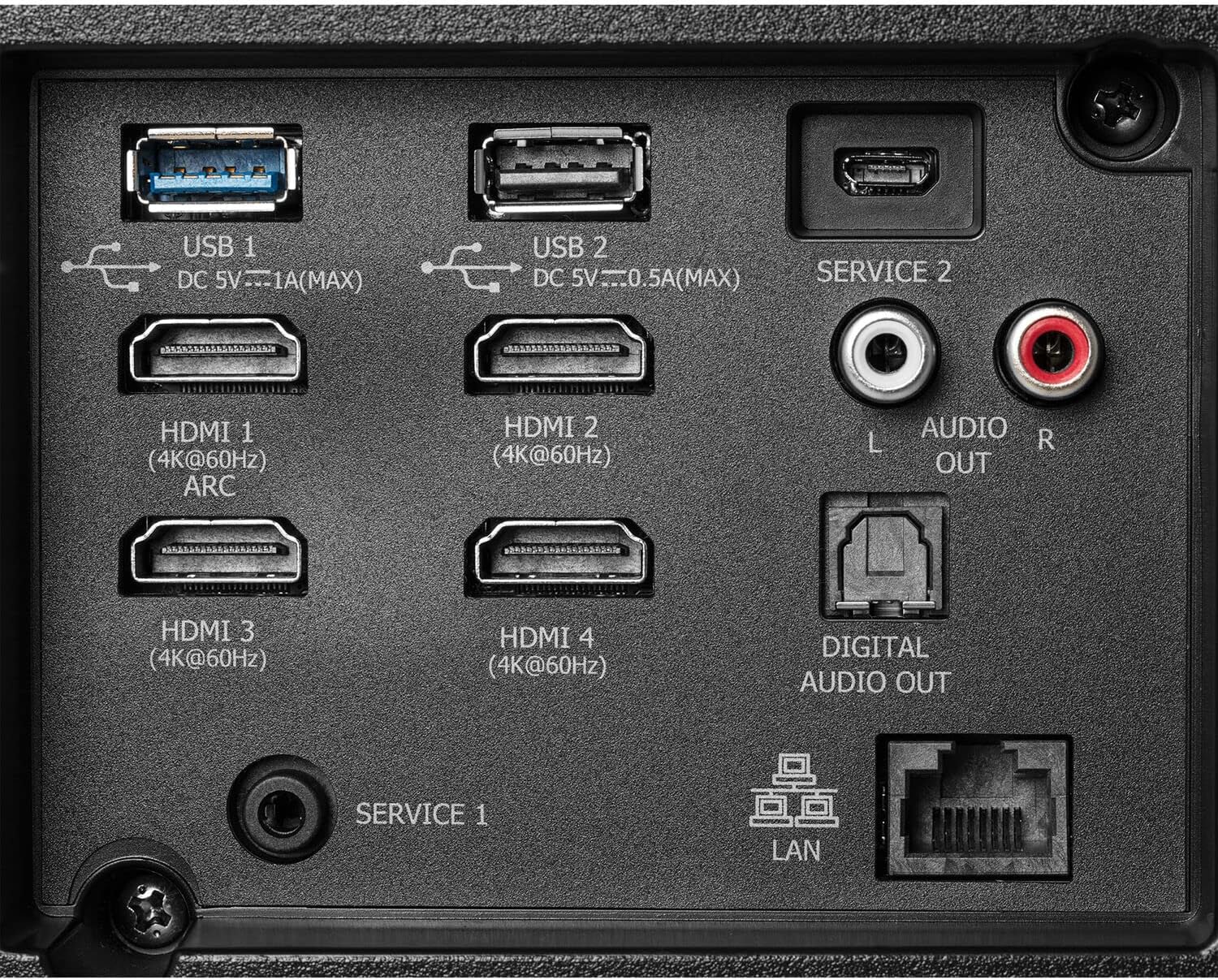
Image: Rear panel of the projector displaying various input ports including HDMI, USB, Audio Out, and LAN.
- HDMI Ports (HDMI 1-4): Connect Blu-ray players, streaming devices, game consoles, or computers. HDMI 1 supports ARC for audio return channel functionality.
- USB Ports (USB 1, USB 2): For connecting USB storage devices to play media files or for service functions.
- Audio Out (L/R): Connect to external audio systems using RCA cables.
- Digital Audio Out (Optical): For connecting to soundbars or AV receivers with optical input.
- LAN Port: For wired network connection.
Power Connection:
Connect the power cord to the projector and then to a power outlet. The projector will enter standby mode. Press the power button on the projector or remote control to turn it on.
Operating
Once powered on, your Hisense 120L5G-RB projector offers a range of smart features and settings for an optimized viewing experience.
Initial Power On and Smart Features:
Upon first power-on, follow the on-screen instructions to set up your network connection, language, and other preferences. The projector features smart capabilities, allowing access to various streaming applications and services.

Image: The Hisense projector positioned below a large screen, displaying a high-quality image of a scenic landscape.
Picture and Sound Settings:
Access the settings menu to adjust picture modes (e.g., Standard, Dynamic, Cinema), brightness, contrast, and color temperature. Sound settings allow you to modify audio output, equalizer, and surround sound options for the built-in 30W speakers or connected external audio systems.
Ultra Short Throw Advantage:
The ultra-short throw design allows the projector to be placed very close to the screen, minimizing shadows and simplifying installation in various room layouts.
Maintenance
Regular maintenance ensures the longevity and optimal performance of your Hisense 120L5G-RB projector.
Cleaning the Projector:
- Exterior: Use a soft, dry cloth to wipe the exterior surfaces. Avoid abrasive cleaners or solvents.
- Lens: Gently clean the projector lens with a lens cleaning cloth or specialized lens paper. Do not use excessive force or harsh chemicals, as this can damage the lens coating.
- Ventilation: Ensure the ventilation openings are clear of dust and obstructions to prevent overheating. Periodically use a soft brush or compressed air to clean the vents.
Light Source:
The laser light source in your projector is designed for long-term use (over 25,000 hours) and typically does not require replacement under normal operating conditions.
Troubleshooting
If you encounter issues with your projector, refer to the following common troubleshooting steps.
- No Power: Ensure the power cord is securely connected to both the projector and a working power outlet. Check if the power indicator light is on.
- No Image: Verify that the correct input source is selected. Check all HDMI or other video cables for secure connections. Ensure the lens cap is removed.
- Blurry Image: Adjust the focus settings. Ensure the projector is placed at the correct distance from the screen for its ultra-short throw capabilities. Check for any obstructions on the lens.
- No Sound: Confirm that the volume is not muted or set too low. Check audio cable connections if using external speakers. Ensure the correct audio output is selected in the settings.
- Remote Control Not Working: Replace the batteries in the remote control. Ensure there are no obstructions between the remote and the projector's IR receiver.
- Overheating Warning: Ensure the projector's ventilation openings are not blocked. Turn off the projector and allow it to cool down in a well-ventilated area.
If the problem persists after attempting these steps, please contact customer support.
Specifications
Detailed technical specifications for the Hisense 120L5G-RB 4K Smart Laser Projector.
| Feature | Specification |
|---|---|
| Brand | Hisense |
| Model | 120L5G-RB |
| Display Resolution | 3840 x 2160 (4K) |
| Display Type | Laser |
| Brightness | 2700 Lumens (ANSI) |
| Light Source Operating Life | 25,000 Hours |
| Maximum Image Size | 120 Inches |
| Connectivity Technology | HDMI |
| HDMI Ports | 4 (4K@60Hz, HDMI 1 with ARC) |
| USB Ports | 2 (USB 1: DC 5V=1A Max, USB 2: DC 5V=0.5A Max) |
| Audio Output | L/R Audio Out, Digital Audio Out (Optical) |
| Built-in Speakers | 30W |
| Special Feature | Ultra Short Throw |
| Recommended Uses | Home Cinema |
| Controller Type | Button Control |
| Smart Home Compatibility | Smart Home Compatible |
Warranty Information
This Hisense 120L5G-RB projector is sold as a renewed product. Warranty terms for renewed products may vary from new products. Please refer to the specific warranty documentation provided at the time of purchase or contact the seller for detailed warranty information regarding your renewed device. Typically, renewed products come with a limited warranty covering defects in materials and workmanship for a specified period from the date of purchase.
Customer Support
For further assistance, technical support, or inquiries regarding your Hisense 120L5G-RB 4K Smart Laser Projector, please contact Hisense customer service or the retailer from whom you purchased the product. Have your model number (120L5G-RB) and purchase information ready when contacting support.
You may also visit the official Hisense website for FAQs, software updates, and additional support resources.