1. Introduction
The YONGNUO YN216 II Portable LED Video Light is a high-performance lighting solution designed for professional and amateur photographers and videographers. It features adjustable color temperature from 2700K to 8000K, 24W output power, and 332 high-quality LED lamp beads, providing bright and consistent illumination. With 12 special FX lighting effects and multiple control options including mobile APP, 2.4G wireless remote, and Bluetooth, the YN216 II offers versatile lighting for various recording, filming, and live streaming scenarios.
2. Product Overview
2.1 Key Features
- Output Power: 24W
- LED Lamp Beads: 332PCS
- Illuminance: 2910LUX@1M
- Color Temperature: Adjustable from 2700K to 8000K
- FX Lighting Effects: 12 built-in special effects
- Control Methods: Mobile APP Remote Control, 2.4G Wireless Remote Control, Bluetooth Remote Control
- Power Supply Modes: NP-F series battery (1pc), 12V2A AC Adapter, 8pcs AA Batteries (Note: Batteries and AC adapter are not included)
- Design: Radial Circle Design with high CRI lamp beads for even light spot and natural spherical attenuation.
- Barn Doors: Includes 4pcs silver-plating hammer pattern compartment doors for light shaping.
- Cooling: AI Intelligent Control on Cooling & Noise Reduction (fan noise ≤20dB).
- Dimming Curves: 4 kinds of dimming curve modes (Exponential, Logarithmic, S-shaped, Linear).
- Mounting: Metal hot shoe buckle for camera mounting or tripod fixing.
2.2 What's in the Box
- 1x YN216 II LED Video Light (2700-8000K)
- 1x Diffuser
- 1x Mini Base
- 1x User Manual
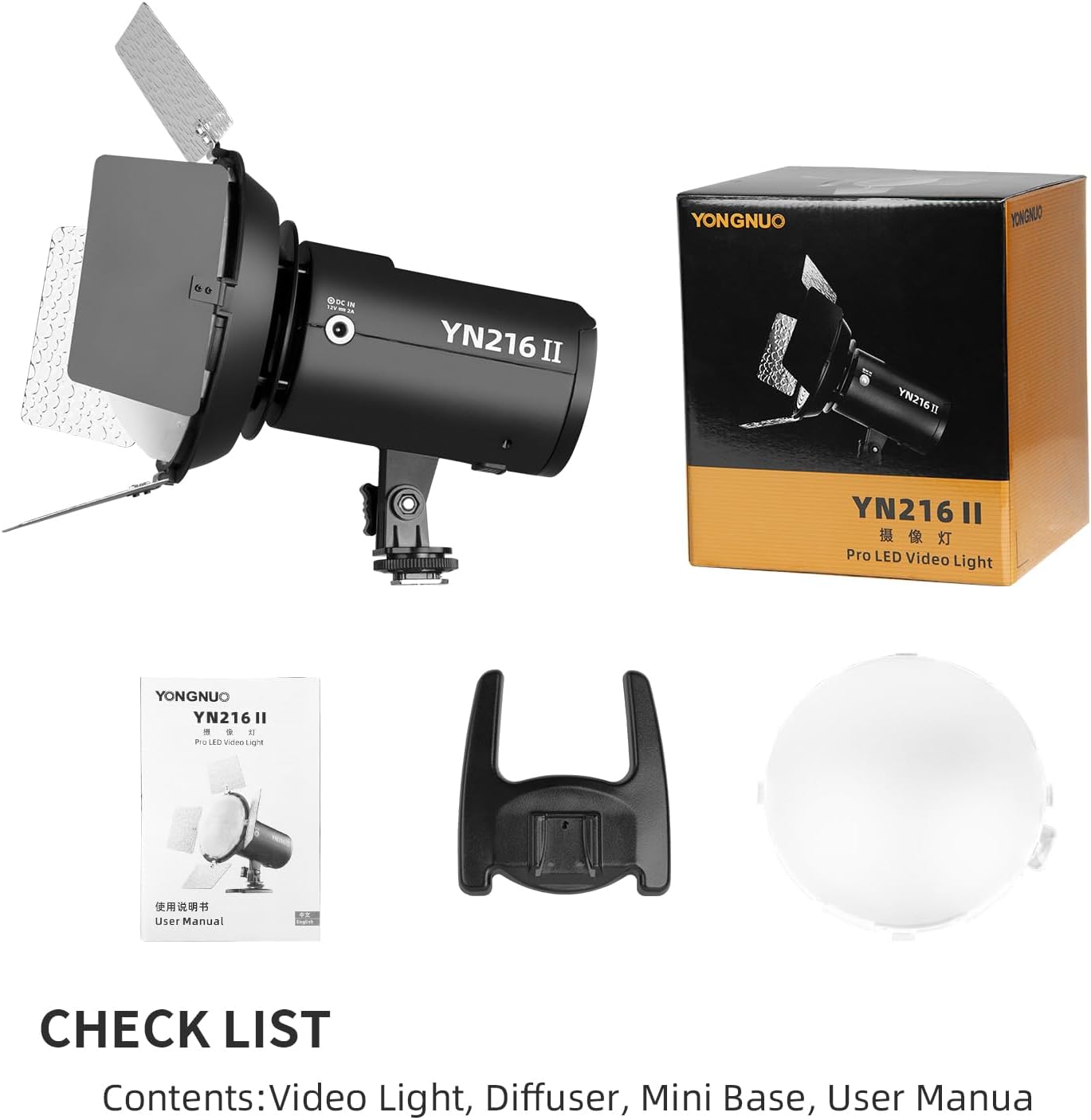
Figure 2.2.1: Package Contents - YN216 II LED Video Light, Diffuser, Mini Base, and User Manual.
3. Setup
3.1 Power Supply Installation
The YN216 II supports three power supply methods:
- NP-F Series Battery: Insert one compatible NP-F series battery (e.g., NP-F750, NP-F550, NP-F970) into the battery compartment at the rear of the light. Ensure it clicks securely into place.
- 12V2A DC Power Adapter: Connect a 12V2A DC power adapter (not included) to the DC IN port on the side of the light.
- AA Batteries: Open the AA battery compartment and insert 8 AA batteries, ensuring correct polarity.
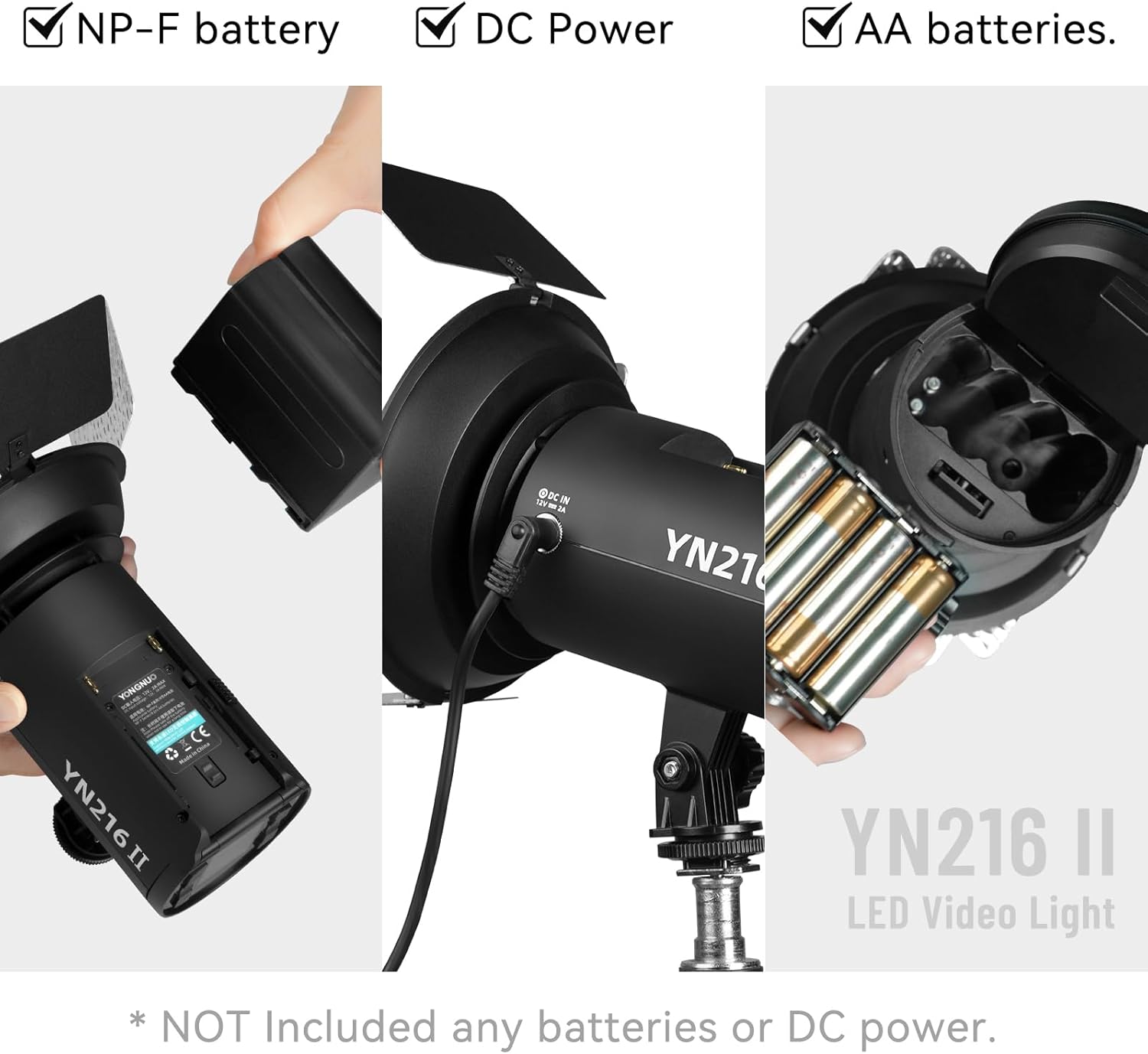
Figure 3.1.1: Power Supply Options - NP-F battery, DC power, and AA batteries.
3.2 Mounting the Light
The YN216 II can be mounted in two primary ways:
- On-Camera (Hot Shoe Mount): Attach the light to your camera's hot shoe using the integrated metal hot shoe buckle. Secure it by tightening the locking wheel.
- On a Tripod/Light Stand: Use the 1/4-inch screw thread at the bottom of the mini base to mount the light onto a standard tripod or light stand.

Figure 3.2.1: Hot Shoe Mount for camera or tripod attachment.
3.3 Attaching Accessories
- Diffuser: The included diffuser can be attached to the front of the light to soften the output and create a more even spread.
- Barn Doors: The four silver-plating barn doors can be adjusted to control the light beam, allowing for precise shaping and spill control.

Figure 3.3.1: YN216 II with Diffuser Attached.
4. Operating Instructions
4.1 Power On/Off
Locate the power button on the unit. Press and hold to turn the light on or off.
4.2 Adjusting Brightness
The YN216 II features encoder digital dimming, allowing for precise brightness adjustments.
- Rough Dimming: For large adjustments in brightness.
- Fine Dimming: For subtle, precise adjustments.
- Dimming Curves: The light supports Exponential, Logarithmic, S-shaped, and Linear dimming curves to suit different lighting needs and creative effects. Select the desired curve via the control panel or mobile app.

Figure 4.2.1: Available Dimming Curves.
4.3 Adjusting Color Temperature
The color temperature can be adjusted from 2700K (warm light) to 8000K (cool light) to match ambient lighting or achieve specific creative looks. Use the dedicated controls on the light or the mobile app to change the color temperature.

Figure 4.3.1: Color Temperature Range (2700K - 8000K).
4.4 Using FX Lighting Effects
The YN216 II includes 12 special FX lighting effects. Refer to the user manual's specific section on FX effects for detailed instructions on how to activate and customize them.
4.5 Remote Control
The YN216 II offers multiple remote control options for convenience:
- Mobile APP Control: Download the official YONGNUO app to your smartphone. Connect via Bluetooth to control the light's settings, including brightness, color temperature, and FX effects.
- 2.4G Wireless Remote Control: Use a compatible 2.4G wireless remote (if included or purchased separately) to control the light from a distance.

Figure 4.5.1: Mobile APP Wireless Control Mode.
4.6 Multi-Light Interconnection
The YN216 II supports multi-light interconnection, allowing you to control multiple YN216 II units simultaneously from a single remote or the mobile app. Consult the detailed user manual for pairing and group control instructions.
5. Maintenance
5.1 Cleaning
To maintain optimal performance and appearance:
- Ensure the device is powered off and disconnected from any power source before cleaning.
- Use a soft, dry cloth to wipe the exterior of the light.
- For stubborn dirt, slightly dampen the cloth with water; avoid using harsh chemicals or abrasive cleaners.
- Gently clean the LED surface with a microfiber cloth to avoid scratching.
5.2 Storage
When not in use for extended periods:
- Remove all batteries (NP-F and AA) from the light.
- Store the light in a cool, dry place, away from direct sunlight and extreme temperatures.
- Keep it in its original packaging or a protective case to prevent dust accumulation and physical damage.
5.3 Battery Care
Proper battery care extends battery life and ensures safe operation:
- Always use recommended battery types (NP-F series, AA).
- Do not mix old and new batteries, or different types of batteries.
- Dispose of used batteries according to local regulations.
6. Troubleshooting
6.1 Common Issues
| Problem | Possible Cause | Solution |
|---|---|---|
| Light does not turn on | No power, low battery, or incorrect battery installation. | Check battery charge, ensure batteries are inserted correctly, or connect to DC power. |
| Remote control not working | Remote battery low, light not in remote mode, or pairing issue. | Replace remote battery, ensure light is in correct remote control mode, re-pair the remote. |
| Mobile App connection issues | Bluetooth not enabled, app not updated, or light not discoverable. | Ensure Bluetooth is on, update the app, restart the light and app, try re-pairing. |
| Light output is inconsistent | Low battery, or internal fault. | Ensure sufficient power supply. If problem persists, contact customer support. |
6.2 General Advice
- Always refer to the full user manual for comprehensive troubleshooting steps.
- If a problem cannot be resolved, contact YONGNUO customer support.
7. Specifications
| Attribute | Value |
|---|---|
| Product Dimensions | 8.27 x 7.48 x 6.69 inches |
| Item Weight | 2.33 pounds |
| Model Number | YN216 II |
| Manufacturer | Hong Kong Yongnuo Photographic Equipment Co., Ltd |
| Compatible Mountings | Hot Shoe Mount |
| Battery Life (Approx.) | 3 Hours (depending on battery type and usage) |
| Camera Flash Type | Hotshoe |
| Flash Sync Speed | 1/200 |
| Date First Available | June 16, 2023 |
8. Warranty and Support
For warranty information and customer support, please refer to the official YONGNUO website or the warranty card included with your product. You may also contact the retailer where you purchased the product for assistance.


