
kurdene V9 Plus
Kurdene Wireless Earbuds & Portable Charger User Manual
Model: V9 Plus
Brand: kurdene
Product Overview
The Kurdene Wireless Earbuds with Portable Charger (Model V9 Plus) offer a comprehensive audio solution with advanced features. These Bluetooth 5.3 headphones come with a powerful 5000mAh charging case that doubles as a power bank, an LED display for battery percentage, and IPX8 waterproof rating for the earbuds. Designed for clear calls with 4 microphones and environmental noise cancellation, they provide an immersive stereo sound experience.

Image: Kurdene Wireless Earbuds (Model V9 Plus) resting in their open charging case, showcasing the LED battery display.
Key Features
- Bluetooth 5.3 Technology: Ensures a stable and faster wireless connection.
- 5000mAh Power Bank Function: The charging case provides emergency power supply for your mobile phone, computer, or other devices via USB-A and Type-C ports.
- LED Display Charging Case: Shows real-time battery percentage for both earbuds and the charging case.
- IPX8 Waterproof Earbuds: Reinforced design for sweat and water resistance, suitable for workouts and running. (Note: The charging case is not waterproof.)
- Clear Calls with 4 Microphones: Equipped with Environmental Noise Cancelling (ENC) for clear communication.
- 10mm Dynamic Drivers: Powerful Neodymium magnets deliver excellent, melodious, and powerful sound quality.
- One-Step Pairing: Automatic pairing with the last connected device when removed from the case.
- Smart Touch Control: Intuitive touch sensors for managing music playback, calls, and voice assistant.

Image: The charging case highlighting its 5000mAh capacity, 5V/2A output, and 6 hours of single charge earbud battery life.

Image: An exploded view diagram illustrating the internal components of a 10mm dynamic driver within the earbud, emphasizing sound quality.
Setup
Initial Charging
Before first use, fully charge the earbuds and the charging case. Connect the charging case to a power source using a compatible USB cable. The LED display will indicate the charging status and battery percentage.
Pairing with Your Device
- Ensure the earbuds are charged.
- Open the charging case. The earbuds will automatically enter pairing mode.
- On your device (smartphone, tablet, etc.), go to Bluetooth settings.
- Search for "S8 Plus" or "Kurdene S8 Plus" in the list of available devices.
- Select it to connect. Once connected, the earbuds will automatically pair with this device in the future when removed from the case.

Image: A smartphone screen showing successful Bluetooth connection to "S8 Plus", demonstrating the one-step pairing process.
Operating Instructions
Wearing the Earbuds
For optimal sound and comfort, ensure a secure fit. The earbuds are designed to fit snugly in your ear canal. You may try different ear tip sizes (S, M, L) for the best fit.

Image: A visual guide demonstrating three steps for correctly placing the earbuds in the ear for a comfortable and secure fit.
Smart Touch Controls
| Function | Action |
|---|---|
| Previous Track | Tap Left Earbud 2 times |
| Next Track | Tap Right Earbud 2 times |
| Play/Pause | Tap L/R Earbud 2 times |
| Voice Assistant | Tap L/R Earbud 3 times |
| Volume+ | Hold Right Earbud |
| Volume- | Hold Left Earbud |
| Answer Call | Tap L/R Earbud 1 time |
| Hang up/Reject Call | Hold L/R Earbud |

Image: A visual representation of the smart touch controls for the earbuds, detailing actions for various functions like track control, volume, and calls.
Using the Power Bank Function
The 5000mAh charging case can be used as an emergency power bank for other devices. Simply connect your device to the USB-A output or Type-C output/input port on the charging case using a compatible cable.
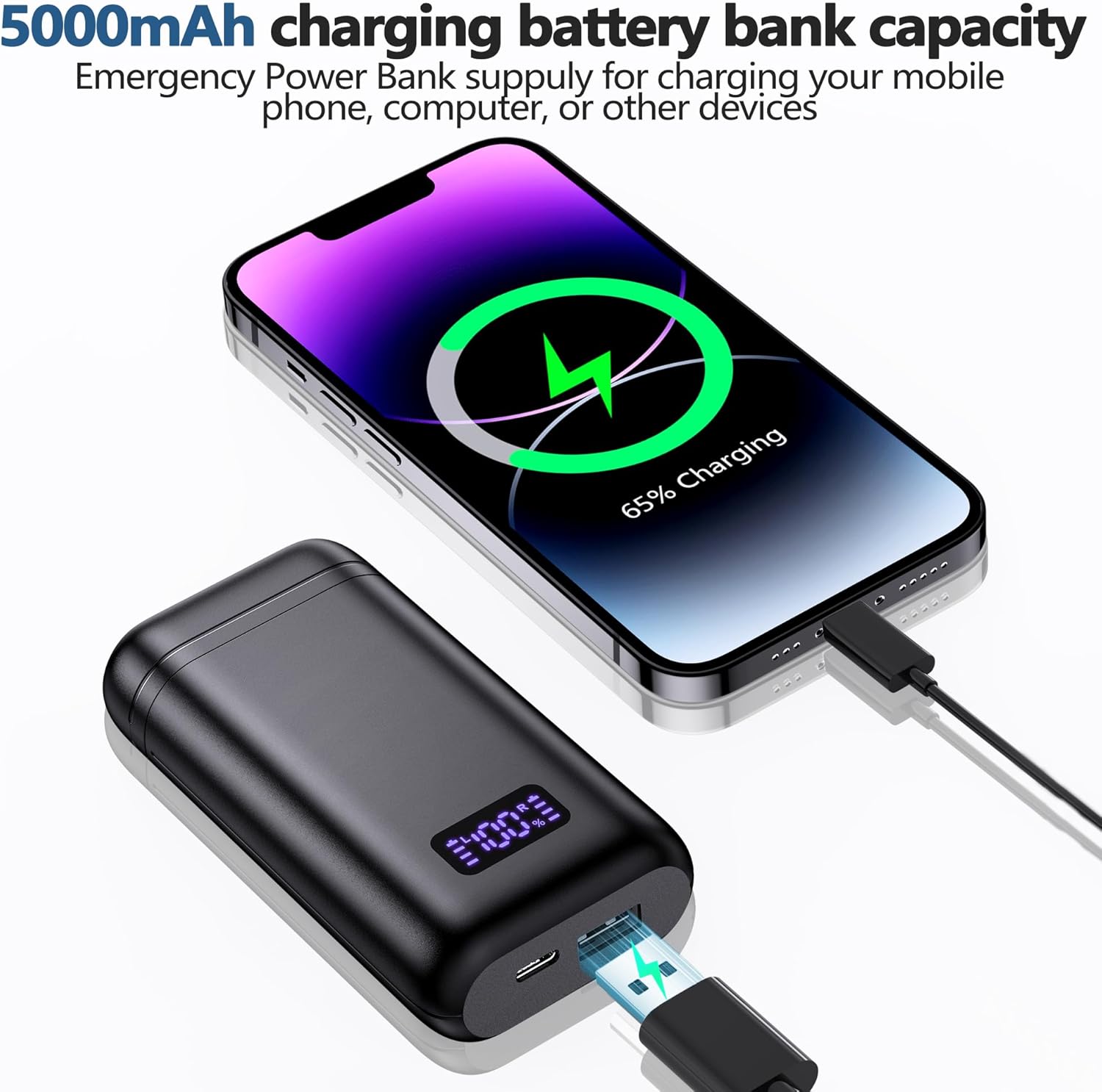
Image: The 5000mAh charging case connected to a smartphone, demonstrating its emergency power bank capability.
Maintenance
Cleaning
Regularly clean the earbuds and charging case with a soft, dry, lint-free cloth. Avoid using abrasive materials or harsh chemicals. Ensure charging contacts on both earbuds and case are clean to maintain proper charging.
Water Resistance
The earbuds are IPX8 waterproof, meaning they can withstand submersion up to 1 meter for 30 minutes. This makes them suitable for intense workouts and light rain. However, the charging case is NOT waterproof. Avoid exposing the charging case to water or moisture.

Image: A woman with earbuds in her ears under a shower, illustrating the IPX8 waterproof and sweat-proof features of the earbuds.
Troubleshooting
- Earbuds not pairing: Ensure both earbuds are charged. Place them back in the case, close the lid, wait a few seconds, then open the lid and try pairing again. Check your device's Bluetooth settings to ensure "S8 Plus" is selected.
- Only one earbud working: Try resetting the earbuds by placing them in the charging case and then taking them out. Ensure both earbuds have sufficient charge.
- Charging case not charging: Verify the charging cable and adapter are working correctly. Ensure the charging port on the case is clean and free of debris.
- Poor sound quality: Ensure the earbuds are properly seated in your ears. Try different ear tip sizes. Check if your device's volume is too low or too high.
- Call clarity issues: Ensure the microphones are not obstructed. Move closer to your device to improve connection stability.
Specifications
| Feature | Detail |
|---|---|
| Model Name | V9 Plus |
| Connectivity Technology | Wireless (True Wireless) |
| Bluetooth Version | 5.3 |
| Earbud Battery Life (Single Charge) | 6 hours |
| Total Playback Time (with Charging Case) | Up to 246 hours |
| Charging Case Battery Capacity | 5000mAh |
| Water Resistance Level | IPX8 (Earbuds only) |
| Audio Driver Type | 10mm Dynamic Driver |
| Microphones | 4 (for clear calls with ENC) |
| Control Method | Touch |
| Charging Case Dimensions | 4.84 x 3.39 x 1.22 inches |
| Item Weight | 1.98 ounces |
| Compatible Devices | iPhone, Android devices |

Image: An illustration detailing the 6 hours of single charge playback and 246 hours total playback with the charging case, along with LED display indicators.
Official Product Video
Video: An official product video showcasing the Kurdene S8 Plus Wireless Earbuds, highlighting key features such as Bluetooth 5.3, power bank functionality, LED display, 10mm dynamic drivers, IPX8 waterproofing, and device compatibility. The video provides a visual overview of the product's design and capabilities.
Warranty and Support
Kurdene is committed to providing high-quality products and excellent customer service. All products are eligible for a full hassle-free refund within 30 days of purchase if you are dissatisfied or unable to resolve an issue through support.
For further assistance, please visit the Kurdene Store on Amazon or contact customer support.
Image: An icon indicating "Need Help?" with text explaining the 30-day return policy for a zero-risk purchase.
Related documentsV9 Plus


Ask a question about this manual
Ask about setup, troubleshooting, compatibility, parts, safety, or missing instructions. Manuals+ will review the question and use this page’s manual context to help answer it.