
Logitech G 910-007197
Contents
Logitech G309 LIGHTSPEED Wireless Gaming Mouse User Manual
Model: G309 (910-007197)
Introduction
The Logitech G309 LIGHTSPEED Wireless Gaming Mouse is engineered for optimal gaming performance, offering advanced wireless technology, precision, and speed. Its lightweight design and long battery life make it an ideal choice for both casual and serious gamers. This manual provides comprehensive instructions for setting up, operating, maintaining, and troubleshooting your G309 mouse.

Image: Top view of the Logitech G309 LIGHTSPEED Wireless Gaming Mouse in black.
What's in the Box
Verify that all components are present in your package:
- G309 LIGHTSPEED Gaming Mouse
- LIGHTSPEED USB Receiver
- USB Cable Extender
- Grip Stickers
- AA battery

Image: All components included in the Logitech G309 LIGHTSPEED Gaming Mouse package, including the mouse, USB receiver, cable extender, grip stickers, and AA battery.
Setup
1. Battery Installation
- Locate the removable backplate on the top of the mouse.
- Gently lift and remove the backplate to reveal the battery compartment.
- Insert the included AA battery into the compartment, ensuring correct polarity.
- Replace the backplate, ensuring it clicks securely into place.
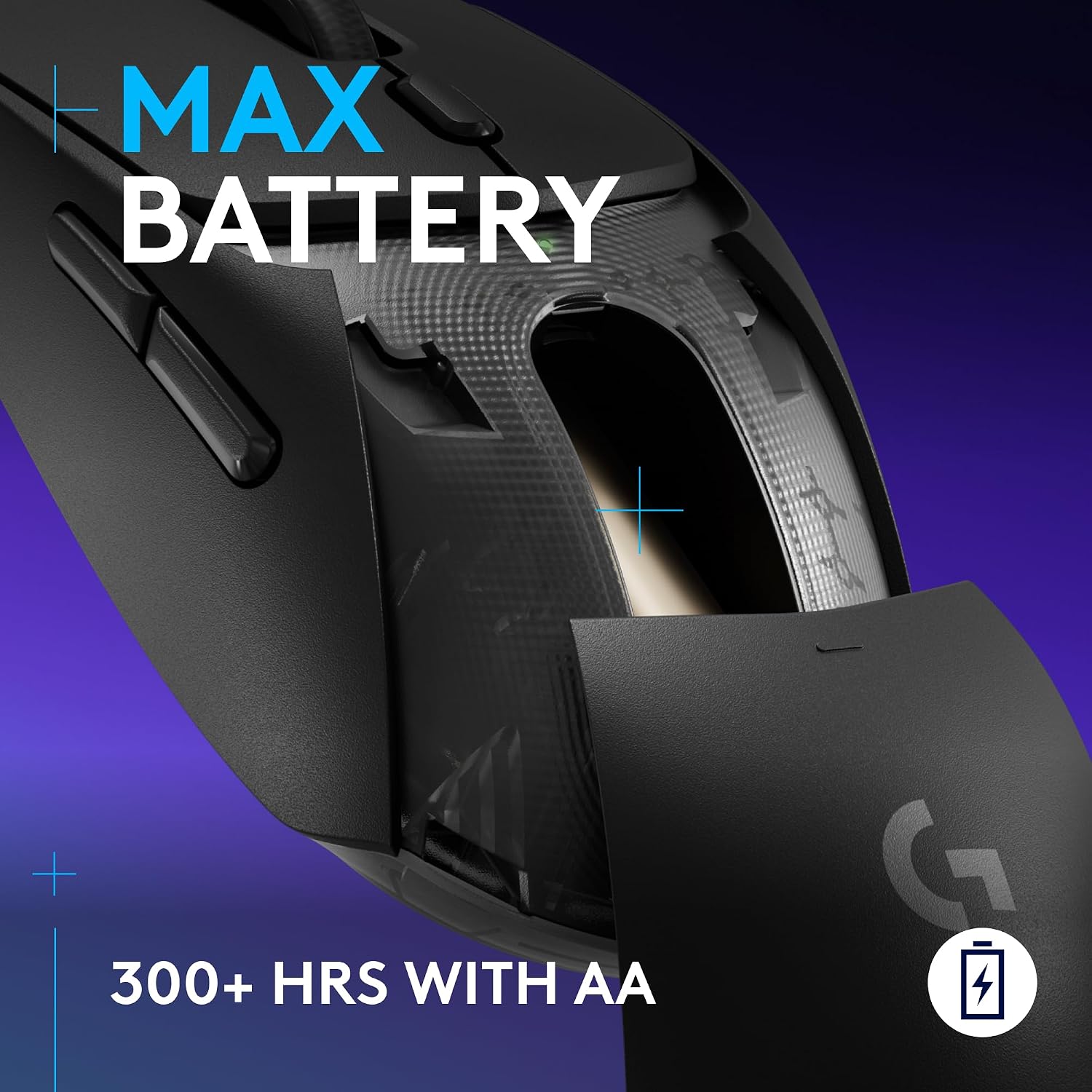
Image: Close-up view of the Logitech G309 mouse with the backplate removed, showing the AA battery inserted into its compartment.
2. Connectivity Options
The G309 offers two connectivity modes: LIGHTSPEED Wireless and Bluetooth.
LIGHTSPEED Wireless (Recommended for Gaming)
- Locate the LIGHTSPEED USB Receiver inside the mouse's battery compartment or in the packaging.
- Plug the USB Receiver directly into an available USB port on your PC or Mac. For optimal signal strength, use the included USB Cable Extender to position the receiver closer to the mouse.
- Turn on the mouse using the ON/OFF switch located on the bottom of the mouse. The mouse will automatically connect.
Bluetooth Connectivity
- Turn on the mouse using the ON/OFF switch.
- Press and hold the Bluetooth pairing button (usually located near the ON/OFF switch on the bottom of the mouse) until the LED indicator starts blinking rapidly.
- On your PC or Mac, navigate to Bluetooth settings and select "Logitech G309" from the list of available devices to pair.

Image: The Logitech G309 mouse shown with its LIGHTSPEED USB receiver, illustrating its wireless capabilities.
3. Software Installation (Logitech G HUB)
For full customization of your G309 mouse, including programmable buttons and DPI settings, download and install the Logitech G HUB software.
- Visit the official Logitech G website: www.logitechg.com/ghub
- Download the G HUB software compatible with your operating system (Windows or macOS).
- Follow the on-screen instructions to complete the installation.
Operating Your Mouse
Key Features and Controls

Image: A detailed diagram of the Logitech G309 mouse, highlighting its key features such as LIGHTFORCE Hybrid Switches, scroll wheel, DPI button, programmable buttons, and battery/dongle storage.
- LIGHTFORCE Hybrid Switches: Experience optical speed with mechanical feel for optimized gaming performance.
- HERO 25K Sensor: Achieve max precision with sub-micron tracking and zero smoothing for accurate movements.
- LIGHTSPEED Wireless & Bluetooth: Seamlessly switch between robust, low-latency LIGHTSPEED wireless for gaming and Bluetooth for general use, offering total wireless flexibility.
- Programmable Buttons: The G309 features 6 programmable buttons. Customize their functions using the Logitech G HUB software to suit your gaming style or productivity needs.
- DPI Button: Easily adjust your mouse sensitivity (DPI) on the fly using the dedicated DPI button, allowing for quick transitions between precise aiming and rapid movements.
- Lightweight Design: Weighing just 86g with the included AA battery, the G309 is designed for comfortable, extended use. It can be even lighter at 68g (battery-free) with POWERPLAY (sold separately).
- Long Battery Life: Enjoy over 300 hours of gaming on a single AA battery. With a POWERPLAY mouse pad (sold separately), you can achieve unlimited battery life.

Image: Side view of the Logitech G309 mouse emphasizing the LIGHTFORCE Hybrid Switches for fast and responsive clicks.

Image: Underside of the Logitech G309 mouse, highlighting the HERO 25K sensor for maximum precision tracking.

Image: Angled view of the Logitech G309 mouse, illustrating its lightweight design at 86g with an AA battery.

Image: The Logitech G309 mouse positioned on a POWERPLAY charging mat, indicating unlimited power when used with this accessory.
Maintenance
Cleaning
To maintain optimal performance, regularly clean your mouse:
- Use a soft, lint-free cloth to wipe down the exterior of the mouse.
- For stubborn dirt, slightly dampen the cloth with water or a mild cleaning solution. Avoid harsh chemicals.
- Use compressed air to clear dust and debris from around the buttons and scroll wheel.
- Clean the sensor area on the bottom of the mouse with a cotton swab lightly dampened with isopropyl alcohol.
Battery Replacement
When the battery indicator light on your mouse turns red or you experience performance issues, it's time to replace the AA battery. Follow the battery installation steps in the Setup section.
Applying Grip Stickers
The G309 comes with optional grip stickers for enhanced control and comfort. Ensure the mouse surface is clean and dry before applying. Carefully peel the stickers and align them with the designated areas on the mouse, pressing firmly to secure.
Troubleshooting
| Issue | Possible Solution |
|---|---|
| Mouse not responding (LIGHTSPEED) |
|
| Mouse not responding (Bluetooth) |
|
| Inconsistent tracking or cursor lag |
|
| Buttons not working or double-clicking |
|
Specifications
| Feature | Detail |
|---|---|
| Brand | Logitech G |
| Series | G309 |
| Model Number | 910-007197 |
| Hardware Platform | Mac, PC |
| Operating System Compatibility | Windows, macOS |
| Item Weight | 3.03 ounces (approx. 86g with AA battery) |
| Physical Dimensions (H x W x D) | 38.36mm x 63.20mm x 117.55mm (approx. 1.51 x 2.49 x 4.63 inches) |
| Color | Black |
| Power Source | Battery Powered (1 AA battery included) |
| Connectivity Technology | Bluetooth, LIGHTSPEED Wireless |
| Special Features | Ergonomic Design, Lightweight, Portable, Programmable Buttons, Wireless |
| Movement Detection Technology | Optical (HERO 25K Sensor) |
| Battery Life | 300+ hours (with AA battery), Unlimited (with POWERPLAY, sold separately) |
Warranty and Support
Logitech G products are designed for durability and performance. For detailed warranty information and technical support, please visit the official Logitech G support website:
You can also find FAQs, drivers, and firmware updates on their support page.
Ask a question about this manual
Ask about setup, troubleshooting, compatibility, parts, safety, or missing instructions. Manuals+ will review the question and use this page’s manual context to help answer it.