1. Introduction
Thank you for choosing the GOOLOO 15W USB-A Wall Charger. This manual provides essential information for the safe and efficient use of your charger. Please read it thoroughly before use and retain it for future reference.
This compact and reliable wall charger is designed to provide stable and efficient power output for a wide range of USB-powered devices, including smartphones, tablets, and GOOLOO jump starters.
2. Safety Information
- Use the charger only in dry, indoor environments. Avoid exposure to water or high humidity.
- Do not attempt to disassemble, repair, or modify the charger. This may result in electric shock, fire, or damage to the product.
- Keep the charger away from heat sources, direct sunlight, and flammable materials.
- Ensure the wall outlet voltage is within the specified range (AC100-240V).
- Unplug the charger from the wall outlet when not in use or during electrical storms.
- Do not operate the charger if it has been damaged in any way.
3. Product Overview
3.1 Package Contents
- 1 x GOOLOO 15W USB-A Wall Charger (Model: SW-050300A)
Note: Charging cable is not included.
3.2 Key Features
- 15W Stable Power Output: Provides efficient charging for compatible devices.
- Automatic Device Detection: Optimizes charging speed for connected devices.
- Compact Design: Small and lightweight for portability.
- Universal Compatibility: Works with various smartphones, tablets, and GOOLOO jump starters.
- Multiple Safety Protections: Built-in safeguards against overcharging, overcurrent, overvoltage, short-circuit, over-heat, and leakage.

Image 1: Front view of the GOOLOO 15W USB-A Wall Charger, showing the USB-A port.

Image 2: Top-down view of the GOOLOO 15W USB-A Wall Charger, highlighting the foldable prongs.
4. Setup
4.1 Connecting the Charger
- Insert the GOOLOO 15W USB-A Wall Charger into a standard AC wall outlet (100-240V).
- Connect your device's USB charging cable (not included) to the USB-A port on the charger.
- Connect the other end of the charging cable to your device.

Image 3: Illustration of the GOOLOO 15W charger plugged into a wall outlet, charging a smartphone. The image also shows charging time comparisons for various devices.
5. Operating Instructions
5.1 Charging Devices
Once connected, the charger will automatically detect your device and begin charging at the optimal speed up to 15W. The charging process is indicated by your device's charging indicator.
- Ensure your device is compatible with USB-A charging.
- For best performance, use a high-quality charging cable.
- The charger is compatible with a wide range of devices, including Apple iPhone/iPad series, Samsung phones (Note 8 and later, S8 and later), LG G7/V30+, Sony XZ2/XZ3, and GOOLOO jump starters (GP3000, GP4000).
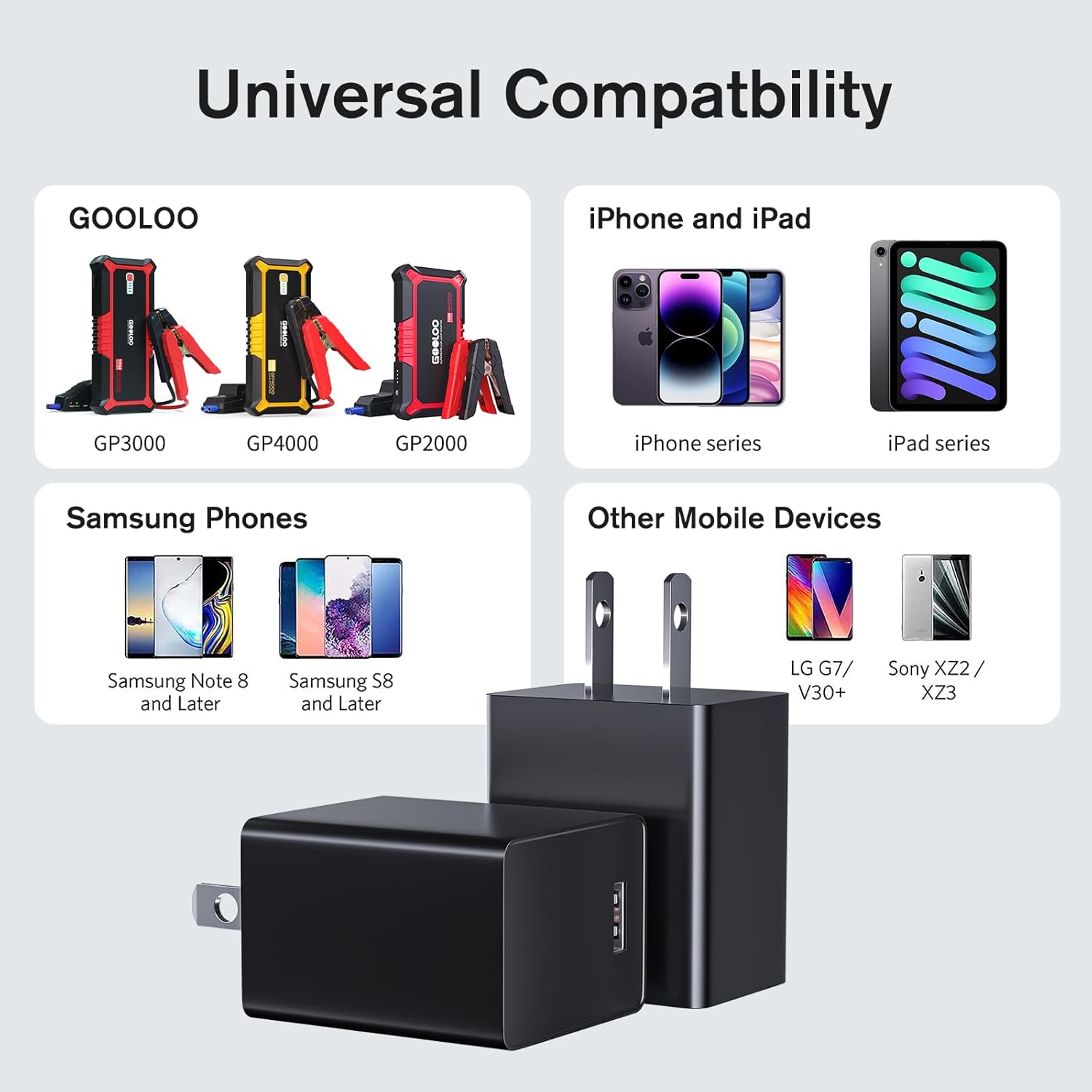
Image 4: Diagram illustrating the universal compatibility of the GOOLOO 15W charger with various devices, including GOOLOO jump starters, iPhones, iPads, Samsung phones, and other mobile devices.

Image 5: Collage showing the GOOLOO 15W charger being used in various settings: home, business trip, travel, and workplace, emphasizing its portability.
6. Maintenance
6.1 Cleaning
To clean the charger, disconnect it from the power outlet and your device. Use a soft, dry cloth to wipe the surface. Do not use liquid cleaners or abrasive materials.
6.2 Storage
Store the charger in a cool, dry place away from direct sunlight and extreme temperatures. The compact design allows for easy storage in a bag or drawer.

Image 6: A hand placing the compact GOOLOO 15W charger into a bag, with dimensions (2.36 x 1.57 inches) shown, highlighting its portability.
7. Troubleshooting
7.1 Common Issues and Solutions
| Problem | Possible Cause | Solution |
|---|---|---|
| Device not charging. | Loose connection, faulty cable, incompatible device, power outlet issue. | Ensure all connections are secure. Try a different USB cable. Verify device compatibility. Test the wall outlet with another device. |
| Slow charging. | Cable quality, device drawing less power, background apps. | Use a high-quality USB cable. Close unnecessary background applications on your device. Ensure your device supports 15W charging. |
| Charger feels warm. | Normal operation during charging. | A slight warmth is normal. If it becomes excessively hot or emits smoke/odor, unplug immediately and discontinue use. |

Image 7: Diagram illustrating the internal intelligent IC chip and various safety protections of the GOOLOO 15W charger, including short-circuit, over-current, over-voltage, over-charge, over-heat, and leakage protection.
8. Specifications
8.1 Technical Specifications
| Feature | Specification |
|---|---|
| Model Number | SW-050300A |
| Input | AC100-240V, 50/60Hz, 0.5A Max |
| Output | DC 5V/3A (15W Max) |
| Connector Type | USB-A |
| Dimensions | 2.36 x 1.57 x 0.86 inches (approx.) |
| Item Weight | 1.76 ounces |
| Color | Black |
| Special Feature | Fast Charging |

Image 8: Close-up view of the GOOLOO 15W charger with text indicating "Maximum 15W output" and displaying input/output specifications (Model: SW-050300A, Input: AC100-240V, 50/60Hz 0.5MAX, Output: DC5V-3000mA).
9. Warranty and Support
9.1 Warranty Information
The GOOLOO 15W USB-A Wall Charger comes with an 18-month worry-free warranty from the date of purchase. This warranty covers manufacturing defects and ensures reliable performance under normal use. Please retain your proof of purchase for warranty claims.
9.2 Customer Support
For any questions, technical assistance, or warranty claims, please contact GOOLOO customer service. You can find contact information and additional resources on the official GOOLOO website or through your retailer.
Visit the GOOLOO Store on Amazon for more product information.


