
TPRO OFB16W
Contents
Rechargeable 16" Fan with LED Light and Solar Panel User Manual
Model: OFB16W
Introduction
Thank you for purchasing the TPRO Rechargeable 16" Fan with LED Light and Solar Panel. This versatile fan is designed to provide cooling comfort and illumination, with the added convenience of rechargeable battery power and solar charging capabilities. Please read this manual carefully before operation to ensure proper use, maintenance, and safety.
Safety Information
To reduce the risk of fire, electric shock, or injury, please observe the following safety precautions:
- Always unplug the fan from the power source before cleaning or performing any maintenance.
- Do not operate the fan with a damaged cord or plug. If the cord or plug is damaged, contact qualified service personnel.
- Do not place the fan in or near water or other liquids.
- Keep fingers, hair, and loose clothing away from the fan blades during operation.
- Do not insert any objects into the fan grille.
- Ensure the fan is placed on a stable, level surface to prevent tipping.
- This appliance is not intended for use by persons (including children) with reduced physical, sensory or mental capabilities, or lack of experience and knowledge, unless they have been given supervision or instruction concerning use of the appliance by a person responsible for their safety.
- Do not expose the battery to extreme temperatures or direct sunlight for prolonged periods.
- Use only the provided power cord and solar panel for charging.
Package Contents
Please check the package for the following items:
- Fan Head Assembly
- Adjustable Stand Pole
- Base
- Remote Control
- AC Power Cord
- Solar Panel (if included with your model)
- User Manual
Product Overview
Familiarize yourself with the components of your TPRO Rechargeable Fan.


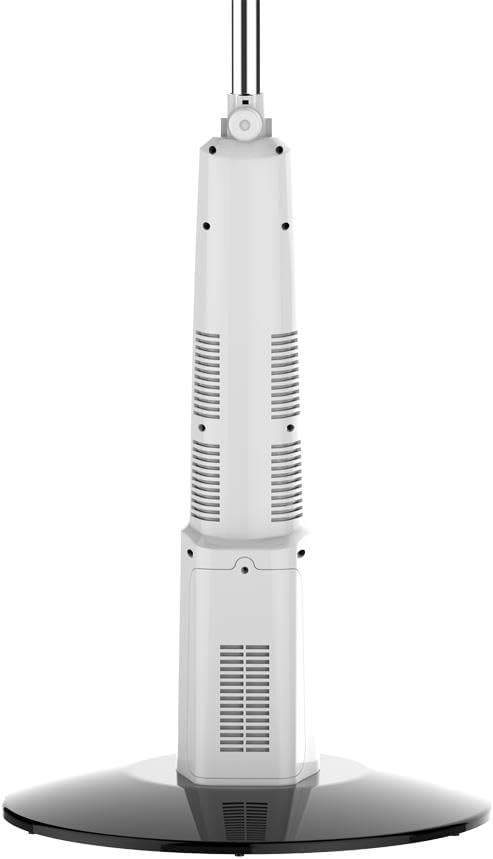
Setup and Assembly
Follow these steps to assemble your fan:
- Carefully unpack all components from the box.
- Attach the adjustable stand pole to the fan base. Ensure it is securely fastened.
- Mount the fan head assembly onto the top of the adjustable stand pole. Tighten any securing screws or knobs.
- Adjust the height of the fan by loosening the height adjustment knob on the stand pole, extending or retracting the pole, and then tightening the knob.
- Ensure all connections are firm before plugging in or operating the fan.
Operating Instructions
Charging the Battery
The fan is equipped with a 12V 5Ah sealed lead-acid battery. Before first use, fully charge the battery for optimal performance.
- AC Charging: Connect the provided AC power cord to the fan's 12V-IN port and plug it into a standard 110V AC outlet. The CHARGE indicator light will illuminate.
- Solar Charging: Connect the solar panel (if included) to the fan's designated solar input port. Place the solar panel in direct sunlight for efficient charging.
The POWER indicator light will show the battery status.
Fan Operation
Use the control panel on the fan or the remote control to operate the fan.
- Power On/Off: Press the POWER button to turn the fan on or off.
- Fan Speed: Press the SPEED button repeatedly to cycle through the 3 available fan speeds.
- Oscillation: Press the OSC button to activate or deactivate the oscillation feature, allowing the fan head to sweep from side to side.
- LED Light: Press the LED button to turn the 18-piece SMD LED light on or off.
USB Output
The fan features two USB output ports (5V-OUT) with a combined current of 1200mAh*2, allowing you to charge small electronic devices.
- Connect your device's USB charging cable to one of the fan's USB output ports.
- Ensure the fan is powered on for the USB output to function.
Battery Runtime
Approximate battery runtimes on a full charge:
- Speed 1: Approximately 17 hours 38 minutes
- Speed 2: Approximately 6 hours 40 minutes
- Speed 3: Approximately 4 hours 10 minutes
Maintenance
Regular maintenance helps ensure the longevity and efficient operation of your fan.
- Cleaning: Disconnect the fan from all power sources. Use a soft, damp cloth to wipe down the exterior surfaces. For the fan blades, carefully remove the front grille (if detachable) and wipe the blades with a soft cloth. Do not use abrasive cleaners or solvents. Ensure all parts are dry before reassembling or operating.
- Storage: When not in use for extended periods, store the fan in a cool, dry place. It is recommended to fully charge the battery every 3 months to maintain its health.
Troubleshooting
If you encounter issues with your fan, refer to the following common problems and solutions:
| Problem | Possible Cause | Solution |
|---|---|---|
| Fan does not turn on. | No power, battery depleted, power cord not connected, or fan not assembled correctly. | Ensure the fan is plugged into a working outlet or the battery is charged. Check all connections. |
| Weak airflow. | Fan speed set too low, dirty blades/grille, or obstruction. | Increase fan speed. Clean fan blades and grilles. Remove any obstructions. |
| LED light not working. | Light is off, or battery is too low. | Press the LED button. Charge the fan's battery. |
| USB charging not working. | Fan is off, or battery is too low. | Ensure the fan is powered on. Charge the fan's battery. |
If the problem persists after trying these solutions, please contact customer support.
Specifications
- Brand: TPRO
- Model Name: OFB16W
- Color: White
- Electric Fan Design: Floor Fan
- Power Source: Solar Powered, AC (110 Volts)
- Fan Speed: 3 speeds
- Battery: 12 V 5 Ah sealed lead-acid battery
- LED Light: 18pcs SMD
- USB Output Current: 1200mAh*2 USB
- Number of Blades: 3
- Blade Material: Plastic
- Special Features: Remote Controlled, LED Light, Oscillating
- Included Components: Remote, Cord
- Dimensions (L x W x H): 15.75 x 15.75 x 53.15 inches
- UPC: 817802019228
Warranty and Support
This product comes with a standard manufacturer's warranty. For detailed warranty information, please refer to the warranty card included in your product packaging or contact TPRO customer support.
For technical assistance, troubleshooting not covered in this manual, or to inquire about replacement parts, please contact TPRO customer service through the retailer where the product was purchased or visit the official TPRO website.
Ask a question about this manual
Ask about setup, troubleshooting, compatibility, parts, safety, or missing instructions. Manuals+ will review the question and use this page’s manual context to help answer it.