1. Introduction
This manual provides essential information for the safe and efficient use of your LG 65UQ7570PUJ 65 Inch 4K UHD Smart webOS TV. It covers setup, operation, maintenance, and troubleshooting to help you maximize your viewing experience. Your television features a 65-inch 4K UHD display, powered by the a5 Gen5 AI Processor 4K for enhanced picture and sound. It includes Active HDR, Filmmaker Mode, and Game Optimizer for versatile entertainment. The webOS platform offers a smart and intuitive user interface with personalized recommendations.
2. What's in the Box
Please ensure all the following items are included with your television:
- LG 65UQ7570PUJ 65 Inch 4K UHD Smart webOS TV
- Remote Control
- TV Stand (2 pieces)
- E Manual (Digital)
- Power Cable
- Batteries for Remote Control
3. Setup
3.1. Stand Assembly
Carefully place the TV screen-down on a soft, flat surface to prevent damage. Attach the two stand pieces to the designated slots on the bottom of the TV using the provided screws. Ensure the stand is securely fastened before proceeding.

Image: Front view of the LG 65UQ7570PUJ 65 Inch TV with its stand, placed on a media console.
3.2. Connecting Devices
Connect your external devices such as cable boxes, Blu-ray players, or gaming consoles to the HDMI ports on the back of the TV. For internet access, connect an Ethernet cable to the LAN port or use the built-in Wi-Fi. USB devices can be connected to the USB ports.

Image: A detailed view of the rear panel of the LG TV, showing various input ports including HDMI, USB, and antenna/cable connections.
3.3. Initial Power On and WebOS Setup
Plug the power cable into an electrical outlet. Press the power button on the remote control or the TV. Follow the on-screen instructions to set up your webOS Smart TV, including language selection, network connection, and channel scanning. You can customize your viewing experience with separate accounts and personalized recommendations for every family member.
4. Operating Your TV
4.1. Navigating webOS
The webOS platform provides an intuitive interface for accessing apps, live TV, and connected devices. Use the remote control to navigate through menus and select options. The Home Dashboard allows quick access to various functions and settings.
4.2. Smart Features
Your LG TV supports various smart features, including access to popular streaming services and a full web browser. The a5 Gen5 AI Processor 4K enhances picture and sound, while AI features provide personalized content suggestions.
4.3. Gaming Experience
For an optimized gaming experience, utilize the Game Optimizer feature to quickly adjust all your game settings in one location. This TV is designed to provide smooth gameplay.

Image: A screenshot of the Game Optimizer menu on the LG TV, displaying options for adjusting game settings like FPS, AI Game Sound, Black Stabilizer, and Low Latency.
5. Picture and Sound Quality
The LG 65UQ7570PUJ delivers stunning visuals and clear audio:
- 4K UHD Resolution: Experience incredible detail and clarity with four times the resolution of Full HD.
- a5 Gen5 AI Processor 4K: This intelligent processor enhances picture and sound quality by analyzing and optimizing content in real-time.
- Active HDR: Enjoy a wider range of contrast and color, bringing out more detail in both bright and dark scenes.
- Filmmaker Mode: Preserves the original vision of the director by disabling motion smoothing and other post-processing effects.
- 2.0 Channel Speaker: Delivers clear and immersive audio for your entertainment.

Image: A banner promoting '4K Resolution' with a scenic sunset over a body of water, highlighting the TV's ability to display high-definition content.

Image: A split image demonstrating the visual improvement provided by the a5 Gen5 AI Processor, with one side showing a blurred image and the other a sharpened, vibrant version of the same scene.
6. Maintenance
6.1. Cleaning the Screen
Gently wipe the screen with a soft, dry microfiber cloth. For stubborn smudges, lightly dampen the cloth with water or a screen-specific cleaning solution (avoiding harsh chemicals) and wipe carefully. Do not spray liquid directly onto the screen.
6.2. Cleaning the TV Body
Use a soft, dry cloth to clean the TV's frame and stand. Avoid using abrasive cleaners or solvents.
7. Troubleshooting
- No Power: Ensure the power cable is securely plugged into both the TV and the wall outlet. Check if the outlet is functional.
- No Picture/Sound: Verify that the correct input source is selected. Check all cable connections between the TV and external devices.
- Remote Control Not Working: Replace the batteries in the remote control. Ensure there are no obstructions between the remote and the TV's sensor.
- Network Connection Issues: Restart your router and modem. Check the TV's network settings to ensure it's connected to the correct Wi-Fi network or that the Ethernet cable is properly connected.
- Picture Quality Issues: Adjust picture settings (brightness, contrast, color) in the TV's menu. Ensure the content source is high quality (e.g., 4K content for 4K display).
For more detailed troubleshooting, refer to the E Manual accessible through your TV's webOS interface.
8. Specifications
| Feature | Specification |
|---|---|
| Brand | LG |
| Model Number | 65UQ7570PUJ |
| Screen Size | 64.5 Inches (Diagonal) |
| Display Technology | LCD |
| Resolution | 4K UHD (3840 x 2160) |
| Refresh Rate | 60 Hz |
| Processor | a5 Gen5 AI Processor 4K |
| Special Features | Active HDR, Filmmaker Mode, Game Optimizer, Full Web Browser |
| Speaker Type | 2.0 Channel |
| Connectivity Technology | Bluetooth, Wi-Fi, Ethernet |
| Product Dimensions (with stand) | 11.9"D x 57.1"W x 35.4"H |
| Item Weight | 37 Pounds |
| Color | Black |
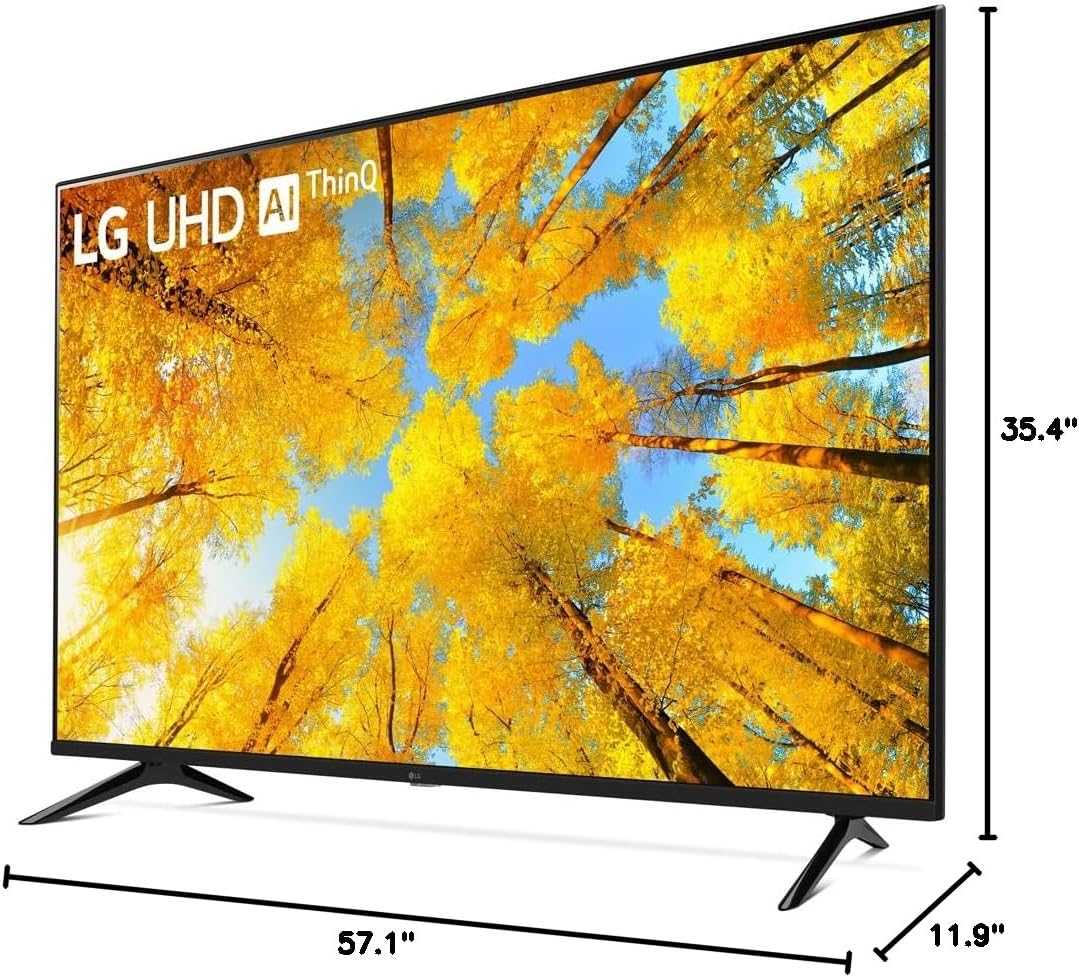
Image: A diagram illustrating the depth, width, and height dimensions of the LG 65UQ7570PUJ 65 Inch TV.
9. Warranty and Support
Your LG 65UQ7570PUJ 65 Inch 4K UHD Smart webOS TV comes with a full LG USA warranty. For warranty details, product support, or service inquiries, please refer to the official LG website or contact LG customer service directly. Keep your purchase receipt for warranty claims.