Product Overview
The Ehaho 25 Inch UTV Sound Bar is designed to provide high-quality audio and dynamic RGB lighting for various outdoor vehicles, including UTVs, ATVs, Golf Carts, and Marine applications. It features a robust, waterproof design suitable for challenging environments.
Key features include:
- RGB Multi-color LED lights with music sync capabilities.
- Powerful 500-watt sound system with 1" tweeters, 4" mid/woofers, and 4" low-frequency radiators.
- IP66 Waterproof and dust-resistant construction.
- Multiple input options: Bluetooth V5.0, USB Audio, and 3.5mm Aux Input.
- Easy mounting with universal brackets for 1" to 2" roll cages.
What's in the Box
Upon opening the package, verify that all components are present:
- Sound Bar
- Mounting Kits
- Remote Control
- User Guide
- Cigarette Lighter Power Cord (91 inch)
- Cigarette Lighter Power Cord (130 inch)
- Cigarette Lighter Socket
- 3.5mm AUX cable
- Fuse

Image: All components included in the Ehaho 25 Inch UTV Sound Bar package, laid out clearly.
Setup and Installation
The Ehaho UTV Sound Bar is designed for straightforward installation on vehicles with 1" to 2" roll cages. Ensure the vehicle's power system is compatible with a 12-volt input.
Mounting Instructions:
- Identify a suitable location on your vehicle's roll cage (1" to 2" diameter) that allows for clear sound projection and easy access to controls.
- Attach the universal mounting brackets to the sound bar using the provided hardware.
- Secure the sound bar to the roll cage using the brackets and tighten all fasteners to ensure a stable and secure fit.
- Route the power cable safely, away from moving parts or heat sources, to the vehicle's 12V power source (e.g., cigarette lighter socket).
- Connect the power cable to the sound bar. Ensure the fuse is properly installed in the power line for protection.

Image: The Ehaho UTV Sound Bar installed on a vehicle's roll cage, demonstrating its universal bracket compatibility.
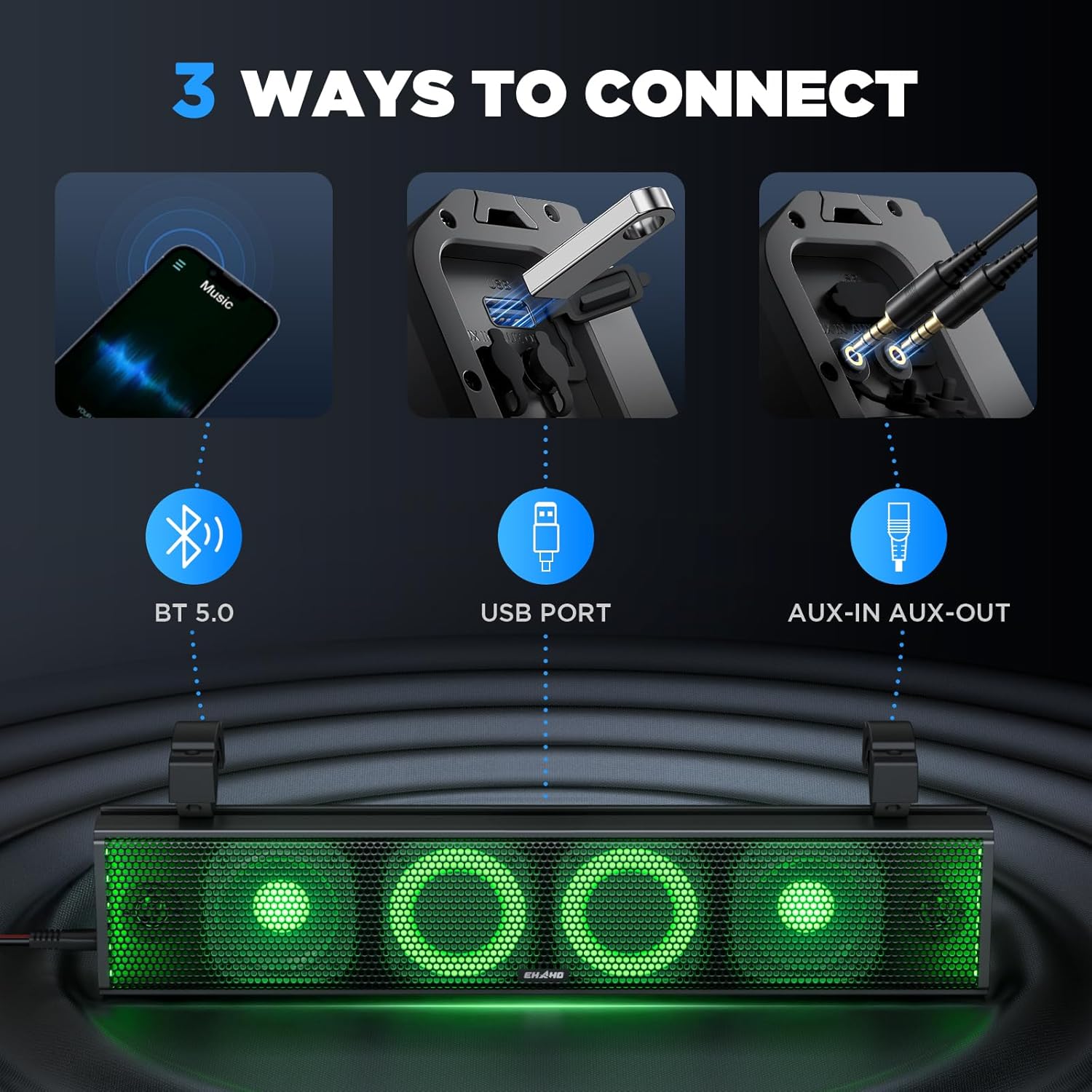
Image: Various vehicles including an ATV, Golf Cart, and Marine boat, illustrating the versatile mounting options for the sound bar.
Operating Instructions
The sound bar offers multiple ways to connect and control your audio experience.
Connectivity Options:
- Bluetooth V5.0: Power on the sound bar. Enable Bluetooth on your device (smartphone, tablet, etc.) and select "Ehaho Sound Bar" from the list of available devices to pair. A stable audio connection will be established.
- USB Audio: Insert a USB drive containing audio files into the USB port on the sound bar. The sound bar will automatically detect and begin playing the audio.
- 3.5mm Aux Input: Connect your audio device (MP3 player, smartphone) to the sound bar using the provided 3.5mm AUX cable. Select the AUX input mode on the sound bar.

Image: Visual representation of the three primary connection methods: Bluetooth 5.0, USB port, and AUX-in/AUX-out.
Controls:
The sound bar can be controlled via its integrated control panel or the wireless remote control.
- Control Panel: Located on the side of the sound bar, it features buttons for power, mode selection, volume adjustment, track skipping, and play/pause.
- Wireless Remote Control: Provides full functionality from a distance, including power, mode, volume, track control, and RGB lighting adjustments.
RGB Lighting:
The sound bar features RGB multi-color LED lights that can be customized. Use the control panel or remote to:
- Change light colors.
- Set lights to hold steady or blink.
- Activate music sync mode for dynamic light patterns that respond to your audio.

Image: The Ehaho UTV Sound Bar displaying different RGB lighting colors, highlighting its customizable visual effects.

Image: An exploded view of the Ehaho UTV Sound Bar's internal components, showing the 1-inch tweeters, 4-inch mid-woofers, and 4-inch low-frequency radiators, along with the built-in 500W amplifier.
Maintenance
To ensure the longevity and optimal performance of your Ehaho UTV Sound Bar, follow these maintenance guidelines:
- Cleaning: Despite its IP66 waterproof rating, it is recommended to clean the sound bar with a soft, damp cloth. Avoid using harsh chemicals or abrasive cleaners that could damage the finish or internal components.
- Water Exposure: While IP66 rated for water and dust resistance, prolonged submersion or high-pressure water jets should be avoided. After exposure to water, allow the unit to air dry completely before operation.
- Storage: If storing the sound bar for an extended period, ensure it is clean and dry. Store it in a cool, dry place away from direct sunlight and extreme temperatures.
- Connections: Periodically check all cable connections for corrosion or damage. Ensure they are securely fastened to maintain optimal performance and prevent power issues.

Image: The Ehaho UTV Sound Bar shown in a challenging outdoor environment with water splashes, illustrating its IP66 waterproof and dust-resistant capabilities.
Troubleshooting
If you encounter issues with your Ehaho UTV Sound Bar, refer to the following common problems and solutions:
| Problem | Possible Cause | Solution |
|---|---|---|
| No power/Sound bar does not turn on. | Loose power connection, blown fuse, vehicle power issue. | Check power cable connection. Inspect and replace the fuse if necessary. Verify vehicle's 12V power source is functioning. |
| No sound output. | Incorrect input mode, low volume, un-paired Bluetooth device, faulty audio cable. | Ensure correct input mode (Bluetooth, USB, AUX) is selected. Increase volume on both sound bar and connected device. Re-pair Bluetooth. Test with a different audio cable. |
| Sound is distorted or too quiet. | Volume too high/low, poor audio source quality, environmental noise. | Adjust volume levels. Use a high-quality audio source. In noisy environments (e.g., high-speed UTV riding), sound perception may be affected. |
| Bluetooth connection issues. | Device too far, interference, previously paired device. | Ensure device is within 33 feet (10m) range. Clear any obstructions. Disconnect from other Bluetooth devices. Forget and re-pair the sound bar on your device. |
| RGB lights not working or stuck. | Incorrect mode, remote control battery low. | Cycle through light modes using the remote or control panel. Replace remote control battery. |
| Sound bar restarts or turns off unexpectedly (especially after water exposure). | Water ingress, internal short circuit. | Immediately power off the unit and disconnect from power. Allow it to dry completely for several days in a well-ventilated area. If the issue persists, contact customer support. |
Specifications
| Feature | Detail |
|---|---|
| Model Name | MT4200 |
| Input Voltage | 12 Volts |
| Speaker Type | Tweeter, Mid/Woofers, Low-Frequency Radiator |
| Speaker Configuration | 2x 1" Tweeters, 2x 4" Mid/Woofers, 2x 4" Low-Frequency Radiators |
| Speaker Maximum Output Power | 500 Watts |
| Frequency Response | 22 KHz |
| Connectivity Technology | Bluetooth V5.0, USB, 3.5mm Auxiliary |
| Bluetooth Range | 33 Feet (10 meters) |
| Water Resistance Level | IP66 Waterproof |
| Product Dimensions (D x W x H) | 3.66"D x 25"W x 5"H |
| Item Weight | 10.78 pounds |
| Material | Acrylonitrile Butadiene Styrene (ABS), Aluminum |
| Mounting Type | Bracket Mounting (fits 1" ~ 2" roll cages) |
| Control Method | Button, Remote Control |
| Special Feature | RGB Lighting (7 colors), Music Sync, Built-in Class D Amplifier |
| Recommended Uses | For Outdoor Vehicles (UTVs, ATVs, Golf Carts, Boats, Polaris RZR, SXS, Can-Am) |

Image: Detailed dimensions of the Ehaho UTV Sound Bar, including length, height, and depth, along with bracket size.
Warranty and Support
The Ehaho 25 Inch UTV Sound Bar comes with a 1-Year Warranty from the date of purchase, covering manufacturing defects and workmanship.
For warranty claims, technical support, or any inquiries regarding your product, please contact Ehaho customer service. Refer to the contact information provided in your product packaging or visit the official Ehaho website for the most up-to-date support details.
Important: Keep your purchase receipt as proof of purchase for warranty validation.
For more information, you may visit the Ehaho Store on Amazon.


