
1. Introduction
This manual provides detailed instructions for the installation, operation, and maintenance of your BXLIYER Android 12 IPS Autoradio. This unit is specifically designed for Mazda CX-5 models manufactured between 2013 and 2016. Please read this manual thoroughly before installation and use to ensure proper function and safety.
2. Package Contents
Verify that all items listed below are included in your package. If any items are missing or damaged, please contact customer support.
- Autoradio Unit
- Accessories
- User Manual
- Frame Kit
- Power Cable
- GPS Antenna
- USB Cables (x2)
- Rear Camera (Gift)
- External Microphone (Gift)
- DAB Antenna
- RCA Output Sockets (A, B, C)
- Square Control Transfer Cable
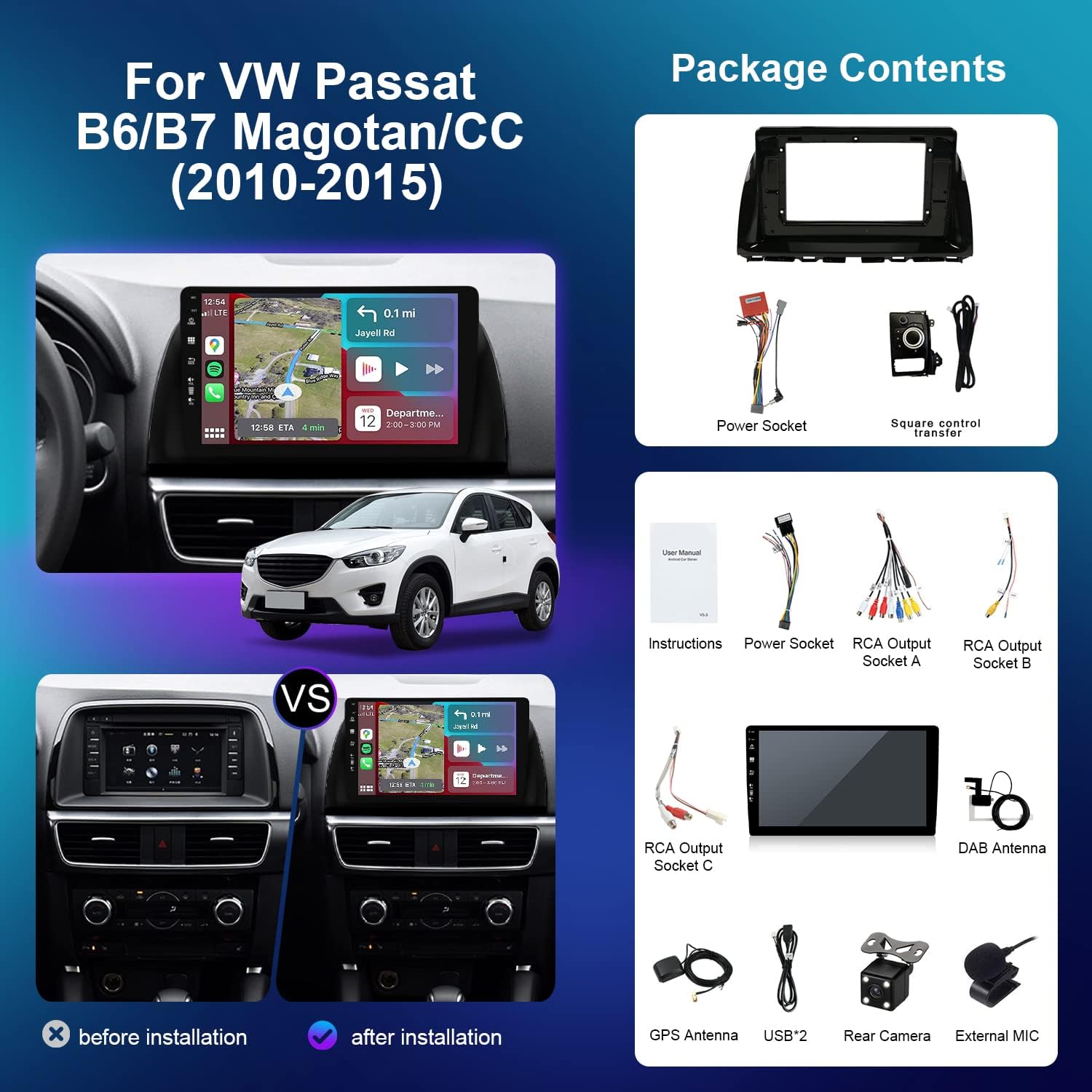
Figure 2.1: Overview of included components, including the autoradio unit, frame kit, various cables, and accessories.
3. Setup and Installation
This autoradio is designed for a perfect fit in Mazda CX-5 models from 2013 to 2016. Professional installation is recommended. Ensure the vehicle's power is disconnected before beginning installation.
3.1 Vehicle Compatibility
This unit is compatible with Mazda CX-5 (2013-2016). If you are unsure about compatibility, please contact technical support with photos of your dashboard.
3.2 Wiring Connections
Connect the power cable, GPS antenna, DAB antenna, USB cables, and RCA output sockets as per the wiring diagram provided in the separate wiring guide (if applicable) or the included user manual. Ensure all connections are secure to prevent malfunctions.
3.3 Camera Installation
The included rear camera should be installed at the rear of the vehicle, typically near the license plate. Connect its video output to the designated camera input on the autoradio. For the optional 360° panoramic parking function, four AHD cameras must be purchased separately and connected to the system.
4. Operating Instructions
This section details the primary functions and features of your autoradio.
4.1 System Overview
- Operating System: Android 12
- CPU: Rockchip AC8257 A53 Octa-Core, 64-bit, 2.0 GHz
- RAM: 4GB DDR3
- ROM: 64GB
- Fast Boot: Accesses the Android system in less than 2 seconds.

Figure 4.1: Key system specifications and features.
4.2 Audio Features
- Audio Output: 4*50W max
- Amplifier IC: TDA7851
- Built-in DSP: Digital Sound Processor for enhanced audio flexibility, dynamics, and transient response for high and low frequencies.
4.3 Radio Functions
- DAB+ Tuner: Integrated high-sensitivity DAB+ tuner for improved sound quality and digital audio broadcast channels. An external DAB+ antenna is included.
- AM/FM Tuner: Integrated worldwide AM/FM tuner with RDS (Radio Data System).
- Frequency Range: AM 522 - 1620 KHz, FM 87.5 - 108 MHz.

Figure 4.2: DAB+ radio and Carplay/Android Auto interface.
4.4 Smartphone Integration
- Wireless CarPlay & Android Auto: Connect your smartphone wirelessly or via cable to access phone functions like contacts, music, and navigation directly on the autoradio display.
- Mirror Link: Mirror your Android phone screen via USB/WiFi or iPhone screen via WiFi (Airplay).
4.5 Navigation
Supports online and offline GPS navigation applications. Features include 3D maps and voice guidance for convenient travel.
4.6 Camera and Parking Assistance
- Rear Camera Input: Supports a reversing camera. The display automatically switches to the rear camera view when reverse gear is engaged. A 4-LED rear camera is included as a gift.
- 360° Panoramic Camera Support: The system supports a 360° panoramic parking function, providing a clear view around the car. This feature requires four AHD cameras, which are sold separately.
4.7 Connectivity and Multimedia
- Integrated WiFi Modem: Connect to the internet via WiFi.
- 4G Support: Supports 4G connectivity (requires a compatible 4G dongle, not included).
- Bluetooth 5.0: For hands-free calling and audio streaming.
- Video Playback: Supports 4K (3840×2160 pixels) and HD 1080P video formats.
- USB & MicroSD: Supports USB drives and MicroSD cards up to 500GB for media playback.
- Split-Screen Function: Allows two applications to be displayed simultaneously on the screen.
4.8 Vehicle Integration
- Steering Wheel Control: Compatible with existing steering wheel controls for safe operation.
- OBD2 Support: Connect an OBD2 scanner (compatible with Torque app) to view real-time vehicle data and error codes.

Figure 4.3: Advanced features including IPS screen, DSP, 360 camera support, and smart connectivity.
5. Maintenance
To ensure the longevity and optimal performance of your autoradio, follow these maintenance guidelines:
- Screen Cleaning: Use a soft, lint-free cloth to clean the IPS screen. Avoid abrasive cleaners or solvents that could damage the display.
- Environmental Conditions: Avoid exposing the unit to extreme temperatures, direct sunlight for prolonged periods, or excessive moisture.
- Software Updates: Periodically check for available software updates to ensure the system runs efficiently and has the latest features and security patches.
- Connection Checks: Occasionally check all wiring connections to ensure they remain secure, especially after driving on rough terrain.
6. Troubleshooting
If you encounter issues with your autoradio, refer to the following common troubleshooting steps:
- No Power: Check the power cable connection and the vehicle's fuse box. Ensure the unit is properly installed.
- No Sound: Verify speaker connections, check volume levels, and ensure the audio source is correctly selected.
- Poor Radio Reception: Check the DAB and AM/FM antenna connections. Ensure the antenna is properly positioned and not obstructed.
- Touchscreen Unresponsive: Try restarting the unit. If the issue persists, a factory reset might be necessary (refer to system settings).
- CarPlay/Android Auto Not Connecting: Ensure your phone's Bluetooth and Wi-Fi are enabled. Try reconnecting the USB cable or re-pairing the device.
- System Slow/Freezing: Close unnecessary background applications. If the issue persists, a system restart or factory reset may be required.
For persistent issues not resolved by these steps, please contact customer support.
7. Specifications
| Feature | Specification |
|---|---|
| Manufacturer | BXLIYER |
| Model Number | 851a8907-3c48-46f0-af09-432d1b901fbd |
| Part Number | BXLIYER-5E2-E064(DAB)-J |
| Operating System | Android 12 |
| CPU | Rockchip AC8257 A53 Octa-Core, 2.0 GHz |
| RAM | 4 GB |
| ROM | 64 GB |
| Output Power | 4 x 50 Watts |
| Number of Channels | 4 |
| Item Weight | 2.3 Kilograms |
| Screen Type | IPS |
| Connectivity | Wi-Fi, Bluetooth 5.0, 4G (via dongle) |
| Included in Box | Autoradio, accessories, user manual, frame kit, power cable |
8. Warranty and Support
8.1 Warranty Information
This BXLIYER Autoradio comes with a 2-year warranty from the date of purchase. Please retain your proof of purchase for warranty claims.
8.2 Customer Support
For technical assistance, compatibility inquiries, or any other support needs, please contact our technical support team:
Email: joyx_techsupport@163.com
When contacting support, please provide your product model number and a detailed description of the issue.