
1. Introduction
Thank you for choosing the DS18 INF-C1.25A Smart Car Battery Charger and Maintainer. This device is designed to efficiently charge and maintain 6V and 12V automotive batteries, including Lead-acid, Gel, and AGM types. It features advanced safety mechanisms and user-friendly monitoring to ensure optimal battery health and reliable performance.
2. Safety Information
Please read all safety instructions carefully before using the charger.
- Eye Protection: Always wear appropriate eye protection when working with batteries.
- Ventilation: Use the charger in a well-ventilated area to prevent the accumulation of explosive gases.
- Sparks: Avoid creating sparks near the battery. Connect and disconnect clamps only when the charger is unplugged from the AC outlet.
- Thermal Protection: The charger is equipped with thermal protection to prevent overheating.
- Reverse Connection Protection: This feature safeguards against accidental incorrect connections.
- Overcurrent/Overcharge Protection: The charger automatically prevents overcurrent and overcharging to maintain battery life.
- Proposition 65 Warning: This product may contain chemicals known to the State of California to cause cancer and reproductive harm. For more information, visit www.P65Warning.ca.gov.
3. Package Contents
Verify that all items are present in your package:
- DS18 INF-C1.25A Smart Car Battery Charger Unit
- Battery Clamps (Red for Positive, Black for Negative)
- User Manual

Image: DS18 INF-C1.25A Smart Car Battery Charger unit with attached red and black battery clamps.
Video: Unboxing of the DS18 INF-C1.25A Smart Battery Charger and Maintainer, showing the contents of the package.
4. Product Features
- Efficient and Swift Charging: Delivers a maximum output current of 1.25A for quick and effective battery charging.
- Versatile Compatibility: Compatible with both 6V and 12V battery systems, supporting Lead-acid, Gel, and AGM battery types.
- Advanced Safety Features: Includes thermal protection, reverse connection protection, and overcurrent/overcharge protection for enhanced safety and battery longevity.
- Reliable and Durable Design: Features a robust housing with an IP60 protection rating, shielding internal components from dust. Operates reliably in temperatures from 0°C to +40°C.
- User-Friendly Monitoring: An LED function display provides intuitive feedback on the charging process. Includes faulty battery and faulty connection indicators for easy troubleshooting.
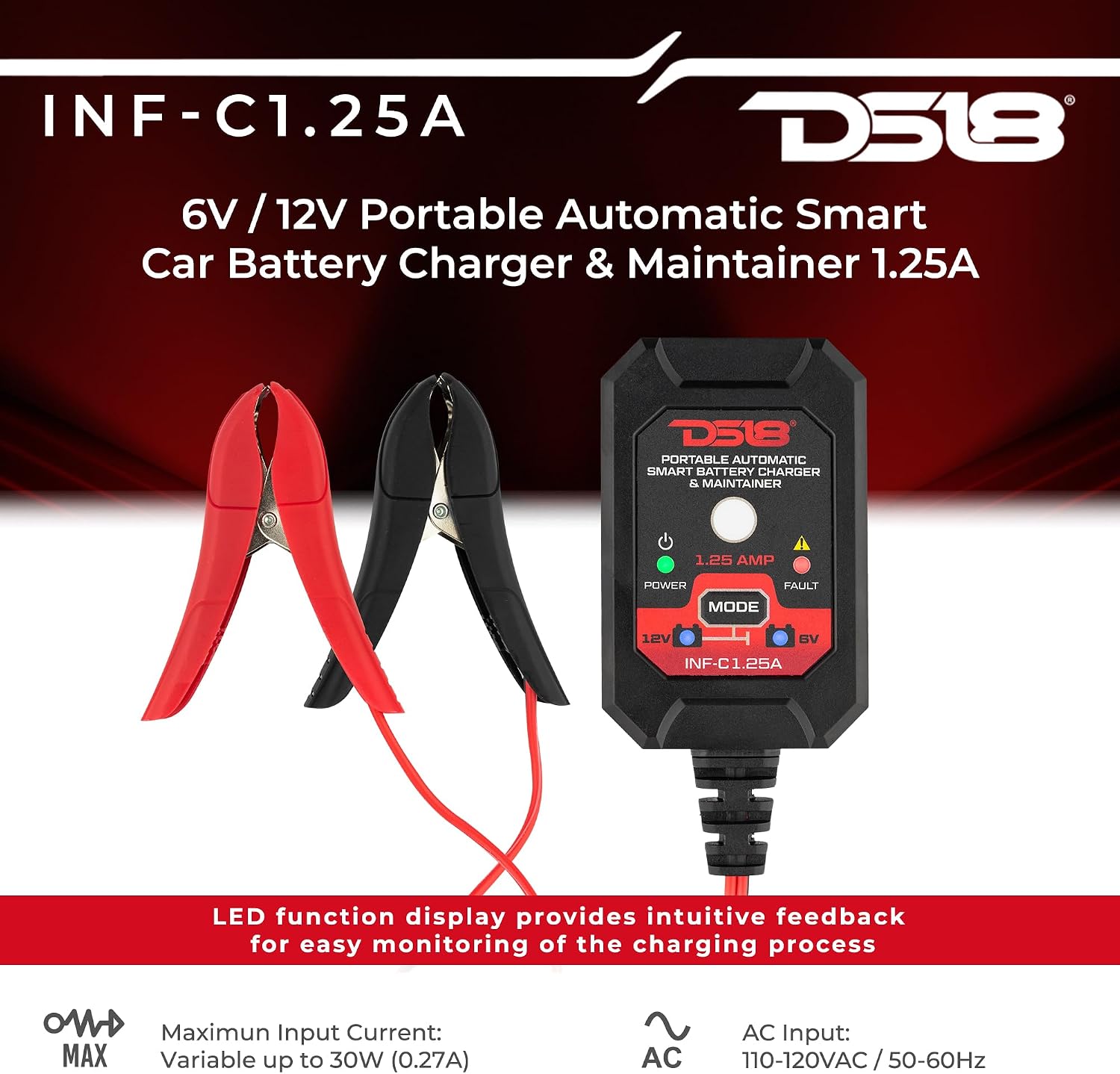
Image: Front view of the DS18 INF-C1.25A charger highlighting its LED display and battery clamps.

Image: Visual representation of the charger's compatibility with various 6V/12V battery types: Lead Acid, Wet, Gel, and AGM.
5. Setup
Follow these steps to connect your DS18 INF-C1.25A charger:
- Prepare the Battery: Ensure the battery terminals are clean and free of corrosion.
- Connect Clamps: First, connect the black negative (-) clamp to the negative battery terminal. Then, connect the red positive (+) clamp to the positive battery terminal.
- Plug in Charger: Plug the charger's AC power cord into a standard 110-120VAC wall outlet.
- Select Voltage Mode: Press the 'MODE' button on the charger to select either 6V or 12V, matching your battery's voltage. The corresponding LED indicator will illuminate.
- Begin Charging: The charger will automatically begin the charging process. The 'POWER' LED will illuminate green, and the '1.25 AMP' LED will blink during charging.

Image: A person connecting the DS18 INF-C1.25A charger to a car battery, demonstrating typical setup.
Video: Demonstration of connecting the DS18 INF-C1.25A Battery Charger and Maintainer to a vehicle battery.
6. Operating Instructions
The DS18 INF-C1.25A operates automatically once connected and the mode is selected:
- Charging Indication: During active charging, the '1.25 AMP' LED will blink.
- Maintenance Mode: Once the battery reaches full charge, the charger automatically switches to a maintenance (trickle charge) mode. The '1.25 AMP' LED will stop blinking and remain solid, indicating the battery is being maintained without overcharging.
- Automatic Restart: If the battery's voltage drops below a certain threshold while in maintenance mode (e.g., due to parasitic drain), the charger will automatically re-initiate the charging cycle to bring the battery back to full capacity.
- Mode Selection: The 'MODE' button allows you to switch between 6V and 12V charging. There are also specific modes for cold weather or AGM batteries (indicated by a snowflake icon on some models, though not explicitly detailed for this model in the provided data, it's a common smart charger feature).

Image: Close-up of the charger's control panel with LED indicators for power, mode selection (6V/12V), 1.25 AMP status, and fault warnings.
7. Maintenance
To ensure the longevity and optimal performance of your DS18 INF-C1.25A charger:
- Cleaning: Keep the charger unit clean and free from dust and debris. Use a dry cloth for cleaning. Do not use liquid cleaners.
- Storage: Store the charger in a cool, dry place when not in use. Avoid extreme temperatures and direct sunlight.
- Cable Inspection: Periodically inspect the power cord and battery clamps for any signs of damage, fraying, or corrosion. Replace if necessary.
- Battery Terminals: Ensure battery terminals are always clean for good electrical contact.
8. Troubleshooting
If you encounter issues with your charger, refer to the following common problems and solutions:
- 'FAULT' Indicator On:
- Cause: Incorrect battery connection (reverse polarity) or a faulty battery.
- Solution: Disconnect the charger from the AC outlet. Verify that the red clamp is connected to the positive (+) terminal and the black clamp to the negative (-) terminal. If connections are correct, the battery may be deeply discharged or faulty.
- No Power/LEDs Off:
- Cause: Charger not plugged in, power outlet issue, or internal fault.
- Solution: Ensure the charger is securely plugged into a working AC outlet. Test the outlet with another device. If the issue persists, contact customer support.
- Battery Not Charging:
- Cause: Incorrect voltage mode selected, poor connection, or severely damaged battery.
- Solution: Confirm the correct 6V or 12V mode is selected. Check all clamp connections for tightness and cleanliness. A battery that is too deeply discharged or damaged may not accept a charge.
9. Specifications
| Model | INF-C1.25A |
| Product Dimensions | 2.6 x 1.6 x 4 inches (6.6 x 4.1 x 10.2 cm) |
| Item Weight | 2 pounds (0.91 kg) |
| Input Voltage | 110-120VAC, 50-60Hz, 30W |
| Output Voltage | 6VDC, 1.25A or 12VDC, 1.25A |
| Battery Compatibility | 6V and 12V Lead-acid, Gel, AGM batteries |
| Battery Capacity Range | 2-60Ah |
| Operating Temperature | 0°C to +40°C |
| Housing Protection Rating | IP60 |
| Safety Certifications | FCC, UL |

Image: Back of the charger unit displaying detailed input and output specifications.
10. Warranty and Support
For warranty information or technical support, please contact DS18 customer service. Keep your purchase receipt as proof of purchase.
DS18 Contact Information: Refer to the official DS18 website or your product packaging for the most current contact details.


