
1. Product Overview
The BaBylissPRO Barberology Texturizing Comb is a professional-grade tool designed for barbers and stylists. It allows for the creation of texture and volume in hair with minimal hair removal, providing a free and choppy look. Constructed from heavy-duty plastic, this comb features both a fine-tooth comb side and a precision razor side.
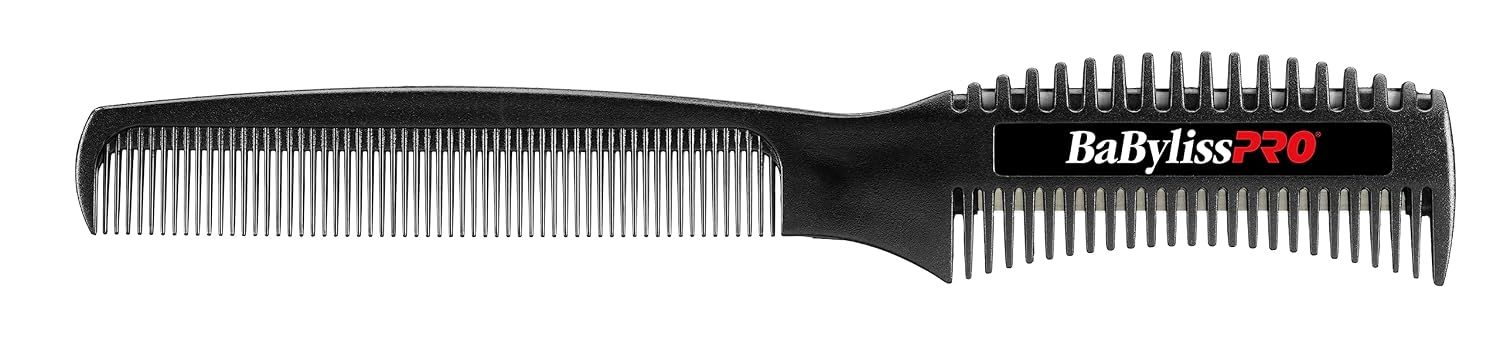
Image 1.1: The BaBylissPRO Barberology Texturizing Comb, shown in its retail packaging. The comb is black with the BaBylissPRO logo.

Image 1.2: A detailed view of the texturizing comb, highlighting its two distinct sides: a fine-tooth comb and a 3¼ inch precision razor side. Measurements are indicated along the side.
Key Features:
- Dual-Sided Design: Features a fine-tooth comb on one side and a precision razor on the other.
- Texture and Volume Creation: Specifically designed to add texture and volume to hair with controlled hair removal.
- Durable Construction: Made from heavy-duty plastic for longevity and professional use.
- Replaceable Razor: The 3¼ inch precision razor is disposable and replaceable for consistent performance.
Product Overview Video:
Video 1.1: A product overview demonstrating the features and general use of the BaBylissPRO Barberology Texturizing Comb.
2. Setup
The BaBylissPRO Barberology Texturizing Comb requires minimal setup before use. It is ready for immediate application.
- Unpack: Carefully remove the comb from its packaging.
- Inspect: Before first use, inspect the comb and razor for any signs of damage or manufacturing defects. Ensure the razor is securely in place.
- Familiarize: Understand the function of both the fine-tooth comb side and the precision razor side.
3. Operating Instructions
This texturizing comb is designed for professional use to create specific hair styles. Always ensure the hair is clean and detangled before use.
General Use for Texturizing and Volume:
- Prepare Hair: Ensure the client's hair is dry or slightly damp, depending on the desired effect. Section the hair as needed for control.
- Identify Section: Select the section of hair where texture or volume is desired.
- Apply Razor Side: Gently glide the precision razor side through the hair section. Use light, controlled strokes. The razor is designed to remove minimal hair while creating a choppy, textured look. Avoid excessive pressure to prevent over-cutting.
- Comb Through: Use the fine-tooth comb side to blend and style the textured sections. This helps to distribute the hair evenly and check the results.
- Repeat: Continue this process on other sections of hair until the desired texture and volume are achieved.

Image 3.1: A stylist demonstrating the use of the texturizing comb to create texture and volume in a client's hair.
Important Considerations:
- Always use caution when handling the razor side to prevent accidental cuts.
- Practice on mannequin heads or less visible sections of hair before working on clients.
- The razor is intended for texturizing, not for significant length reduction.
4. Maintenance
Proper maintenance ensures the longevity and hygienic use of your BaBylissPRO Barberology Texturizing Comb.
- Cleaning: After each use, remove any loose hair from both the comb and razor sides. Clean the comb with a suitable disinfectant solution designed for barber tools. Rinse thoroughly and allow to air dry.
- Razor Replacement: The precision razor is disposable and replaceable. When the razor becomes dull or damaged, carefully slide it out and insert a new 3¼ inch precision razor. Handle new and used razors with extreme care.
- Storage: Store the comb in a clean, dry place, away from direct sunlight and extreme temperatures.
5. Troubleshooting
The BaBylissPRO Barberology Texturizing Comb is a simple, non-electronic tool. Most issues can be resolved by ensuring proper technique and maintenance.
- Ineffective Texturizing: If the comb is not creating the desired texture, ensure the razor is sharp and properly seated. Replace the razor if it is dull. Also, verify that the hair is adequately prepared (clean, detangled) and that appropriate technique is being used.
- Hair Pulling: Hair pulling can occur if the comb is used on tangled hair or if the razor is dull. Ensure hair is detangled before use and replace the razor if necessary.
6. Specifications
| Attribute | Detail |
|---|---|
| Model Number | BCUTCOMB |
| Brand | BaBylissPRO |
| Product Dimensions | 0.38 x 4 x 10 inches |
| Item Weight | 1.45 ounces |
| Material | Heavy-duty Plastic |
| Color | Black |
| Razor Size | 3¼ inch precision razor (replaceable) |

Image 6.1: Side view of the texturizing comb, illustrating its dimensions and design.
7. Warranty and Support
For warranty information, product support, or to purchase replacement parts (such as razors), please contact BaBylissPRO customer service directly or visit their official website. Keep your proof of purchase for any warranty claims.
BaBylissPRO Official Website: www.babylisspro.com
Please refer to the product packaging or the official BaBylissPRO website for the most current contact information and warranty details.