
Introduction
This manual provides essential information for the proper installation, operation, and maintenance of your Dyson Genuine UP22 Cleaner Head Assembly, part number 968642-01. This genuine Dyson component is designed to ensure optimal performance and compatibility with specified Dyson UP22 vacuum cleaner models. Please read this manual thoroughly before use to ensure safe and effective operation.
Product Overview: The Dyson UP22 Cleaner Head Assembly is a crucial component of your Dyson vacuum, responsible for agitating and collecting debris from various floor types. It features a motorized brush bar designed for efficient cleaning.
Compatibility
This cleaner head assembly (part number 968642-01) is compatible with the following Dyson UP22 models:
- UP22 Allergy UK/IE Mbu/Ir (327313-02) (Moulded Blue/Iron)
- UP22 Allergy UK/IE MBu/Ir (327313-01) (Moulded Blue/Iron)
- UP22 Animal UK Ir/MPu 239673-01 (Iron/Moulded Purple)
- UP22 Animal UK/IE MPu/Pu (363391-01) (Moulded Purple/Purple)
- UP22 Animal UK/IE MPu/Pu B Grade (363391-02) (Moulded Purple/Purple)
- UP22 Multifloor + UK Ir/MYe 234581-01 (Iron/Moulded Yellow)
- UP22 Multifloor UK Ir/MYe 210238-01 (Iron/Moulded Yellow)
- UP22 Origin UK Ir/MWh/Ir 241061-01 (Iron/Moulded White)
Ensure your vacuum cleaner model matches one of the listed compatible models before attempting installation.
Setup and Installation
Before beginning installation, ensure your Dyson vacuum cleaner is unplugged from the power outlet to prevent electrical hazards.
- Preparation: Place the vacuum cleaner on a flat, stable surface.
- Remove Old Head (if applicable): If replacing an existing cleaner head, locate the release mechanism (usually a button or latch) that secures the cleaner head to the vacuum wand or main body. Press the release and carefully detach the old cleaner head.
- Attach New Head: Align the new Dyson UP22 Cleaner Head Assembly with the connection point on your vacuum cleaner's wand or main body. Push firmly until you hear a click, indicating it is securely latched into place.
- Verify Connection: Gently tug on the cleaner head to ensure it is firmly attached and does not wobble.

Image: Front view of the Dyson UP22 Cleaner Head Assembly, showing the clear casing and brush bar. This is the main component to be attached to the vacuum.
Operating Instructions
Once the cleaner head is securely attached, your Dyson vacuum is ready for operation. The cleaner head functions automatically with the vacuum's power.
- Power On: Plug in your vacuum cleaner and turn on the power switch. The brush bar within the cleaner head should begin to rotate.
- Floor Types: The UP22 cleaner head is designed for various floor types. For optimal performance, ensure your vacuum's settings (if applicable) are adjusted according to the surface you are cleaning (e.g., carpet, hard floor).
- Maneuvering: Guide the vacuum cleaner across the floor surface. The cleaner head's swivel mechanism allows for easy navigation around furniture and obstacles.

Image: Top view of the Dyson UP22 Cleaner Head Assembly, highlighting the red and blue brush bar bristles, which are essential for effective cleaning.
Maintenance
Regular maintenance of your cleaner head will ensure its longevity and consistent performance.
- Brush Bar Cleaning: Periodically inspect the brush bar for tangled hair, threads, or debris. Use scissors to cut away any entangled material and pull it free.
- Clear Obstructions: If suction performance decreases or the brush bar stops rotating, check for blockages in the cleaner head's airway or around the brush bar.
- Wheel Inspection: Check the small wheels on the underside of the cleaner head for debris accumulation that might hinder smooth movement.
- Wipe Down: Use a damp cloth to wipe the exterior of the cleaner head to remove dust and dirt. Do not use harsh chemicals or abrasive cleaners.
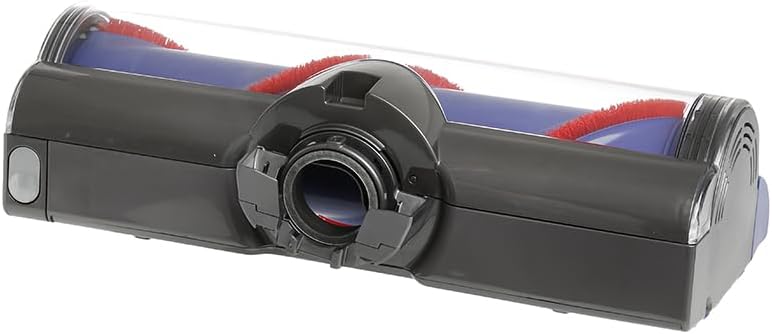
Image: Underside view of the Dyson UP22 Cleaner Head Assembly, showing the connection point and the wheels. This area should be regularly checked for blockages and debris.
Troubleshooting
| Problem | Possible Cause | Solution |
|---|---|---|
| Brush bar not rotating. | Tangled debris in brush bar; obstruction in airway; cleaner head not properly connected. | Clean brush bar of hair/debris. Check for blockages in the cleaner head. Re-attach cleaner head securely. |
| Reduced suction at cleaner head. | Blockage in cleaner head or vacuum hose; full dustbin. | Check cleaner head and hose for obstructions. Empty the vacuum's dustbin. |
| Cleaner head making unusual noises. | Debris caught in brush bar mechanism; worn components. | Inspect and clean brush bar. If noise persists, contact Dyson support. |
If troubleshooting steps do not resolve the issue, please contact Dyson customer support for further assistance.
Specifications
- Part Number: 968642-01
- Product Type: Cleaner Head Assembly
- Compatibility: Dyson UP22 series vacuum cleaners (specific models listed in Compatibility section)
- Manufacturer: Dyson
- Item Weight: 1 pound (approximately)
- Package Dimensions: 12 x 4 x 4 inches (approximately)
Warranty and Support
As a genuine Dyson part, this cleaner head assembly is covered by Dyson's standard warranty policy for replacement parts. For specific warranty terms and conditions, please refer to the documentation provided with your original Dyson vacuum cleaner or visit the official Dyson website.
For technical support, troubleshooting assistance, or to inquire about warranty claims, please contact Dyson Customer Service:
- Dyson Official Website: www.dyson.com
- Customer Support: Refer to your region's Dyson website for local contact numbers and support options.


