
ANRAN Q4 Max
ANRAN Q4 Max 5MP Wireless Outdoor Surveillance Camera User Manual
Model: Q4 Max | Brand: ANRAN
1. Introduction
The ANRAN Q4 Max is a state-of-the-art 5MP wireless outdoor surveillance camera designed for comprehensive home security. Featuring an integrated solar panel, this camera offers 100% wire-free operation, eliminating the need for complex wiring and frequent battery changes. Its advanced capabilities include vivid 5MP resolution, full-color night vision, intelligent human detection, two-way audio communication, and a 360-degree panoramic view.
This manual provides detailed instructions for setting up, operating, and maintaining your ANRAN Q4 Max camera to ensure optimal performance and security for your property.

Figure 1.1: ANRAN Q4 Max 5MP Wireless Outdoor Surveillance Camera
2. Package Contents
Please check the package contents carefully. If any items are missing or damaged, please contact ANRAN customer support.
- ANRAN Q4 Max 5MP Wireless Outdoor Surveillance Camera
- Mounting Bracket
- Mounting Screws and Wall Plugs
- USB-C Charging Cable
- User Manual (this document)
3. Product Overview
Familiarize yourself with the main components of your ANRAN Q4 Max camera.

Figure 3.1: Camera with Embedded Solar Panel. This image highlights the integrated solar panel for efficient light energy conversion and the 100% wireless design, eliminating electrical wiring hassles.
- Integrated Solar Panel: For continuous power supply.
- 5MP Lens: High-resolution optical lens for clear images and videos.
- Spotlights: Enable full-color night vision.
- PIR Sensor: Passive Infrared sensor for human motion detection.
- Microphone & Speaker: For two-way audio communication.
- Antennas: For stable Wi-Fi connectivity.
- Mounting Base: For secure installation.
4. Setup Guide
4.1 Initial Charging
Before first use, it is highly recommended to fully charge the camera's built-in battery using the provided USB-C cable. Connect the cable to the camera's charging port and a standard 5V USB power adapter (not included). A full charge ensures optimal performance and battery longevity.
4.2 App Installation
Download the official ANRAN app from your mobile device's app store. The app is compatible with both iOS and Android devices.
- For iOS devices, search for "ANRAN" on the Apple App Store.
- For Android devices, search for "ANRAN" on the Google Play Store.

Figure 4.1: ANRAN App Availability. The image shows the Google Play and App Store logos, indicating where to download the ANRAN application for smartphone control.
4.3 Camera Pairing
Follow the in-app instructions to pair your camera with your Wi-Fi network. Ensure your Wi-Fi network is 2.4GHz, as the camera only supports this frequency band.
- Open the ANRAN app and create an account or log in.
- Tap the "+" icon to add a new device.
- Select your camera model and follow the on-screen prompts, which typically involve scanning a QR code on the camera or connecting to a temporary Wi-Fi hotspot created by the camera.
- Connect the camera to your home 2.4GHz Wi-Fi network.
4.4 Mounting the Camera
The ANRAN Q4 Max is designed for wall mounting. Choose a location that provides optimal surveillance coverage and receives sufficient direct sunlight for the integrated solar panel.
- Use the provided mounting bracket as a template to mark drill holes on the wall.
- Drill holes and insert wall plugs if necessary.
- Secure the mounting bracket to the wall using the screws.
- Attach the camera to the mounting bracket. The integrated solar panel means no additional drilling is required for a separate solar panel.

Figure 4.2: Wireless Installation. This image illustrates the ease of installation due to the integrated solar panel, requiring no additional drilling for power.
5. Operating Instructions
5.1 Live View and PTZ Control
Access the live video feed from your camera through the ANRAN app. You can remotely control the camera's pan and tilt functions to achieve a 360-degree view.
- Open the ANRAN app and select your camera from the device list.
- The live view will appear. Use the on-screen controls to pan (355°) and tilt (90°) the camera.
- The camera supports 4x digital zoom to magnify details.

Figure 5.1: 360° Full Field of View & 4x Zoom. This image demonstrates the camera's ability to pan 355 degrees and tilt 120 degrees, providing comprehensive coverage without blind spots, along with 4x digital zoom for magnified details.
5.2 Two-Way Audio
The built-in microphone and speaker allow for real-time two-way communication. You can speak to visitors or deter intruders directly through the camera.
- While in live view, tap the microphone icon in the app to speak.
- Tap the speaker icon to listen to audio from the camera's location.

Figure 5.2: Two-Way Audio & Multi-player Sharing. This image illustrates the two-way audio feature, allowing communication with individuals near the camera, and also highlights the multi-user sharing capability.
5.3 Night Vision Modes
The camera offers three night vision modes to suit different surveillance needs:
- Infrared Mode: Standard black and white night vision using IR LEDs.
- Color Mode: Utilizes built-in spotlights to provide full-color video even in low-light conditions (can be switched off).
- Alarm Mode: Activates spotlights and siren upon motion detection for enhanced deterrence.

Figure 5.3: Three Night Vision Modes. This graphic displays the different night vision options: Infrared mode for standard black and white, Color mode using spotlights, and Alarm mode which combines light and siren for deterrence.
5.4 Motion Detection and Alerts
The camera features intelligent PIR human motion detection, significantly reducing false alarms. When motion is detected, you will receive real-time alerts.
- Light Alert: Spotlights activate to illuminate the detected area.
- Audible Alert: The built-in siren can be triggered to deter intruders.
- Message Notification: Receive instant alerts on your smartphone via the ANRAN app.
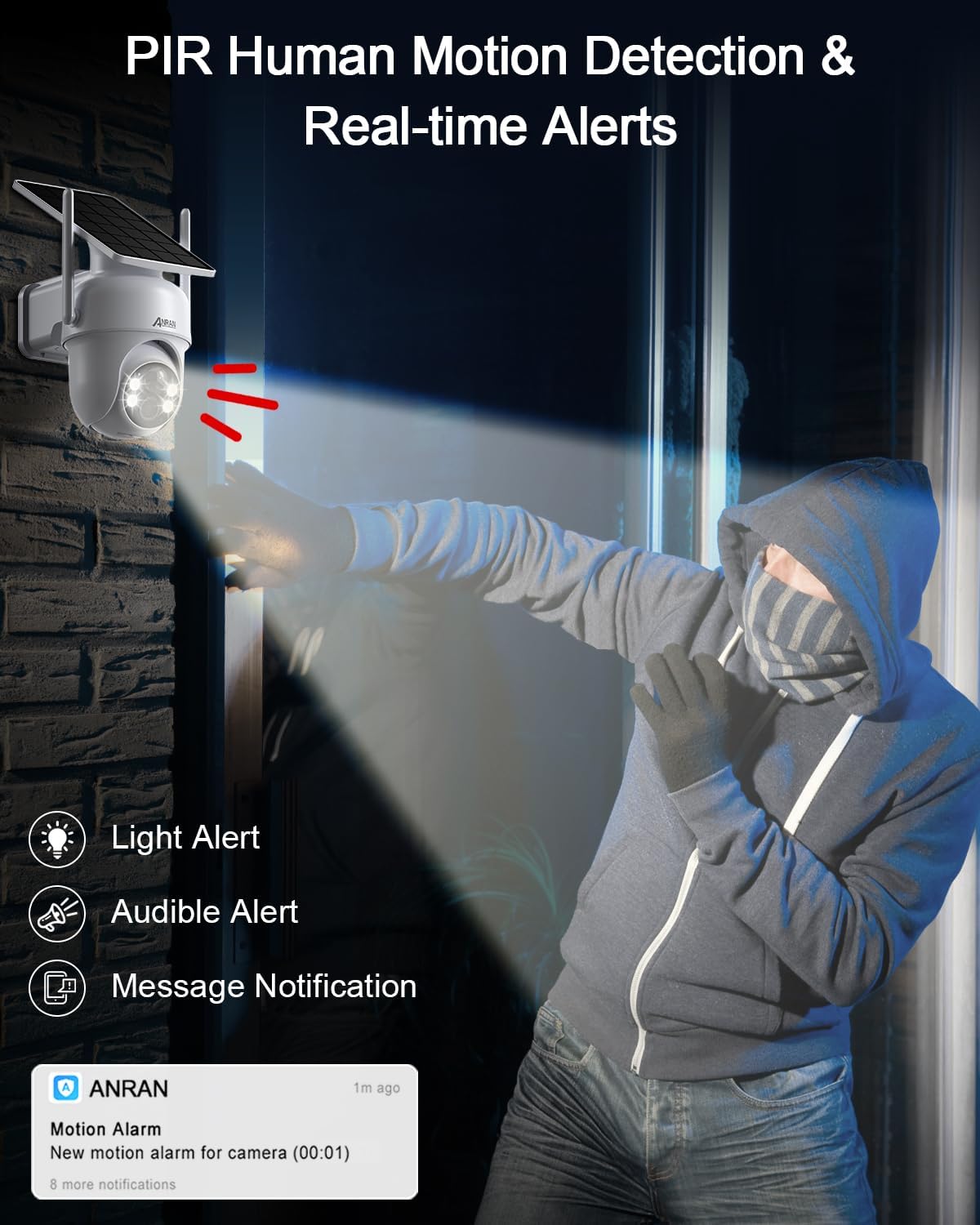
Figure 5.4: PIR Human Motion Detection & Real-time Alerts. This image shows the camera detecting a person and triggering a light alert, audible alert, and sending a message notification to a smartphone.
5.5 Video Storage and Playback
The camera supports local storage via a MicroSD card (up to 128GB, not included) and cloud storage options.
- MicroSD Card Storage: Insert a MicroSD card into the designated slot for continuous or event-triggered recording.
- Cloud Storage: ANRAN offers cloud storage services for secure backup of your footage. Check the app for details on available plans.
- Playback: Access recorded videos through the app's playback feature, filtering by date and event.

Figure 5.5: Storage Options. This image illustrates the availability of both local SD card storage (up to 128GB) and permanent free cloud storage (covering 30 days).
5.6 Family Sharing
You can share access to your camera's live feed and recordings with family members or trusted individuals through the ANRAN app.
- In the app, navigate to the camera settings and find the sharing option.
- Invite others by scanning a QR code or entering their account details.
- Manage permissions for each shared user.

Figure 5.6: Multi-User Sharing. This image depicts various individuals accessing the camera feed on their mobile devices, demonstrating the family sharing feature.
6. Maintenance
6.1 Cleaning
Regularly clean the camera lens and solar panel to ensure clear image quality and efficient solar charging. Use a soft, damp cloth to wipe away dust and debris. Avoid abrasive cleaners or harsh chemicals.
6.2 Battery Care
While the integrated solar panel provides continuous charging, ensure the camera is installed in a location that receives adequate direct sunlight. In periods of prolonged cloudy weather or heavy usage, the battery might deplete. If the battery level drops significantly, you may need to manually charge the camera using the USB-C cable.
6.3 Firmware Updates
ANRAN may release firmware updates to improve camera performance, add new features, or enhance security. Check the ANRAN app periodically for available updates and follow the in-app instructions to install them.

Figure 6.1: Weather Resistance. This image shows the ANRAN Q4 Max camera performing reliably in sunny, rainy, and snowy conditions, highlighting its weatherproof design.
7. Troubleshooting
This section addresses common issues you might encounter with your ANRAN Q4 Max camera.
| Problem | Possible Cause | Solution |
|---|---|---|
| Camera not connecting to Wi-Fi | Incorrect Wi-Fi password; Camera too far from router; Only 5GHz Wi-Fi network available. | Double-check password; Move camera closer to router or use a Wi-Fi extender; Ensure you are connecting to a 2.4GHz Wi-Fi network. |
| Battery not charging via solar panel | Insufficient direct sunlight; Solar panel is dirty or obstructed. | Relocate camera to a sunnier spot; Clean the solar panel surface; Manually charge via USB-C if needed. |
| Frequent false alarms | PIR sensitivity too high; Environmental factors (e.g., swaying trees, passing cars). | Adjust PIR sensitivity settings in the app; Configure detection zones to exclude high-traffic areas. |
| Poor image quality at night | Lens is dirty; Insufficient ambient light for color night vision. | Clean the camera lens; Ensure spotlights are enabled for color night vision, or switch to infrared mode. |
8. Specifications
Detailed technical specifications for the ANRAN Q4 Max camera.
| Feature | Specification |
|---|---|
| Model | Q4 Max |
| Resolution | 5MP (2560x1920P) |
| Night Vision Range | Up to 20-30 meters (Color Night Vision available) |
| Pan/Tilt Angle | Pan 355°, Tilt 90° |
| Zoom | 4x Digital Zoom |
| Connectivity | 2.4GHz Wi-Fi (IEEE 802.11b/g/n) |
| Audio | Two-Way Audio (Built-in Mic & Speaker) |
| Detection | PIR Human Motion Detection |
| Storage | MicroSD Card (up to 128GB), Cloud Storage |
| Power Source | Rechargeable Lithium-ion Battery, Integrated Solar Panel |
| Water Resistance | Weatherproof |
| Dimensions (L x W x H) | 16 x 13.5 x 21.8 cm |
| Weight | 880 grams |
| Compatible Devices | Smartphone (iOS, Android), Amazon Alexa, Google Assistant |
9. Warranty and Support
ANRAN is committed to providing high-quality products and excellent customer service.
- Warranty: Your ANRAN Q4 Max camera comes with a 2-year warranty. Please retain your proof of purchase for warranty claims.
- Technical Support: ANRAN offers lifetime technical support for its products.
- Online Service: Dedicated 7x24 hour online service is available for your convenience.
For further assistance, please visit the official ANRAN brand store or contact their customer service through the ANRAN app or website.

Figure 9.1: ANRAN Support. This image displays icons representing a 2-year warranty, lifetime technical support, and 7x24 hour online service.
For more information and support, visit the Official ANRAN Brand Store.
10. Official Product Videos
No official product videos from the seller were found in the provided data.