
1. Introduction
Thank you for choosing the Topwit Electric Tea Kettle. This 0.8L electric kettle features 11 temperature control settings, 4 preset programs, a removable infuser, and an 8-hour keep warm function. Designed for versatility, it is perfect for brewing tea, coffee, preparing formula, or simply boiling water. Please read this manual thoroughly before use to ensure safe and optimal performance.
2. Safety Precautions
- Always ensure the kettle is placed on a stable, flat, heat-resistant surface.
- Do not immerse the power base or cord in water or other liquids.
- This appliance is equipped with auto shut-off and boil-dry protection technology. The kettle will automatically turn off when water boils or if there is no water inside.
- Use only with the provided power base.
- Do not overfill the kettle beyond the MAX 0.8L mark to prevent boiling water from overflowing.
- The kettle is made with 304 stainless steel and borosilicate glass, which are BPA-free and food-grade materials.
- Exercise caution when handling hot water or steam. The handle is designed to be anti-scald.
- Keep out of reach of children.
3. Product Components
Familiarize yourself with the parts of your Topwit Electric Tea Kettle:
- Tea Kettle Lid
- Removable Stainless Steel Infuser (SUS304)
- Glass Kettle Body (Borosilicate Glass)
- Non-Drip Spout
- Anti-scald Handle
- Stainless Steel Heating Plate
- 360° Rotation Power Base with Smart Control Panel

Figure 3.1: Key components of the Topwit Electric Tea Kettle, highlighting the lid, removable infuser, non-drip spout, stainless steel heating plate, and 360° rotation base.
4. Setup
- Unpacking: Carefully remove all packaging materials and inspect the kettle for any damage.
- First Use Cleaning: Before first use, fill the kettle with water to the MAX line, boil, and then discard the water. Repeat this process 2-3 times to remove any manufacturing residue.
- Placement: Place the power base on a dry, flat, stable, and heat-resistant surface away from the edge of the countertop. Ensure the power cord is not dangling.
5. Operating Instructions
The Topwit Electric Tea Kettle offers 4 preset programs and 11 custom temperature settings for various beverages.
General Operation:
- Fill the kettle with the desired amount of water. Ensure water level is between MIN and MAX marks.
- Place the kettle securely on the power base.
- Plug the power cord into a suitable electrical outlet. The digital display will illuminate.
- Select your desired function using the control panel buttons.

Figure 5.1: Smart Control Panel with Temp Set/Timer, Boil Water, Tea, Coffee, Formula, and Menu/Cancel buttons.
Preset Programs:
- Boil Water: Default temperature is 212°F (100°C). After boiling, it automatically enters keep warm mode at 104°F.

Figure 5.2: Boil Water function display.
- Tea: Default temperature is 212°F (100°C). Adjustable brewing time from 20-45 minutes. After brewing, it automatically enters keep warm mode at 104°F.
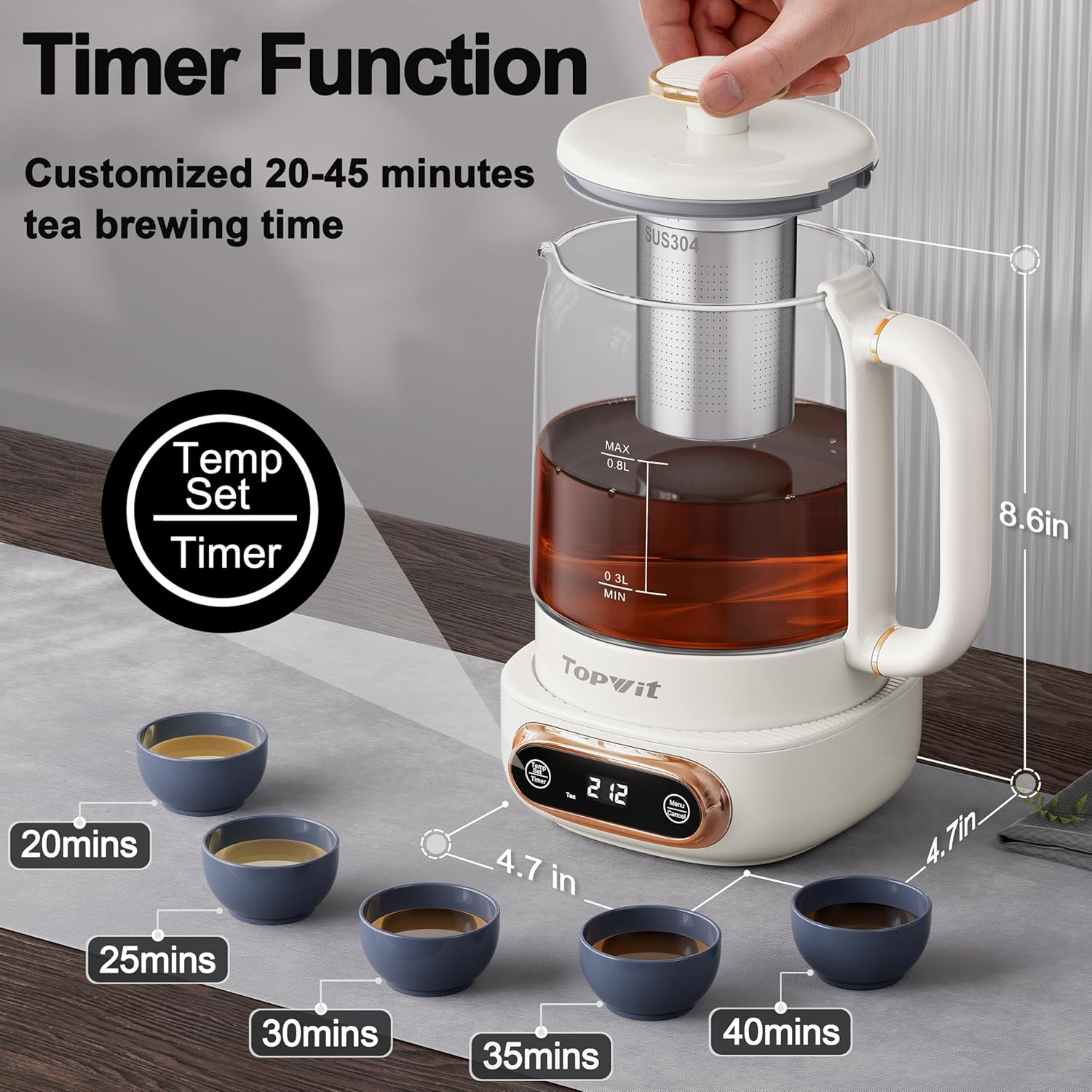
Figure 5.3: Tea function with adjustable timer.

Figure 5.4: Tea function display.
- Coffee: Default temperature is 194°F (90°C). After reaching temperature, it automatically enters keep warm mode at 194°F.

Figure 5.5: Coffee function display.
- Formula: Default temperature is 113°F (45°C). After reaching temperature, it automatically enters keep warm mode at 113°F.

Figure 5.6: Formula function display.
Custom Temperature Setting (Temp Set):
Use the "Temp Set" button to select 11 temperatures between 104°F and 194°F (adjusted in 9°F increments) for brewing different teas and beverages. The kettle will heat to the selected temperature and then maintain it.

Figure 5.7: Custom temperature settings for delicate, green, white, and oolong teas.
Removable Tea Infuser:
The kettle comes with a built-in stainless steel infuser. You can place loose tea leaves directly into the infuser for brewing. After brewing, the infuser can be easily removed for cleaning or if you wish to use the kettle for plain water, coffee, or formula.

Figure 5.8: The removable infuser allows for brewing loose leaf tea or using the kettle for other purposes.
Keep Warm Function:
After boiling or reaching the set temperature, the kettle will automatically enter the keep warm mode for up to 8 hours. The 180-second memory function records your last temperature and time settings. If the kettle is removed from the base and replaced within 180 seconds, it will resume its previous setting.

Figure 5.9: The 8-hour keep warm function maintains the desired temperature.
Official Product Video:
Video 5.1: Official product video demonstrating the Topwit Electric Tea Kettle's features, including 11 temperature control and 4 presets.
6. Maintenance and Cleaning
- Daily Cleaning: Unplug the kettle and allow it to cool completely before cleaning. The glass kettle body and removable infuser can be hand washed with mild soap and water. Rinse thoroughly.
- Drying: Ensure all parts are completely dry before storing or reassembling.
- Descaling: Mineral deposits from water can build up over time. To descale:
- Fill the kettle with white vinegar and water in a 1:2 ratio.
- Boil the mixture and let it soak for 15-30 minutes.
- Gently brush the interior of the kettle and rinse thoroughly with clean water.

Figure 6.1: Descaling process for the kettle's heating plate.
- Do not use abrasive cleaners or scouring pads, as they may scratch the surface.
7. Troubleshooting
| Problem | Possible Cause | Solution |
|---|---|---|
| Kettle does not turn on. | Not plugged in; power outlet not working; kettle not properly seated on base. | Check power connection; try a different outlet; ensure kettle is firmly on the base. |
| Water not heating. | Kettle is empty (boil-dry protection activated); incorrect setting selected. | Add water; select the appropriate heating program. |
| Kettle turns off too quickly. | Boil-dry protection activated due to insufficient water. | Ensure water level is above the MIN mark. |
| Mineral buildup/rust spots on heating plate. | Hard water deposits. | Perform descaling as described in the Maintenance section. |
| Kettle continues to heat after reaching temperature (no explicit off button). | This model is designed to enter a "keep warm" mode or requires removal from base/unplugging to stop heating completely. | Remove the kettle from the power base or unplug the unit to fully stop heating. |
8. Specifications
| Feature | Detail |
|---|---|
| Brand | TopWit |
| Model Name | Electric Tea Kettle |
| Item Model Number | 808MF |
| Color | Beige |
| Capacity | 0.8 Liters (0.8 Quarts) |
| Product Dimensions | 4.7"L x 4.7"W x 8.6"H |
| Item Weight | 2.46 pounds (1.12 Kilograms) |
| Material | 304 Stainless Steel, Borosilicate Glass (BPA-Free, Non-Toxic) |
| Special Features | 8 Hours Keep Warm, Digital Display, Heat Resistant Handle, Removable Infuser, Auto Shut-off, Boil-dry Protection |
| Included Components | Infuser, Kettle, Manual |
| Product Care Instructions | Hand Wash |
9. Warranty and Support
For warranty information or technical support, please refer to the contact details provided with your product packaging or visit the official TopWit website. Keep your purchase receipt for warranty claims.
You can also visit the TopWit Store on Amazon for more information and support.