
1. Introduction
Thank you for choosing the Galano Lawrence Buffet. This versatile storage unit is designed to enhance your living space with its functional design and durable construction. This manual provides essential information for the safe assembly, proper usage, and effective maintenance of your new buffet. Please read these instructions carefully before beginning assembly and retain them for future reference.

Figure 1: Front view of the assembled Galano Lawrence Buffet, showcasing its two doors and three central drawers in a dusty grey oak finish with black handles and base.
2. Safety Information
To ensure safe assembly and use of your Galano Lawrence Buffet, please observe the following precautions:
- Read All Instructions: Familiarize yourself with all steps before starting assembly.
- Two-Person Assembly Recommended: For safety and ease, assembly is best performed by two adults.
- Use Correct Tools: Ensure you have the necessary tools as specified in the assembly guide.
- Secure to Wall: To prevent tipping, especially in households with children or pets, it is highly recommended to secure the buffet to a wall using the provided anti-tip hardware.
- Weight Distribution: Distribute weight evenly across shelves and drawers. Avoid placing excessively heavy items on top or in a single section.
- Keep Small Parts Away from Children: Hardware and small components can be choking hazards.
- Inspect Regularly: Periodically check all fasteners to ensure they remain tight.
3. Package Contents
Before beginning assembly, verify that all parts and hardware are present and undamaged. Refer to the separate assembly guide included in your package for a detailed list of components and their corresponding labels. Each piece is typically labeled for easy identification.
- Main structural panels (top, bottom, sides, back)
- Door panels and hinges
- Drawer components (fronts, sides, backs, bottoms, slides)
- Adjustable shelves and shelf pins
- Handles and mounting hardware
- Legs/base components
- Assembly hardware (screws, dowels, cam locks, etc.)
- Anti-tip hardware
- Assembly instructions booklet
4. Setup and Assembly Instructions
The Galano Lawrence Buffet is designed for straightforward assembly. Follow the step-by-step instructions provided in the dedicated assembly booklet included with your product. Ensure you have ample space and a clean, flat surface for assembly.
- Prepare the Area: Clear a spacious area and lay out all components on a soft, clean surface to prevent scratches.
- Identify Parts: Match all components with the parts list in the assembly guide.
- Assemble the Base: Begin by assembling the base structure and attaching the legs.
- Construct the Main Frame: Attach side panels, bottom panel, and central dividers according to the instructions.
- Install Drawer Slides: Secure the drawer slides to the internal panels.
- Assemble Drawers: Construct each drawer box and attach the drawer fronts and handles. Insert the assembled drawers into the slides.
- Attach Doors: Mount the hinges to the doors and then attach the doors to the main frame. Adjust hinges for proper alignment.
- Insert Shelves: Place shelf pins at desired heights and insert the adjustable shelves into the side compartments.
- Install Back Panel: Secure the back panel to the unit.
- Attach Anti-Tip Hardware: Secure the anti-tip hardware to the back of the buffet and to a wall stud, following the specific instructions provided. This step is crucial for safety.
Note: If you encounter any difficulties during assembly, refer to the detailed diagrams in your assembly booklet or contact customer support.
5. Operating Instructions
The Galano Lawrence Buffet offers versatile storage through its doors and drawers.
- Doors: The two side doors open to reveal spacious compartments. These compartments feature adjustable shelves, allowing you to customize the storage height to suit various items such as dishes, books, or small appliances.
- Drawers: The three central drawers provide convenient storage for smaller items like cutlery, linens, or personal accessories. The smooth-gliding drawer slides ensure easy opening and closing.

Figure 2: Internal view of the Galano Lawrence Buffet with both doors open, showing the adjustable shelves in the side compartments and the three central drawers.
6. Maintenance and Care
To maintain the appearance and longevity of your buffet, follow these care guidelines:
- Cleaning: Wipe surfaces with a soft, damp cloth. Avoid abrasive cleaners, harsh chemicals, or polishes that may damage the finish.
- Spills: Clean spills immediately to prevent staining or damage to the engineered wood.
- Sunlight: Avoid prolonged exposure to direct sunlight to prevent fading or discoloration.
- Heat and Moisture: Keep the buffet away from direct heat sources and areas of high humidity. Use coasters under hot or wet items.
- Moving the Unit: When moving the buffet, always lift it rather than dragging it to prevent damage to the legs and structure.
7. Troubleshooting
If you encounter any issues with your buffet, refer to the following common solutions:
| Problem | Possible Cause | Solution |
|---|---|---|
| Wobbly or unstable unit | Loose fasteners; uneven floor | Tighten all screws and bolts. Ensure the unit is on a level surface; use shims if necessary. Verify anti-tip hardware is securely installed. |
| Drawers do not slide smoothly | Improperly installed slides; obstruction; misaligned drawer box | Check that drawer slides are correctly aligned and securely fastened. Remove any obstructions. Re-assemble drawer box if necessary. |
| Doors do not close properly or are misaligned | Hinges not adjusted correctly; loose hinge screws | Adjust the hinge screws to align the doors. Refer to the assembly guide for hinge adjustment instructions. Tighten all hinge screws. |
8. Specifications
Key specifications for the Galano Lawrence Buffet:
- Model Number: FG-DI-PU-14-763-UK
- Brand: Galano
- Material: Engineered Wood
- Color: Dusty Grey Oak
- Overall Dimensions (L x W x H): 115.8 cm x 39.8 cm x 74.2 cm (approximately 45.6 x 15.7 x 29.2 inches)
- Item Weight: 37.8 Kilograms (approximately 83.3 lbs)
- Features: 2 Doors, 3 Drawers, Adjustable Shelves, Floor Mount Type

Figure 3: Diagram illustrating the external dimensions of the Galano Lawrence Buffet: 1158mm length, 398mm depth, and 742mm height.
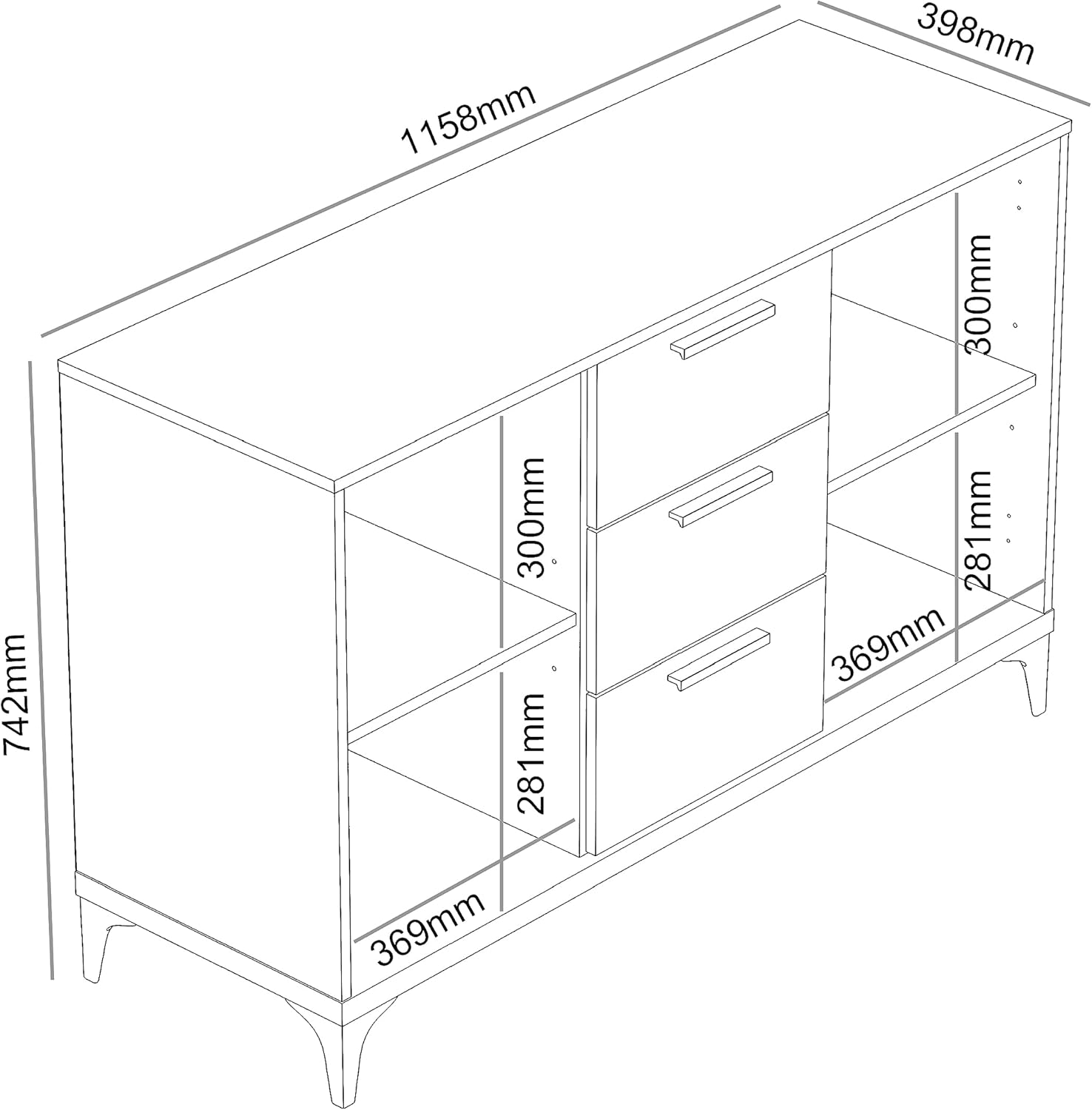
Figure 4: Diagram illustrating the internal dimensions of the Galano Lawrence Buffet, including drawer internal size (316mm W x 336mm D x 121mm H) and shelf compartment dimensions.
9. Warranty and Support
Galano products are manufactured to high-quality standards. For information regarding warranty coverage, spare parts availability, or customer support, please refer to the contact details provided in your product packaging or visit the official Galano website. Please have your model number (FG-DI-PU-14-763-UK) and purchase information ready when contacting support.
