
1. Introduction
This manual provides essential information for the safe and efficient operation, installation, and maintenance of your SNOOKER SK-700P Commercial Cube Ice Machine. Please read this manual thoroughly before operating the unit and retain it for future reference.
The SNOOKER SK-700P is a high-capacity, freestanding commercial ice machine designed for large commercial settings such as restaurants, bars, and hotels. It features a durable stainless steel construction, an air-cooled compressor, a lighted insulated storage bin, adjustable legs, and a digital control system for precise ice thickness and temperature adjustments.
2. Safety Information
Always observe the following safety precautions to reduce the risk of fire, electric shock, or injury.
- Electrical Safety: Ensure the unit is connected to a properly grounded 220V power supply. Do not use extension cords. Disconnect power before any maintenance or cleaning.
- Water Connections: All water connections must comply with local plumbing codes. Use only potable water.
- Ventilation: The ice machine requires adequate air circulation. Do not block ventilation openings. Ensure the installation location is well-ventilated.
- Leveling: The unit must remain level at all times for optimal performance. Use the adjustable legs to ensure stability.
- Refrigerant: This unit contains R404A refrigerant. Servicing should only be performed by qualified personnel.
- Children: Keep children away from the ice machine.
3. Unpacking and Inspection
Upon receiving your SNOOKER ice machine, carefully unpack it and inspect for any shipping damage. Report any damage to the carrier immediately.
3.1. Package Contents
Verify that all components are included:
- SNOOKER SK-700P Ice Machine Head Unit
- Insulated Storage Bin
- Pipe Fittings
- Water Filter
- Ice Scoop
- LED Lamp (pre-installed in bin)
- Adjustable Legs (4)
4. Setup and Installation
Proper installation is crucial for the performance and longevity of your ice machine.
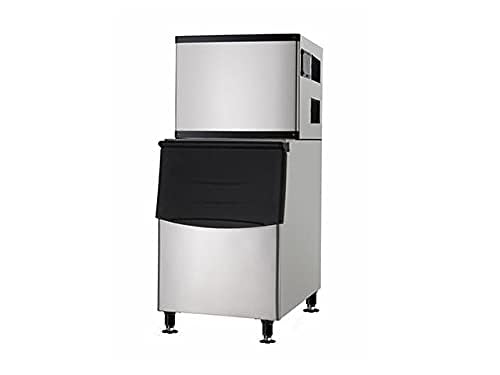
Figure 4.1: SNOOKER SK-700P Commercial Cube Ice Machine, showing the ice maker head unit stacked on top of the insulated storage bin, both made of stainless steel, with adjustable legs visible at the base.
4.1. Location Requirements
Choose a location that meets the following criteria:
- Ventilation: Ensure ample space around the unit for proper air circulation, especially for the air-cooled condenser.
- Water Supply: Access to a potable water intake line.
- Drainage: Access to a drainage pipe for wastewater.
- Power Outlet: A dedicated 220V grounded electrical outlet.
- Level Surface: Although the unit has adjustable legs, a relatively level surface is recommended.
4.2. Leveling the Unit
The SNOOKER SK-700P comes with four adjustable legs. Use a spirit level to ensure the unit is perfectly level. Adjust each leg by rotating it clockwise or counter-clockwise until the machine is stable and level on all sides. This is critical for efficient ice production and proper drainage.
4.3. Water and Drain Connections
Connect the water intake line to the designated inlet on the ice machine using the provided pipe fittings and water filter. Ensure all connections are secure and leak-free. Connect the drain hose from the ice machine to a suitable floor drain or standpipe, ensuring proper slope for gravity drainage.
4.4. Electrical Connection
Plug the power cord into a dedicated 220V grounded electrical outlet. Do not use adapters or extension cords. Ensure the power supply matches the unit's requirements (220V, 1500W).
5. Operating Instructions
Once installed, your SNOOKER ice machine is ready for operation.
5.1. Initial Startup
- Ensure all connections (water, drain, electrical) are secure.
- Turn on the water supply to the unit.
- Turn on the main power switch for the ice machine.
- The unit will begin its initial cycle, which may include a self-check and water fill.
5.2. Digital Control System
The SNOOKER SK-700P features a digital control screen for easy operation. Refer to the on-screen prompts for navigation.
- Ice Thickness Adjustment: Use the digital controls to customize the thickness of the ice cubes. Thicker ice takes longer to produce but melts slower.
- Temperature Settings: Adjust internal temperature settings as needed, though the default settings are optimized for most environments.
- Status Indicators: The display will show operational status, error codes, and maintenance reminders.
5.3. Ice Production
The machine is capable of producing up to 700 pounds of uniform, crystal clear full dice cubes per day under optimal conditions. Ice will drop into the insulated storage bin below.
5.4. Insulated Storage Bin
The integrated storage bin can hold up to 350 lbs of fresh-made cubed ice. It features an internal LED light for visibility and comes with a durable ice scoop for hygienic dispensing. Keep the bin door closed when not in use to maintain ice quality and temperature.
6. Maintenance and Cleaning
Regular maintenance ensures optimal performance and extends the lifespan of your ice machine.
6.1. Internal Self-Cleaning System
The SNOOKER SK-700P is equipped with a convenient internal self-cleaning system. Activate this feature periodically as indicated by the digital display or as part of your routine maintenance schedule. This system helps reduce mineral buildup and maintains hygiene between manual cleanings.
6.2. Manual Cleaning
Despite the self-cleaning feature, periodic manual cleaning is necessary. Disconnect power before cleaning.
- Exterior: Wipe down the stainless steel exterior with a soft cloth and mild detergent. Do not use abrasive cleaners.
- Condenser Coils: Periodically clean the air filter and condenser coils to ensure efficient heat exchange. Refer to the service manual for detailed instructions on accessing these components.
- Ice Bin: Clean the interior of the ice bin with a food-grade sanitizer solution. Rinse thoroughly.
- Water Filter: Replace the water filter regularly as per manufacturer recommendations or more frequently in areas with hard water.
7. Troubleshooting
This section addresses common issues you might encounter. For problems not listed here, contact customer support.
| Problem | Possible Cause | Solution |
|---|---|---|
| Machine not producing ice. | No power; Water supply off; Clogged water filter; High ambient temperature. | Check power connection; Ensure water supply is on; Replace water filter; Ensure proper ventilation. |
| Ice production is low. | Poor ventilation; Dirty condenser coils; Incorrect temperature settings. | Clear obstructions around unit; Clean condenser coils; Adjust digital settings. |
| Ice cubes are not clear. | Poor water quality; Dirty water system components. | Replace water filter; Run self-cleaning cycle; Perform manual cleaning of water system. |
| Water leaking from unit. | Loose water connections; Clogged drain line; Unit not level. | Check and tighten all water connections; Clear drain line; Re-level the unit. |
8. Specifications
Technical specifications for the SNOOKER SK-700P Commercial Cube Ice Machine.
| Feature | Detail |
|---|---|
| Model | SK-700P |
| Dimensions (D x W x H) | 30" x 33" x 66" (76.2 cm x 83.8 cm x 167.6 cm) |
| Ice Production Output | 700 lbs (317.5 kg) per 24 hours |
| Ice Shape | Full Dice Cubes |
| Bin Capacity | 350 lbs (158.8 kg) |
| Voltage | 220V |
| Wattage | 1500W |
| Condenser Unit | Air-Cooled |
| Refrigerant | R404A |
| Net Weight (Head) | 145 lbs (65.8 kg) |
| Net Weight (Bin) | 100 lbs (45.4 kg) |
9. Warranty and Support
SNOOKER stands behind the quality of its products.
9.1. Warranty Information
Your SNOOKER SK-700P Commercial Cube Ice Machine comes with the following premium protection package:
- Parts: 1 Year
- Labor: 1 Year
- Compressor: 3 Years
This warranty covers defects in material and workmanship under normal use and service. Please retain your proof of purchase for warranty claims.
9.2. Customer Support
For technical assistance, warranty claims, or to order replacement parts, please contact SNOOKER customer support. Refer to your purchase documentation for specific contact details or visit the official SNOOKER website.