
Introduction
Thank you for choosing the LEZYNE Fusion Drive Pro 600 Plus and Strip Drive 300 Plus Bicycle Light Set. This comprehensive light system is designed to enhance your visibility and safety during cycling, offering powerful illumination for both front and rear. The Fusion Drive Pro 600 Plus provides a high-performance front headlight, while the Strip Drive 300 Plus serves as a versatile rear taillight. Please read this manual thoroughly to ensure proper installation, operation, and maintenance of your new lights.
Package Contents
Verify that all items are present in your package:
- 1 x Fusion Drive Pro 600 Plus Headlight
- 1 x Strip Drive 300 Plus Taillight
- Mounting Straps (for Headlight and Taillight)
- USB-C Charging Cable
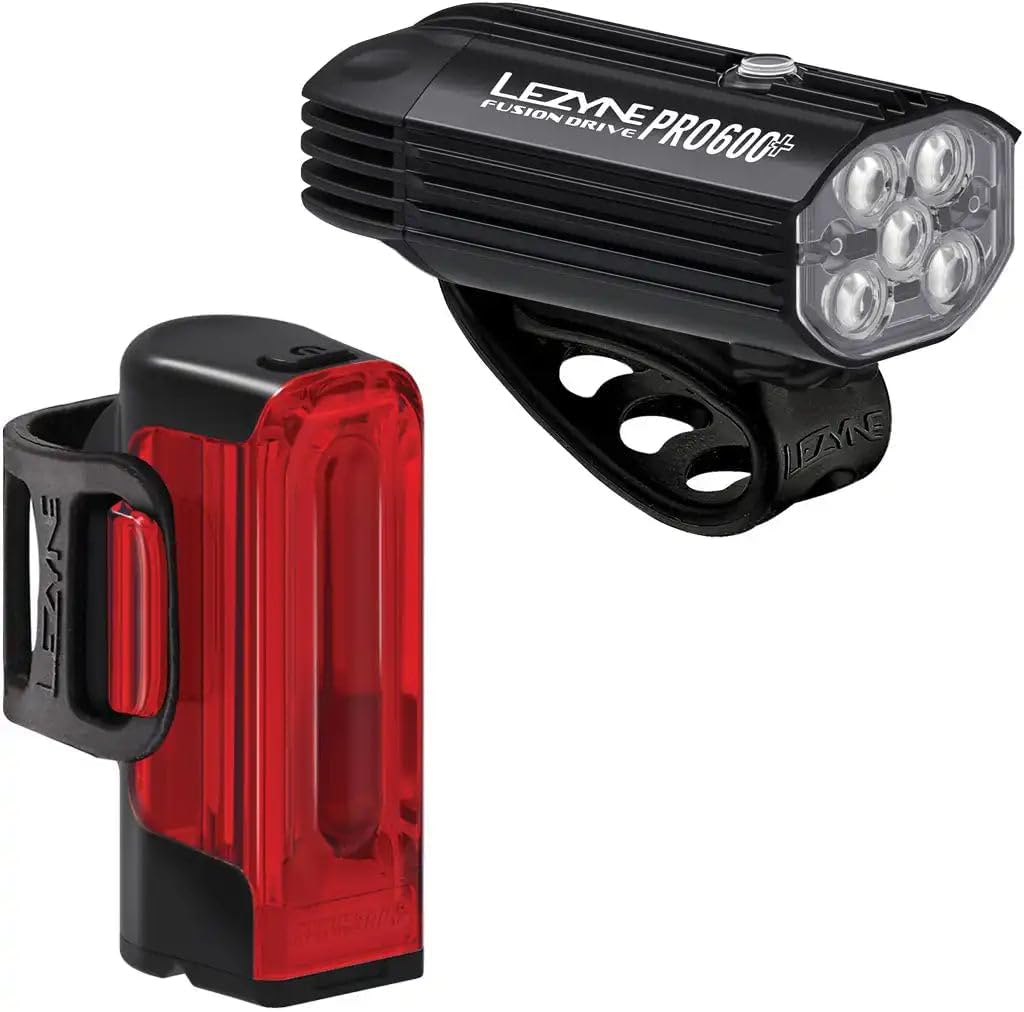
This image displays the Lezyne Fusion Drive Pro 600 Plus front bicycle light and the Lezyne Strip Drive 300 Plus rear bicycle light, both in black. The front light is shown with its handlebar mount, and the rear light with its seatpost strap.
Setup
Mounting the Fusion Drive Pro 600 Plus (Front Light)
- Select a suitable position on your handlebar. Ensure the light beam is unobstructed and points forward.
- Wrap the silicone strap around the handlebar and hook it onto the light's mounting tab.
- Adjust the light angle so it illuminates the path ahead without blinding oncoming traffic.
Mounting the Strip Drive 300 Plus (Rear Light)
- Choose a position on your seatpost that provides maximum visibility to the rear. The light is compatible with both aero and round seatposts.
- Secure the silicone strap around the seatpost and attach it to the light's mounting tab.
- Ensure the light is vertical and facing directly backward.

A Lezyne bicycle light securely mounted on a handlebar, showcasing its compact design and integration with a bicycle.
Operating Instructions
Power On/Off
To turn the light ON, press and hold the power button for approximately 2 seconds. To turn the light OFF, press and hold the power button for approximately 2 seconds again.
Mode Selection
Once the light is on, short press the power button to cycle through the available lighting modes. Each light offers multiple modes to suit various riding conditions and preferences.
- Fusion Drive Pro 600 Plus (Front Light): Features multiple brightness modes, including Eco and Boost settings, providing up to 600 lumens of output and up to 36 hours of runtime.
- Strip Drive 300 Plus (Rear Light): Offers various solid and flash modes, including a Femto mode with an impressive 80-hour runtime, and provides 300 lumens with 270-degree wide-angle visibility.

This image highlights the advanced lens design and LED array of a Lezyne bicycle light, demonstrating its light dispersion capabilities.
Charging
Both the Fusion Drive Pro 600 Plus and Strip Drive 300 Plus lights are equipped with waterproof USB-C charging ports for convenient recharging.
- Locate the USB-C port cover on the light.
- Carefully open the cover to expose the USB-C port.
- Connect the provided USB-C charging cable to the light and plug the other end into a powered USB port (e.g., computer, wall adapter).
- The light's indicator will show charging status (refer to the light's specific indicator behavior for full/low charge).
- Once fully charged, disconnect the cable and securely close the USB-C port cover to maintain its waterproof seal.

A detailed view of the waterproof USB-C charging port on a Lezyne bicycle light, indicating its robust design for all-weather use.
Maintenance
Proper maintenance ensures the longevity and optimal performance of your LEZYNE lights.
- Cleaning: Wipe the lights with a soft, damp cloth after each ride, especially if exposed to dirt, mud, or saltwater. Avoid using harsh chemicals or abrasive materials.
- USB-C Port: Ensure the USB-C port cover is always securely closed when not charging to maintain its waterproof integrity. Keep the port free of debris.
- Storage: Store the lights in a cool, dry place when not in use. For long-term storage, charge the batteries to approximately 50% every few months to preserve battery health.
- Heat Dissipation: The lights are constructed from durable CNC-machined aluminum with cooling fins to ensure optimal heat dissipation. Do not obstruct these fins during operation.

A close-up view of the CNC-machined aluminum body with cooling fins on a Lezyne bicycle light, designed for optimal heat management and durability.
Troubleshooting
If you encounter issues with your LEZYNE lights, refer to the following common problems and solutions:
- Light Not Turning On:
- Ensure the battery is charged. Connect to a USB-C power source.
- Press and hold the power button for the required 2 seconds to activate.
- Light Not Charging:
- Verify the USB-C cable is securely connected to both the light and the power source.
- Try a different USB-C cable or power adapter.
- Ensure the charging port is clean and free of debris.
- Short Runtime:
- Ensure the light is fully charged before use.
- Operating in higher lumen modes (e.g., Boost) will naturally reduce runtime. Consider using Eco or lower settings for extended battery life.
- Battery performance can degrade over time with extensive use.
Specifications
| Feature | Specification |
|---|---|
| Model Name | Fusion Drive Pro 600+/Strip Drive 300+ Light Set |
| Front Light Output (Max) | 600 Lumens |
| Rear Light Output (Max) | 300 Lumens |
| Front Light Runtime (Max) | Up to 36 hours |
| Rear Light Runtime (Femto Mode) | Up to 80 hours |
| Charging Type | USB-C (Waterproof) |
| Material | CNC-machined Aluminum (Front Light) |
| Water Resistance Level | Waterproof (IPX7) |
| Mounting Type | Handlebar Mount (Front), Seatpost Mount (Rear) |
| Product Dimensions (Front Light) | Approx. 8"L x 5"W x 3"H |
Warranty Information
This LEZYNE product is covered by a Limited Warranty. For specific details regarding warranty coverage, terms, and conditions, please refer to the official LEZYNE website or contact LEZYNE customer support directly. Keep your proof of purchase for warranty claims.
Support
For further assistance, technical support, or to view additional product information, please visit the official LEZYNE website:
Visit the LEZYNE Store on Amazon
You may also contact LEZYNE customer service through their official channels for personalized support.