
1. Product Overview
The Long Run Technologies Dual Bluetooth Speakers are designed for versatile audio playback, offering both stereo and multi-speaker connectivity. These compact speakers feature a durable aircraft-grade stainless steel construction, providing drop and shockproof protection. They are equipped with a built-in microphone for hands-free calls and support multiple input modes including Bluetooth, TF/SD card, and 3.5mm auxiliary cable. Each speaker delivers 10 Watts of power and offers up to 10 hours of playtime per charge.

Image: Two Long Run Technologies Dual Bluetooth Speakers, showcasing their compact design and included stands.
2. What's in the Box
- 2 x Dual Bluetooth Speakers
- 2 x Rubber Stands
- 2 x USB-C Charging Cables
- 2 x 3.5mm Auxiliary Cables
- Instruction Manual

Image: Contents of the product package, illustrating the two speakers, stands, cables, and manual.
3. Setup
3.1 Initial Charging
Before first use, fully charge both speakers using the provided USB-C charging cables. A full charge takes approximately 2 hours.
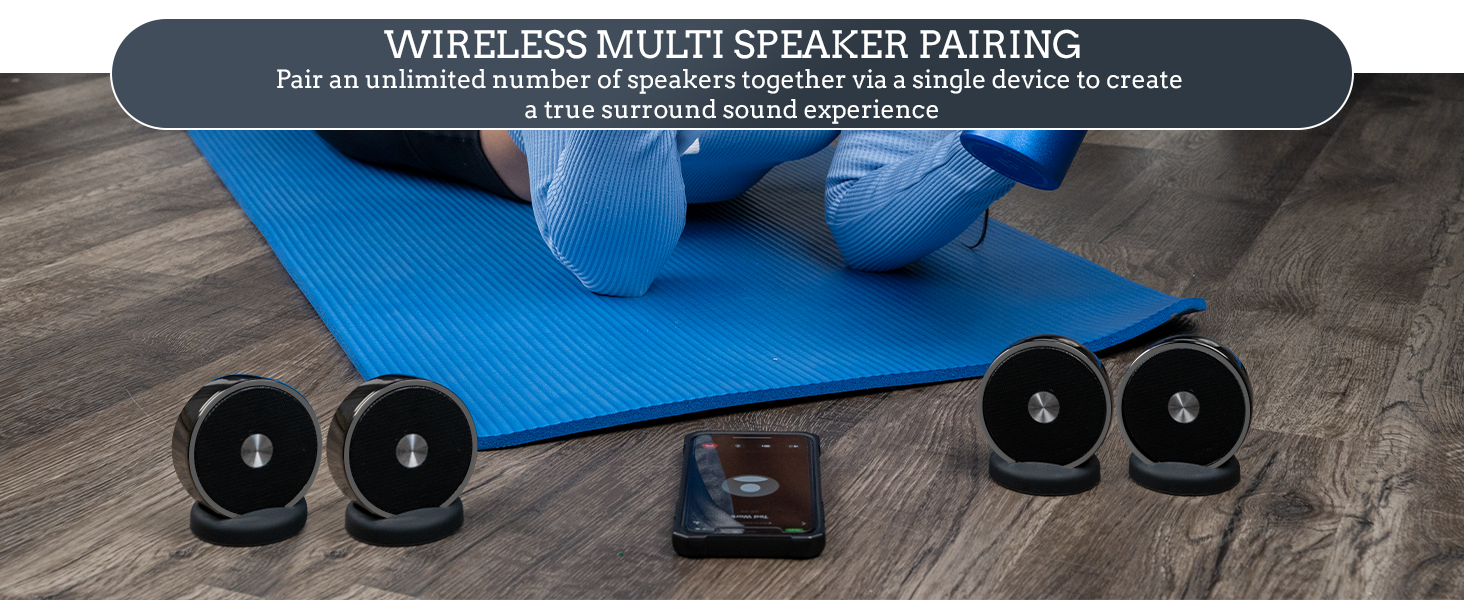
Image: An exploded view of the speaker, highlighting the USB-C charging port.
3.2 Bluetooth Pairing (Single Speaker)
- Turn on the speaker by pressing the power button located on the back.
- On your Bluetooth-enabled device (phone, laptop, tablet), navigate to the Bluetooth settings.
- Select the speaker from the list of available devices to pair.
3.3 Multi-Speaker Pairing (Unlimited Speakers)
These speakers support pairing an unlimited number of units for an immersive surround sound experience. Follow these steps:
- Connect a single speaker to your Bluetooth device first (as per 3.2). This will be your primary speaker.
- Turn on the second speaker.
- On the second speaker, long-press the "Phone/Play/Pause" button until you hear an audio prompt indicating that it has joined the primary speaker.
- Repeat step 3 for any additional speakers you wish to add to the group.

Image: Multiple speakers connected to a tablet, illustrating the multi-speaker pairing capability.
3.4 Pairing with Bluetooth TVs
If the pairing code does not immediately appear in your TV's Bluetooth options, turn the TV's Bluetooth function "Off" and then "On" several times until the code is visible and you can complete the pairing process.
4. Operation
4.1 Audio Playback Modes
The speakers offer three modes for audio playback:
- Stereo Bluetooth Mode: Connect wirelessly to any Bluetooth-enabled device.
- TF/SD Card Slot: Insert a TF/SD card with your music files for direct playback.
- 3.5mm Audio Cable: Use the included auxiliary cable to connect to devices without Bluetooth.

Image: A couple enjoying an immersive sound experience with multiple speakers connected to a laptop.
4.2 Hands-Free Calls
The built-in microphone allows for hands-free phone calls when connected via Bluetooth. Use the integrated control buttons on the speaker to manage calls.

Image: A user demonstrating hands-free calling with the speaker and a laptop.
4.3 Volume Control
Volume can be adjusted directly on the speaker using the dedicated buttons or via the connected Bluetooth device. For maximum volume, ensure the volume on your connected device is set to its highest level, then adjust the speaker's volume accordingly.
4.4 Portability
The compact size and 10-hour battery life make these speakers highly portable, suitable for various indoor and outdoor settings.
Video: An official product video demonstrating the features and portability of the Long Run Technologies Bluetooth Speaker Set.
5. Maintenance
To ensure the longevity and optimal performance of your speakers, follow these maintenance guidelines:
- Clean the speakers with a soft, dry cloth. Avoid using abrasive cleaners or solvents.
- Store the speakers in a cool, dry place when not in use.
- While the speakers feature shockproof construction, avoid unnecessary drops or impacts to prevent internal damage.
- Ensure the charging port is free of dust and debris before connecting the charging cable.

Image: Illustration of the speaker's durable aircraft-grade stainless steel and shockproof construction.
6. Troubleshooting
6.1 Sound Chattering or Stuttering
If you experience chattering, stuttering, or poor sound quality, it is likely due to interference from other Bluetooth or wireless signals. Ensure the speakers are operating in an environment free from potential interfering wireless devices.
6.2 Low Volume Output
If the volume is not loud enough, first increase the volume to maximum on the Bluetooth device connected to the speakers. Then, use the speaker's volume controls to fine-tune the audio level.
6.3 Pairing Issues
If you encounter difficulty pairing, ensure the speaker is in pairing mode and within the 33-foot Bluetooth operation range. For TV pairing, cycle the TV's Bluetooth function off and on multiple times.
7. Specifications
| Feature | Detail |
|---|---|
| Model Name | Wireless Speaker Pair |
| Material | Aircraft Grade Steel |
| Speaker Type | Bookshelf |
| Special Features | Bass Boost, Waterproof, Multi Room Audio, Built In Microphone, Shockproof |
| Connectivity Technology | Bluetooth, Auxiliary |
| Wireless Communication Technology | Bluetooth |
| Bluetooth Range | Up to 33 feet |
| Audio Output Mode | Stereo |
| Speaker Maximum Output Power | 10 Watts |
| Battery Life | 10 Hours |
| Battery Capacity | 5000 Milliamp Hours |
| Charging Time | 2 Hours |
| Product Dimensions | 3"D x 3"W x 1"H |
| Item Weight | 2 Pounds |
| Unit Count | 2.00 Count |
| Water Resistance Level | Water Resistant |
8. Warranty and Support
Long Run Technologies products are backed by a limited warranty. For specific warranty details or technical support, please refer to the contact information provided in your product packaging or visit the official Long Run Technologies website. If you are not 100% satisfied with your purchase, you may return the product as per the retailer's return policy.