Introduction
This manual provides essential instructions for the safe and effective use, maintenance, and disposal of your Enyuly 660mAh Lithium-Ion replacement battery. This battery is designed for specific Voigtlander camera models. Please read this manual thoroughly before using the product.
Compatible Models:
- Voigtlander Vitolux S80
- Voigtlander Vitolux S100
- Voigtlander Vito 75
- Voigtlander Vito 65
- Voigtlander Vitoret U8
Safety Information and Warnings
Failure to follow these safety instructions may result in fire, electric shock, injury, or damage to the battery or device.

Image: Detailed view of the battery label with safety warnings and specifications.
- DO NOT ATTEMPT TO DISASSEMBLE, OPEN OR SERVICE THE BATTERY PACK.
- DO NOT CRUSH, PUNCTURE, SHORT EXTERNAL CONTACTS OR DISPOSE OF IN FIRE OR WATER.
- REPLACE ONLY WITH THE BATTERY PACK DESIGNATED FOR THIS PRODUCT.
- DO NOT STORE ABOVE 60°C (140°F).
- Keep the battery away from children.
- Avoid exposing the battery to extreme temperatures or direct sunlight.
- If the battery leaks, avoid contact with skin and eyes. If contact occurs, rinse with plenty of water and seek medical advice.
Setup
1. Unpacking
Carefully remove the battery from its packaging. Inspect the battery for any visible damage. Do not use if damaged.
2. Initial Charge
For optimal performance, it is recommended to fully charge the battery before its first use. Use a compatible charger designed for your camera model.
3. Installation
Refer to your camera's instruction manual for specific battery installation procedures. Generally, this involves:
- Ensure the camera is powered off.
- Locate the battery compartment on your camera.
- Open the battery compartment cover.
- Align the battery with the contacts inside the compartment, ensuring correct polarity. The battery is designed to fit in only one orientation.
- Gently push the battery into place until it clicks or is securely seated.
- Close the battery compartment cover.
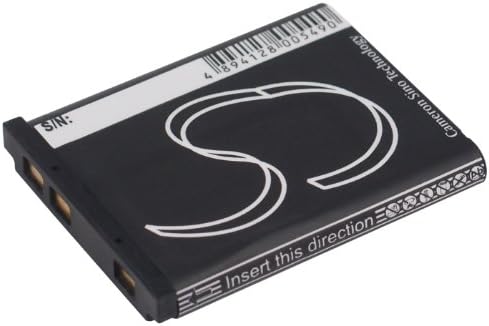
Image: Side view of the battery, highlighting the electrical contacts for proper installation.
Operating Instructions
1. Powering On Your Device
After installing the battery, power on your camera as per its manufacturer's instructions. The battery should provide power immediately.
2. Charging the Battery
When the camera indicates a low battery, remove the battery and charge it using a compatible charger. Follow the charger's instructions for proper charging. Do not overcharge the battery.
3. Battery Life
Battery life varies depending on camera usage, settings, and environmental conditions. Frequent use of flash, video recording, or continuous shooting will consume power more quickly.

Image: Front view of the Enyuly 660mAh replacement battery.
Maintenance
1. Storage
If storing the battery for an extended period, charge it to approximately 50% capacity. Store in a cool, dry place, away from direct sunlight and extreme temperatures. Avoid storing fully charged or fully depleted batteries for long periods.
2. Cleaning
Periodically clean the battery contacts and the camera's battery compartment contacts with a clean, dry cloth to ensure good electrical connection.
3. Disposal
Do not dispose of the battery in household waste. Lithium-Ion batteries contain materials that require special handling. Please dispose of the battery at an authorized recycling center or according to local regulations.
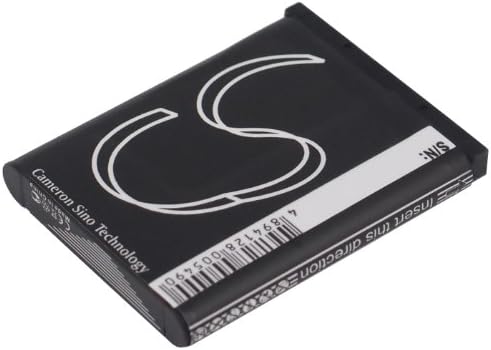
Image: Back view of the Enyuly replacement battery, showing the barcode and branding.
Troubleshooting
- Battery not charging: Ensure the charger is properly connected and functioning. Check battery contacts for cleanliness.
- Camera not powering on: Verify the battery is correctly installed and charged. Try a different, known-good battery if available.
- Shortened battery life: This can be normal with age. Ensure the battery is fully charged. Reduce power-intensive camera functions.
Specifications
| Feature | Specification |
|---|---|
| Model Number | CS-LI40B |
| Battery Type | Lithium-Ion |
| Voltage | 3.7V |
| Capacity | 660mAh |
| Energy Rating | 2.44Wh |
| Dimensions (L x W x H) | 40.0 x 31.1 x 5.9mm (1.57 x 1.22 x 0.23 inches) |
| Weight | 40.0g |
Warranty and Support
Enyuly provides 1 year of after-sales service for this product. For warranty claims, technical support, or any questions regarding your battery, please contact Enyuly customer support through your purchase platform or the official Enyuly website.


