
TELE System TS27 FHD SMV13
TELE System Smart TV 27 inch Full HD User Manual
Model: TS27 FHD SMV13
Introduction
This user manual provides comprehensive instructions for the setup, operation, maintenance, and troubleshooting of your TELE System Smart TV 27 inch Full HD, model TS27 FHD SMV13. Please read this manual thoroughly before using your television to ensure proper functionality and to maximize your viewing experience.
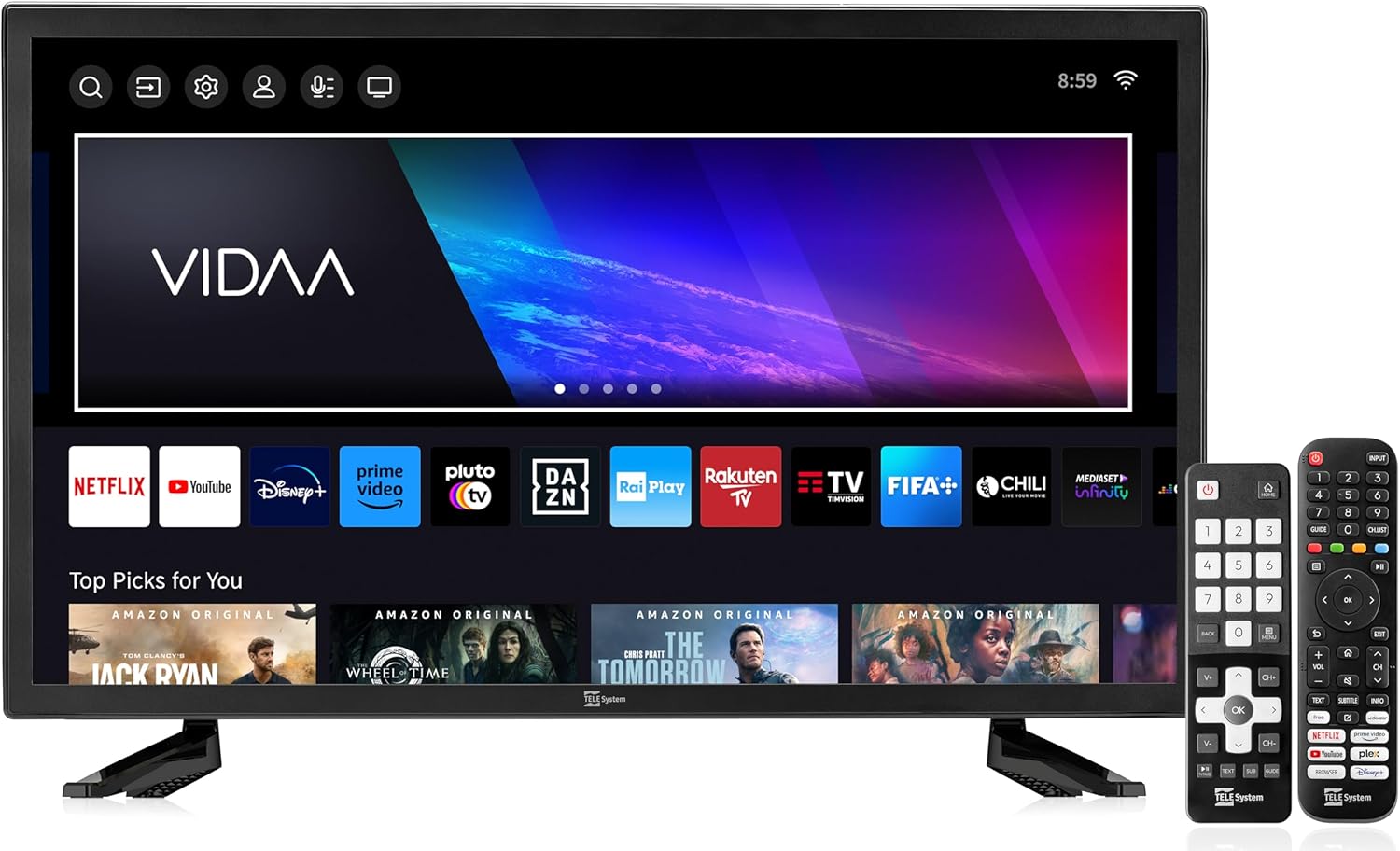
Image: The TELE System 27 inch Smart TV, featuring a sleek black design with a frameless display, accompanied by its two remote controls. The screen displays the VIDAA smart TV interface with various streaming applications.
What's in the Box
Upon unpacking your TELE System Smart TV, please ensure all the following components are present:
- TELE System Smart TV (TS27 FHD SMV13)
- Standard Remote Control
- Easy Remote Control (with larger buttons)
- Quick Start Guide
- Warranty Paper
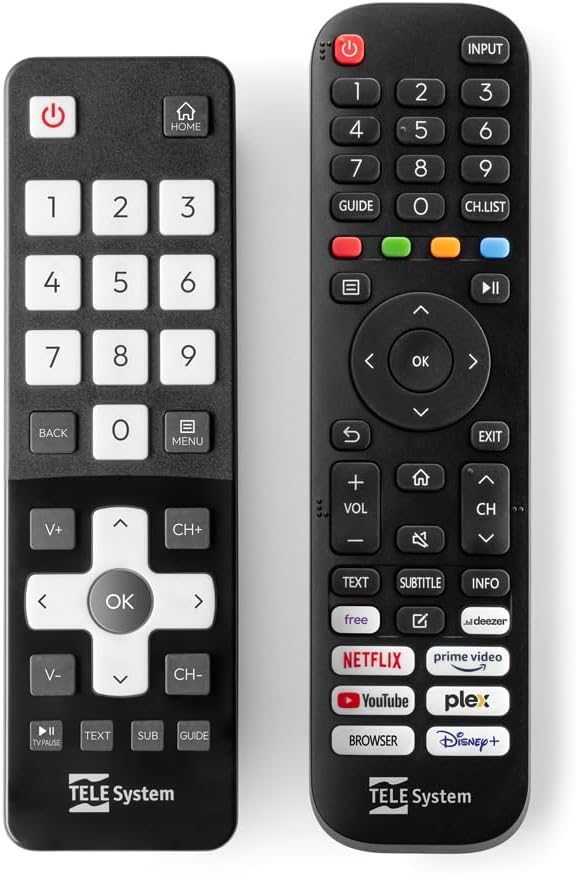
Image: A close-up view of the two included remote controls. On the left is the Easy Remote Control with large, clearly labeled buttons, designed for simplified use. On the right is the Standard Remote Control, offering a full range of functions including dedicated buttons for popular streaming services.
Setup
1. Unpacking and Placement
Carefully remove the TV from its packaging. Place the TV on a stable, flat surface or mount it on a wall using a compatible VESA mount (not included). Ensure adequate ventilation around the TV.
2. Connecting Power
Connect the power cord to the TV's power input and then to a wall outlet. The TV will enter standby mode.
3. Initial Setup Wizard
Upon first power-on, the TV will guide you through the initial setup process. This includes:
- Language Selection
- Network Connection (Wi-Fi or Ethernet)
- Channel Scan (DVB-T2/S2)
- Time Zone and Date Settings
- Accepting Terms and Conditions for Smart TV features
4. Tivùsat HD Certification
This TV is certified for Tivùsat HD. To access Tivùsat channels, you will need a compatible CAM (Conditional Access Module) and a smart card (not included). Insert the CAM into the CI+ slot on the side or back of the TV.
Operating Instructions
1. Remote Controls
Your TV comes with two remote controls: a standard remote for full functionality and an easy remote with larger buttons for essential functions. Refer to the button layout for specific controls.

Image: A hand holding the standard TELE System remote control, demonstrating its ergonomic design and the placement of frequently used buttons like Netflix, Prime Video, and YouTube for quick access to streaming services.
2. Smart TV Features (VIDAA OS)
The TV is powered by VIDAA OS, providing access to a wide range of applications. You can manage your favorite apps directly from your smartphone using the free Vidaa application.
- Pre-installed Apps: Netflix, Prime Video, YouTube, DAZN, Disney+, Paramount+, and many more.
- HbbTV Support: Access interactive applications and free content. The "restart" function allows you to restart a program from the beginning.

Image: The TELE System Smart TV screen showcasing the VIDAA operating system's home interface. Prominently displayed are icons for popular streaming applications such as Netflix, YouTube, Disney+, Prime Video, and DAZN, indicating the TV's smart capabilities.
3. TV PAUSE Function
The "TV PAUSE" function allows you to pause live TV and resume viewing later. To activate:
- Connect an external USB memory device to the TV.
- Press the "TV PAUSE" button on the remote control.

Image: The TELE System Smart TV screen displaying a paused video, with a "TV Pause" overlay indicating the active pause function. This visual demonstrates the convenience of pausing live television broadcasts.
Maintenance
1. Cleaning the TV
Always unplug the TV before cleaning. Use a soft, dry cloth to wipe the screen and cabinet. For stubborn marks, lightly dampen the cloth with water or a mild, non-abrasive screen cleaner. Do not use alcohol, benzene, thinners, or other volatile substances.
2. Software Updates
The TV may receive software updates automatically via its internet connection. Ensure your TV is connected to the internet to receive the latest features and performance improvements. Do not power off the TV during an update.
Troubleshooting
If you encounter issues with your TELE System Smart TV, please refer to the following common solutions:
| Problem | Possible Cause / Solution |
|---|---|
| No Power | Check if the power cord is securely connected to the TV and the wall outlet. Ensure the outlet has power. |
| No Picture / Sound | Verify the correct input source is selected. Check antenna/cable connections. For smart features, ensure internet connection is active. |
| Remote Control Not Working | Replace batteries. Ensure no obstructions between the remote and the TV's IR sensor. |
| Poor Audio Quality | Adjust volume settings. Check audio cables if external speakers are used. Ensure TV speakers are not muted. |
| Smart Features Not Responding | Check Wi-Fi or Ethernet connection. Restart the TV by unplugging it for a few minutes and plugging it back in. |
If the problem persists after trying these solutions, please contact TELE System customer support.
Specifications
| Feature | Detail |
|---|---|
| Brand | TELE System |
| Model | TS27 FHD SMV13 |
| Screen Size | 27 inches |
| Resolution | 1080p (Full HD) |
| Display Technology | LED |
| Refresh Rate | 60 Hz |
| Operating System | VIDAA |
| Connectivity | Ethernet, Wi-Fi |
| Special Features | Flat Screen, HbbTV, HDR10 HLG, Tivùsat HD Certified, TV PAUSE function, Dual Remote Control (Standard & Easy) |
| Product Dimensions (LxWxH) | 63.7 x 6.2 x 41 cm |
| Weight | 5.5 kg |
| Energy Efficiency Class | E |
Warranty and Support
Your TELE System Smart TV comes with a manufacturer's warranty. Please refer to the included Warranty Paper for detailed terms and conditions. For technical support, product inquiries, or warranty claims, please contact TELE System customer service.
For information regarding returns or defective products purchased on Amazon.it, please consult Amazon's help pages on Returns and Defective/Damaged Products. For Marketplace purchases, refer to the specific Marketplace help page.
Related documentsTS27 FHD SMV13


Ask a question about this manual
Ask about setup, troubleshooting, compatibility, parts, safety, or missing instructions. Manuals+ will review the question and use this page’s manual context to help answer it.