
Introduction
The Tineco PURE ONE Station Pet is a versatile 4-in-1 cordless stick vacuum cleaner designed for efficient home cleaning, especially for pet owners. It features a self-cleaning station, a ZeroTangle brush, and a 4-stage HEPA filtration system to ensure a cleaner and healthier living environment. The intelligent iLoop sensor automatically adjusts suction power based on detected dirt, optimizing cleaning performance.
Safety Instructions
Before operating the appliance, please read all instructions carefully. Keep this manual for future reference. Always ensure the power supply matches the voltage specified on the appliance. Do not use the appliance with a damaged cord or plug. Keep hair, loose clothing, fingers, and all parts of the body away from openings and moving parts. Do not pick up flammable or combustible materials, or anything that is burning or smoking. Do not immerse the appliance in water or other liquids. This appliance is for household use only.
Setup
Unpacking and Assembly
Carefully remove all components from the packaging. Refer to the diagram below for an overview of included parts and assembly steps. Connect the main vacuum body to the extension wand, and then attach the desired cleaning head (e.g., ZeroTangle brush) to the wand. Assemble the self-cleaning OmniHub station according to the instructions provided in the box, ensuring all connections are secure.

Figure 1: Included Components and Accessories
Initial Charging
Place the assembled vacuum cleaner into the OmniHub self-cleaning station. Connect the power adapter to the station and plug it into a wall outlet. The vacuum will begin charging automatically. Ensure the vacuum is fully charged before its first use to maximize battery life and performance. A full charge takes approximately 9 minutes.
Operating Instructions
Powering On and Suction Modes
Press the power button to turn on the vacuum. The Tineco PURE ONE Station Pet features an intelligent iLoop sensor that automatically detects dirt levels and adjusts suction power accordingly. This optimizes cleaning efficiency and battery usage. The vacuum offers up to 65 minutes of runtime on a single charge.

Figure 2: iLoop Smart Sensor in Action
Using the ZeroTangle Brush
The specially designed ZeroTangle brush effectively captures hair without tangling, making it ideal for pet owners. It ensures consistent cleaning performance by preventing hair wrap around the brush roller.

Figure 3: ZeroTangle Brush Technology
Versatile Cleaning with Attachments
The 4-in-1 design allows for various cleaning scenarios. Use the LED brush for general floor cleaning, the mini power brush for upholstery and pet beds, and the 2-in-1 crevice and dusting brush for tight spaces and delicate surfaces. The lightweight design of the main body (2.69 lbs) makes it easy to maneuver and clean high or hard-to-reach areas.

Figure 4: Lightweight Design for Easy Cleaning
Maintenance
Automatic Self-Cleaning Station
The OmniHub self-cleaning station provides hands-free maintenance. After placing the vacuum back into the station, it automatically empties the dustbin and thoroughly cleans all components, including the brush, hose, and filters. This ensures consistent suction power and extends the lifespan of the vacuum.
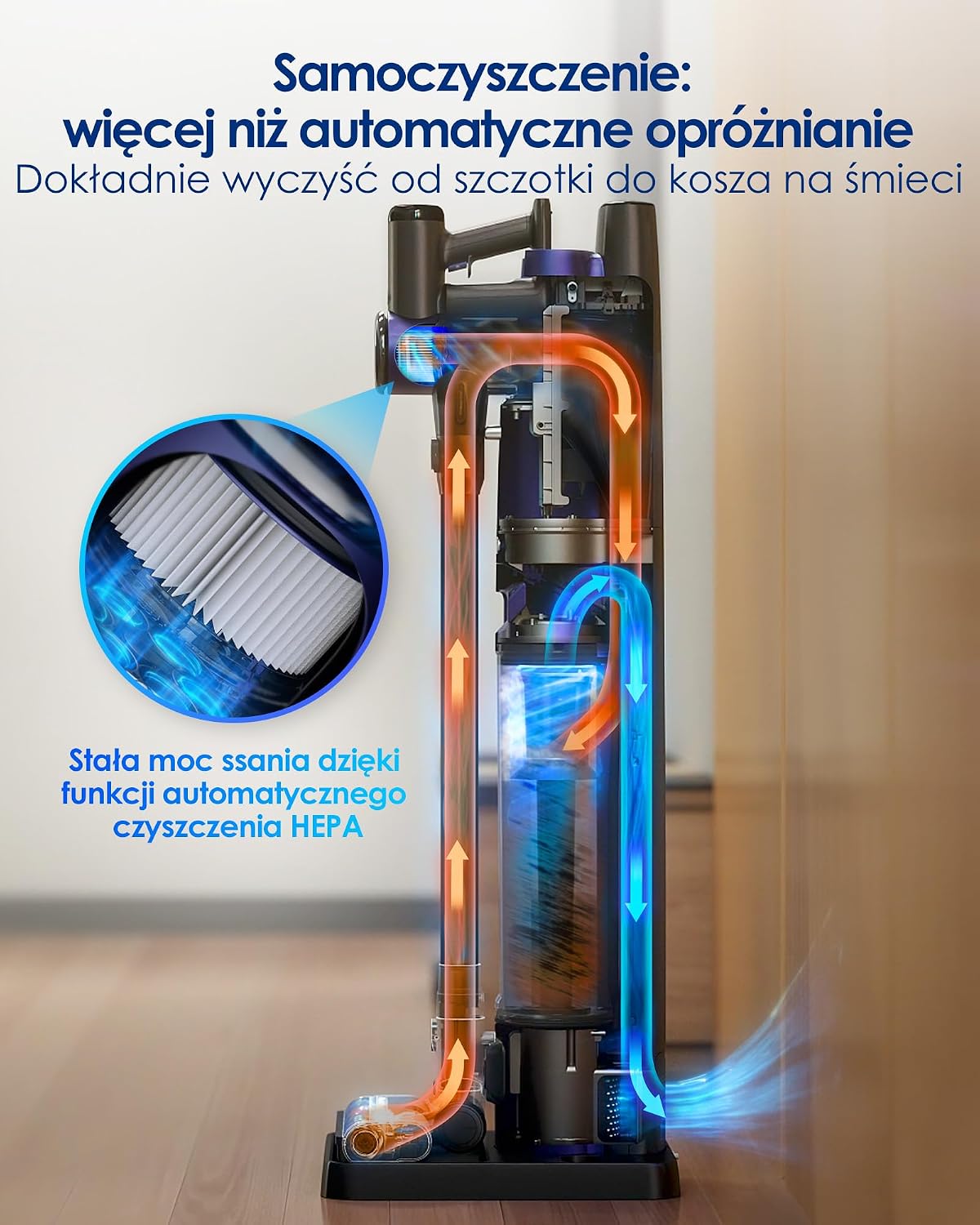
Figure 5: Self-Cleaning Mechanism
Dustbin Management
The OmniHub station features a large 3-liter reusable dustbin, capable of holding debris for up to 60 days of daily use. For wet waste, empty the dustbin promptly to prevent odors or blockages. The station's automatic emptying function eliminates the need for frequent manual emptying.

Figure 6: 3L Dustbin Capacity
HEPA Filtration System
The vacuum is equipped with a 4-stage HEPA H13 filtration system, capturing up to 99.97% of dust particles as small as 0.3 microns. The OmniHub station also features a 5-stage filtration system for enhanced air purification. Regular cleaning of the HEPA filter is crucial for maintaining optimal performance and air quality. The self-cleaning function of the station includes filter cleaning.

Figure 7: H13 HEPA Filtration System
Troubleshooting
If you encounter any issues with your Tineco PURE ONE Station Pet, please refer to the following common troubleshooting steps:
- No Power/Not Charging: Ensure the power adapter is securely connected to both the station and a working wall outlet. Verify that the vacuum is correctly seated in the charging station.
- Reduced Suction: Check if the dustbin is full and needs emptying. Inspect the brush roller for any blockages or tangled hair. Clean the HEPA filter as instructed in the maintenance section. Ensure all parts are properly assembled and sealed.
- Unusual Noise: Turn off the vacuum and check for any foreign objects lodged in the brush roller, hose, or air inlets. Remove any obstructions carefully.
- Self-Cleaning Not Initiating: Ensure the vacuum is correctly placed in the OmniHub station. Check for any error messages on the display.
For persistent issues, please contact customer support.
Product Specifications
| Brand | Tineco |
| Model Name | Tineco Pure One Station |
| Model Number | Pure ONE Station Pet |
| Special Feature | Cordless, Self-cleaning OmniHub |
| Filter Type | HEPA H13 |
| Power Source | Battery Powered |
| Voltage | 14.4 Volts |
| Wattage | 230 W |
| Battery Life | 65 Minutes |
| Charging Time | 9 Minutes |
| Product Weight | 10.5 Kilograms (Main body: 2.69 lbs) |
| Noise Level | 70 Decibels |
| Recommended Surface | Carpet, Ceramic Tile, Hard Floor |
| Included Components | Three brushes (LED brush, mini power brush, 2-in-1 crevice/dusting brush), cleaning tool |
Warranty Information
Tineco products are manufactured to the highest quality standards. For detailed warranty information, including coverage period and terms, please refer to the warranty card included in your product packaging or visit the official Tineco website. Keep your proof of purchase for warranty claims.
Customer Support
If you have any questions, require technical assistance, or need to report an issue with your Tineco PURE ONE Station Pet, please contact Tineco customer support. Contact details can be found on the official Tineco website or in your product documentation. Please have your model number and purchase date ready when contacting support.


