
1. Introduction
Thank you for choosing the Sluban Power Bricks F1 Remote Control Car M38-B1023. This building block set allows you to construct a detailed F1 racing car and control it remotely. This manual provides essential information for assembly, operation, and maintenance to ensure a rewarding experience.
Safety Warning: This product contains small parts and is not suitable for children under 3 years of age due to choking hazards. Recommended for ages 8 and up. Adult supervision is recommended during assembly and play.
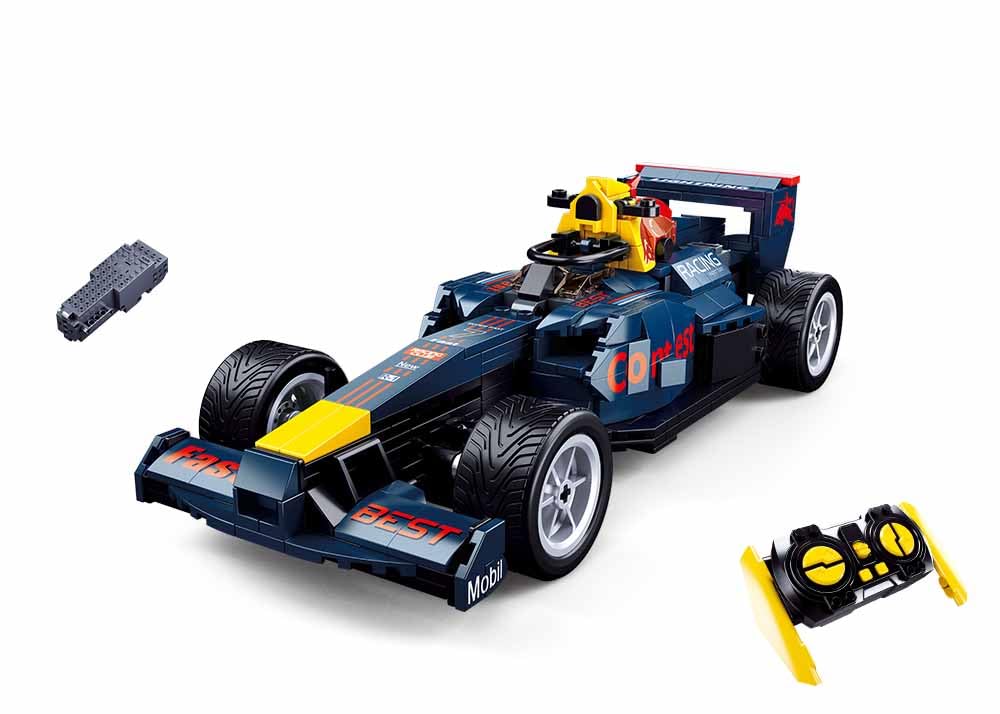
Image 1.1: Fully assembled Sluban Power Bricks F1 Remote Control Car M38-B1023.
2. Package Contents
Before you begin, please verify that all components are present in the box:
- 423 Building Block Pieces
- 1 x Remote Control Unit
- 1 x Power Control Module (for the car)
- Detailed Colored Instruction Manual
- 2 x AAA 1.5V Batteries (for the remote control)

Image 2.1: Product packaging displaying the car, remote control, and power module.
3. Setup
3.1 Assembly
Follow the detailed colored instruction manual provided in the box to assemble the 423 building block pieces into the F1 racing car. Take your time and ensure each piece is securely connected. The assembly process enhances building skills and attention to detail.
3.2 Battery Installation
For the Remote Control:
- Locate the battery compartment on the back of the remote control.
- Open the battery compartment cover.
- Insert 2 x AAA 1.5V batteries, ensuring correct polarity (+/-).
- Close the battery compartment cover securely.
For the Car (Power Control Module):
The car's power control module requires its own power source. Refer to the specific instructions in the colored manual for installing batteries or charging the power module, as this may vary. Ensure the power module is correctly integrated into the car's structure during assembly.
4. Operating Instructions
4.1 Powering On and Pairing
- Ensure batteries are correctly installed in both the remote control and the car's power module.
- Turn on the power switch on the car's power module.
- Turn on the remote control. The 2.4G frequency allows for automatic pairing. If pairing does not occur automatically, turn both devices off and on again.
4.2 Driving Controls
The remote control allows for precise movement of the F1 car:
- Forward/Backward: Use the designated joystick or buttons to move the car forward or backward.
- Turning: The car features a unique turning mechanism where the rear wheels differentially rotate to enable left and right turns, including 360-degree rotation in place. Use the corresponding controls on the remote for steering.

Image 4.1: Car demonstrating forward motion capabilities.

Image 4.2: Car demonstrating 360-degree rotation capability.
5. Maintenance
5.1 Cleaning
To clean the car and remote control, gently wipe surfaces with a dry, soft cloth. Avoid using water or chemical cleaners, as these can damage electronic components or the plastic blocks.
5.2 Storage
When not in use, store the car and remote control in a cool, dry place away from direct sunlight and extreme temperatures. Remove batteries from the remote control if storing for extended periods to prevent leakage.
6. Troubleshooting
- Car not moving: Check if the car's power module is switched on and fully charged/has fresh batteries. Ensure the remote control has fresh batteries and is switched on. Re-attempt pairing.
- Remote control not responding: Replace the AAA batteries in the remote control. Ensure there are no obstructions between the remote and the car.
- Short operating time: The car's power module batteries may need recharging or replacement. Ensure you are using high-quality batteries.
- Difficulty with assembly: Refer to the detailed colored instruction manual. If a piece is missing or damaged, contact customer support.
7. Specifications
| Feature | Detail |
|---|---|
| Model Name | M38-B1023 |
| Product Dimensions | 38 x 28.5 x 10 cm (Box); Car length: 25.2 cm (9.88 inches) |
| Weight | 950 grams |
| Recommended Age | 8 - 16 years (Minimum 96 months) |
| Number of Pieces | 423 |
| Material Type | Plastic |
| Remote Control Type | Radio Control (2.4G Frequency) |
| Remote Control Batteries | 2 x 1.5V AAA (Included) |
| Educational Objective | Building Skills |
| Color | Multi-color |

Image 7.1: Diagram showing the car's length of 25.1 cm (9.88 inches).
8. Safety Information
- Not suitable for children under 3 years due to small parts.
- Always use under adult supervision.
- Do not mix old and new batteries. Do not mix alkaline, standard (carbon-zinc), or rechargeable (nickel-cadmium) batteries.
- Ensure batteries are inserted with correct polarity.
- Remove exhausted batteries promptly.
- Do not dispose of batteries in fire; they may leak or explode.
- Keep packaging for future reference as it contains important information.
9. Warranty and Support
For any questions, missing parts, or support needs, please refer to the contact information provided on the product packaging or reach out to the retailer where the product was purchased. Keep your proof of purchase for warranty claims.