
AMHVMU C3
Contents
AMHVMU C3 HUD Dual System OBD2+GPS Car Head-Up Display User Manual
Model: C3
1. Introduction
The AMHVMU C3 Head-Up Display (HUD) is designed to project essential driving data onto your car's front windshield. This device enhances driving safety by allowing you to view information such as speed, RPM, water temperature, voltage, and driving distance without diverting your gaze from the road. The C3 HUD ensures that critical driving information is instantly accessible, helping you maintain optimal driving conditions.

Image 1.1: The AMHVMU C3 HUD unit displaying various vehicle parameters on its transparent screen.
2. Package Contents
Please verify that all items are present in your package:
- C3 HUD Main Unit
- OBD Cable
- USB Cable
- Anti-slip Mat
- User Manual
- Cleaning Cloth

Image 2.1: All included accessories for the AMHVMU C3 HUD, laid out for inspection.
3. Setup and Installation
The C3 HUD features a dual system (OBD2 + GPS) for broad compatibility. The GPS system is universally compatible with all vehicles. The OBD2 mode is compatible with most OBD2-compliant vehicles manufactured after 2008. You can switch between these systems based on your vehicle's compatibility and preference.
3.1. Installation Steps
- Connect Power: Plug the OBD cable into your vehicle's OBD socket connector. Alternatively, use the USB cable with a cigarette lighter adapter for power, especially when using GPS mode.
- Route Cable: Carefully route the cable along the A-pillar seal to conceal it and prevent interference with driving.
- Connect to HUD: Connect the other end of the OBD or USB cable to the C3 HUD unit.
- Position HUD: Place the HUD unit on your dashboard in a position that provides a clear view of the projected display on your windshield without obstructing your view of the road. Ensure it is stable using the provided anti-slip mat.

Image 3.1: Visual guide demonstrating the connection of the OBD cable, routing, and placement of the HUD unit.
3.2. Initial Power-On and System Selection
Upon first power-on, the device will automatically detect the vehicle's system. If both OBD2 and GPS signals are available, you may need to select your preferred mode through the device's settings menu. Refer to the detailed instructions in the included paper manual for specific menu navigation.
4. Operating Instructions
The C3 HUD provides a wide range of driving data and customizable display options.
4.1. Displayed Information
The C3 HUD can display various parameters, including but not limited to:
- Engine Speed (RPM)
- Water Temperature
- Battery Voltage
- Current Time
- Fuel Consumption
- Driving Distance
- Trip Time
- ODO Meter
- Kilometers per Liter (KPL)
- Oil Temperature
- Turbo Pressure
- Air-Fuel Ratio
- Intake Pressure
- GPS Satellite Number
- Altitude
- Driving Direction
- Acceleration Test Results
- Braking Test Results
- Detailed Error Codes (DTCs)
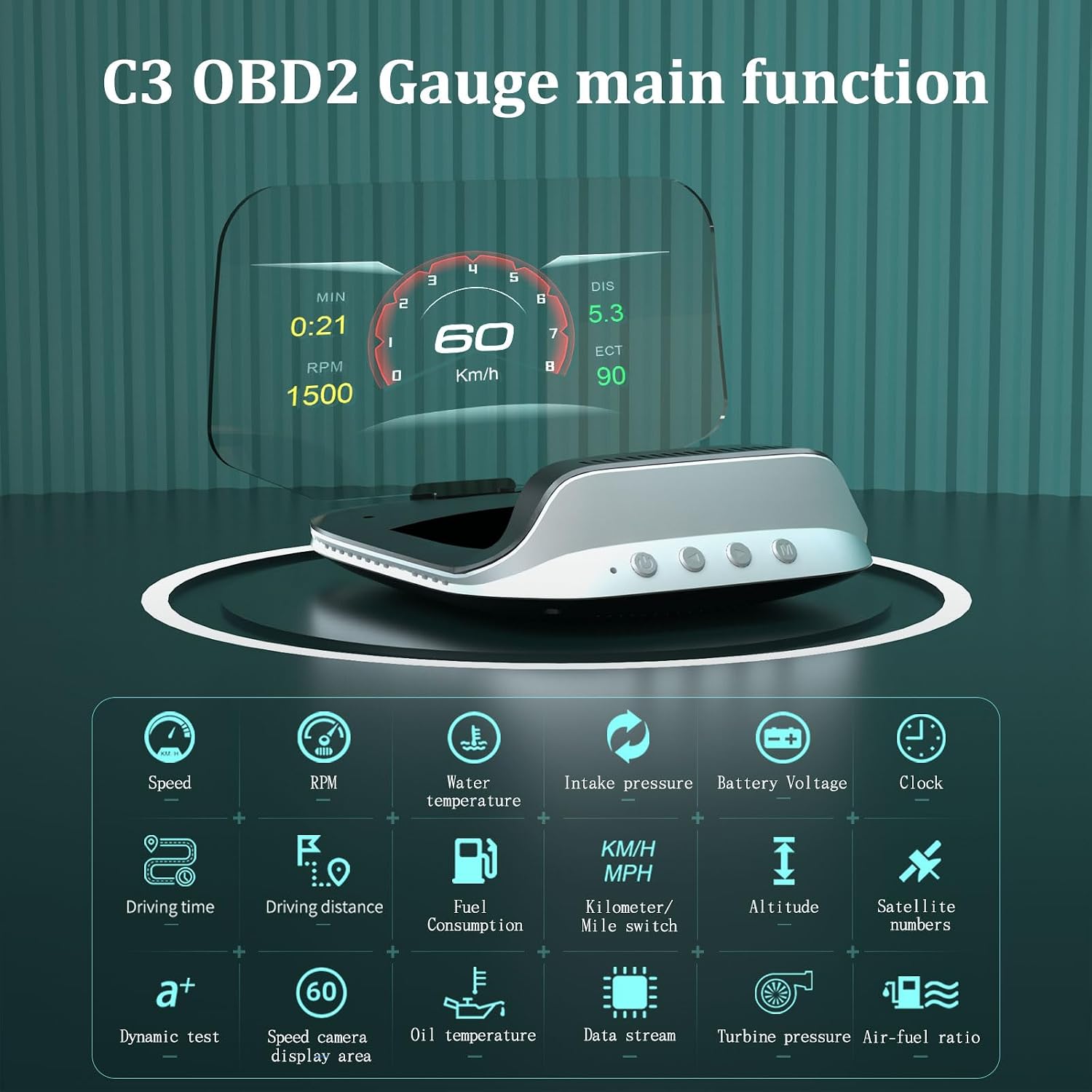
Image 4.1: An overview of the extensive data points and functions available on the C3 HUD.
4.2. Display Features
The C3 HUD utilizes three-dimensional imaging with semi-transparent, semi-reflective mirrors. This technology ensures that information is displayed as if suspended in the air, providing a clear, ghost-free image even in bright daylight conditions.

Image 4.2: The C3 HUD in operation, showing data projected onto the windshield from the driver's perspective.
4.3. Multi-Alarm Functions
The device includes several alarm functions to alert the driver to critical conditions:
- Overspeed Alarm: Alerts when the vehicle exceeds a preset speed limit.
- RPM Alarm: Notifies when engine RPMs reach a critical level.
- Low Voltage Alarm: Warns of low battery voltage.
- Water Temperature Alarm: Alerts to high engine coolant temperature.
- DTCS Alarm: Indicates detected diagnostic trouble codes.
- Fatigue Driving Reminder: Prompts the driver to take a break after extended driving periods.

Image 4.3: Visual representation of the multi-alarm features of the C3 HUD.
4.4. Day and Night Display Effect
The C3 HUD automatically adjusts its display brightness and sensitivity based on external illumination, ensuring optimal visibility during morning, afternoon, and night driving conditions.

Image 4.4: The C3 HUD's adaptive display, showing clear visibility across different lighting environments.
5. Maintenance
To ensure the longevity and optimal performance of your AMHVMU C3 HUD, follow these maintenance guidelines:
- Cleaning: Use the provided cleaning cloth or a soft, dry, lint-free cloth to gently wipe the display screen and the unit's exterior. Avoid using abrasive cleaners, solvents, or chemical sprays, as these can damage the surfaces.
- Storage: When not in use for extended periods, store the HUD in a cool, dry place away from direct sunlight and extreme temperatures.
- Handling: Handle the unit with care to prevent drops or impacts, which could damage internal components or the display screen.
- Cable Care: Ensure that the OBD and USB cables are not pinched, twisted, or subjected to excessive tension, which can lead to damage.
6. Troubleshooting
If you encounter issues with your C3 HUD, please refer to the following common problems and solutions:
- No Display/Power:
- Ensure the OBD or USB cable is securely connected to both the vehicle and the HUD unit.
- Check the vehicle's OBD port for power (some vehicles require the ignition to be on).
- If using the USB cable, ensure the cigarette lighter adapter is functioning.
- Inaccurate Speed/Data:
- Verify that the correct system (OBD2 or GPS) is selected for your vehicle.
- For GPS mode, ensure the unit has a clear view of the sky to acquire satellite signals.
- Check the unit's settings for speed calibration if discrepancies persist (refer to the full manual).
- Ghosting/Double Image on Windshield:
- Ensure the HUD is positioned correctly and the windshield is clean.
- The C3 HUD is designed to minimize ghosting; if it occurs, try slightly adjusting the unit's angle or position.
- Alarms Triggering Incorrectly:
- Review the alarm threshold settings in the HUD's menu and adjust them to your preference.
- OBD2 Mode Not Working:
- Confirm your vehicle is OBD2 compliant and manufactured after 2008.
- Try switching to GPS mode as an alternative.
For more detailed troubleshooting or issues not listed here, please consult the comprehensive user manual included with your product or contact customer support.
7. Product Specifications
| Feature | Specification |
|---|---|
| Model Number | C3 |
| Brand | AMHVMU |
| Dimensions (L x W x H) | 116 x 128 x 78 mm (4.57 x 5.04 x 3.07 inches) |
| Weight | 160 Grams |
| Material | Acrylonitrile Butadiene Styrene (ABS), Polycarbonate (PC) |
| Connectivity | OBD2, GPS |
| UPC | 743430814068 |
| Manufacturer | AMHVMU |
| Country of Origin | China |
8. Warranty and Support
The AMHVMU C3 HUD has undergone multiple quality control checks to ensure it meets high standards. Product certifications include FCC, RHOS, and CE.
Warranty: Information regarding specific warranty duration is typically provided with the product packaging or on the official product page. Please retain your proof of purchase for warranty claims.
Customer Support: If you encounter any problems or require assistance with using this product, please contact AMHVMU customer service. Contact details can usually be found on the product packaging, the official AMHVMU website, or through your point of purchase.
Ask a question about this manual
Ask about setup, troubleshooting, compatibility, parts, safety, or missing instructions. Manuals+ will review the question and use this page’s manual context to help answer it.