
VTOSEN VTOSEN72bfy5g0d8
VTOSEN Smart Lock Round User Manual
Model: VTOSEN72bfy5g0d8
Introduction
This user manual provides comprehensive instructions for the installation, operation, and maintenance of your VTOSEN Smart Lock Round. This intelligent anti-theft lock offers multiple unlocking methods including fingerprint, password, IC card, mechanical key, and mobile application (via BT). Designed for enhanced security and convenience, it is suitable for various indoor doors.
Package Contents
Please verify that all components are present in the package before beginning installation.
- 1 x Front Lock Plate
- 1 x Rear Lock Plate
- 1 x Lock Bolt
- 1 x Use Manual (this document)
- 8 x Screw
- 2 x IC Card
- 2 x Key
- 5 x Accessory (various small parts for installation)

Image: All components included in the VTOSEN Smart Lock package, including the front and rear lock plates, lock bolt, screws, IC cards, and mechanical keys.
Product Features
- Multiple Unlock Ways: Supports unlocking via mobile phone (BT, APP), fingerprint, password, mechanical key, and IC card for versatile access.
- Garbled Input (Virtual Passcode): Enhances security by allowing users to input random digits before and after the actual password, preventing onlookers from discerning the correct code.
- Comfortable Sound: Features an elegant electronic digital touch button tone for a pleasant user experience.
- Large Capacity: Stores up to 120 fingerprints and 200 IC cards. Supports 150 groups of passwords (including customized and permanent), with unlimited temporary passwords.
- High Durability: Constructed from zinc alloy for the surface and stainless steel for the lock cylinder, ensuring robustness and a service life of 300,000 unlocking cycles.
- Wide Compatibility: Suitable for indoor doors, wooden doors, room doors, apartment doors, rental doors, and office doors with a thickness of approximately 35 to 55mm (1.38 to 2.17 inches).
Specifications
| Feature | Specification |
|---|---|
| Material | Zinc Alloy, Stainless Steel, Glass |
| BT Standard | BT 4.1BLE |
| Fingerprint Storage Capacity | 120 |
| Card Capacity | 200 (IC Card) |
| Password Groups | 150 (Customized and Permanent) |
| Temporary Passwords | Unlimited |
| Application | For TTlock App |
| Unlock Times (Lifetime) | > 300,000 |
| Scanning Time | < 0.5s |
| Error Rate | < 0.001% |
| Operating Temperature | -20°C to 70°C (-4°F to 158°F) |
| Working Humidity | 20% to 90% |
| Service Life | 300,000 Times |
| Applicable Door Thickness | 35 to 55mm (1.38 to 2.17 inches) |
| Battery | 4 AA Alkaline Battery (Not Included) |
| Low Electric Alarm Voltage | 4.8V |
| Item Weight | Approx. 1.32 kg (46.39 oz) |
Setup and Installation
Proper installation is crucial for the optimal performance and security of your smart lock. While specific detailed steps are not provided here, please follow general smart lock installation practices and refer to the included accessory guide if available.
- Prepare the Door: Ensure your door thickness is within the specified range (35-55mm). Remove any existing lock hardware.
- Install the Lock Bolt: Insert the lock bolt into the door edge and secure it with screws.
- Install Front and Rear Lock Plates: Connect the front and rear lock plates through the door, ensuring proper alignment with the lock bolt. Secure them using the provided screws.
- Install Batteries: Open the battery compartment on the rear lock plate and insert 4 AA alkaline batteries (not included), ensuring correct polarity.
- Test Operation: After installation, test the mechanical key, and if possible, perform an initial setup with the app to ensure the lock functions correctly.
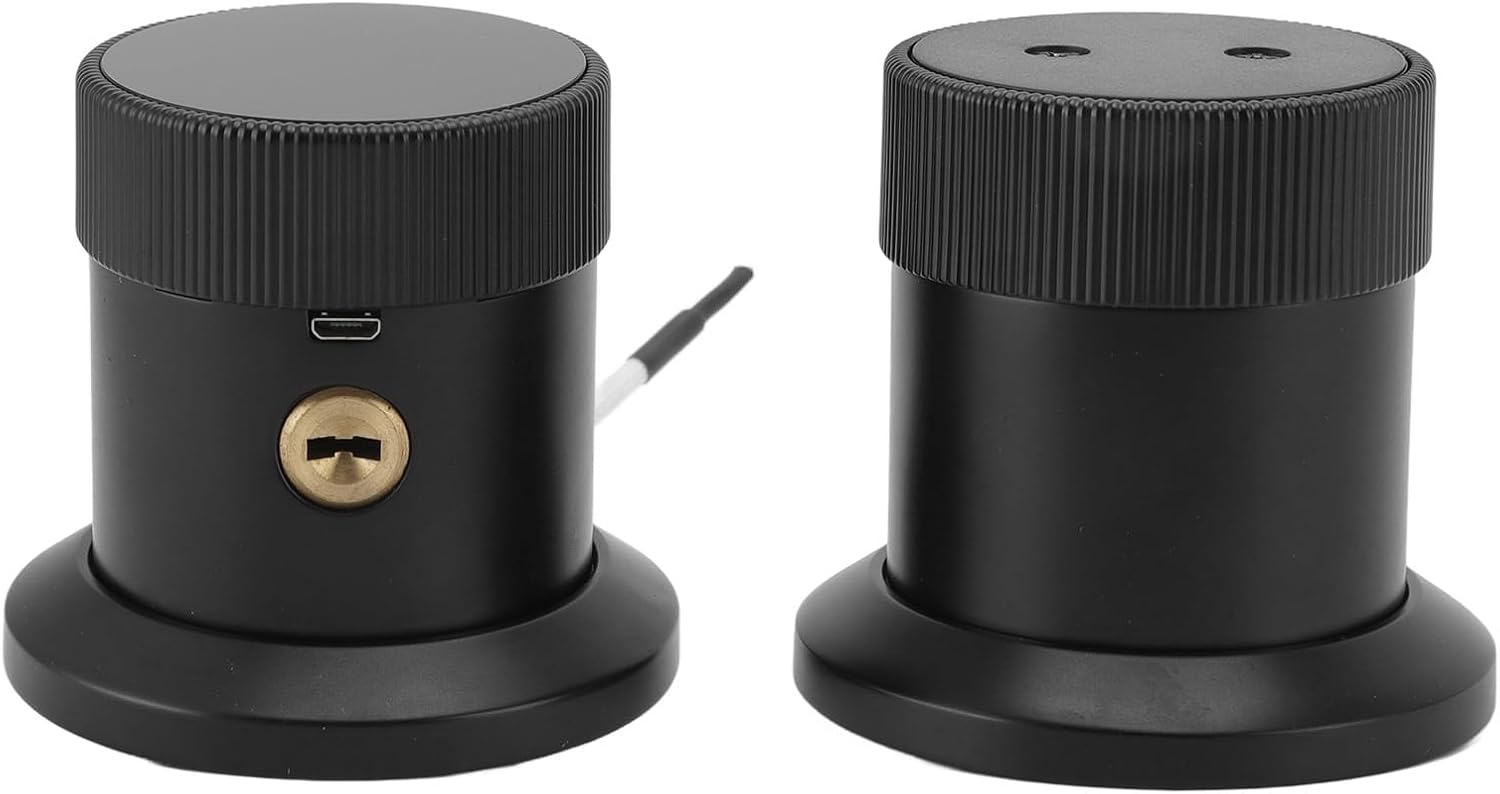
Image: The two main components of the smart lock, the exterior and interior units, ready for installation.
Operating Instructions
The VTOSEN Smart Lock offers multiple convenient ways to unlock your door.
1. Using the TTlock App (BT Connection)
- Download the "TTlock" app from your smartphone's app store.
- Create an account and log in.
- Enable Bluetooth on your smartphone.
- In the app, add your new lock by following the on-screen instructions. You may need to touch the lock's keypad or fingerprint sensor to activate it for pairing.
- Once paired, you can unlock the door directly from the app, manage users, add fingerprints, set passwords, and issue IC cards.
- The app also allows for generating time-limited or one-time passwords for guests.
2. Fingerprint Unlock
- Register your fingerprints through the TTlock app. Follow the app's prompts to scan your finger multiple times from different angles.
- To unlock, place your registered finger firmly on the fingerprint sensor. The lock will emit a sound and unlock if the fingerprint is recognized.

Image: The top surface of the smart lock's interior unit, featuring the fingerprint sensor for quick access.
3. Password Unlock (with Garbled Input)
- Set up your desired password(s) via the TTlock app.
- To unlock, activate the keypad (usually by touching it).
- Enter any random digits, then your actual password, then more random digits (e.g., 123[Your Password]456). This "garbled input" feature prevents others from guessing your password by observing your input.
- Press the '#' or 'Enter' key (if available) to confirm. The lock will unlock if the password is correct.
4. IC Card Unlock
- Register the provided IC cards through the TTlock app.
- To unlock, simply tap the registered IC card against the designated sensing area on the lock. The lock will unlock upon successful recognition.
5. Mechanical Key Unlock
In case of battery depletion or electronic malfunction, the mechanical key serves as a reliable backup. Insert the key into the keyhole and turn to unlock the door manually.

Image: The VTOSEN Smart Lock, highlighting the discreetly placed mechanical keyhole for emergency access.
Maintenance
- Cleaning: Wipe the lock surface with a soft, dry cloth. Avoid using abrasive cleaners or solvents that could damage the finish or electronic components.
- Battery Replacement: The lock will provide a low electric alarm when the battery voltage drops to 4.8V. Replace all 4 AA alkaline batteries promptly to ensure continuous operation. Do not mix old and new batteries or different types of batteries.
- Fingerprint Sensor Care: Keep the fingerprint sensor clean and dry for optimal performance. Avoid scratching the sensor surface.
- Keyhole Maintenance: Ensure the mechanical keyhole remains free of debris.
Troubleshooting
| Problem | Possible Cause | Solution |
|---|---|---|
| Lock does not respond. | Dead batteries. | Replace all 4 AA alkaline batteries. Use the mechanical key for immediate access. |
| Fingerprint not recognized. | Finger is wet/dirty; sensor is dirty; fingerprint not properly registered. | Ensure finger and sensor are clean and dry. Re-register fingerprint in the app, trying different angles. |
| Password not working. | Incorrect password entered; keypad not activated. | Ensure correct password is used. Activate keypad before entering. Remember to use garbled input if desired. |
| IC card not unlocking. | Card not registered; card damaged. | Register the IC card via the app. Try another registered card. |
| Lock is difficult to turn or sticky. | Misalignment during installation; debris in bolt mechanism. | Check door and frame alignment. Ensure lock bolt moves freely. Re-install if necessary. |
Warranty and Support
For warranty information and technical support, please refer to the specific warranty card included with your product or contact the seller/manufacturer directly. Keep your purchase receipt as proof of purchase.
Manufacturer: VTOSEN
Ask a question about this manual
Ask about setup, troubleshooting, compatibility, parts, safety, or missing instructions. Manuals+ will review the question and use this page’s manual context to help answer it.