
1. Introduction
Welcome to the KALINCO Kids Smart Watch IDW19 user manual. This guide provides detailed instructions for setting up, operating, and maintaining your new smartwatch. The KALINCO Kids Smart Watch is designed for children aged 7 and up, offering a range of features including fitness tracking, health monitoring, communication capabilities, and smart assistant integration.

Figure 1.1: KALINCO Kids Smart Watch IDW19
Package Contents
Please verify that all items are present in your package:
- KALINCO Kids Smart Watch (Model IDW19)
- Charging Cable
- User Manual (this document)
2. Setup
2.1 Charging the Smart Watch
Before initial use, fully charge your smartwatch. A full charge typically takes approximately 1 hour. The watch offers up to 7 days of normal use and 20 days of standby time on a single charge.
- Connect the charging cable to the charging port on the back of the smartwatch.
- Plug the USB end of the charging cable into a standard USB power adapter (not included) or a computer's USB port.
- The watch screen will display a charging indicator.

Figure 2.1: Charging the Smart Watch
2.2 App Installation and Pairing
The KALINCO Kids Smart Watch requires the 'VeryFit' app for full functionality. The app is compatible with iOS 9.0+ and Android 6.0+ smartphones.
- Download the 'VeryFit' app from the App Store (for iOS) or Google Play Store (for Android).
- Open the 'VeryFit' app and follow the on-screen instructions to create an account or log in.
- Ensure Bluetooth is enabled on your smartphone.
- In the 'VeryFit' app, navigate to the device pairing section and select your KALINCO Smart Watch (IDW19) from the list of available devices.
- Confirm the pairing request on both your smartphone and the smartwatch.

Figure 2.2: The VeryFit App Interface
3. Operating Instructions
3.1 Basic Navigation
- Touchscreen: Swipe left, right, up, or down to navigate through menus and features. Tap to select.
- Side Button: Press to return to the home screen or wake the display.
- Raise to Wake: The screen will automatically turn on when you raise your wrist. This feature can be adjusted in settings.
3.2 Communication Features
When connected to your smartphone, the smartwatch allows you to manage calls directly from your wrist.
- Make/Answer Calls: Use the built-in microphone and speaker to make, answer, or reject calls.
- Contacts: Add frequent contacts via the VeryFit app for quick dialing.
- Call History: View recent call logs on the watch.

Figure 3.1: Making and Answering Calls
3.3 Alexa Built-in
The smartwatch features Alexa Built-in, allowing voice commands for various tasks.
- Voice Commands: Ask Alexa questions, set alarms, play music, check weather forecasts, and control compatible smart home devices.
- Activation: Access Alexa through the watch interface or by a designated gesture/button press (refer to in-app instructions for specific activation).

Figure 3.2: Using Alexa Built-in
3.4 Customization
- Watch Faces: Choose from over 100 built-in watch faces or customize your own using cloud pictures or personal photos via the VeryFit app.
- Brightness: Adjust screen brightness directly on the smartwatch.
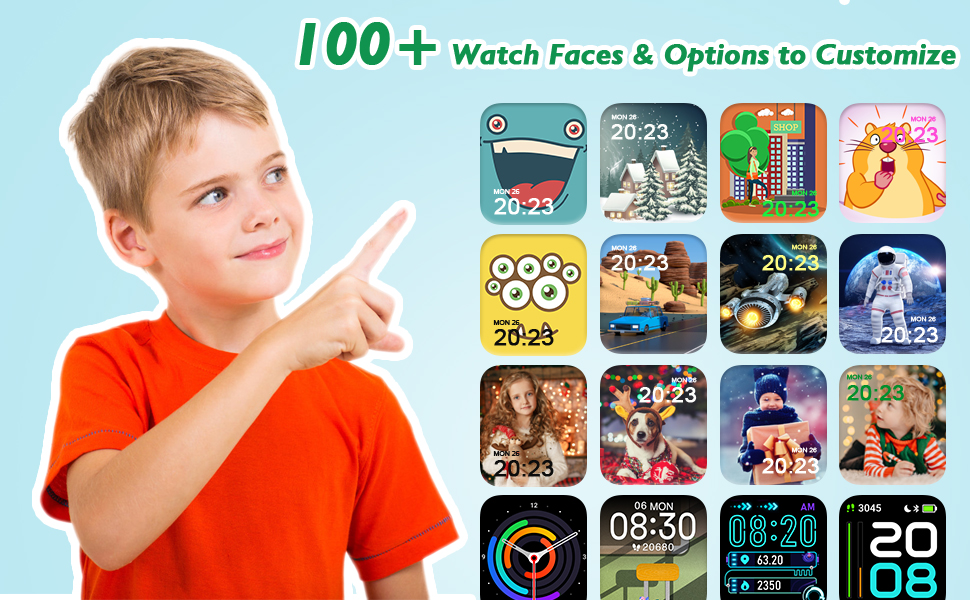
Figure 3.3: Watch Face Customization
3.5 Additional Functions
- Music Control: Play, pause, skip tracks, and adjust volume for music playing on your connected smartphone.
- Flashlight: Activate the built-in flashlight for convenience in low-light conditions.
- Weather Forecast: View a three-day weather forecast directly on your watch.
- Camera Control: Remotely control your smartphone's camera to take photos.
- Stopwatch and Timer: Utilize these tools for various time-keeping needs.
4. Health and Fitness Tracking
The KALINCO Kids Smart Watch provides comprehensive health and fitness monitoring features.
4.1 Health Monitoring
- Heart Rate Monitor: Continuously monitors real-time heart rate and provides reminders for high or low readings.
- SpO2 Monitor: Measures and analyzes blood oxygen levels.
- Sleep Monitor: Tracks sleep patterns, including deep, light, and REM sleep stages, to help understand sleep quality.
- Stress Monitoring: Generates a stress pattern with all-day detection and offers breathing exercises for relaxation.
- Cycle Tracking: For adolescent girls, the watch can log and remind about menstrual cycles.

Figure 4.1: Health Monitoring Features

Figure 4.2: Sleep Monitoring
4.2 Activity Tracking
- 100+ Sports Modes: Track various activities such as running, cycling, basketball, football, swimming, and more.
- Data Recording: Records steps, calories burned, pace, time, distance, workout paths, heart rate, and SpO2 levels during exercise.
- Goal Achievements: Rewards children with unique achievements upon reaching fitness goals, promoting motivation.

Figure 4.3: 100+ Sports Modes
4.3 Habit Development
- Sedentary Alert: Reminds users to stand up and move after periods of inactivity.
- Drinking Reminder: Prompts users to drink water at regular intervals.
- Hand Wash Reminder: Encourages good hygiene habits.

Figure 4.4: Developing Good Life Habits
5. Maintenance
5.1 Water Resistance
The KALINCO Kids Smart Watch is IP68 waterproof, making it suitable for swimming and other water activities. It includes a built-in draining function to expel water after exposure.
Figure 5.1: IP68 Waterproof Feature
5.2 Cleaning and Care
- Wipe the watch and strap regularly with a soft, damp cloth.
- Avoid using harsh chemicals or abrasive materials, as these can damage the watch's finish.
- Ensure the charging contacts are clean and dry before charging to prevent corrosion.
6. Troubleshooting
If you encounter issues with your KALINCO Kids Smart Watch, please refer to the following common solutions:
| Problem | Possible Solution |
|---|---|
| Watch not turning on | Ensure the watch is fully charged. Connect it to the charger for at least 10 minutes. |
| Cannot pair with phone | Ensure Bluetooth is enabled on your phone and the watch. Restart both devices and try pairing again through the VeryFit app. Check that the VeryFit app has necessary permissions. |
| Inaccurate health data | Ensure the watch is worn snugly on the wrist, about one finger's width from the wrist bone. Avoid excessive movement during measurements. |
| Notifications not received | Check notification settings in the VeryFit app and on your phone. Ensure the app is running in the background and has notification access. |
| Time/Date incorrect | Ensure the watch is properly connected and synced with the VeryFit app on your smartphone. The time and date are automatically updated via the app. |
| Battery drains quickly | Reduce screen brightness, disable continuous heart rate monitoring if not needed, and limit frequent use of power-intensive features like calls or Alexa. |
For more detailed troubleshooting, refer to the built-in user manual within the VeryFit app.
7. Specifications
| Feature | Detail |
|---|---|
| Model Number | IDW19 |
| Screen Size | 1.8 Inches |
| Display Resolution | 240x284 |
| Operating System | iOS & Android (Requires iOS 9.0+ or Android 6.0+) |
| Connectivity | Bluetooth |
| GPS | No GPS |
| Water Resistance | IP68 |
| Battery Capacity | 300 Milliamp Hours (Lithium Polymer) |
| Battery Life | Up to 7 days (normal use), 20 days (standby) |
| Charging Time | Approx. 1 hour |
| Item Weight | 3.17 ounces (0.09 Kilograms) |
| Human Interface Input | Touchscreen |
| Special Features | Alexa Built-in, 100+ Sports Modes, Make/Answer Call, Automatic Heart Rate/Blood Oxygen/Stress Monitoring, Sleep Monitor, Breathe Training, Cycle Tracking |
8. Warranty and Support
8.1 Quality Assurance
KALINCO provides a 1-Year Quality Assurance for this product, demonstrating our commitment to quality.
8.2 Customer Support
We offer lifetime technical support and 24/7 online customer service to assist you with any questions or issues.
For assistance, please log in to your Amazon account, navigate to 'Your Orders', and locate your watch order to contact support.