1. Introduction
Thank you for choosing the POGOLAB WS-70+ UHF Wireless Guitar System. This system provides a reliable and high-quality wireless audio connection for your electric guitar, bass, and other compatible musical instruments. Designed for ease of use, it features a 2-in-1 plug design, long battery life, and stable UHF transmission.
Please read this manual thoroughly before using the product to ensure proper operation and to maximize its lifespan.
2. Key Features
- UHF Wireless Transmission Technology: Utilizes advanced UHF technology for strong anti-interference, ultra-short delay (<2ms), and an effective range of approximately 98-164 feet (30-50m). Ensures stable and clear signal transmission.
- 2-in-1 Plug Design (6.35mm & 3.5mm): Features both 6.35mm (1/4") and 3.5mm (1/8") plugs, making it compatible with a wide range of musical instruments and devices, including guitars, bass, blowpipes, electronic drums, and tablets.
- Rechargeable Battery: Built-in rechargeable battery provides 5-6 hours of working time on a full charge. Includes dual USB cables for simultaneous charging of both transmitter and receiver.
- Plug & Play Operation: Simple setup; long press the power button for 2 seconds on both units for automatic matching. No complex configurations required.
- 10 Channel Support: The digital audio wireless system supports up to 10 sets of equipment operating simultaneously without interference, ensuring clear audio transmission for multiple instruments.
- 220° Rotatable Design: The plug can rotate 220 degrees, allowing for flexible positioning and compatibility with various instrument jack orientations.
3. Package Contents
Please check the package for the following items:
- 1 x POGOLAB WS-70+ Transmitter
- 1 x POGOLAB WS-70+ Receiver
- 1 x Dual USB Charging Cable
- 1 x User Manual

Image: The POGOLAB WS-70+ wireless guitar system, showing the transmitter and receiver units with their plugs, and the dual USB charging cable.
4. Setup Guide
- Charge the Devices: Before first use, fully charge both the transmitter and receiver using the provided dual USB charging cable. Connect the cable to a 5V 2A USB power adapter (not included). The battery indicator lights will show charging progress. All four green lights indicate a full charge.

Image: Diagram illustrating the battery indicator lights and their corresponding charge levels (25%, 50%, 75%, 100%).
- Power On: Long press the power button on both the transmitter and the receiver for 2 seconds simultaneously. The devices will power on and automatically attempt to pair.

Image: A close-up of hands holding the transmitter and receiver, demonstrating the power button location.
- Connect Transmitter: Plug the transmitter into your instrument's output jack (e.g., guitar, bass). Use the appropriate 6.35mm or 3.5mm plug. The 220° rotatable design allows for flexible positioning.
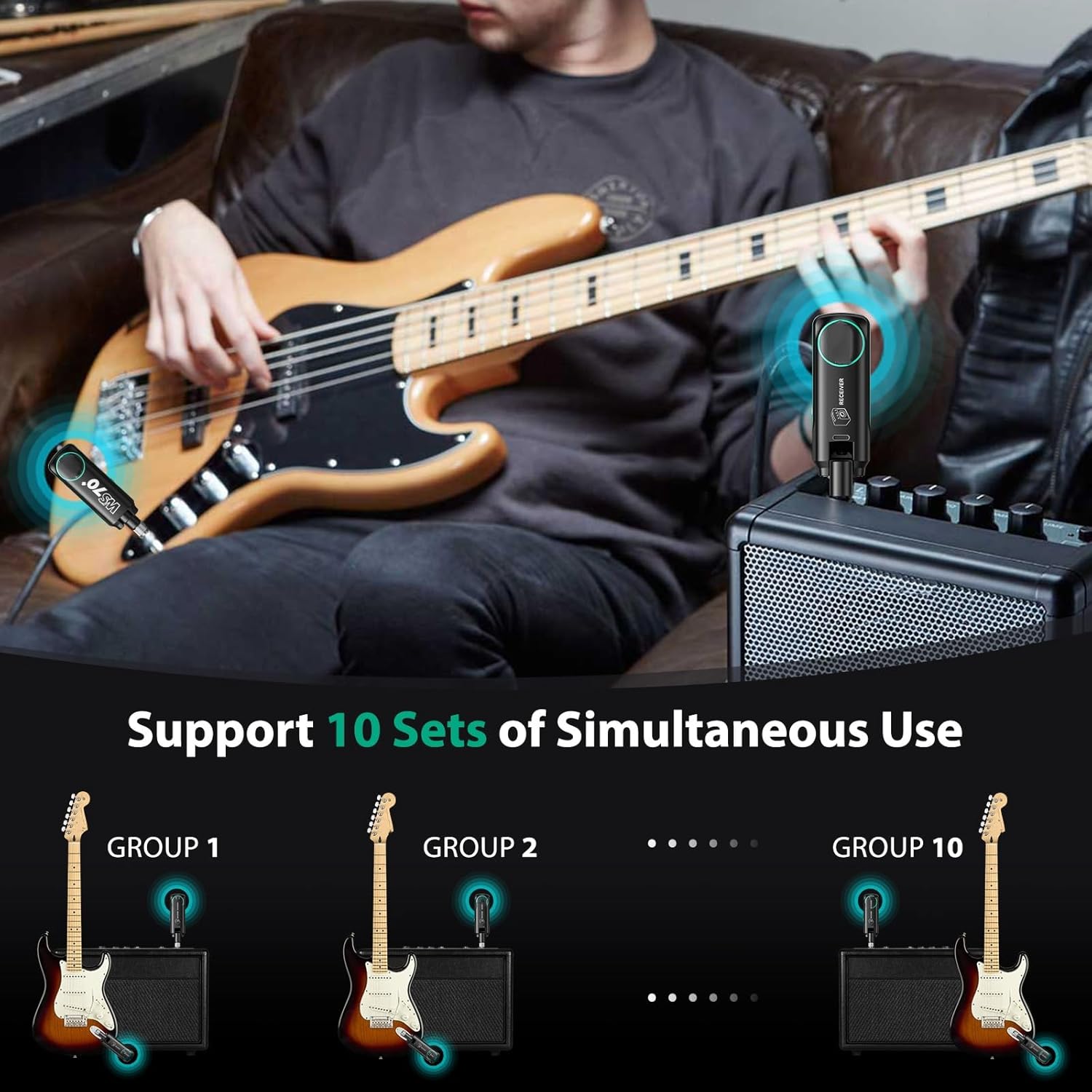
Image: The WS-70+ transmitter plugged into the output jack of an electric guitar, showing its compact size and rotatable plug.
- Connect Receiver: Plug the receiver into the input jack of your amplifier, mixer, or other audio device.

Image: The WS-70+ receiver plugged into the input of a guitar amplifier, indicating a successful wireless connection.
- Automatic Pairing: The transmitter and receiver will automatically pair. A solid green light on both units indicates a successful connection.
5. Operating Instructions
5.1 Basic Operation
- Power On/Off: Long press the power button for 2 seconds to turn the device on or off.
- Channel Switching: Briefly press the power button (after powering on) to cycle through the available 10 channels. Both the transmitter and receiver must be on the same channel for a connection.
- Battery Indicator: The LED lights on the side indicate the remaining battery level. Four lights mean 100%, one flashing light means less than 20%.
5.2 Multi-Device Usage
The WS-70+ system supports up to 10 sets of devices working simultaneously without interference. To use multiple sets:
- Ensure each transmitter-receiver pair is set to a unique channel.
- Power on each pair and allow them to connect.
- Verify that each instrument's signal is being transmitted to its corresponding receiver without crosstalk.

Image: An illustration depicting multiple wireless guitar systems (up to 10 groups) operating simultaneously, each with its own transmitter and receiver pair.
5.3 Compatibility
Thanks to its 6.35mm and 3.5mm dual-plug design, the WS-70+ is compatible with a wide array of instruments and audio equipment. This includes, but is not limited to:
- Electric Guitars
- Electric Basses
- Keyboards
- Violins (with appropriate pickup)
- Mixers
- PCs/Laptops (with appropriate input)
- Electronic Drums
- Blowpipes (e.g., electronic wind instruments)

Image: A visual representation of the WS-70+ system's compatibility with different musical instruments and devices, including guitar, keyboard, violin, mixer, and PC.
6. Maintenance and Care
- Cleaning: Use a soft, dry cloth to clean the surface of the devices. Do not use abrasive cleaners or solvents.
- Storage: Store the system in a cool, dry place away from direct sunlight and extreme temperatures.
- Battery Care: To prolong battery life, avoid fully discharging the battery frequently. If storing for a long period, charge the battery to about 50% every few months.
- Avoid Impact: Do not drop or subject the devices to strong impacts, as this may damage internal components.
- Moisture: Keep the devices away from water and high humidity.
7. Troubleshooting
| Problem | Possible Cause | Solution |
|---|---|---|
| No sound or intermittent sound. |
|
|
| Poor sound quality (noise, distortion). |
|
|
| Devices not turning on. |
|
|
8. Specifications
| Feature | Detail |
|---|---|
| Model Name | WS-70+ |
| Transmission Technology | UHF Wireless |
| Latency | <2ms |
| Effective Range | 30-50m (98-164 ft) |
| Frequency Response | 20Hz-20KHz |
| Number of Channels | 10 |
| Plug Type | 6.35mm (1/4") & 3.5mm (1/8") |
| Battery Type | Lithium Polymer (included) |
| Working Time | 5-6 hours (after full charge) |
| Charging Port | Type-C USB |
| Item Weight | 5.9 ounces |
| Dimensions | 4.06 x 4.06 x 1.65 inches (Package) |

Image: A diagram showing the approximate dimensions of the WS-70+ units: 80mm (0.31in) height and 29mm (0.1in) width.
9. Warranty and Support
POGOLAB is committed to providing high-quality products and excellent customer service. For warranty information, technical support, or any questions regarding your WS-70+ Wireless Guitar System, please contact POGOLAB customer support through the retailer's platform or visit the official POGOLAB store online.
POGOLAB Official Store: Visit POGOLAB Store on Amazon


