
Erbauer EAG18-115
Erbauer 18V Brushless Angle Grinder EAG18-Li 115mm User Manual
Model: EAG18-115
1. Introduction and Safety Information
This manual provides essential information for the safe and efficient operation of your Erbauer 18V Brushless Angle Grinder. Please read all instructions carefully before use to prevent injury and ensure proper tool function. Keep this manual for future reference.
General Safety Warnings
- Always wear eye protection, hearing protection, and suitable gloves when operating the grinder.
- Ensure the workpiece is securely clamped before grinding.
- Keep hands and body clear of the rotating disc.
- Do not use damaged or incorrect accessories.
- Disconnect the battery pack before making any adjustments, changing accessories, or storing the tool.
2. Product Components
Familiarize yourself with the parts of your Erbauer Angle Grinder:
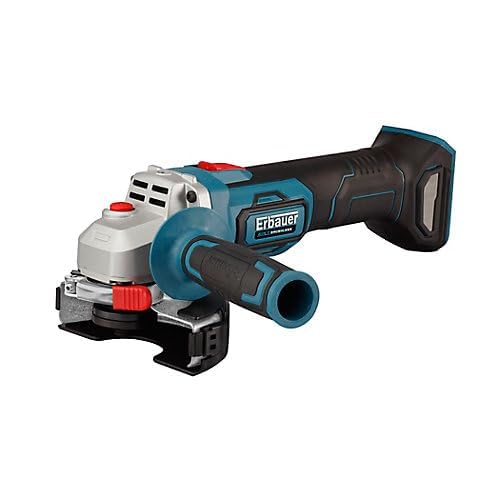
An image showing the Erbauer 18V Brushless Angle Grinder, model EAG18-Li 115mm. The tool is blue and black with a silver head, featuring a red power button and a black and blue side handle attached.
- Grinder Body
- Spindle Lock Button
- On/Off Switch
- Side Handle
- Protective Guard
- Grinding Disc (not included)
- Battery Port (battery not included)
3. Setup and Assembly
3.1 Battery Installation
This tool operates with an Erbauer 18V battery pack (sold separately). Ensure the battery is fully charged before use.
- Align the battery pack with the battery port on the grinder.
- Slide the battery into place until it clicks securely.
- To remove, press the battery release button and slide the battery out.
3.2 Attaching the Side Handle
The side handle can be attached to either side of the grinder head for optimal control.
- Screw the side handle clockwise into one of the threaded holes on the grinder head until it is tight.
3.3 Installing the Protective Guard
The protective guard must always be used to shield against sparks and debris.
- Loosen the guard clamping screw.
- Position the guard to cover the grinding disc and direct sparks away from you.
- Tighten the clamping screw firmly.
3.4 Mounting the Grinding Disc
Use only 115mm diameter grinding or cutting discs rated for the grinder's maximum RPM.
- Press and hold the spindle lock button.
- Unscrew the outer flange using the provided spanner.
- Place the grinding disc onto the inner flange, ensuring it sits correctly.
- Screw the outer flange back on and tighten it firmly with the spanner while holding the spindle lock button.
- Release the spindle lock button.
4. Operating Instructions
4.1 Powering On/Off
- To turn on: Slide the On/Off switch forward.
- To turn off: Slide the On/Off switch backward to the OFF position.
4.2 Grinding Techniques
- Hold the grinder firmly with both hands, one on the main handle and one on the side handle.
- Allow the disc to reach full operating speed before contacting the workpiece.
- Apply light, even pressure. Do not force the tool, as this can cause kickback or damage the disc.
- Maintain a shallow angle (typically 15-30 degrees) between the disc and the workpiece for grinding. For cutting, use a cutting disc and hold the tool perpendicular to the workpiece.
- Move the grinder smoothly across the surface to ensure an even finish and prevent overheating.
5. Maintenance and Storage
5.1 Cleaning
- Always remove the battery pack before cleaning.
- Regularly clean the ventilation slots to prevent dust buildup, which can lead to overheating. Use compressed air if available.
- Wipe the tool's exterior with a soft, damp cloth. Do not use harsh chemicals or abrasive cleaners.
5.2 Storage
- Store the grinder in a dry, secure location, out of reach of children.
- Remove the battery pack from the tool before long-term storage.
- Protect the tool from direct sunlight and extreme temperatures.
6. Troubleshooting
| Problem | Possible Cause | Solution |
|---|---|---|
| Grinder does not start | Battery not charged; Battery not inserted correctly; On/Off switch not fully engaged. | Charge battery; Reinsert battery securely; Ensure switch is in ON position. |
| Excessive vibration | Damaged or unbalanced disc; Disc not properly mounted; Loose side handle. | Replace disc; Re-mount disc correctly, ensuring flanges are tight; Tighten side handle. |
| Reduced performance | Battery low; Worn disc; Overheating. | Recharge battery; Replace disc; Allow tool to cool down, clean ventilation slots. |
7. Technical Specifications
- Brand: Erbauer
- Model: EAG18-115
- Voltage: 18 Volts
- Disc Diameter: 115 mm
- Power: 72 Watts
- Material: Metal
- Color: Blue
- ASIN: B0C7JWVC1F
8. Warranty and Support
This Erbauer product is covered by the manufacturer's standard warranty. For specific warranty terms and conditions, please refer to the documentation provided with your purchase or visit the official Erbauer website. For technical support, spare parts, or service inquiries, please contact Erbauer customer service through their official channels.
For more information, you may visit the Erbauer brand page on Amazon.
Ask a question about this manual
Ask about setup, troubleshooting, compatibility, parts, safety, or missing instructions. Manuals+ will review the question and use this page’s manual context to help answer it.