Introduction
This manual provides essential instructions for the safe and effective use of your XTREME Lit 6.5ft Neon Bend and Shape Memory Flex Wire White LED Light Strip. Please read this manual thoroughly before installation and operation, and retain it for future reference.
Safety Information
- This product is designed for indoor use only. Do not expose to water or moisture.
- Ensure the power source is 5V USB. Using an incorrect voltage may damage the product and void the warranty.
- Do not attempt to open or modify the light strip. This may result in electric shock or product malfunction.
- Keep out of reach of children.
- Avoid bending the strip sharply at angles less than 90 degrees to prevent damage to the internal wiring.
- Unplug the light strip from the power source before cleaning or when not in use for extended periods.
Package Contents
- 1 x XTREME Lit 6.5ft Neon Bend and Shape Memory Flex Wire White LED Light Strip
- Mounting Clips
Setup
1. Unpacking and Inspection
Carefully remove the light strip and all accessories from the packaging. Inspect the product for any visible damage. If any damage is found, do not proceed with installation and contact customer support.
2. Understanding Components

Image: Overview of the light strip components, including the USB plug, button control, and mounting clips.
3. Shaping the Light Strip
The XTREME Lit Neon Flex Light Strip features a bendable memory flex wire. Gently bend the strip into your desired shape, word, or design. The material is designed to hold its shape once formed.
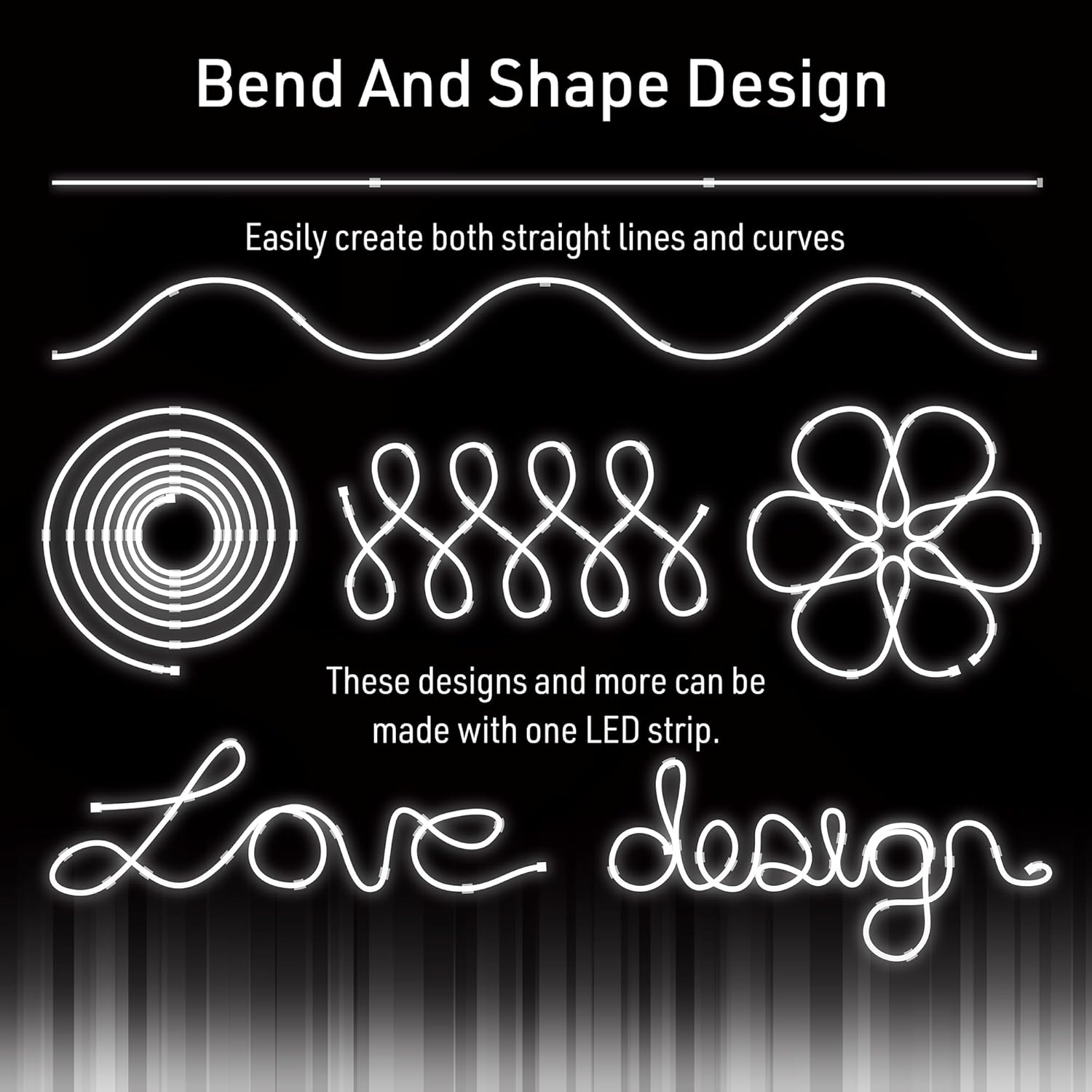
Image: Examples of shapes and designs achievable with the bendable light strip.

Image: The light strip shaped into a flower and mounted on a wall.
4. Mounting the Light Strip
Once you have formed your desired shape, use the included mounting clips to secure the light strip to a wall or other surface. Position the clips strategically to maintain the shape and provide stability. Ensure the surface is clean and dry before attaching the clips.
5. Power Connection
Connect the USB plug of the light strip to any standard 5V USB power source (e.g., a USB wall adapter, power bank, or computer USB port). The light strip will illuminate upon connection if the button control is in the 'on' position.
Operating
Turning On/Off
The light strip is equipped with a button control located on the power cord. Press the button once to turn the light strip on, and press it again to turn it off.
Maintenance
Cleaning
To clean the light strip, first ensure it is unplugged from the power source. Gently wipe the surface with a soft, dry, or slightly damp cloth. Do not use harsh chemicals, abrasive cleaners, or excessive moisture, as this may damage the product.
Storage
When not in use, store the light strip in a cool, dry place, away from direct sunlight and extreme temperatures. You may gently coil the strip for compact storage, ensuring not to create sharp bends.
Troubleshooting
- Light strip does not turn on:
- Ensure the USB plug is securely connected to a functional 5V USB power source.
- Check if the button control on the cord is pressed to the 'on' position.
- Try a different 5V USB power source or adapter.
- Light strip flickers or is dim:
- Ensure the power source provides sufficient and stable 5V power.
- Check for any damage to the cord or light strip.
- Light strip does not hold its shape:
- Ensure the bends are not too sharp, which can cause the material to spring back.
- Use additional mounting clips to secure complex shapes more effectively.
If these steps do not resolve the issue, please contact customer support.
Specifications
| Model Number | XLB7-1089-SWT |
| Length | 6.5 Feet (2 meters) |
| Light Color | Bright White |
| Light Source Type | LED, Neon |
| Power Source | Corded Electric (USB) |
| Voltage | 5 Volts |
| Wattage | 12.5 watts |
| Indoor/Outdoor Usage | Indoor |
| Material | Polyvinyl Chloride |
| Special Feature | Adjustable, Bendable Memory Flex Wire |
| Control Method | Button Control (on cord) |
Warranty Information
XTREME products are manufactured to high-quality standards. For specific warranty details, including duration and coverage, please refer to the warranty card included with your purchase or visit the official XTREME website. Keep your proof of purchase for any warranty claims.
Customer Support
If you have any questions, require assistance, or encounter issues not covered in this manual, please contact XTREME customer support. Contact information can typically be found on the product packaging or the official XTREME website.


