
1. Introduction
This manual provides detailed instructions for the safe and effective use of the NOYAFA NF-8108-A Cable and Network Tester. The NF-8108-A is designed to measure network cable length, identify open and short circuits, and detect wiring errors in 5E, 6E, and coaxial cables. Please read this manual thoroughly before operating the device.
2. Safety Information
- Do not connect to high voltage lines: Connecting the device to live electrical circuits or high voltage lines can cause severe damage to the tester and pose a risk of electric shock.
- Handle with care: The device contains sharp parts; store it in a safe place to prevent injury.
- Correct port usage: Always connect cables to the correct ports as indicated on the device.
- Read manual: Always read this user manual completely before initial use.
3. Product Overview
The NOYAFA NF-8108-A consists of a main tester unit and a remote identifier unit. The main unit features an LCD display for test results and various function buttons. The remote unit is used for testing installed cables.
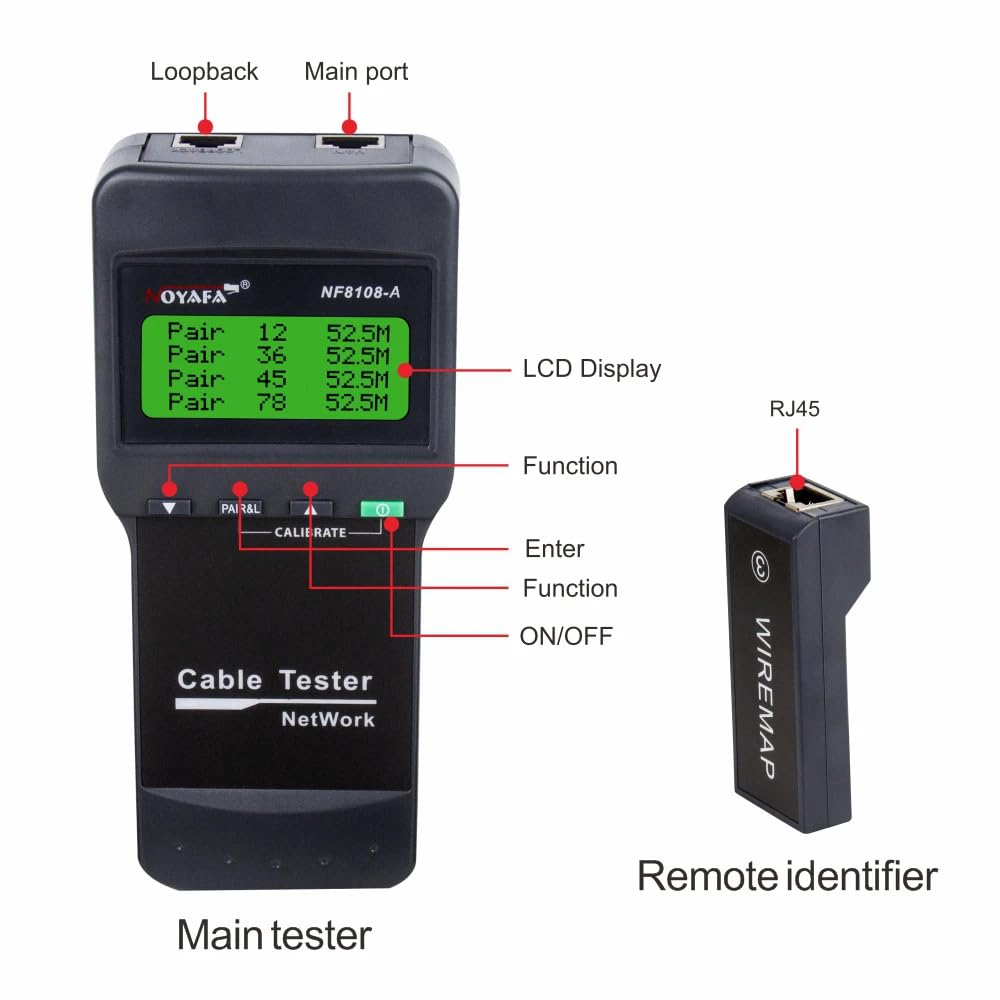
Figure 3.1: Main Tester and Remote Identifier with labeled components. The main tester features an LCD display, function buttons, ON/OFF switch, Loopback port, and Main port. The remote identifier has an RJ45 port.
3.1 Main Tester Components
- LCD Display: Shows test results, cable length, wiring status, and battery level.
- Loopback Port: Used for self-testing or loopback testing of short cables.
- Main Port (RJ45): Connects to the cable under test.
- Function Buttons: Used to navigate menus and select test modes.
- ON/OFF Button: Powers the device on or off.
3.2 Remote Identifier
The remote identifier is a passive unit used in conjunction with the main tester to test network cables installed over a distance. It connects to the far end of the cable.

Figure 3.2: The NOYAFA NF-8108-A Main Tester and its accompanying Remote Identifier.
4. Specifications

Figure 4.1: Dimensions of the NOYAFA NF-8108-A Main Tester (184x84x46mm) and Remote Identifier (78x33x22mm).
| Feature | Specification |
|---|---|
| Model | NF-8108-A |
| LCD Display | 53x25 mm |
| Max. Distance of Cable Map | 300m (for length measurement) |
| Max. Working Current | Less than 70mA |
| Compatible Connectors | RJ45 |
| Faults Display | LCD display |
| Low Battery Display | LCD (6.5V) |
| Voltage Protection | AC 60V / DC 42V |
| Battery Type (Main Unit) | DC 4 x 1.5V AA batteries (not included) |
| Dimensions (Main Unit L x W x D) | 184 x 84 x 46 mm |
| Remote Units | 1 (for NF-8108-A) |
| Dimensions (Remote Unit L x W x D) | 78 x 33 x 22 mm |
| Battery Life (Standby) | Approx. 50 hours |
| Automatic Shut-off | Yes |
| Self-checking & Compensation | Yes (for battery capacity/ambient temperature) |
| Weight | 500 g (approx.) |
| Operating Voltage (Min.) | 60 Volts |
| Upper Temperature Rating | 60 Degrees Celsius |
Note: The NF-8108-A model includes one remote unit. The NF-8108-M model, which is a different product variant, can test 8 groups of cables in sequence and comes with 8 remote units.
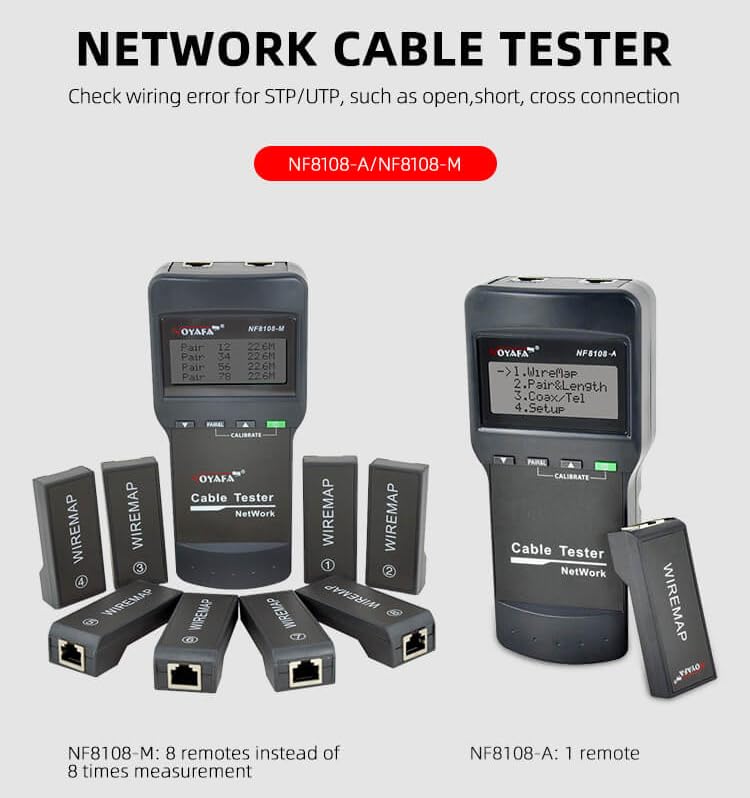
Figure 4.2: Visual comparison showing the NF-8108-A with one remote and the NF-8108-M with eight remotes, highlighting their primary difference in remote unit quantity.
5. Setup
5.1 Battery Installation
- Locate the battery compartment on the back of the main tester unit.
- Open the battery compartment cover.
- Insert four (4) 1.5V AA batteries, ensuring correct polarity (+/-).
- Close the battery compartment cover securely.
Note: Batteries are typically not included with the device. Please ensure you have fresh AA batteries for optimal performance. The remote identifier does not require batteries.
6. Operating Instructions
6.1 Powering On/Off
Press the ON/OFF button on the main tester unit to power the device on or off. The LCD display will illuminate upon power-on.
6.2 Basic Cable Testing (Length & Wiring)
- Connect the Main Unit: Plug one end of the network cable (RJ45) into the 'Main port' of the main tester unit.
- Connect the Remote Unit: Plug the other end of the network cable into the RJ45 port of the remote identifier unit.
- Select Test Mode: Use the function buttons to navigate to the desired test mode (e.g., 'Length Measurement' or 'Wiring Map').
- Start Test: Press the 'Enter' button to initiate the test.
- Read Results: The LCD display will show the cable length in meters and/or the wiring map, indicating any open circuits, short circuits, or wiring errors (e.g., jumper wire, reverse connection, cross-talk).
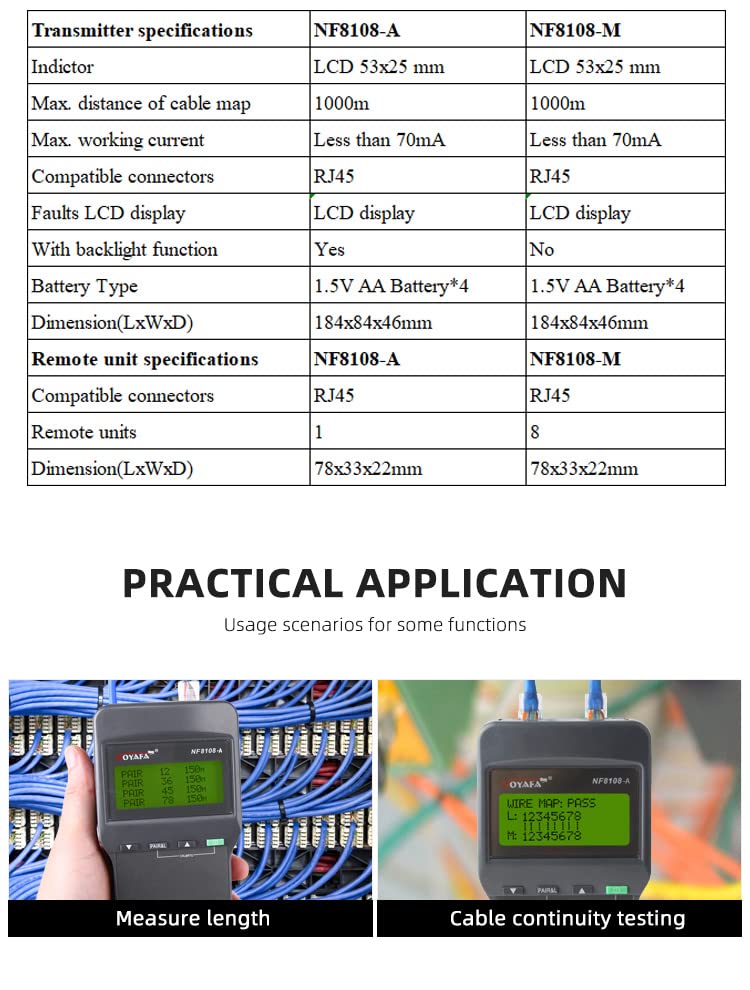
Figure 6.1: The NOYAFA NF-8108-A in use, demonstrating cable length measurement and cable continuity testing on the LCD display.
6.3 Loopback Test
For testing short patch cables or verifying the main unit's functionality, you can perform a loopback test:
- Connect one end of a short RJ45 cable to the 'Main port'.
- Connect the other end of the same cable to the 'Loopback port'.
- Select the appropriate test mode and initiate the test. The display should show a correct wiring map if the cable and unit are functioning properly.
6.4 Calibration
The NF-8108-A features self-checking and automatic compensation for changes in battery capacity or ambient temperature. If manual calibration is required, refer to the on-screen menu options accessible via the function buttons. Typically, calibration involves using a known length of cable to fine-tune length measurements.
7. Maintenance
7.1 Cleaning
Wipe the device with a soft, dry cloth. Do not use abrasive cleaners or solvents, as these can damage the casing or LCD screen.
7.2 Battery Replacement
When the low battery indicator appears on the LCD, replace the four (4) 1.5V AA batteries in the main unit. Refer to Section 5.1 for battery installation instructions.
7.3 Storage
Store the device in a cool, dry place away from direct sunlight and extreme temperatures. If storing for an extended period, remove the batteries to prevent leakage.
8. Troubleshooting
- Device does not power on: Check if batteries are installed correctly and have sufficient charge. Replace batteries if necessary.
- Inaccurate length measurement: Ensure the cable is properly connected to both the main unit and the remote. Perform calibration if available in the menu.
- No display or partial display: Check battery level. If the issue persists, contact customer support.
- "Open Circuit" or "Short Circuit" error: This indicates a fault in the cable. Visually inspect the cable and connectors for damage.
- "Wiring Error" message: The display will show which wire pairs are incorrectly connected (e.g., reversed, split). Re-terminate the cable according to standard wiring schemes (T568A or T568B).
9. Warranty and Support
The NOYAFA NF-8108-A Cable and Network Tester comes with a 1-year warranty from the date of purchase. This warranty covers manufacturing defects and malfunctions under normal use. It does not cover damage caused by misuse, accidents, unauthorized modifications, or connection to high voltage. For warranty claims or technical support, please contact your retailer or NOYAFA customer service.