
1. Introduction
Thank you for choosing the MEIKEE 6 in 1 Solar Spotlights Outdoor. This product is designed to provide efficient and versatile outdoor lighting using solar power. It features a 6W/6V solar panel, a high-capacity rechargeable battery, and offers three color temperatures (2700K-4000K-6500K) with three levels of brightness. The system also includes flash/smooth modes with adjustable speeds, an IP66 waterproof rating, and convenient remote control operation. This manual provides essential information for the safe and effective use of your solar spotlights.
2. Package Contents
Please verify that all components are present and in good condition upon unpacking.
- 6 in 1 Solar Landscape Spotlights (1 unit)
- 6W/6V Solar Panel (1 unit)
- Remote Control (1 unit)
- Screw Package (1 unit)

3. Safety Information
Read all safety instructions before installation and use. Failure to follow these instructions may result in electric shock, fire, or serious injury.
- Electrical Safety: Do not attempt to modify or repair the product. Refer all servicing to qualified personnel.
- Placement: Ensure the solar panel is placed in an area that receives direct sunlight for at least 6-8 hours daily for optimal charging.
- Water Resistance: The product is IP66 waterproof, suitable for outdoor use in various weather conditions. However, avoid submerging the control box or spotlights in water.
- Temperature: Operate the product within its specified temperature range. Extreme temperatures may affect battery performance and lifespan.
- Children and Pets: Keep small parts and packaging materials away from children and pets to prevent choking hazards.
4. Setup and Installation
The MEIKEE solar landscape lights offer flexible installation options: ground insertion or wall mounting.
4.1 Choosing a Location
- Select a location for the solar panel that receives maximum direct sunlight throughout the day.
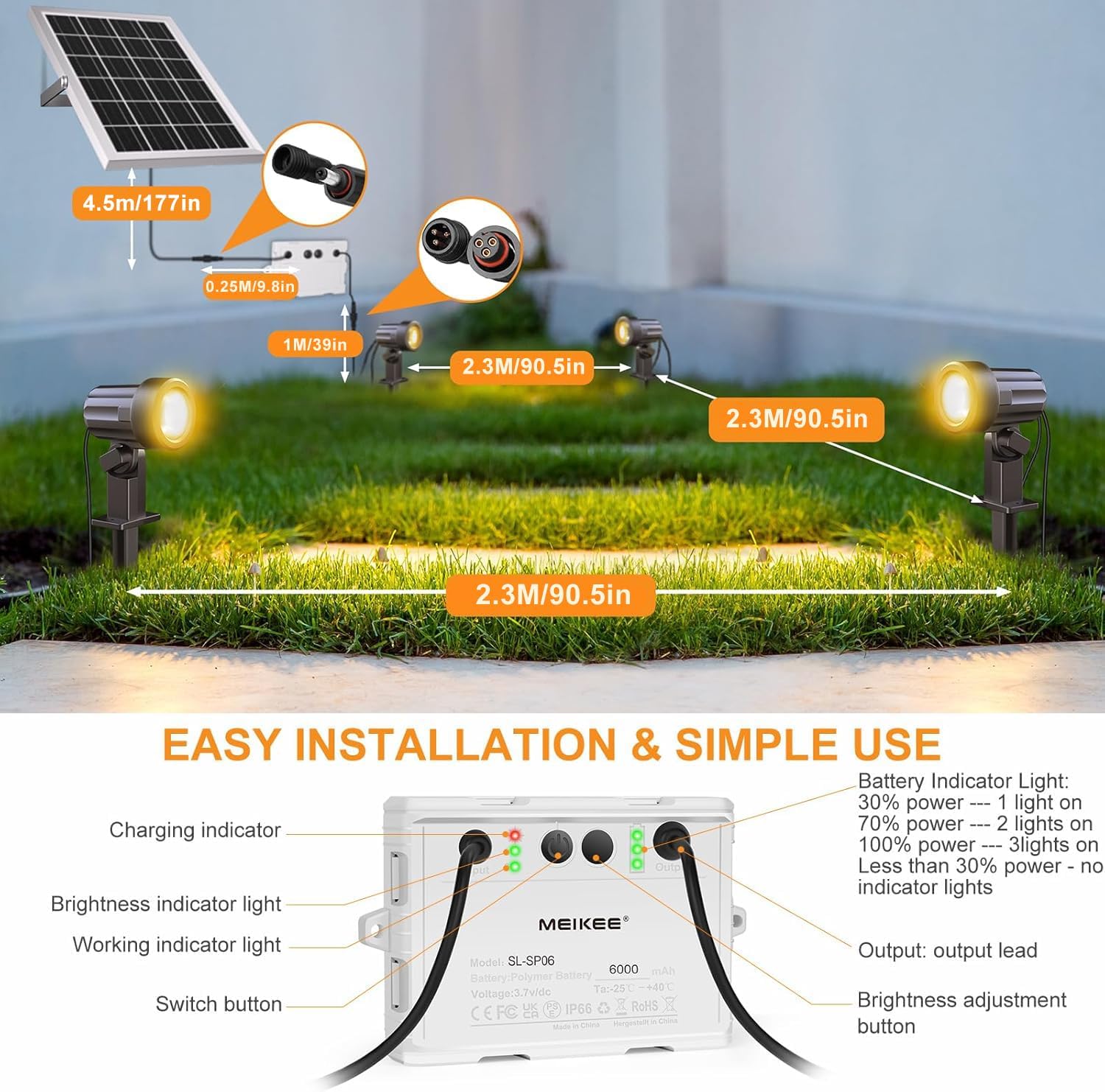
- Position the spotlights in desired areas, ensuring the cables can reach the control box. Each spotlight has a 2.3m (90.55 inch) cable.
4.2 Assembly Steps
- Solar Panel Installation: Attach the ground stake to the solar panel bracket or use screws to mount it on a wall. Adjust the angle to optimize sun exposure.
- Control Box Placement: Secure the control box in a suitable location, either by ground insertion or wall mounting, ensuring it is accessible for connections.
- Spotlight Installation: Attach the ground stakes to each spotlight. Insert the spotlights into the ground in your desired arrangement. Alternatively, use screws for wall mounting. The spotlights are 180° adjustable for directing light.
- Connect Wiring: Connect the solar panel cable to the input port of the control box. Connect each spotlight cable to the output ports of the control box. Ensure all connections are secure.

5. Operating Instructions
The MEIKEE solar spotlights operate automatically and can be controlled via the included remote.
5.1 Initial Charge
Before first use, allow the solar panel to charge for a full day (8-12 hours) in direct sunlight to ensure the built-in 6000mAh Lithium Polymer battery is fully charged.
5.2 Automatic Operation
The spotlights are equipped with a dusk-to-dawn sensor. They will automatically charge during the day and illuminate at night.

5.3 Remote Control Functions
The 15-key remote control allows for convenient adjustment of settings from up to 12 meters away.
- ON/OFF: Power the lights on or off.
- Forced Lighting Button: Manually turn on the lights during the day.
- Brightness Adjustment: Cycle through High, Medium, and Low brightness levels.
- Color Temperature: Select between 2700K (Warm White), 4000K (Natural White), and 6500K (Cold White).
- Smooth Mode: Lights gradually change between the three color temperatures. Speed is adjustable.
- Flash Mode: Lights quickly jump between the three color temperatures. Speed is adjustable.
- Timer Function: Set the lights to turn off automatically after 2, 4, or 6 hours.
- Memory Function: The lights will remember the last setting when they turn on again.


6. Maintenance
Regular maintenance ensures optimal performance and extends the lifespan of your solar spotlights.
- Clean Solar Panel: Periodically wipe the solar panel with a soft, damp cloth to remove dust, dirt, or debris. A clean panel ensures efficient charging.
- Inspect Connections: Occasionally check all cable connections to ensure they are secure and free from corrosion.
- Clear Obstructions: Ensure no trees, bushes, or other objects are blocking sunlight from reaching the solar panel.
- Battery Care: The built-in Lithium Polymer battery has a lifespan of approximately 500 charging cycles. If the lights' runtime significantly decreases, it may indicate the battery is nearing the end of its life.
7. Troubleshooting
If you encounter issues with your MEIKEE solar spotlights, refer to the following common problems and solutions:
| Problem | Possible Cause | Solution |
|---|---|---|
| Lights do not turn on at night. | Insufficient solar panel charging. | Ensure the solar panel is in direct sunlight for 6-8 hours daily. Clean the solar panel surface. |
| Lights turn on but are dim or have short runtime. | Battery not fully charged or aging battery. | Allow for a full day's charge. If problem persists, battery may need replacement (contact support). |
| Remote control not working. | Remote battery low or obstruction. | Ensure line of sight to the control box. Replace remote battery if necessary. |
| Lights flicker or change settings unexpectedly. | Loose connection or internal fault. | Check all cable connections. If problem persists, contact customer support. |
8. Specifications
| Feature | Detail |
|---|---|
| Brand | MEIKEE |
| Model Name | landscape spotlights |
| Item Model Number | 02 |
| Power Source | Solar Powered |
| Wattage | 6 watts |
| Voltage | 6 Volts (DC) |
| Light Source Type | LED |
| Number of Light Sources | 6 |
| Light Color / Color Temperature | 2700K (Warm White), 4000K (Natural White), 6500K (Cold White) |
| Control Method | Remote Control |
| Water Resistance Level | IP66 Waterproof |
| Battery | 1 Lithium Polymer battery required (included) |
| Battery Capacity | 6000mAh |
| Charging Time | 8-12 hours (full charge) |
| Working Time | 8-12 hours (when fully charged) |
| Product Dimensions | 10.62"L x 7.7"W x 4.33"H |
| Item Weight | 4.73 pounds |
| Material | ABS Light + Control Box, Aluminum Solar Panel |
| Installation Type | Ground insert/Wall mount |
| Special Features | 15-key remote control, 3 levels brightness, 3 color temperatures, smooth/flash modes, IP66 waterproof, timing and memory function, dusk to dawn. |
9. Warranty and Support
MEIKEE is committed to providing quality products and customer satisfaction.
9.1 Warranty Information
MEIKEE products are covered by a 2-year limited warranty from the date of purchase. This warranty covers manufacturing defects and issues arising from normal use.
9.2 Customer Support
For any questions, technical assistance, or warranty claims, please contact MEIKEE customer service. You can reach us via email through Amazon or the email address provided on the product packaging. We aim to provide a timely response within 24 hours.
Return Policy: This product is eligible for a refund or replacement within 30 days of purchase, subject to the retailer's return policy.

