
1. Introduction and Overview
Thank you for choosing the VILTROX AF 16mm F1.8 FE lens. This full-frame ultra-wide angle autofocus lens is designed for Sony E-Mount cameras, offering exceptional image quality with its large F1.8 aperture. It is ideal for various photography styles, including landscapes, astrophotography, and vlogging, providing high resolution and accurate focusing performance.

2. Key Features
- Large F1.8 Aperture: The 16mm focal length combined with a wide F1.8 aperture allows for excellent low-light performance and beautiful background blur (bokeh).
- Advanced Optical Design: Comprising 15 optical elements in 12 groups, including three aspherical lenses and four ED (Extra-low Dispersion) lenses. This design effectively controls dispersion, ghosting, and flare, ensuring ultra-high resolution and vivid details across the frame.
- HD Nano Multilayer Coating: Applied to correct dispersion differences and further reduce ghosting and flare, especially beneficial with a large aperture.
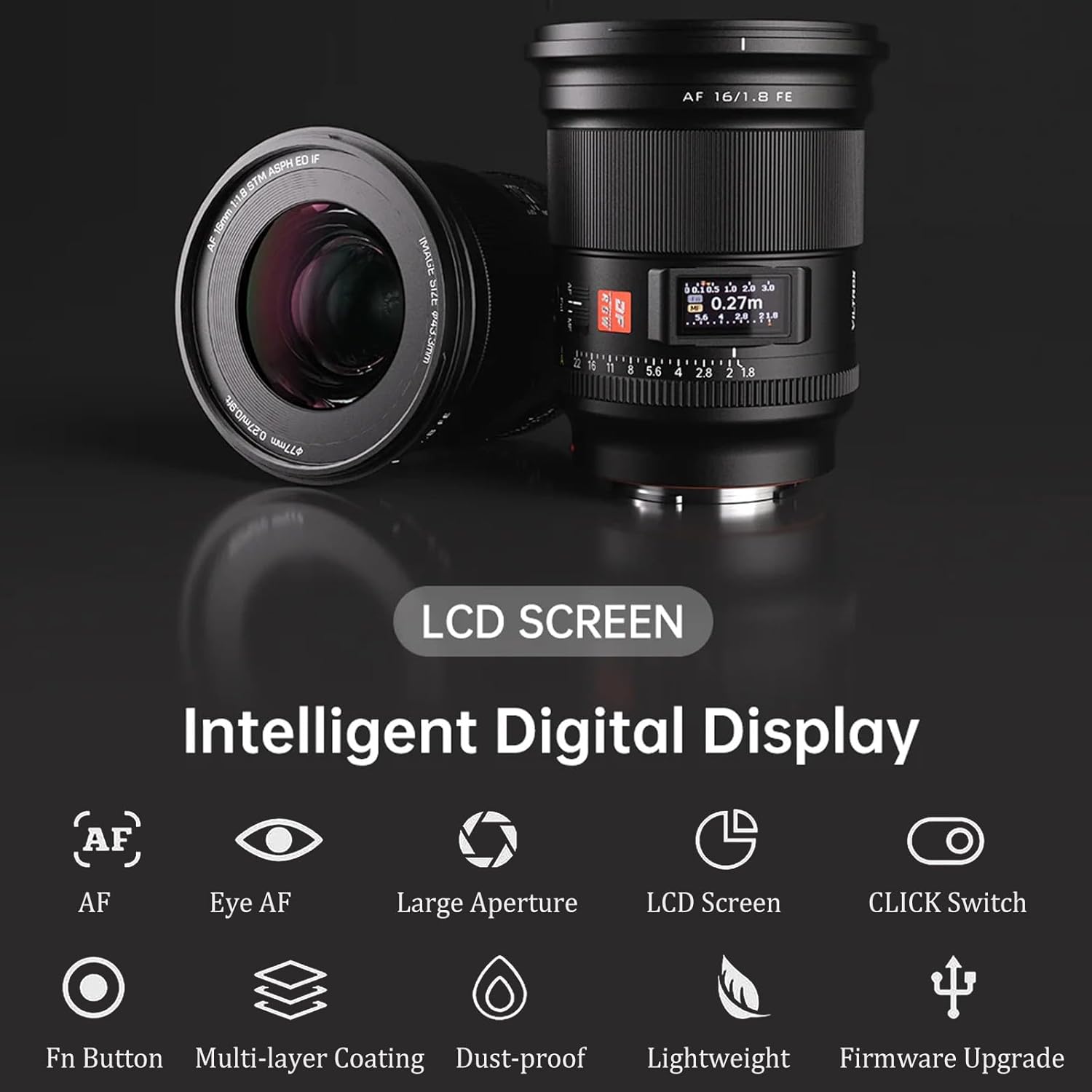
- Built-in LCD Display: A convenient LCD screen on the lens body displays crucial shooting parameters such as aperture and focus distance, allowing for quick adjustments without needing to check the camera screen.
- Click Aperture Ring Switch: Provides the flexibility to switch between a clicked aperture ring for tactile feedback or a clickless (de-clicked) aperture for smooth, silent adjustments during video recording.
- Accurate and Fast Autofocus: Equipped with a precise autofocus system that supports Eye AF and Face Focus, ensuring sharp subjects even in dynamic shooting conditions.
- Dust-Resistant Design: Built to withstand challenging outdoor environments, making it a reliable companion for adventure photography.
- Lightweight Construction: Weighing approximately 550g, the lens is designed for portability without compromising on build quality.
- 77mm Filter Compatibility: Supports standard 77mm filters, allowing for creative control and protection.


3. Setup
3.1 Unboxing
Carefully remove all components from the packaging. Ensure you have the lens, front and rear lens caps, lens hood, and carrying pouch.

3.2 Attaching the Lens to Your Camera
- Ensure your Sony E-Mount camera is turned off.
- Remove the rear lens cap from the VILTROX lens and the body cap from your camera.
- Align the white index mark on the lens barrel with the corresponding white index mark on your camera's lens mount.
- Insert the lens into the camera mount and rotate it clockwise until it clicks securely into place.

3.3 Attaching the Lens Hood
Align the lens hood with the front of the lens, matching the alignment marks. Rotate the hood clockwise until it locks into position. The lens hood helps to prevent flare and provides additional protection for the front element.
3.4 Attaching Filters
The VILTROX AF 16mm F1.8 FE lens is compatible with 77mm screw-on filters. Gently screw the filter onto the front thread of the lens until it is secure.
4. Operating Instructions
4.1 Autofocus (AF) / Manual Focus (MF) Switch
Locate the AF/MF switch on the side of the lens barrel. Slide the switch to 'AF' for autofocus operation or 'MF' for manual focus. In MF mode, rotate the focus ring to adjust focus manually.
4.2 Aperture Control
The lens features an aperture ring for direct control over the aperture. Additionally, there is a 'CLICK' switch on the lens. When set to 'ON', the aperture ring will have distinct clicks at each f-stop. When set to 'OFF', the aperture ring will rotate smoothly without clicks, which is ideal for video recording to avoid audible clicks during adjustments.
4.3 Fn Button
The lens includes a customizable Fn (Function) button. This button can be programmed via the camera's menu to perform various functions, such as Eye AF, focus peaking, or other camera-specific features. Refer to your camera's user manual for detailed customization options.
4.4 LCD Display Usage
The integrated LCD display provides real-time information. It typically shows the current aperture value and the focus distance. This allows for quick visual confirmation of your settings, especially useful in manual focus mode or when precise focus distance is critical.
4.5 Firmware Update
VILTROX periodically releases firmware updates to improve lens performance and compatibility. To update the firmware, connect the lens to your computer via the USB-C port (if available on the lens, otherwise via the camera). Visit the official VILTROX website (www.viltrox.com) for the latest firmware and instructions. Ensure your camera's firmware is also up to date.

5. Maintenance
5.1 Cleaning the Lens
- Use a soft, lint-free microfiber cloth specifically designed for optics to clean the lens elements.
- For stubborn smudges, use a small amount of lens cleaning fluid applied to the cloth, not directly to the lens.
- Use a blower brush to remove dust particles before wiping to avoid scratching the glass.
- Clean the lens body with a dry, soft cloth.
5.2 Storage
When not in use, store the lens with both front and rear caps attached in a dry, cool place, away from direct sunlight and extreme temperatures. Using a desiccant packet in your camera bag can help prevent moisture buildup.
6. Troubleshooting
6.1 Common Issues and Solutions
| Problem | Possible Cause | Solution |
|---|---|---|
| Lens not recognized by camera | Improper mounting, dirty contacts, outdated firmware. | Re-mount the lens, clean lens and camera contacts with a dry cloth, check for firmware updates for both lens and camera. |
| Autofocus not working | Lens set to MF, insufficient light, subject too close. | Ensure AF/MF switch is on 'AF', use adequate lighting, ensure subject is within minimum focus distance. |
| Image quality issues (softness, chromatic aberration) | Dirty lens, shooting at extreme apertures, camera settings. | Clean lens elements, try shooting at slightly narrower apertures (e.g., F2.8-F8), check camera's image quality settings. |
If you encounter issues not listed here or if the suggested solutions do not resolve the problem, please contact VILTROX customer support for assistance.
7. Specifications
| Feature | Detail |
|---|---|
| Model | AF 16mm F1.8 FE |
| Focal Length | 16mm |
| Maximum Aperture | F1.8 |
| Minimum Aperture | F22 |
| Lens Mount | Sony E-Mount |
| Format Compatibility | Full-Frame |
| Optical Structure | 15 elements in 12 groups (including 3 Aspherical, 4 ED) |
| Minimum Focus Distance | 0.27m (0.89 ft) |
| Filter Size | 77mm |
| Dimensions (D x L) | Approx. 4.72 x 3.94 x 3.94 inches |
| Weight | Approx. 1.21 pounds (550g) |
| Autofocus | Yes |
| Image Stabilization | No (relies on camera's IBIS if available) |
8. Warranty and Support
VILTROX products are manufactured to high-quality standards and come with a limited warranty. Please refer to the warranty card included with your product for specific terms and conditions. For technical support, service, or inquiries regarding your VILTROX AF 16mm F1.8 FE lens, please contact VILTROX customer service.
VILTROX Contact Information:
- Website: www.viltrox.com
- Email: info@viltrox.com
- Tel: +86-755-28779024
- Fax: +86-755-2877-4730
