
1. Introduction
This manual provides essential information for the safe and effective operation of your DJI Air 3 (DJI RC-N2) drone. Please read this manual thoroughly before first use and retain it for future reference. The DJI Air 3 is a high-performance drone featuring dual primary cameras, extended flight time, and omnidirectional obstacle sensing, designed for advanced aerial photography and videography.
Important Note: Due to platform compatibility issues, the DJI Fly app has been removed from Google Play. For the best product experience, please download the latest version of the DJI Fly app directly from the official DJI website.
Always check and strictly abide by local laws and regulations before flying. The DJI Air 3 complies with FAA Remote ID rules. Refer to the official FAA website for drone registration and Remote ID requirements.

Image: The DJI Air 3 drone with its propellers unfolded, positioned above the DJI RC-N2 remote controller. This image illustrates the primary components included in the standard package.
2. What's in the Box
The standard DJI Air 3 (DJI RC-N2) package includes the following components:
- DJI Air 3 Aircraft x 1
- DJI RC-N2 Remote Controller x 1
- DJI RC-N2 RC Cable (USB-C Connector) x 1
- DJI RC-N2 RC Cable (Lightning Connector) x 1
- DJI Air 3 Intelligent Flight Battery x 1
- Spare DJI Air 3 Low-Noise Propellers (Pair) x 1
- Gimbal Protector x 1
- USB Type-C Cable x 1
Note: A battery charger is sold separately. It is recommended to purchase the DJI 65W Portable Charger or DJI 100W USB-C Power Adapter for optimal charging.
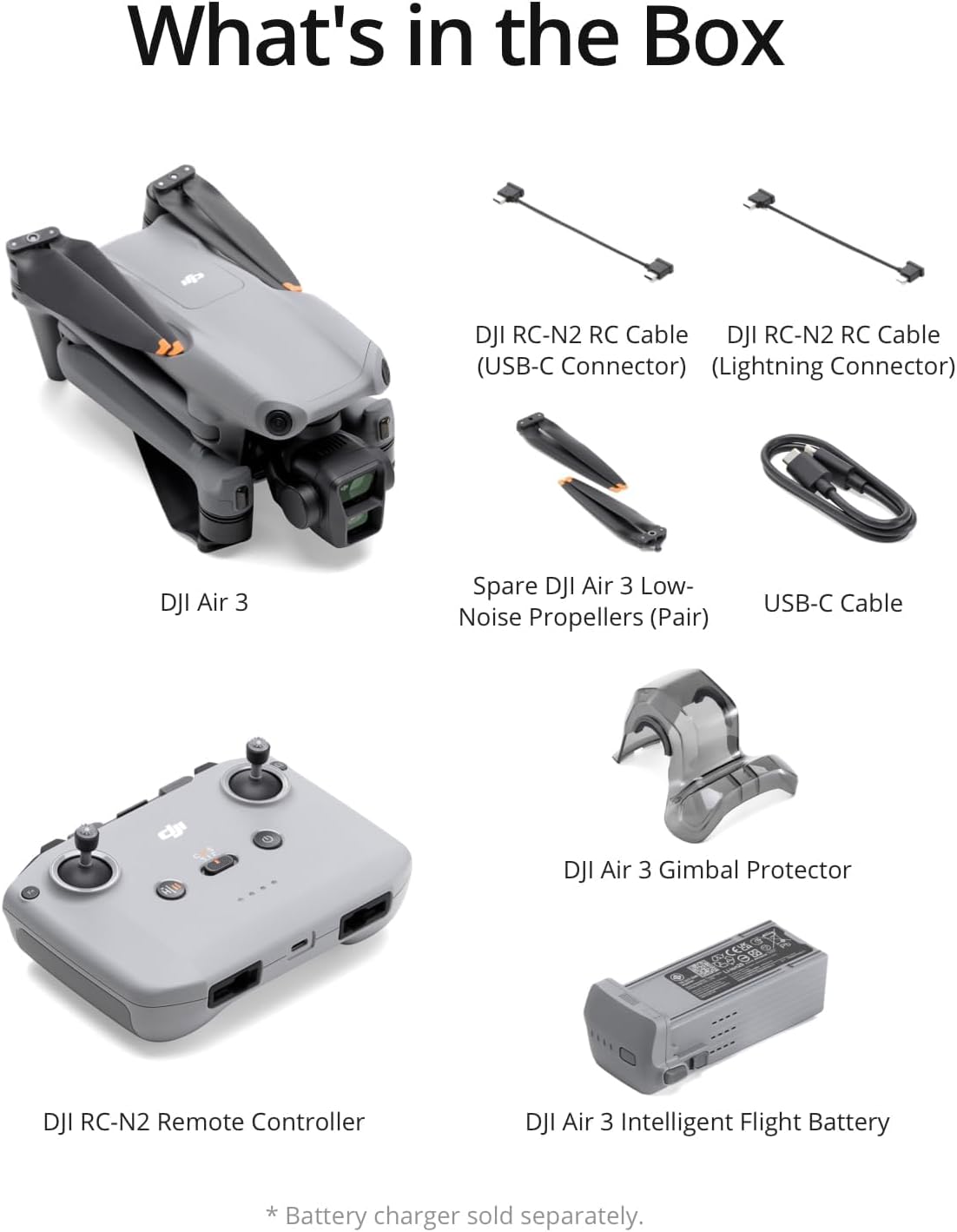
Image: A visual representation of all items included in the DJI Air 3 (DJI RC-N2) standard package, neatly laid out. This includes the drone, remote controller, cables, battery, propellers, gimbal protector, and USB-C cable.
3. Setup Guide
3.1. Charging the Battery
Before first use, fully charge the Intelligent Flight Battery and the remote controller. Connect the USB Type-C cable to a compatible charger (sold separately) and then to the drone's battery port or the remote controller's charging port.
3.2. Installing Propellers
Attach the propellers to the motor mounts. Match the marked propellers (e.g., with a grey ring) to the marked motor mounts, and the unmarked propellers to the unmarked motor mounts. Press down and twist to secure.
3.3. Activating the Aircraft
The DJI Air 3 must be activated via the DJI Fly app before use. Download the DJI Fly app from the official DJI website. Power on the drone and remote controller, then follow the on-screen instructions in the app to complete activation.
3.4. Remote Controller Connection
Connect your mobile device to the DJI RC-N2 remote controller using the appropriate RC cable (USB-C or Lightning). Ensure the DJI Fly app is running on your mobile device.
4. Operating Instructions
4.1. Pre-Flight Checklist
- Ensure all batteries (drone and remote controller) are fully charged.
- Check that propellers are securely attached and undamaged.
- Verify the gimbal protector is removed.
- Confirm sufficient storage space on the microSD card (not included).
- Check GPS signal strength and home point recording in the DJI Fly app.
- Review local flight regulations and ensure compliance.
4.2. Taking Off and Landing
Automatic Takeoff: In the DJI Fly app, tap the takeoff icon and confirm. The drone will automatically take off and hover at a safe altitude.
Manual Takeoff: Push both control sticks simultaneously to the bottom inner or outer corners to start the motors. Slowly push the left stick up to ascend.
Automatic Landing: In the DJI Fly app, tap the landing icon and confirm. The drone will automatically land at its current position or return to the recorded home point.
Manual Landing: Slowly pull the left stick down to descend. Once landed, pull both sticks to the bottom inner or outer corners to stop the motors.
4.3. Flight Controls (Mode 2)
| Control Stick | Movement | Drone Action |
|---|---|---|
| Left Stick | Up/Down | Ascend/Descend |
| Left Stick | Left/Right | Yaw (Rotate) Left/Right |
| Right Stick | Up/Down | Pitch (Move) Forward/Backward |
| Right Stick | Left/Right | Roll (Move) Left/Right |
5. Key Features
5.1. Dual Primary Cameras
The DJI Air 3 features a dual-camera system, including a wide-angle camera and a 3x medium tele camera. Both cameras utilize a 1/1.3-inch CMOS sensor, ensuring consistent performance and image quality across focal lengths.
- Wide-Angle Camera: 24 mm Format Equivalent, f/1.7 Aperture. Ideal for sweeping landscape shots.
- 3x Medium Tele Camera: 70 mm Format Equivalent, f/2.8 Aperture. Provides a more compressed perspective, excellent for highlighting subjects or achieving cinematic compositions.

Image: Close-up view of the DJI Air 3's dual camera module, highlighting the 3x Medium Tele Camera (70mm, f/2.8) and the Wide-Angle Camera (24mm, f/1.7). This illustrates the distinct lenses for varied photographic needs.

Image: A split image demonstrating the difference between a wide-angle shot and a 3x medium telephoto shot from the DJI Air 3, showcasing how the telephoto lens can dramatically highlight a subject.
5.2. Imaging Capabilities
- 48MP Photos: Capture stunning 48-megapixel images with both cameras, allowing for significant cropping and resizing without loss of detail.
- 4K/60fps HDR Video: Record immersive 4K/60fps HDR videos. Both cameras support dual native ISO and 10-bit D-Log M and 10-bit HLG color modes for rich detail in various lighting conditions.
- 2.7K Vertical Shooting: Supports 2.7K vertical shooting, optimized for social media platforms.

Image: A breathtaking landscape photo of snow-capped mountains and a lake, demonstrating the rich detail captured by the DJI Air 3's 48MP camera.

Image: A drone shot capturing a person riding a horse through a scenic landscape, illustrating the vivid colors and details possible with 4K/60fps HDR video recording.
5.3. Enhanced Safety and Flight Performance
- Omnidirectional Obstacle Sensing: Equipped with advanced omnidirectional obstacle detection and smooth bypassing with APAS 5.0, providing comprehensive protection and safer flights, even in complex environments.
- Extended Flight Time: Offers up to 46 minutes of maximum flight time, allowing for longer exploration and capture sessions.
- O4 Video Transmission: The O4 video transmission system provides a maximum range of 20 km and a stable 1080p/60fps live feed for ultra-smooth viewing and operation.
- New Power Accumulation Function: Long press the function button on the battery charging hub to transfer remaining power from batteries with lower charge to the battery with the highest remaining power.

Image: The DJI Air 3 drone flying with visual indicators of its omnidirectional obstacle sensing capabilities, demonstrating its ability to detect and avoid obstacles from all directions.

Image: A person inserting the Intelligent Flight Battery into the DJI Air 3 drone, illustrating the ease of battery installation and highlighting the drone's impressive 46-minute max flight time.

Image: The DJI Air 3 battery charging hub with three batteries, showing an arrow indicating the power accumulation function where charge is transferred from lower-power batteries to the highest-power one.

Image: A person holding the DJI RC-N2 remote controller with a mobile device attached, displaying a live feed from the drone and indicating a 20km transmission range, emphasizing the O4 video transmission system.
5.4. Intelligent Flight Modes
The DJI Air 3 offers various intelligent flight modes to enhance your creative possibilities:
- FocusTrack: Includes Spotlight 2.0, ActiveTrack 5.0, and Point of Interest 3.0 for intelligent subject tracking.
- QuickShots: Automated flight patterns like Dronie, Helix, Rocket, Boomerang, and Circle for cinematic shots with ease.
- MasterShots: Automatically performs diverse drone movements while recording, then edits the footage with music and effects.
- Hyperlapse: Create stunning time-lapse videos with various modes (Free, Circle, Course Lock, Waypoint).
- Waypoint Flight: Plan flight routes and actions in advance for precise, repeatable flights.
6. Maintenance
6.1. Cleaning
- Wipe the drone body with a soft, clean cloth.
- Clean camera lenses with a lens cleaning cloth and solution.
- Ensure no dust or debris is in the motor areas.
6.2. Propeller Inspection
Regularly inspect propellers for cracks, bends, or damage. Replace any damaged propellers immediately using the spare pairs provided or genuine DJI replacements.
6.3. Battery Care
- Store batteries at approximately 50-60% charge if not used for extended periods.
- Avoid overcharging or completely draining batteries.
- Do not connect the charger, external devices, or insert/remove any batteries when using the power accumulation function.
6.4. Firmware Updates
Keep your drone and remote controller firmware updated via the DJI Fly app to ensure optimal performance, new features (like Vision Assist and ActiveShots 360°), and improved safety.
7. Troubleshooting
| Problem | Possible Cause | Solution |
|---|---|---|
| Drone does not power on. | Battery not charged or improperly inserted. | Ensure battery is fully charged and correctly inserted. Press power button once, then press and hold for two seconds. |
| No video feed from drone. | Poor connection, app issue, or gimbal protector still on. | Check cable connection, restart app/drone/RC, remove gimbal protector. Ensure strong signal. |
| Drone drifts during flight. | GPS signal weak, compass interference, or IMU calibration needed. | Fly in open area with strong GPS. Calibrate compass and IMU via DJI Fly app if prompted. |
| Obstacle avoidance not working. | Obstacle avoidance disabled in app or sensors are dirty/blocked. | Enable obstacle avoidance in DJI Fly app (set to Bypass). Clean sensors. Avoid flying in extremely complex environments that exceed sensor capabilities. |
| DJI Fly app not available on Google Play. | Platform compatibility issue. | Download the latest version of the DJI Fly app directly from the official DJI website. |
For more detailed troubleshooting, please refer to the official DJI Air 3 Troubleshooting Guide (PDF) available on the DJI website or through the product's Amazon page under "Product guides and documents."
8. Specifications
| Feature | Detail |
|---|---|
| Brand | DJI |
| Model Name | EB3WBC |
| Item Model Number | CP.MA.00000691.04 |
| Item Weight | 720 Grams (1.59 pounds) |
| Product Dimensions | 0.85"L x 1.06"W x 0.35"H |
| Max Flight Time | 46 Minutes |
| Video Capture Resolution | 4K (4K/60fps HDR) |
| Effective Still Resolution | 48 MP |
| Connectivity Technology | Bluetooth, Wi-Fi |
| Control Type | Remote Control |
| Media Type | Micro SD |
| Maximum Range | 20 Kilometers (O4 Transmission) |
| Obstacle Sensing | Omnidirectional |
| Battery Type | Lithium Ion |
| Optical Sensor Technology | CMOS (1/1.3-inch for both cameras) |
| UPC | 190021089006 |

Image: An infographic displaying key performance metrics of the DJI Air 3, including Max Takeoff Altitude (6000m), Max Wind Speed Resistance (12m/s), and Max Flight Time (46-Min).

Image: A comparison table outlining specifications for various DJI drone models, including DJI Air 3, DJI Mini 4 Pro, DJI Mini 3 Pro, and DJI Air 2S, highlighting differences in weight, flight time, cameras, video resolution, transmission distance, and obstacle sensing.
9. Warranty and Support
9.1. Official Warranty
DJI provides an official warranty for the Air 3. For detailed warranty terms and conditions, please refer to the official DJI website or the warranty card included with your product. Keep your proof of purchase for warranty claims.
9.2. Customer Support
For technical assistance, troubleshooting, or service inquiries, please contact DJI Customer Support through their official website. You can also find additional resources, FAQs, and the latest user guides in PDF format on the DJI support page.
- User Guide (PDF): Download User Guide
- Troubleshooting Guide (PDF): Download Troubleshooting Guide
- Safety Information (PDF): Download Safety Information
- Certificate of Compliance (PDF): Download Certificate of Compliance
Consider purchasing DJI Care Refresh for comprehensive protection and replacement services for your drone.


