
1. Product Overview
The XTRONS 10.25 Inch IPS Touch Screen Car Stereo is an advanced in-car entertainment and navigation system designed for select BMW models. It integrates seamlessly with your vehicle's existing systems while offering modern Android 13 functionalities, including GPS navigation, multimedia playback, and smartphone integration.

Image: The XTRONS car stereo unit showcasing its intuitive main menu interface.
2. Applicable Models and Years
This car stereo unit is specifically designed for Left Driving Vehicles with NBT System. Please verify your vehicle's system before installation.
- For BMW 3 Series F30 / F31 / F34 / F35 (2013, 2014, 2015, 2016, 2017)
- For BMW 4 Series F32 / F33 / F36 (2013, 2014, 2015, 2016, 2017)
- For BMW M3 F80 F81 (2013-2019)
- For BMW M4 F82 F83 (2013-2019)
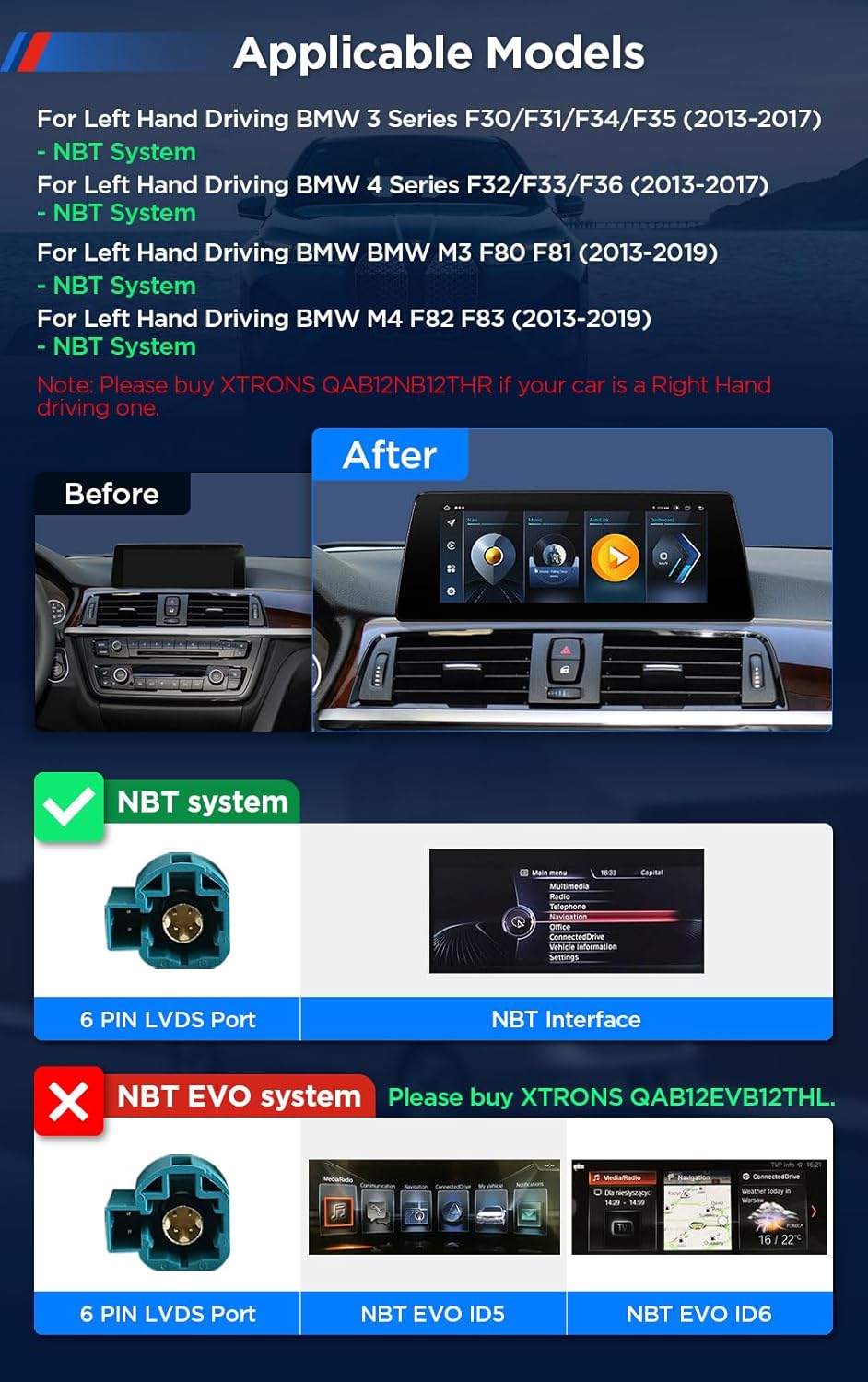
Image: Visual guide for applicable BMW models and NBT system identification.
3. Key Features
The XTRONS car stereo boasts a range of features designed to enhance your driving experience:
- Latest Android 13: Octa-core processor with 8GB DDR4 RAM and 128GB Solid State ROM for responsive performance.
- 10.25” 1920x720 Full Laminated Screen: Provides a supersized entertainment experience with clear visuals.
- IPS Panel, 178° Viewing Angle: Ensures comfortable viewing from various angles without eye fatigue.
- 2K Video Playback: Supports high-resolution video formats.
- Wireless CarPlay & Wireless/Wired Android Auto: Seamless smartphone integration for navigation, calls, and music.
- Built-in DSP: Advanced digital sound processing for a customizable audio experience.
- Bluetooth 5.1: Stable connections for hands-free calls and music streaming.
- Dual Wi-Fi Band (2.4GHz/5GHz): Faster internet speeds and flexible connectivity.
- Split-Screen & PIP Mode: Multitask by running two applications simultaneously or watching videos in Picture-in-Picture mode.
- Global 4G LTE Solution: Integrated SIM card slot for direct internet access without external dongles.

Image: A summary of the stereo's core technical specifications and capabilities.
Feature Demonstration Video
Video: An official XTRONS video demonstrating various features of the car stereo, including its display quality, 4G LTE network access, Wireless CarPlay and Android Auto, built-in DSP, Bluetooth 5.1, GPS navigation, UI themes, dual-band WiFi, USB tethering, PIP mode, multi-window view, DAB+ tuner readiness, and OBD2 support.
4. What's in the Box
Upon unboxing, ensure all the following components are present:
- 1 × ISO Wiring Harness
- 1 × Audio Cable
- 1 × 4G Antenna
- 1 × USB Cable
- 1 × GPS Antenna
- 1 × Tweezers
- 1 × User Manual (this document)
- 1 × Installation Instructions

Image: A visual representation of all items included in the product package.
5. Installation Guide
Proper installation is crucial for optimal performance. Refer to the dedicated "Installation Instructions" document included in your package for detailed steps. Below is an overview of the wiring harness connections:
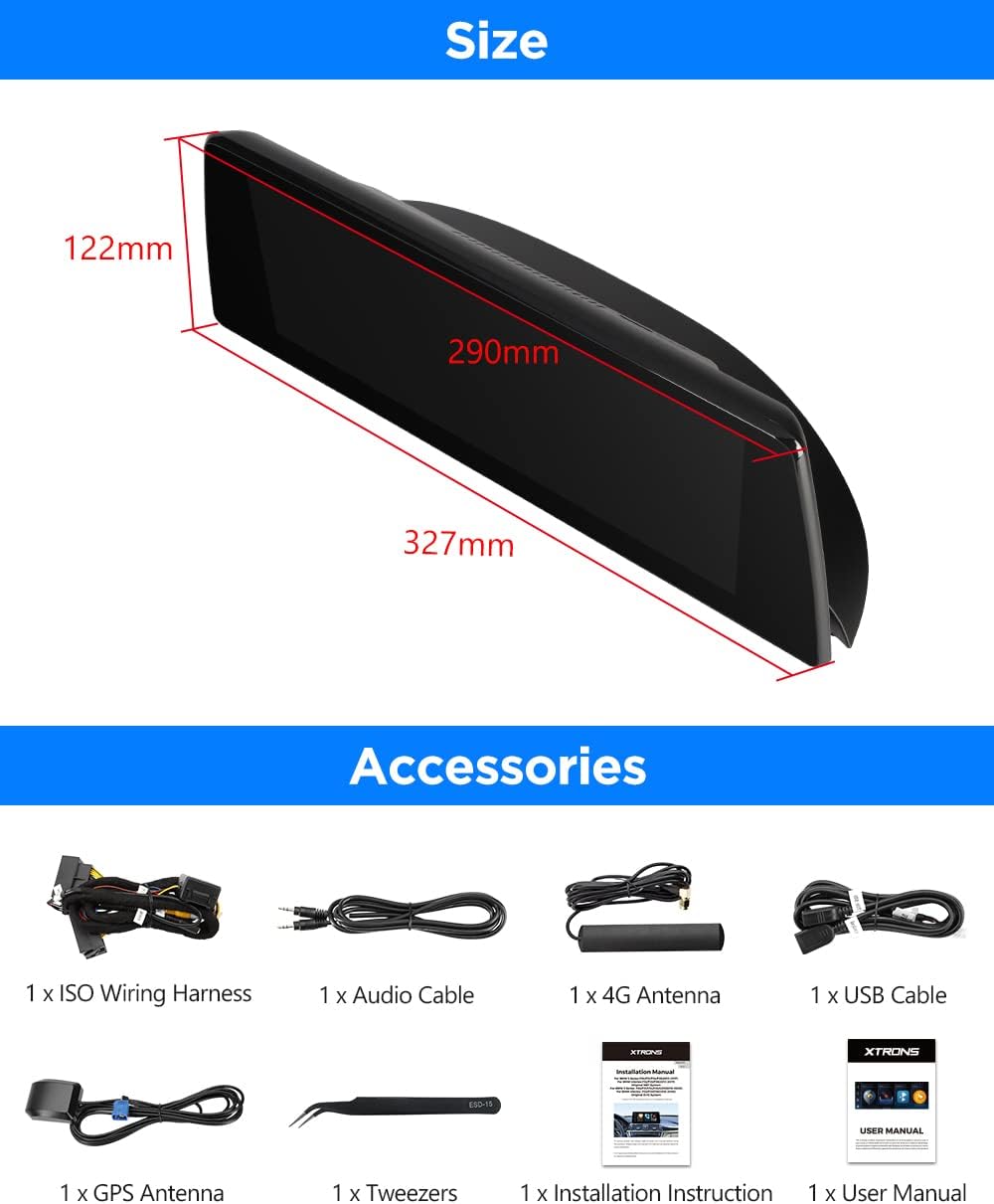
Image: Comprehensive wiring diagram for the XTRONS car stereo.
Physical Installation
The unit is designed to integrate seamlessly into your BMW's dashboard. Ensure all cables are securely connected and routed to avoid interference. The dimensions of the unit are approximately 327mm (length) x 290mm (width) x 122mm (height).
6. Operating Instructions
Retaining Original Car Functions
The XTRONS unit is engineered to retain your vehicle's original functions, including the iDrive system control, amplifier system, Bluetooth, original radio, original CD player, and backup camera display. This ensures a familiar user experience while upgrading your infotainment capabilities.

Image: Visuals confirming the retention of key original vehicle functionalities.
Wireless CarPlay and Android Auto
Connect your iPhone or Android smartphone wirelessly via Bluetooth (or wired for Android Auto) to access compatible apps directly on the large screen. This allows for safer operation of GPS, calls, music, and voice assistants like Siri or Google Assistant while driving.

Image: Demonstration of Wireless CarPlay and Android Auto integration.
Built-in Professional DSP
Enhance your audio experience with the built-in Digital Sound Processor (DSP). Customize sound settings with equalizer, filter, and delay options to achieve a cinematic audio effect tailored to your preferences.

Image: Overview of the DSP's audio customization capabilities.
User Interface Themes
Personalize your stereo's appearance with four available user interface themes, including XTRONS Q series special and BMW Style UI. Switch between themes with a simple touch to match your mood or vehicle interior.

Image: Examples of the customizable UI themes.
Connectivity and Multitasking
Leverage the dual Wi-Fi band for fast internet access. Utilize USB tethering to get the unit online by connecting your smartphone. The system also supports split-screen and Picture-in-Picture (PIP) modes, allowing you to run multiple applications simultaneously, such as navigation while listening to music or watching a video.
7. Troubleshooting
For common issues, refer to the dedicated troubleshooting section in the included "Installation Instructions" document. The unit supports OBD2 functionality (optional accessory required) to retrieve real-time data and trouble codes from your vehicle's computer, aiding in diagnostics.
If you encounter persistent issues, please contact XTRONS customer support.
8. Specifications
| Feature | Detail |
|---|---|
| Operating System | Android 13 |
| Processor | Octa-core (Cortex-A75 up to 2.0GHz) |
| RAM | 8GB DDR4 |
| ROM | 128GB SSD |
| Screen Size | 10.25 Inches |
| Screen Resolution | 1920x720 HD |
| Panel Type | IPS |
| Connectivity | Bluetooth 5.1, Dual-band Wi-Fi (2.4GHz/5GHz), 4G LTE |
| Special Features | Touchscreen, Built-in DSP, Wireless CarPlay, Wireless/Wired Android Auto, Split-Screen, PIP Mode |
| Mounting Type | Dashboard Mount |
| Audio Output Mode | Stereo |
9. Warranty and Support
XTRONS products are designed for reliability and performance. For warranty information and technical support, please refer to the official XTRONS website or contact their customer service directly. Keep your purchase receipt for warranty claims.
For additional accessories like OBD functions, TPMS, external DVR, or cameras, please search for the respective ASINs mentioned in the product description on Amazon.com.