
FEELWORLD 4K12X-OF-US
Contents
FEELWORLD 4K12X PTZ Camera User Manual
Model: 4K12X-OF-US
1. Introduction
The FEELWORLD 4K12X PTZ Camera is a professional-grade camera designed for high-quality video capture in various environments, including live streaming, church services, video conferences, and educational settings. It features 4K resolution, 12X optical zoom, AI auto-tracking, and multiple output interfaces for versatile connectivity. This manual provides detailed instructions for setting up, operating, and maintaining your 4K12X PTZ camera.


2. Setup
2.1 Package Contents
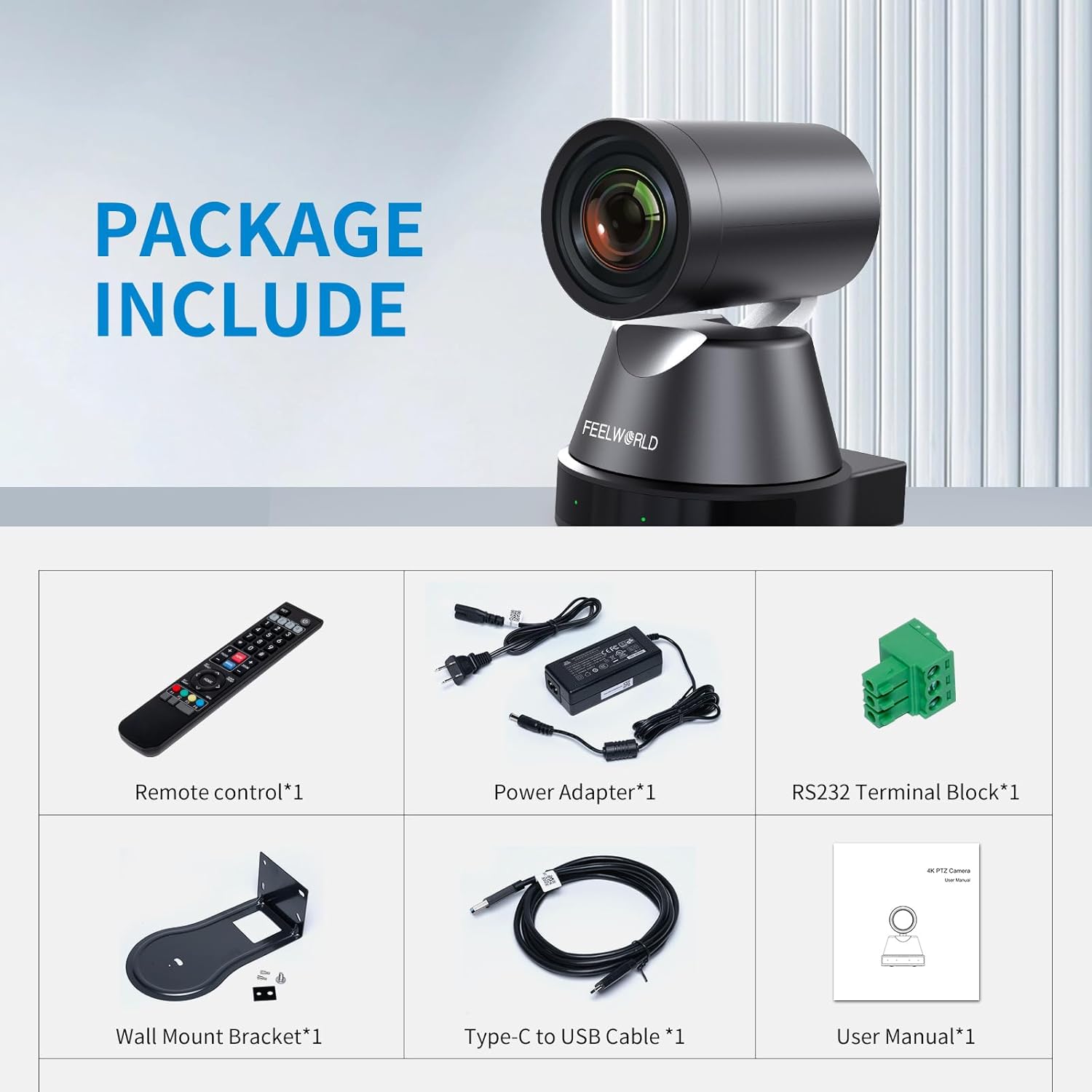
Before beginning setup, please verify that all items are present in the package:
- 1x Remote control
- 1x Power Adapter
- 1x USB3.0 Cable
- 1x RS232 Control Cable
- 1x User Manual
- 1x Wall Mount Bracket (if included in your specific package)
- 1x Type-C to USB Cable (if included in your specific package)
2.2 Physical Installation
The 4K12X PTZ camera can be installed in various configurations:
- Desktop Placement: Place the camera on a stable, flat surface.
- Tripod Mounting: Secure the camera to a standard tripod using the integrated mounting point.
- Wall Mounting: Utilize the provided wall mount bracket (if included) to securely attach the camera to a wall. Ensure the wall can support the camera's weight.

2.3 Connectivity
The 4K12X PTZ camera offers multiple connectivity options for video output, control, and power.
- USB: Connect to a computer for video and control.
- HDMI: Output high-definition video to a monitor or video switcher.
- RS232: For serial control from a PTZ controller.
- LINE IN: Audio input.
- LAN (Ethernet/PoE): For IP streaming, network control, and Power over Ethernet (PoE).
- DC 12V: For external power supply if PoE is not used.

Power over Ethernet (PoE)
The 4K12X supports PoE, allowing both power and network data to be transmitted over a single Ethernet cable.
- PoE devices must comply with the IEEE802.3af/at standard.
- The PoE output voltage range is 44-57V.
- The output voltage of the PoE switcher should be above 48V.
- For network cable, CAT5A is suggested, but CAT6A cable is better for optimal performance.

3. Operating Instructions
3.1 Key Features
- 4K 12X Optical Zoom: The camera features a high-quality lens with 12X optical zoom, providing clear images even from long distances.
- AI Auto Tracking: Advanced AI technology automatically tracks subjects, keeping them in focus within the frame.
- Pan/Tilt Control: Offers smooth and precise pan (340°) and tilt (60°) control for capturing various angles.
- Multi Output Interface: Supports HDMI and IP streaming for flexible integration with monitors, recording devices, or streaming platforms.
- IP Live Streaming: Stream video directly over the internet without additional equipment, ideal for online broadcasts and webinars.
- Preset Positions: Save and recall specific camera angles and settings with a single button press.


3.2 Control Options
The 4K12X PTZ camera can be controlled using several methods:
- IR Remote Controller: Included with the camera for basic functions like camera selection, preset recall, zoom/focus, and pan/tilt.
- IP Joystick (e.g., FEELWORLD KBC10): For professional, precise control over pan, tilt, and zoom.
- Web Browser: Access the camera's settings and control interface via a web browser over the IP network.
- Video Switcher (e.g., FEELWORLD L2 PLUS): Integrate the camera into a multi-camera setup and control it directly from the switcher.

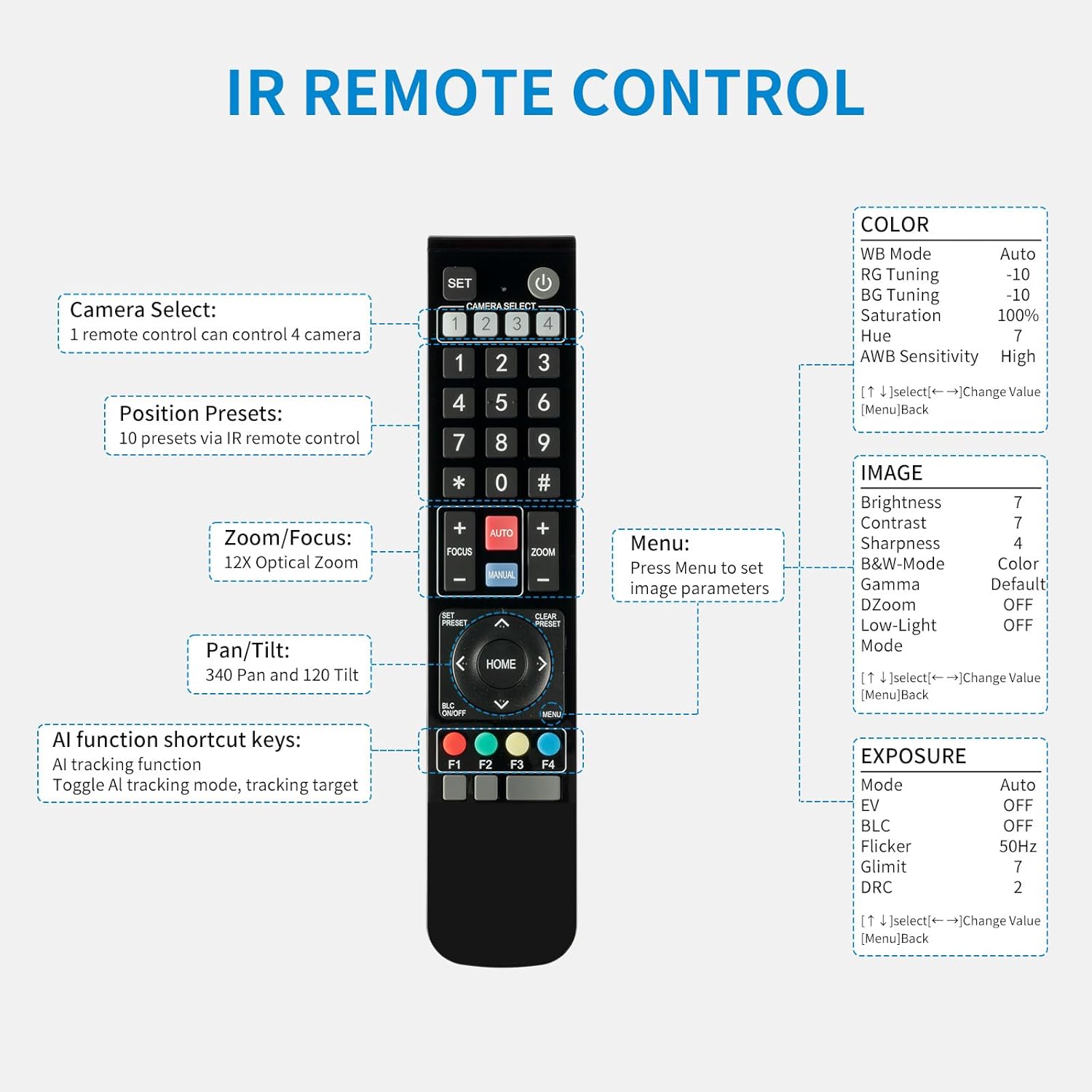
IR Remote Control Functions
The included IR remote control allows for convenient operation of the camera.
- Camera Select: One remote can control up to 4 cameras.
- Position Presets: Store and recall up to 10 preset positions.
- Zoom/Focus: Control 12X optical zoom and focus manually or automatically.
- Pan/Tilt: Adjust camera direction (340° Pan and 120° Tilt).
- AI Function Shortcut Keys: Activate AI tracking and toggle tracking targets.
- Menu: Access camera settings for color, image, and exposure parameters.

3.3 Live Streaming and Multi-Camera Solutions
The 4K12X PTZ camera is designed for seamless integration into live streaming workflows.

The camera supports RTSP/RTMP/SRT protocols for 4K streaming. You can configure streaming parameters via the web interface.

3.4 Official Product Video
Watch this official video from FEELWORLD demonstrating the preset positions feature of the 4K12X PTZ Camera.
Video 1: FEELWORLD 4K12X Camera Supports Preset Positions. This video demonstrates how to utilize the preset position feature for efficient camera operation.
4. Maintenance
- Cleaning: Use a soft, dry cloth to clean the camera body. For the lens, use a specialized lens cleaning cloth and solution. Avoid abrasive materials or harsh chemicals.
- Storage: When not in use, store the camera in a cool, dry place away from direct sunlight and excessive dust.
- Firmware Updates: Periodically check the FEELWORLD official website for any available firmware updates to ensure optimal performance and access to new features.
- Cable Management: Ensure all cables are properly routed and secured to prevent damage or accidental disconnections.
5. Troubleshooting
| Problem | Possible Cause | Solution |
|---|---|---|
| USB connection not working. | Loose cable connection, driver issue, or incompatible USB port. | Ensure USB cable is securely connected. Try a different USB port on your computer. Install or update necessary drivers from the FEELWORLD website. |
| AI Auto Tracking is not functioning correctly. | Poor lighting conditions, subject too far/close, or tracking feature not activated. | Ensure adequate lighting. Verify subject is within optimal tracking range. Activate AI tracking using the remote or web interface. |
| No video output via HDMI. | HDMI cable issue, incorrect input selection on display, or camera not powered on. | Check HDMI cable connection. Ensure display is set to the correct HDMI input. Confirm camera is powered on. |
| Cannot access web interface. | Incorrect IP address, network configuration issue, or firewall blocking access. | Verify the camera's IP address. Check network cable connection. Temporarily disable firewall or add an exception for the camera's IP address. |
6. Specifications
| Feature | Detail |
|---|---|
| Brand | FEELWORLD |
| Model Number | 4K12X-OF-US |
| Item Weight | 5.33 pounds |
| Package Dimensions | 13.78 x 10.12 x 7.44 inches |
| Photo Sensor Technology | CMOS |
| Video Capture Resolution | 4K |
| Maximum Focal Length | 15 Millimeters |
| Maximum Aperture | 2 f |
| Flash Memory Type | SD (Note: This might refer to SD card slot for recording, or a general memory type. Clarify with manufacturer if needed.) |
| Video Capture Format | 4k 30 |
| Supported Audio Format | AAC |
| Screen Size | 2.7 Inches (Note: This might refer to a small display on the camera or a related product. The camera itself doesn't have a large screen.) |
| Connectivity Technology | USB, HDMI |
| Special Features | Low Light |
| First Available Date | June 8, 2023 |
7. Warranty and Support
7.1 Product Warranty
For detailed information regarding the product warranty, please refer to the warranty card included with your purchase or visit the official FEELWORLD website. Warranty terms and conditions may vary by region and retailer.
7.2 Customer Support
If you encounter any issues or have questions regarding your FEELWORLD 4K12X PTZ Camera, please contact FEELWORLD customer support. You can typically find contact information on the official FEELWORLD website or through your product's documentation.
Online Resources:
- Visit the FEELWORLD Store on Amazon for product information and updates.
- Check the official FEELWORLD website for the latest drivers, firmware, and FAQs.
Ask a question about this manual
Ask about setup, troubleshooting, compatibility, parts, safety, or missing instructions. Manuals+ will review the question and use this page’s manual context to help answer it.