
1. Introduction
This manual provides detailed instructions for the installation, operation, and maintenance of your Alpine PXE-C80-88 8-Channel Hi-Res Amplifier with Automatic Digital Signal Processing. Please read this manual thoroughly before using the product to ensure proper functionality and to prevent damage.
Key Features:
- 8-channel amplifier with High-Resolution Class D technology.
- Digital signal processing with a 96 kHz, 24-bit resolution.
- Automatic tuning via iPhone or PC, with built-in mic or external measurement microphone.
- Versatile input options, including coaxial, USB, high-level speaker, and RCA.
- Compact dimensions of 8.82"W x 2.14"H x 10.43"D for easy installation.

2. Setup and Installation
Proper installation is crucial for optimal performance. It is recommended that installation be performed by a qualified professional.
2.1 Unpacking
Carefully unpack all components and verify that all items listed in the "What's in the Box" section are present. Retain all packaging materials for future use or shipping.
- PXE-C80-88 Amplifier Unit
- Wiring Harnesses
- Mounting Hardware
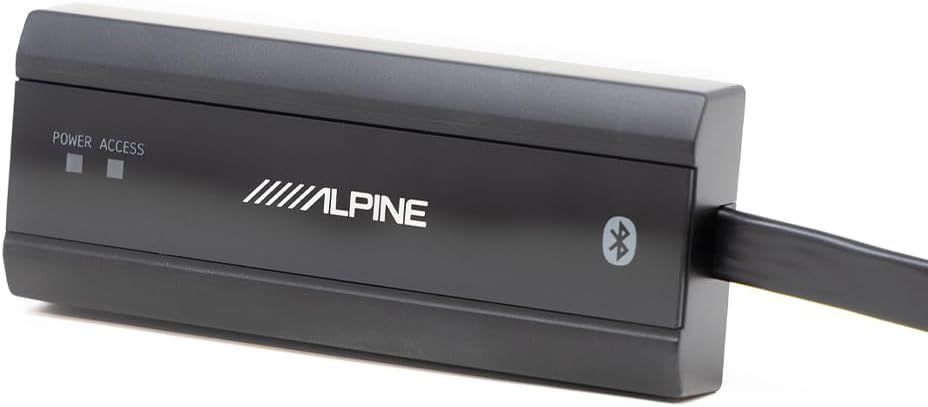
- External Bluetooth Module (if included)
- Remote Controller (if included)

2.2 Mounting Location
Choose a mounting location that is dry, well-ventilated, and away from direct sunlight or excessive heat. Ensure sufficient space for wiring connections and proper air circulation around the unit.
2.3 Wiring Connections
Refer to the diagrams below for proper wiring connections. Ensure all connections are secure to prevent intermittent operation or damage.
Power Connections:
- BATT (Battery): Connect to the positive (+) terminal of the vehicle's battery. Use appropriate gauge wire and an inline fuse (40A recommended).
- GND (Ground): Connect to a clean, unpainted metal surface of the vehicle chassis.
- ACC (Accessory): Connect to a switched 12V source that turns on with the vehicle's ignition.
Input Connections:
The PXE-C80-88 supports multiple input types:
- RCA Inputs (1-6): For low-level audio signals from a head unit or other source.
- High-Level Speaker Inputs (H1+ to H8-): For connecting directly to speaker outputs from a factory or aftermarket head unit.
- Coaxial Input: For digital audio input.
- USB Input: For connecting to a PC for tuning and firmware updates.
- MIC Input: For connecting the measurement microphone for automatic tuning.


Output Connections:
The amplifier provides 8 output channels for speakers and subwoofers.
- OUTPUT 1-6: Speaker outputs for main channels.
- OUTPUT 7 (SUB W.1) & OUTPUT 8 (SUB W.2): Dedicated subwoofer outputs.


2.4 External Modules
Connect the external Bluetooth module and remote controller as per the provided instructions for enhanced control and connectivity.

3. Operation
The Alpine PXE-C80-88 features advanced digital signal processing and automatic tuning capabilities to optimize your audio experience.
3.1 Initial Power On
After all connections are made, turn on your vehicle's ignition. The amplifier should power on, indicated by the power LED. If the LED does not illuminate, refer to the Troubleshooting section.
3.2 Automatic Tuning (via iPhone or PC)
The PXE-C80-88 offers automatic sound tuning using a dedicated application on your iPhone or PC. This process uses a measurement microphone (either built-in to the iPhone or an external microphone for PC) to analyze the acoustic environment of your vehicle and optimize the amplifier's settings.
- Download the Alpine tuning application for your device (iOS or PC).
- Connect your device to the amplifier (via USB for PC, or Bluetooth for iPhone if the external module is used).
- Follow the on-screen instructions within the application to perform the automatic tuning process. This typically involves placing the microphone in the listening position and playing test tones.
- The application will measure and adjust parameters such as equalization, time alignment, and crossover settings for optimal sound.

3.3 Manual Adjustments
After automatic tuning, you can make manual adjustments using the PC application or the optional remote controller (RUX-ESP1) to fine-tune the sound to your personal preferences. This includes adjusting individual channel levels, equalization, and crossover points.
4. Maintenance
Regular maintenance ensures the longevity and optimal performance of your amplifier.
- Cleaning: Use a soft, dry cloth to clean the exterior of the amplifier. Do not use harsh chemicals or abrasive cleaners.
- Ventilation: Ensure that the amplifier's ventilation openings are not blocked. Proper airflow is essential to prevent overheating.
- Connections: Periodically check all wiring connections to ensure they are secure and free from corrosion.
- Fuse Replacement: If the amplifier does not power on, check the inline fuse. Replace it with a fuse of the same type and rating (40A).
5. Troubleshooting
If you encounter issues with your Alpine PXE-C80-88, refer to the following common problems and solutions:
5.1 No Power
- Check Power Connections: Ensure the BATT, GND, and ACC wires are securely connected and receiving proper voltage.
- Check Fuse: Verify the 40A fuse is intact. Replace if blown.
- Vehicle Battery: Ensure the vehicle battery has sufficient charge.
5.2 No Sound Output
- Input Source: Confirm the audio source (head unit, etc.) is functioning and sending a signal to the amplifier.
- Speaker Connections: Check all speaker wiring for proper polarity and secure connections.
- Amplifier Settings: Verify that the amplifier's volume levels are not set to minimum and that input/output routing is correctly configured in the tuning application.
- Mute Function: Ensure the amplifier is not in mute mode.
5.3 Distorted Sound
- Input Level: Adjust the input gain settings to prevent clipping.
- Speaker Impedance: Ensure speakers are compatible with the amplifier's output impedance.
- Ground Loop: Check for proper grounding to eliminate hum or noise.
- Tuning Settings: Re-run the automatic tuning process or adjust EQ settings manually.
5.4 Remote Controller Display Not Working
- Connection: Ensure the remote controller cable is securely connected to the amplifier.
- Power: Verify the amplifier is powered on.
- Software/Firmware: Ensure the amplifier and remote controller have the latest compatible firmware.
5.5 Software/App Issues
- Compatibility: Ensure your device (iPhone/PC) meets the minimum system requirements for the Alpine tuning application.
- Updates: Check for updates to the tuning application and amplifier firmware.
- Reinstallation: Try reinstalling the application.
- Connectivity: Verify USB or Bluetooth connection is stable.
6. Specifications
| Feature | Specification |
|---|---|
| Model Number | PXE-C80-88 |
| Brand | Alpine |
| Number of Channels | 8 |
| Output Power | 300 Watts (Total, specific per channel not provided) |
| Digital Signal Processing | 96 kHz, 24-bit resolution |
| Voltage | 12 Volts (DC) |
| Maximum Supply Voltage | 30 Volts (DC) |
| Mounting Type | Surface Mount |
| Product Dimensions (L x W x H) | 12 x 11.5 x 5 inches |
| Item Weight | 7.8 pounds |
| Specification Met | FCC, Hi-Res Audio Certified |
| UPC | 793276085207 |
7. Warranty and Support
For warranty information and technical support, please refer to the official Alpine website or contact Alpine customer service directly. Keep your purchase receipt as proof of purchase for warranty claims.
Manufacturer: Alpine
Website: www.alpine-usa.com (Example link, actual link may vary)


