
1. Product Overview
The Dayton Audio Signature Series SIG120-4 is a 4-inch extended range woofer designed for high-fidelity audio applications. It features an open aluminum cast frame, an anodized aluminum cone, and a polyimide former, engineered to provide extended frequency response with minimal distortion. This driver is suitable for various DIY speaker designs and audio system upgrades.
Key Features:
- Extended Frequency Range: Operates from 75 Hz to 8,500 Hz for clear audio reproduction.
- Durable Construction: Features an aluminum cone and cast aluminum basket for longevity and reduced distortion.
- Power Handling: Capable of handling up to 40W RMS and 80W peak power.
- Flush Mount Design: Facilitates easy integration into speaker enclosures or surfaces.
- Optimized for DIY: Engineered for enthusiasts seeking high performance at an accessible price point.
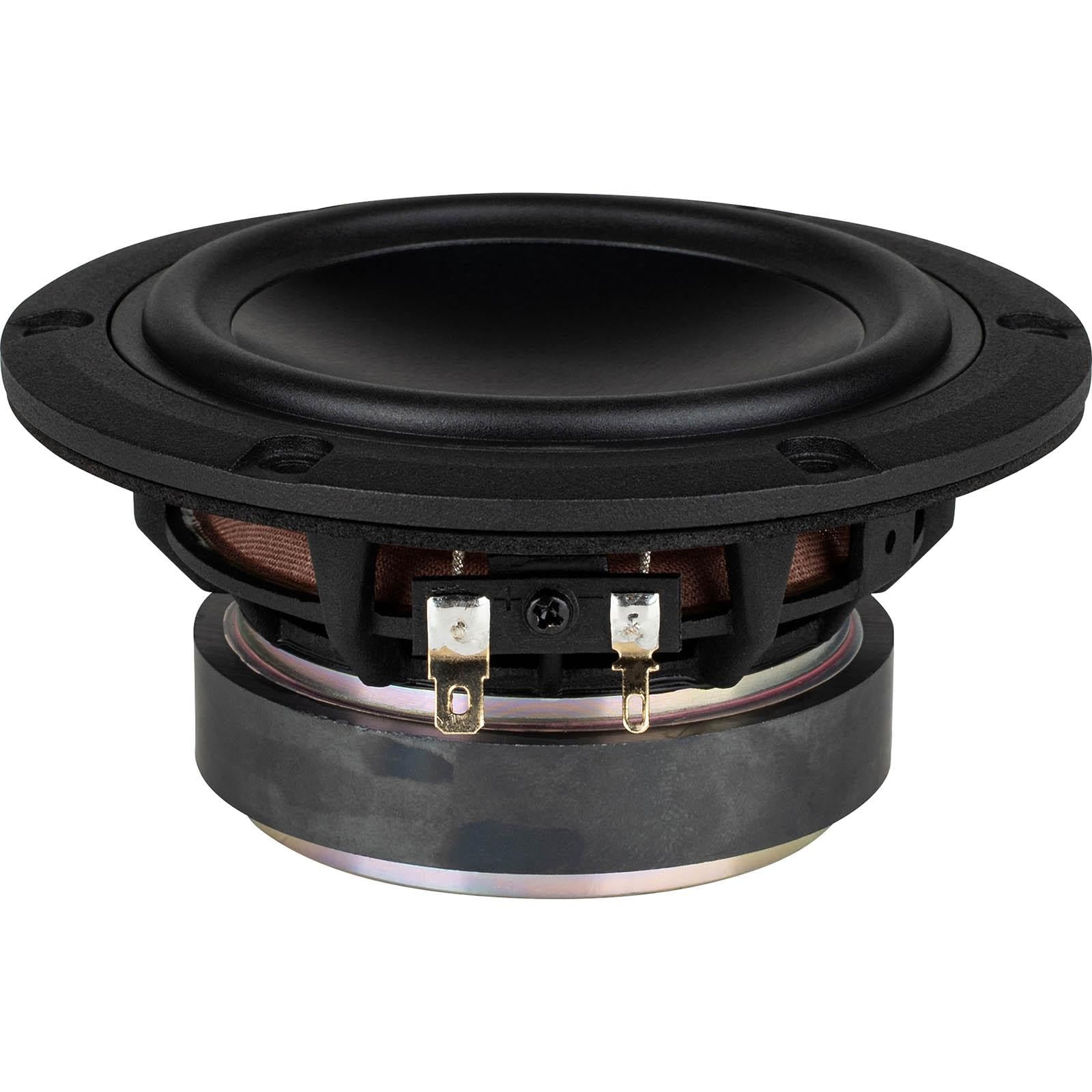
2. Setup and Installation
Proper installation is crucial for optimal performance and longevity of your Dayton Audio SIG120-4 woofer. This section outlines the general steps for integrating the driver into your speaker system.
2.1 Unpacking
Carefully remove the woofer from its packaging. Inspect the driver for any signs of damage during transit. Retain the packaging for future storage or transport.
2.2 Mounting
The SIG120-4 features a flush mount design. Ensure your speaker enclosure or mounting surface has a cutout of the appropriate diameter. Use suitable fasteners (screws) to secure the woofer firmly to the baffle, ensuring an airtight seal to prevent air leaks that can degrade sound quality.

2.3 Wiring
Connect the speaker wires from your amplifier or crossover to the terminals on the back of the woofer. Observe correct polarity: connect the positive (+) terminal of the woofer to the positive output of your amplifier/crossover, and the negative (-) terminal of the woofer to the negative output. The SIG120-4 has a 4-ohm impedance.

2.4 Initial Testing
Before fully assembling your speaker system, perform a low-volume test to ensure all connections are correct and the woofer is functioning as expected. Listen for clear sound reproduction without distortion or buzzing.

3. Operating Instructions
The Dayton Audio SIG120-4 woofer is designed for reliable performance within its specified parameters. Adhering to these guidelines will ensure optimal sound quality and product longevity.
3.1 Power Handling
This woofer can handle up to 40 watts RMS (Root Mean Square) and 80 watts peak power. Avoid exceeding these limits to prevent damage to the voice coil and other components. Use an amplifier that matches the woofer's power handling capabilities.
3.2 Frequency Response
The SIG120-4 provides an extended frequency response from 75 Hz to 8,500 Hz. For full-range audio systems, it is recommended to use a crossover network to direct appropriate frequencies to this woofer and other drivers (e.g., tweeters) in your system.
3.3 Compatible Applications
This woofer is suitable for various audio applications, including home theater systems, gaming setups, and general multimedia consumption. Its design allows for integration into 5.1 channel audio systems.
4. Maintenance
Regular, simple maintenance can help preserve the performance and appearance of your Dayton Audio SIG120-4 woofer.
4.1 Cleaning
Use a soft, dry cloth to gently wipe dust from the cone and frame. Avoid using harsh chemicals, solvents, or abrasive materials, as these can damage the cone material or finish. Do not apply excessive pressure to the cone.
4.2 Environmental Conditions
Protect the woofer from direct sunlight, extreme temperatures, and high humidity. While the aluminum cone offers durability, prolonged exposure to adverse conditions can affect performance and material integrity. This product is not waterproof.
4.3 Inspection
Periodically inspect the woofer for any signs of wear, such as cracks in the surround or dust cap, or loose connections. Address any issues promptly to prevent further damage.
5. Troubleshooting
If you encounter issues with your Dayton Audio SIG120-4 woofer, refer to the following common troubleshooting steps.
5.1 No Sound
- Check Connections: Ensure all speaker wires are securely connected to both the woofer and the amplifier/crossover, and that polarity is correct.
- Verify Amplifier: Confirm that your amplifier is powered on and functioning correctly. Test with another speaker if possible.
- Crossover Settings: If using a crossover, ensure it is properly configured and sending signals to the woofer.
5.2 Distorted Sound
- Reduce Volume: Distortion often occurs when the amplifier or woofer is overdriven. Lower the volume to see if the distortion disappears.
- Check Power: Ensure your amplifier has sufficient power for the woofer and is not clipping.
- Inspect Woofer: Visually inspect the cone and surround for any physical damage or debris that might be causing interference.
- Enclosure Integrity: Check for any air leaks in the speaker enclosure, which can cause buzzing or rattling sounds.
5.3 Low Volume
- Check Amplifier Gain: Ensure the gain settings on your amplifier are appropriately set.
- Source Volume: Verify the volume level of your audio source device.
- Wiring Polarity: Incorrect wiring polarity can cause phase cancellation, leading to reduced bass output and overall lower volume.
6. Specifications
Detailed technical specifications for the Dayton Audio Signature Series SIG120-4 4-inch Extended Range Woofer.
| Feature | Specification |
|---|---|
| Brand | Dayton Audio |
| Model Name | SIG120-4 |
| Speaker Size | 4 inches |
| Woofer Diameter | 4 inches |
| Speaker Maximum Output Power | 80 watts (Peak) |
| RMS Power Handling | 40 watts |
| Frequency Response | 75 Hz - 8,500 Hz |
| Connectivity Technology | Wired |
| Audio Output Mode | Surround |
| Mounting Type | Flush Mount |
| Enclosure Material | Aluminum |
| Color | Black |
| Is Waterproof | No |
| Specific Uses For Product | Home Theater, Gaming, Multimedia Consumption |
| Number of Audio Channels | 5.1 |
| Compatible Devices | Television, Projector, Laptop, Desktop |
| Power Source | Corded Electric (via amplifier) |
| Audio Driver Type | Dynamic Driver |
| UPC | 848791009051 |
7. Warranty Information
Dayton Audio products are typically covered by a manufacturer's warranty. For specific details regarding the warranty period and terms for your SIG120-4 woofer, please refer to the documentation included with your purchase or visit the official Dayton Audio website. Warranty coverage generally addresses defects in materials and workmanship under normal use.
8. Support
For further assistance, technical support, or inquiries regarding your Dayton Audio Signature Series SIG120-4 woofer, please contact Dayton Audio directly.
- Online Support: Visit the official Dayton Audio website for FAQs, product documentation, and contact options.
- Contact Information: Refer to the manufacturer's website for current customer service contact details, including phone numbers and email addresses.
You can visit the Dayton Audio Store on Amazon for more information: Dayton Audio Store


