
1. Introduction to Creality ABS Filament
Creality ABS Filament is an engineering-grade thermoplastic designed for 3D printing. It offers excellent impact resistance and heat resistance, making it suitable for durable and functional prints. This filament is formulated to be odorless and non-toxic during the printing process, ensuring a safer environment. It provides good dimensional stability, wear resistance, and high impact strength, contributing to reliable and high-quality 3D prints.

A spool of Creality 1.75mm black ABS filament, alongside a complex 3D printed object demonstrating the filament's capabilities.
2. Setup and Preparation
2.1 Unboxing and Initial Inspection
Upon receiving your Creality ABS filament, carefully remove it from its packaging. Inspect the spool for any visible damage. The filament should be neatly wound without tangles. It is typically vacuum-sealed with a desiccant packet to prevent moisture absorption during transit.
2.2 Storage Recommendations
Proper storage is crucial for maintaining filament quality. ABS filament is hygroscopic, meaning it absorbs moisture from the air, which can lead to printing issues. Store the filament in a dry, ventilated environment, away from high temperatures, direct sunlight, or humid conditions. Using a sealed container with desiccant packets is highly recommended when the filament is not in use.

A yellow spool of Creality ABS filament, illustrating its engineering properties such as good printing results, dimensional stability, toughness, wear resistance, and non-toxic composition.
3. Operating Parameters for 3D Printing
Optimal printing results with Creality ABS filament depend on correct printer settings. The following are general guidelines; fine-tuning may be necessary based on your specific 3D printer model and environmental conditions.
3.1 Recommended Printing Temperatures
- Extruder Temperature: 220-260°C. Start with 230-240°C and adjust as needed.
- Heated Bed Temperature: 90-110°C. A higher bed temperature helps prevent warping.
3.2 Print Speed and Cooling
- Print Speed: ABS generally prints best at moderate speeds. Start with 40-60 mm/s and adjust for quality.
- Cooling Fan: Minimal to no cooling fan is typically recommended for ABS to prevent layer delamination and warping. If cooling is necessary for overhangs, use a very low setting (e.g., 10-20%).
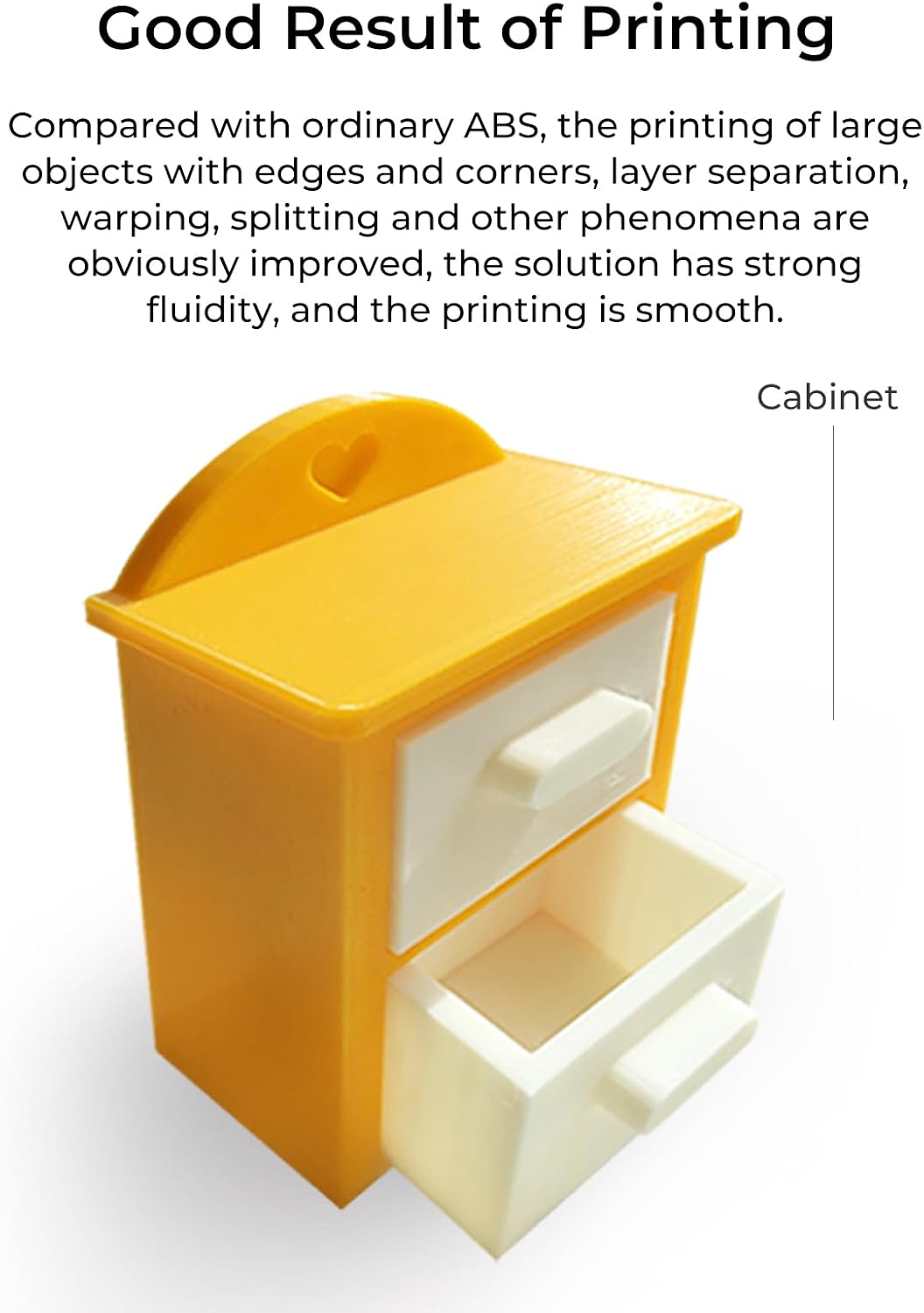
A small, yellow 3D printed cabinet with two drawers, showcasing the smooth finish and good printing results achievable with Creality ABS filament.
4. Filament Maintenance
To ensure consistent print quality and extend the lifespan of your Creality ABS filament, proper maintenance is essential:
- Dry Storage: Always store unused filament in an airtight container with desiccant to prevent moisture absorption.
- Filament Dryer: If you suspect your filament has absorbed moisture (indicated by popping sounds during printing, stringing, or poor layer adhesion), use a dedicated filament dryer to remove humidity before printing.
- Handle with Care: Avoid bending or kinking the filament, as this can lead to feeding issues during printing.

Hands holding small white plastic pellets, emphasizing that the Creality ABS filament is non-toxic and environmentally friendly during the printing process.
5. Troubleshooting Common Printing Issues
Addressing common issues can significantly improve your 3D printing experience with ABS filament.
5.1 Warping and Bed Adhesion
Warping occurs when the printed object lifts from the print bed, often due to uneven cooling or insufficient bed adhesion. ABS is particularly prone to this.
- Solution: Ensure your print bed is properly leveled. Increase the heated bed temperature (e.g., to 100-110°C). Use adhesion aids such as ABS slurry, glue stick, or specialized print surfaces. Printing in an enclosed environment or with a draft shield can also help maintain a consistent temperature around the print.
5.2 Layer Separation
This issue manifests as cracks or layers detaching from each other within the print.
- Solution: Layer separation is often caused by rapid cooling. Print in an enclosure to maintain a warm ambient temperature. Increase the extruder temperature slightly within the recommended range. Reduce cooling fan speed or turn it off completely.
5.3 Stringing
Stringing refers to fine strands of plastic left on the printed object, typically when the extruder moves between different parts of the print.
- Solution: Ensure your filament is dry. Adjust retraction settings (increase retraction distance or speed). Optimize print temperature; sometimes a slightly lower temperature can reduce oozing.

Examples of 3D printed items: a green Moai statue, a blue wrench, and black pipe fittings, showcasing the filament's excellent wear resistance, corrosion resistance, and dimensional stability.
6. Product Specifications
| Attribute | Detail |
|---|---|
| Product Name | CR-ABS 3D Printer Filament |
| Brand | Creality |
| Material Type | Acrylonitrile Butadiene Styrene (ABS) |
| Filament Diameter | 1.75 mm |
| Diameter Tolerance | ±0.03 mm |
| Net Weight | 1 kg (2.2 lbs) |
| Package Weight | 1.15 kg |
| Extruder Temperature | 220-260°C |
| Tensile Strength | 43 MPa |
| Bubble | No |
| Item Model Number | 3301020040 |
| Product Dimensions | 8.27 x 2.76 x 8.27 inches |
| Available Colors | Black, White, Gray, Red, Blue, Yellow, Green, Orange, Pink, Brown |

An array of Creality ABS filament spools in different colors, indicating the variety available for diverse 3D printing projects.
7. Support and Warranty
Creality is committed to providing excellent customer service and support for its products.
7.1 After-Sales Service
Creality offers 12-month after-sales service and 24-hour support for product inquiries and assistance.
7.2 Contact and Resources
- Creality Official Store: For product information and purchases, visit the Creality Amazon Store.
- Social Media: Connect with Creality and the 3D printing community on Facebook.
- Creality Cloud App: Access additional resources and community features via the Creality Cloud App.


