
YUHANUS K03-P9-280-00
YUHANUS Door Access Control System User Manual
Model: K03-P9-280-00
Brand: YUHANUS
1. Product Overview
The YUHANUS Door Access Control System provides a secure and convenient solution for managing access to various premises. This kit includes an RFID keypad, a 600lb electric magnetic door lock, an exit button, and a power supply. It supports unlocking via password, RFID card, or the exit button, making it suitable for residential, commercial, and industrial applications.
Key features include:
- Easy to use: The system can be opened by entering a password or swiping a card, making it easy to use.
- Secure: The 600LBS electromagnetic lock provides strong security and restricts unauthorized access.
- Convenient: Users do not need to unlock the door from inside the room as there is an exit button nearby the door.
- Versatile: This access control system can be used in any type of setting- residential, commercial, or industrial.
- Scalable: The system can accommodate up to 10 user cards, which makes it suitable for small workgroups or households.

Figure 1: Complete YUHANUS Door Access Control System Kit, showing the magnetic lock, RFID keypad, RFID key fobs, exit button, and power supply.
2. Components
The YUHANUS Door Access Control System includes the following main components:
- RFID Keypad: For password and RFID card entry.
- 600lb Electric Magnetic Door Lock: Provides secure locking mechanism.
- Exit Button: Allows for easy exit from inside.
- Power Supply: Converts AC power to DC for the system.
- RFID Key Fobs: For card-based access.

Figure 2: RFID Keypad for secure entry.

Figure 3: 600lb Electric Magnetic Door Lock.
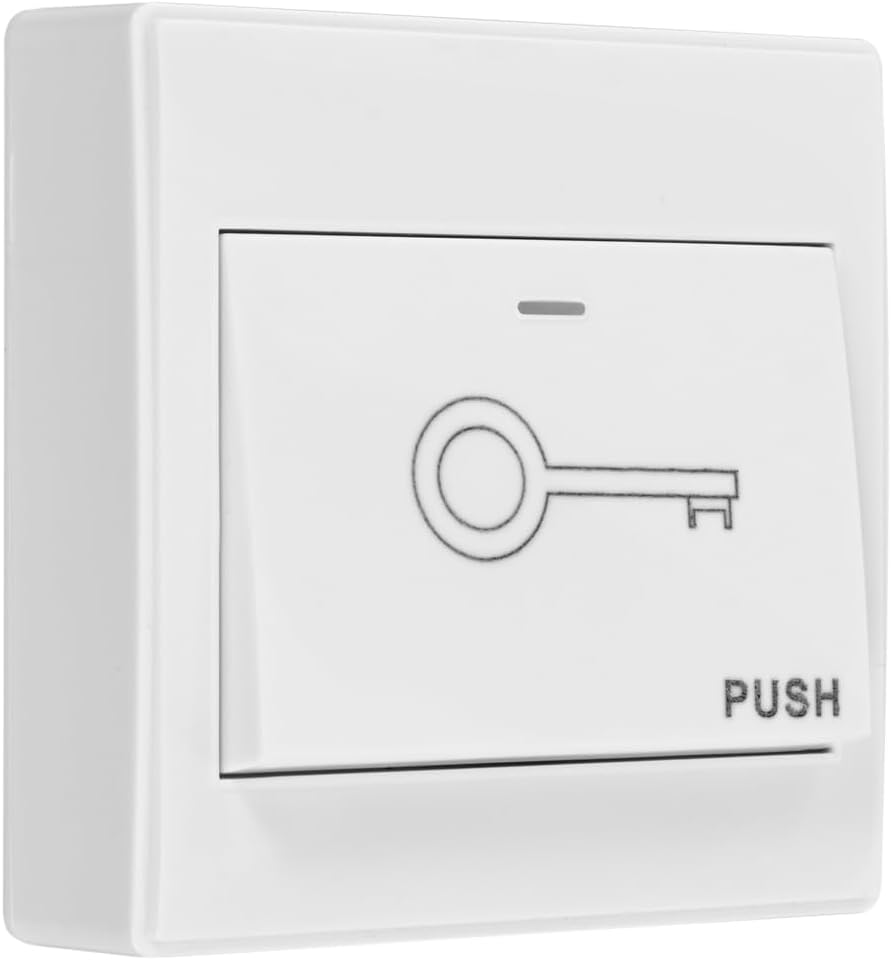
Figure 4: Exit Button for convenient egress.

Figure 5: Power Supply Unit.
3. Setup and Installation
Proper installation is crucial for the optimal performance and security of your access control system. It is recommended that installation be performed by a qualified professional if you are unfamiliar with electrical wiring or door hardware.
3.1 Wiring Diagram
Follow the wiring diagram carefully to ensure all components are connected correctly. Incorrect wiring can damage the system or pose a safety hazard.
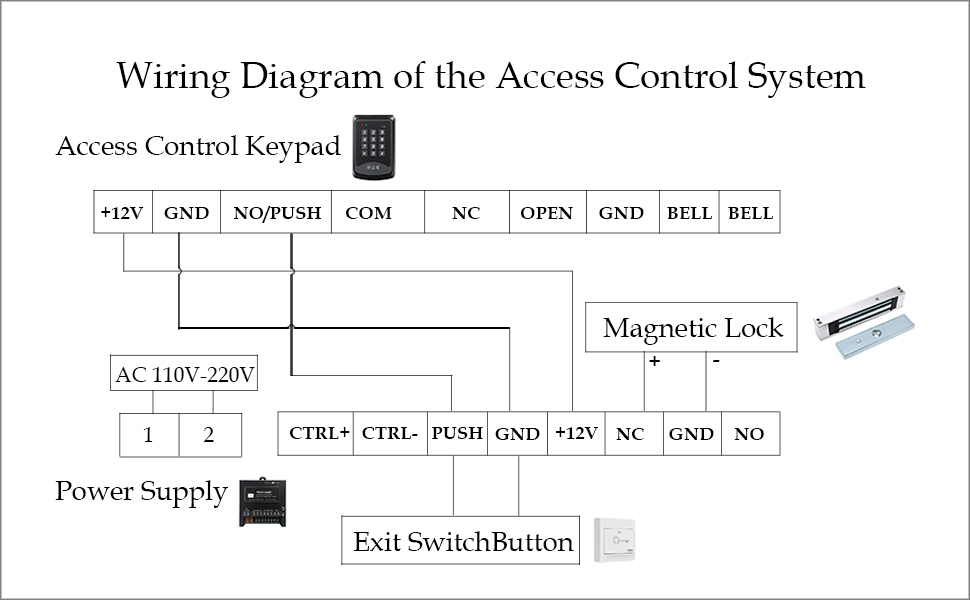
Figure 6: Detailed wiring diagram for connecting the RFID keypad, magnetic lock, exit button, and power supply.
Key connections:
- Connect the power supply to a stable AC 110V-240V source.
- Connect the keypad and magnetic lock to the power supply as indicated.
- Ensure the exit button is wired correctly to allow for internal release.
- Double-check all connections before applying power.
3.2 Physical Installation
Mount the magnetic lock securely on the door frame and the armature plate on the door, ensuring proper alignment for maximum holding force. The RFID keypad should be installed on the exterior side of the door, and the exit button on the interior side, at a convenient height for users.
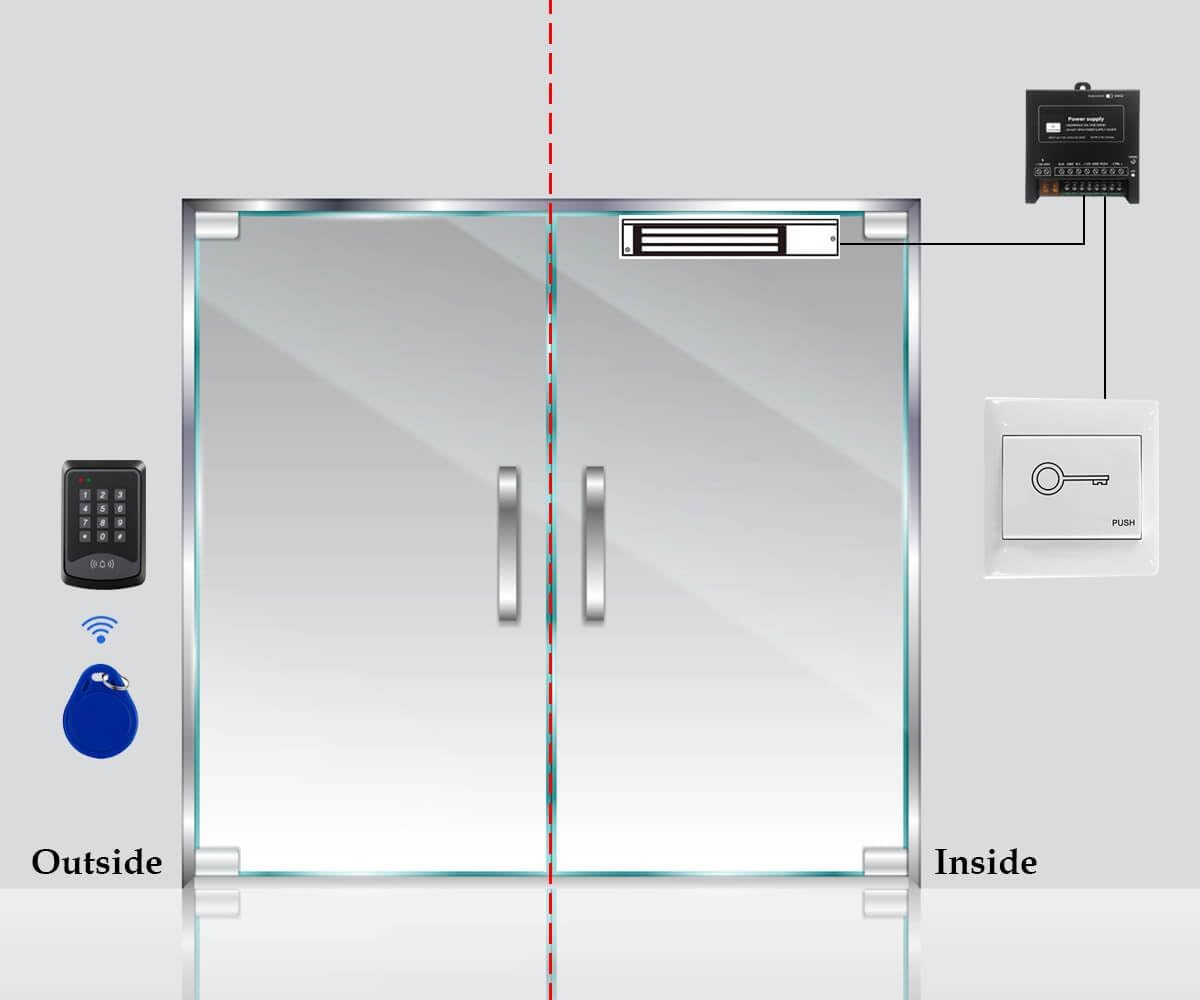
Figure 7: Illustrative diagram of the access control system components installed on a door, showing external keypad and internal exit button.
4. Operating Instructions
This section details how to operate your YUHANUS Door Access Control System, including setting up user credentials and unlocking the door.
4.1 System Operation Overview
The system allows access through a password, an RFID card, or by pressing the exit button from the inside. The magnetic lock will disengage when a valid credential is provided or the exit button is pressed.
Video 1: Demonstration of YUHANUS Door Access System functions, including setting a new password, enrolling RFID cards, and unlocking the magnetic lock using both methods and the exit button. (Duration: 1:08)
4.2 Unlocking the Door
- Using Password: Enter your programmed PIN on the keypad and press '#'. The magnetic lock will disengage.
- Using RFID Card: Swipe a programmed RFID card over the keypad's sensor. The magnetic lock will disengage.
- Using Exit Button: From inside, press the exit button. The magnetic lock will disengage immediately.
4.3 Setting a New Password
To set a new password for the system, follow these steps:
- Press * 9999 # 5.
- Enter your New PIN (e.g., 123456).
- Press #.
- Re-enter your New PIN.
- Press # * to confirm and exit programming mode.
Note: The default master password is typically 9999. Refer to the video for a visual guide.
4.4 Enrolling RFID Cards
To enroll new RFID cards for access, follow these steps:
- Press * 9999 # 1.
- Swipe each RFID card you wish to enroll over the keypad's sensor. The keypad will beep to confirm enrollment.
- After enrolling all desired cards, press # * to confirm and exit programming mode.
Note: The system can accommodate up to 10 user cards. Refer to the video for a visual guide.
5. Maintenance
To ensure the longevity and reliable operation of your YUHANUS Door Access Control System, regular maintenance is recommended:
- Cleaning: Periodically wipe down the keypad and magnetic lock surfaces with a soft, dry cloth. Avoid abrasive cleaners or solvents.
- Connection Check: Annually inspect all wiring connections to ensure they are secure and free from corrosion.
- Magnetic Lock Alignment: Verify that the magnetic lock and armature plate remain properly aligned. Misalignment can reduce holding force.
- Functionality Test: Regularly test all access methods (password, RFID card, exit button) to confirm they are working correctly.
6. Troubleshooting
If you encounter issues with your access control system, refer to the following common problems and solutions:
| Problem | Possible Cause | Solution |
|---|---|---|
| Magnetic lock does not engage/disengage. |
|
|
| Keypad does not respond or lights are off. |
|
|
| RFID cards are not recognized. |
|
|
| Cannot set new password or enroll cards. |
|
|
7. Specifications
| Feature | Detail |
|---|---|
| Brand | YUHANUS |
| Model Number | K03-P9-280-00 |
| Color | 600LBS Lock |
| Power Source | Corded Electric |
| Compatible Devices | Smartphone (Note: This might refer to app compatibility not explicitly detailed in provided data, but listed in specs.) |
| Item Dimensions (L x W x H) | 11.81 x 7.09 x 3.15 inches |
| Connectivity Technology | Wireless (Note: This might refer to RFID communication, not Wi-Fi.) |
| Installation Type | Screw-In |
| Alert Type | Audio & Motion |
| Item Weight | 5.44 pounds (2.47 Kilograms) |
| Control Method | Touch |
| Recommended Uses | Home Security, Commercial/Industrial |
| Included Components | Compartments Included |
| UPC | 769894490471 |
| Manufacturer | YUHAN |
| Batteries Included? | No |
| Batteries Required? | No |
| ASIN | B0C77X3J6S |
| Date First Available | June 6, 2023 |
8. Warranty and Support
For warranty information and technical support, please refer to the product packaging or contact the seller directly through the platform where the product was purchased. It is advisable to retain your proof of purchase for any warranty claims.
Note: Some users have reported limited direct manufacturer support. For assistance, please reach out to the seller, YuHan, via the Amazon platform.
Ask a question about this manual
Ask about setup, troubleshooting, compatibility, parts, safety, or missing instructions. Manuals+ will review the question and use this page’s manual context to help answer it.