
Introduction
Thank you for choosing the Bearhug Electric Throw Controller. This manual provides essential information for the safe and efficient use of your new controller. Please read these instructions carefully before use and retain them for future reference. This controller is designed specifically for use with Bearhug 50"x60" heated throws.
Important Safety Information
To reduce the risk of burns, electric shock, fire, or injury, please observe the following safety precautions:
- Read all instructions before use.
- Do not use this controller with any heated throw other than a compatible Bearhug 50"x60" model. Ensure the connector type on the controller matches your heated throw's connector.
- Do not use if the cord or plug is damaged. If the controller is not working correctly, has been dropped or damaged, return it to a service center for examination and repair.
- Do not use pins or other metallic objects with this appliance.
- Do not use while sleeping.
- Do not use with infants, children, incapacitated persons, or anyone insensitive to heat.
- Keep the controller away from water or other liquids.
- Always unplug the controller from the wall outlet when not in use or before cleaning.
- Do not use this controller in an oxygen-enriched environment or near equipment that stores or emits oxygen.
Package Contents
Your package should contain the following item:
- 1 x Bearhug Electric Throw Controller (Model: Heated Throw Controller)
Product Overview
The Bearhug Electric Throw Controller provides convenient control over your heated throw's warmth settings. It features an easy-to-read digital display and intuitive buttons for adjusting heat levels and managing the auto-off timer.
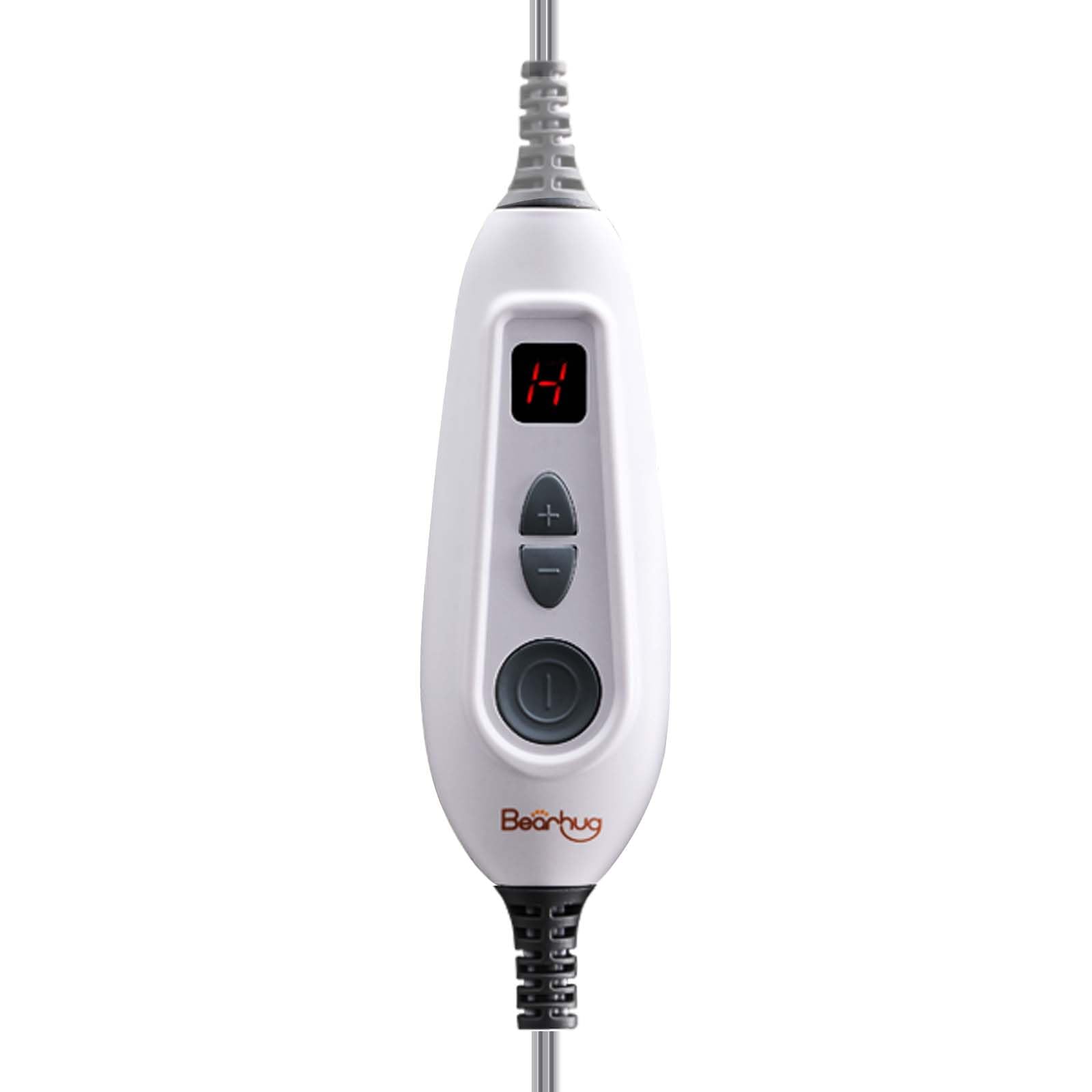
Image: Close-up view of the Bearhug Electric Throw Controller, showing the digital display and control buttons.
Key features include:
- 6 Heating Levels: Customize your warmth from gentle heat to maximum comfort.
- 4-Hour Auto-Off: For safety and energy conservation, the controller automatically shuts off after 4 hours of continuous use.
- User-Friendly Interface: Simple buttons for power, increasing heat, and decreasing heat.

Image: The Bearhug Electric Throw Controller connected to a heated throw, illustrating the 4-hour auto-off and 6 heating levels features.
Setup
- Inspect the Controller: Before first use, carefully inspect the controller, cord, and plug for any signs of damage. Do not use if any damage is present.
- Connect to Heated Throw: Locate the connector port on your Bearhug 50"x60" heated throw. Firmly insert the controller's connector into the throw's port until it clicks securely into place. Ensure the connection is snug to prevent accidental disconnection during use.
- Connect to Power Outlet: Plug the power cord of the controller into a standard 120V AC electrical wall outlet.
- Placement: Ensure the controller is placed on a flat, stable surface or within easy reach, and not covered by the heated throw or other objects, to prevent overheating.
Operating Instructions
- Turning On: Press the power button (usually a circular button with a power symbol) on the controller. The digital display will illuminate, showing the current heat setting.
- Adjusting Heat Levels:
- To increase the heat, press the "+" button.
- To decrease the heat, press the "-" button.
- Auto-Off Feature: The controller is equipped with a 4-hour automatic shut-off feature. This means the heated throw will turn off automatically after 4 hours of continuous operation. This is a safety feature and cannot be adjusted. To continue use after auto-off, simply press the power button again.
- Turning Off: Press the power button again to turn off the heated throw. The digital display will turn off. Always unplug the controller from the wall outlet when not in use.
Maintenance
- Cleaning the Controller: Disconnect the controller from both the heated throw and the wall outlet. Wipe the controller surface with a soft, damp cloth. Do not immerse the controller in water or use harsh cleaning agents. Ensure the controller is completely dry before reconnecting to power.
- Storage: When not in use, store the controller and heated throw in a cool, dry place. Avoid placing heavy objects on the controller or folding the cord tightly, as this can cause damage.
- Heated Throw Care: For cleaning instructions regarding your Bearhug heated throw, please refer to the specific care label and instruction manual provided with the throw itself. The throw is typically machine washable, but the controller must always be detached before washing.
Troubleshooting
If you experience issues with your Bearhug Electric Throw Controller, please consult the following common problems and solutions:
| Problem | Possible Cause | Solution |
|---|---|---|
| Controller display is blank / Heated throw not turning on. | Not plugged in, loose connection, power outage, or controller malfunction. |
|
| Heated throw is not heating up. | Low heat setting, auto-off activated, or internal issue. |
|
| Controller connector does not fit my heated throw. | Incompatibility with blanket model. |
|
Specifications
- Brand: Bearhug
- Model Name: Heated Throw Controller
- Item Weight: 8.4 ounces
- Compatible Throw Dimensions: 60"L x 50"W
- Special Feature: Heated (Controller for heated throw)
- Power: Standard 120V AC (as implied by typical household use)
- Auto-Off Timer: 4 Hours
- Heat Settings: 6 Levels
Warranty and Support
Bearhug is committed to providing quality products. If you encounter any issues with your Electric Throw Controller, please do not hesitate to contact our customer support team. While specific warranty details may vary, Bearhug aims to ensure customer satisfaction and assist with product-related concerns.
For support, please visit the official Bearhug store or contact us through the retailer where you purchased the product. You can find more information and contact options at the Bearhug Store on Amazon.