
1. Introduction
This manual provides detailed instructions for the operation and maintenance of your TYT TH-UV8000D 10W Two-Way Radio. Please read this manual thoroughly before using the device to ensure proper function and safety.
The TYT TH-UV8000D is a high-power handheld transceiver designed for amateur radio use, featuring dual-band VHF/UHF capabilities and a cross-band repeater function.
2. Product Features
- 10W Ultra-High Output Power
- Cross-Band Repeater Function
- VHF/UHF Dual Band Operation (VHF 144-148 MHz TX, UHF 420-450 MHz TX; VHF 136-174 MHz RX, UHF 400-520 MHz RX)
- Dual Display, Dual Watch
- 128 Channels Storage
- 3600mAh High Capacity Lithium-Ion Battery
- VOX (Voice Operated Exchange) Function
- ANI (Automatic Number Identification)
- MSK (Multi-Tone Squelch Keying)
- DTMF (Dual-Tone Multi-Frequency)
- Remote Kill/Stun Function
- Broad (Wide) / Narrowband (Narrow) Selectable
- Tri-color Background Light Selectable
- FM Radio Receive

Image: Feature icons for the TH-UV8000D radio.
3. Package Contents
Verify that all items are present in the package:
- TYT TH-UV8000D Two-Way Radio Unit
- High Gain Antenna
- Standard Antenna
- 3600mAh Lithium-Ion Battery
- Desktop Charger Base
- Power Adapter for Charger
- Belt Clip
- User Manual (this document)

Image: Components included with the TH-UV8000D radio.
4. Setup
4.1 Battery Installation
- Align the battery pack with the grooves on the back of the radio.
- Slide the battery pack upwards until it clicks into place.
- To remove, press the battery release latch and slide the battery downwards.
4.2 Antenna Attachment
- Locate the SMA-Male connector on the antenna.
- Screw the antenna clockwise onto the connector at the top of the radio until it is finger-tight. Do not overtighten.
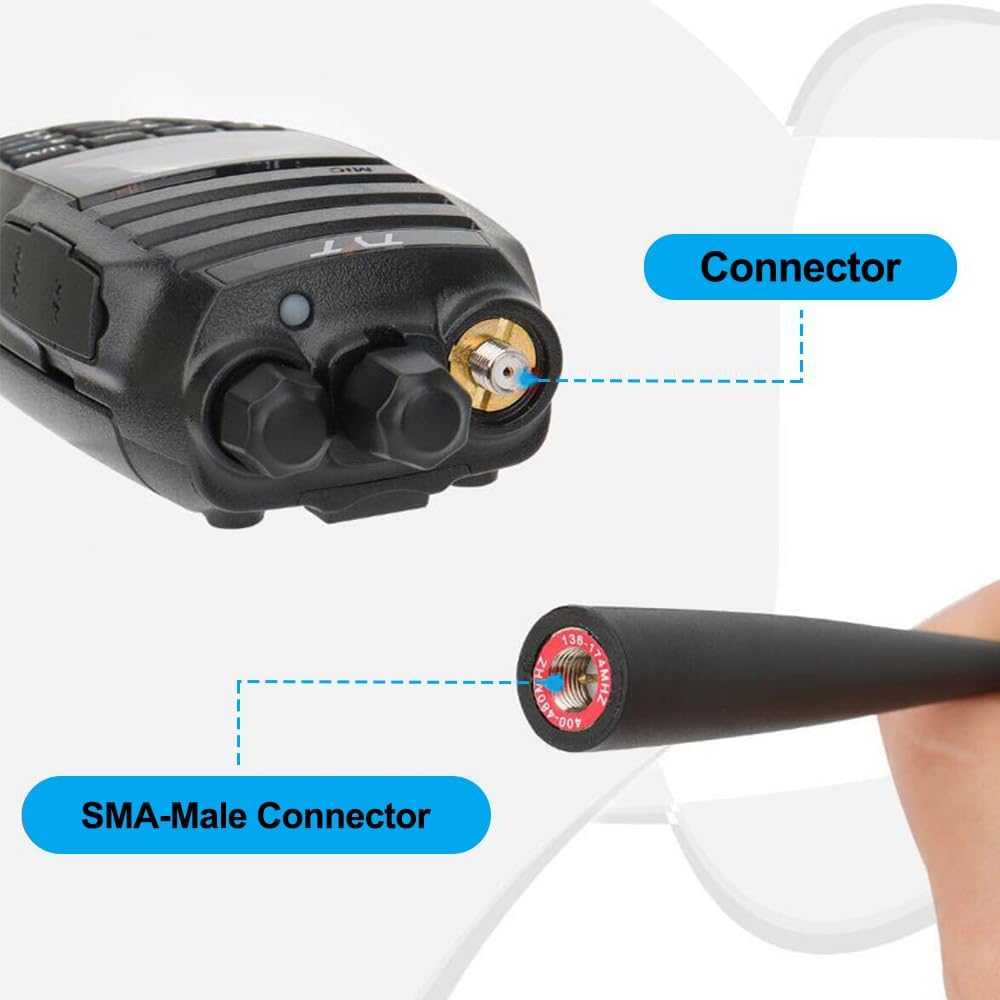
Image: Detail of the antenna and radio connector.
4.3 Charging the Battery
Before initial use, fully charge the battery. The radio uses a 3600mAh Lithium-Ion battery.
- Connect the power adapter to the desktop charger base.
- Plug the power adapter into a standard wall outlet.
- Place the radio (with battery installed) into the charger base. Ensure proper contact.
- The charging indicator light on the charger will illuminate (typically red) during charging and change color (typically green) when charging is complete.

Image: Multiple charging options for the TH-UV8000D radio.
5. Operating Instructions
5.1 Turning the Radio On/Off
- To turn on: Press and hold the [F] key and the [MONI] key simultaneously.
- To turn off: Press and hold the [F] key and the [MONI] key simultaneously again.

Image: Instructions for powering the radio on and off.
5.2 Basic Communication
- Select Frequency/Channel: Use the keypad to directly input a frequency or navigate through stored channels.
- Adjust Volume: Rotate the top knob clockwise to increase volume, counter-clockwise to decrease.
- Transmit: Press and hold the PTT (Push-To-Talk) button on the side of the radio to transmit. Speak clearly into the microphone. Release the PTT button to receive.
5.3 Cross-Band Repeater Function
The TH-UV8000D supports cross-band repeating, allowing the radio to re-transmit signals received on one band (e.g., VHF) to another band (e.g., UHF) and vice-versa. This extends communication range.
Refer to the full programming software manual for detailed instructions on configuring the cross-band repeater function, as it typically requires specific frequency and tone settings.

Image: TH-UV8000D highlighting 10W power and cross-band function.
5.4 Range Expectations
Communication range varies significantly based on terrain, obstructions, and environmental conditions.
- City: Approximately 1-2 miles
- Mountain: Approximately 3-5 miles
- Road/Open Area: Approximately 5-15 miles

Image: Signal range in various environments.
6. Maintenance
6.1 General Care
- Keep the radio dry. Exposure to moisture can damage internal circuits.
- Avoid extreme temperatures. Do not store the radio in very hot or cold environments.
- Clean the radio with a soft, damp cloth. Do not use harsh chemicals or solvents.
- Handle the antenna carefully. Bending or twisting can cause damage.
6.2 Battery Care
- Charge the battery fully before first use.
- Do not overcharge or deep discharge the battery regularly, as this can reduce its lifespan.
- If storing the radio for an extended period, remove the battery and store it in a cool, dry place at approximately 50% charge.

Image: Radio side view emphasizing battery and durability.
7. Troubleshooting
- Radio does not power on: Ensure the battery is correctly installed and fully charged. Check the battery contacts for dirt or damage.
- Poor reception or transmission: Verify the antenna is securely attached. Check that you are on the correct frequency/channel and that the squelch level is appropriately set. Obstructions or distance can significantly affect signal quality.
- Programming difficulties: Ensure you are using the correct programming cable and software for the TH-UV8000D. Consult online resources or the manufacturer's support for software compatibility, especially with different operating systems.
- Constant squelch opening: This may indicate interference or an incorrectly set CTCSS/DCS tone. Adjust the squelch level or verify tone settings.
- Short battery life: Ensure the battery is fully charged. Battery performance can degrade over time. Operating at high power (10W) will consume battery faster than lower power settings.
8. Specifications
| Feature | Specification |
|---|---|
| Item Weight | 1 pound |
| Package Dimensions | 11 x 8 x 2.7 inches |
| Model Number | TH-UV8000D |
| Battery Type | 1 Lithium Ion battery (included) |
| Number of Channels | 128 |
| Frequency Range | VHF: 136-174 MHz, 144-148 MHz (TX); UHF: 400-520 MHz, 420-450 MHz (TX) |
| Talking Range Maximum | 5 Miles (nominal, varies by terrain) |
| Voltage | 7.4 Volts DC (3.7E+3 Volts is likely a typo in source data) |
| Water Resistance Level | Water Repellent |
| Included Components | Antenna |
9. Warranty
The TYT TH-UV8000D radio typically comes with a 1-year manufacturer's warranty. Please retain your proof of purchase for warranty claims. For specific terms and conditions, refer to the warranty card included in your package or contact the seller/manufacturer directly.
10. Support
For further assistance, technical support, or inquiries regarding your TYT TH-UV8000D radio, please contact your authorized dealer or the manufacturer's customer service. Contact information can usually be found on the product packaging or the manufacturer's official website.


