
Inateck BCST-91-GY
Inateck BCST-91-GY Barcode Scanner User Manual
Model: BCST-91-GY
1. Introduction
The Inateck BCST-91-GY is a versatile 2D QR Code wireless barcode scanner designed for efficient and accurate data capture. Equipped with a mega-pixel CMOS scanning module, it excels at reading various barcode types, including high-density, small, blurry, damaged, colored, inverse, and GS1 barcodes from both paper and digital screens. Its smart base provides convenient charging and wireless data transfer, while multiple connectivity options (Bluetooth, 2.4 GHz wireless, and wired USB) ensure adaptability to diverse operational environments. This manual provides detailed instructions for setting up, operating, maintaining, and troubleshooting your BCST-91-GY scanner.

Figure 1: Inateck BCST-91-GY Barcode Scanner on its Smart Base.
2. Package Contents
- Inateck BCST-91-GY Barcode Scanner
- Smart Base
- USB-A to USB-C Data and Charging Cable
- User Manual
3. Setup Guide
3.1 Charging the Scanner
Before first use, ensure the scanner is fully charged. Place the scanner onto the smart base, or connect the scanner directly to a USB power source using the provided USB-C cable. The smart base supports fast charging. The scanner's indicator lights will show charging status.
3.2 Connection Modes
The BCST-91-GY offers three primary connection methods:
- 2.4G Wireless Connection (via Smart Base): Connect the smart base to your computer's USB port. The scanner will automatically connect to the base, enabling wireless data transfer. This mode is ideal for desktop setups.
- Bluetooth Connection: To connect via Bluetooth, ensure the scanner is not connected to the base. Activate Bluetooth pairing mode on the scanner (refer to the included user manual for specific QR codes to scan for Bluetooth pairing). Then, search for and connect to the scanner on your Bluetooth-enabled device (e.g., tablet, smartphone, laptop).
- Wired USB Connection: Connect the scanner directly to your computer using the provided USB-C cable. The scanner will function as a wired device, typically emulating a keyboard for direct data input.

Figure 2: Available Connection Modes.
3.3 Initial Configuration
For advanced settings such as keyboard layout (e.g., US, German), operating system modes (Windows/Android, MacOS/iOS), or specific barcode type enablement/disablement, refer to the special QR codes provided in the physical user manual. Scan these codes with the scanner to apply the desired configurations.
4. Operating Instructions
4.1 Scanning Barcodes
To scan a barcode, point the scanner's window at the barcode and press the trigger button. The scanner will emit a red aiming cross and a surrounding illuminated area to assist with precise targeting. Once successfully scanned, the scanner will provide feedback based on its reminder mode settings.

Figure 3: Barcode Compatibility of BCST-91-GY.
4.2 Scanning Modes
The smart base features touch switch buttons to configure scanning behavior:
- Auto-induction Mode: The scanner automatically detects a barcode in its field of view and scans it without requiring a trigger press.
- Auto Laser-off Mode: The laser automatically turns off after a period of inactivity to conserve battery.
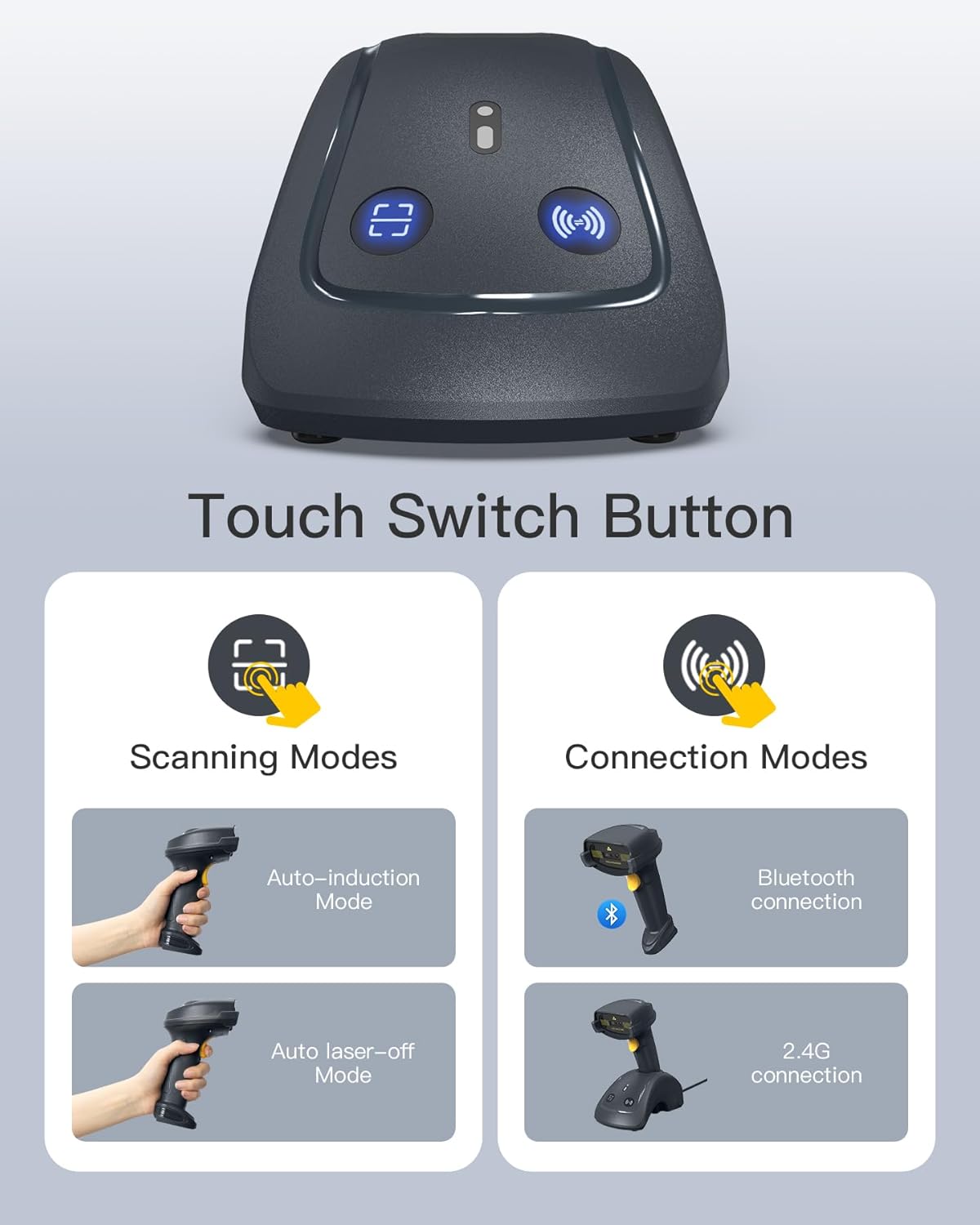
Figure 4: Smart Base Touch Switch Buttons for Scanning and Connection Modes.
4.3 Reminder Modes
The scanner provides feedback upon successful scans through three reminder modes:
- Vibration: The scanner vibrates briefly.
- Indicators: Visual cues from LED lights on the scanner.
- Sound: An audible beep confirms the scan.

Figure 5: Scanner Feedback Reminder Modes.
5. Key Features
- Mega-pixel CMOS Module: Enables rapid and accurate scanning of high-density, small, and even damaged barcodes. Offers a wide scanning window for ease of use.
- Extended Scanning Range & Speed: Capable of scanning distances from 25cm to 125cm with improved scanning speeds, enhancing operational efficiency.
- Smart Base Functionality: Serves as both a charging dock and a 2.4 GHz wireless data receiver, simplifying setup and ensuring continuous operation.
- Long Battery Life: Provides up to 28 hours of continuous working time and supports over 50,000 scans on a single charge, minimizing downtime.
- Broad Barcode Compatibility: Reads virtually all common 1D and 2D barcodes, including those on paper, smartphones, and computer screens.
- Inateck SDK Support: Facilitates seamless integration with applications for optimized data capture and enhanced productivity.

Figure 6: Enhanced Scanning Performance.

Figure 7: Extended Battery Life.
6. Maintenance
To ensure the longevity and optimal performance of your Inateck BCST-91-GY scanner, follow these maintenance guidelines:
- Cleaning: Regularly wipe the scanner's exterior and scanning window with a soft, dry, lint-free cloth. For stubborn dirt, a slightly damp cloth can be used, but avoid excessive moisture. Do not use abrasive cleaners or solvents.
- Storage: Store the scanner in a cool, dry place away from direct sunlight, extreme temperatures, and corrosive materials.
- Battery Care: Avoid fully discharging the battery frequently. If storing for an extended period, charge the battery to about 50% and recharge every few months to prevent deep discharge.
- Handling: While robust, avoid dropping the scanner or subjecting it to severe impacts to prevent internal damage.
7. Troubleshooting
If you encounter issues with your Inateck BCST-91-GY scanner, refer to the following common troubleshooting steps:
- Scanner Not Connecting:
- Ensure the scanner is fully charged.
- Verify the correct connection mode (2.4G, Bluetooth, or Wired) is selected and properly configured.
- For 2.4G, ensure the smart base is securely plugged into the computer.
- For Bluetooth, ensure Bluetooth is enabled on your host device and the scanner is in pairing mode.
- Try restarting both the scanner and the host device.
- Scanner Not Reading Barcodes:
- Ensure the barcode is clean, clear, and not excessively damaged.
- Adjust the scanning distance. The optimal range is typically between 25cm and 125cm.
- Check if the barcode type is supported by the scanner.
- Ensure sufficient lighting for the barcode.
- Verify that the scanner's laser is active when the trigger is pressed.
- Incorrect Data Output:
- Check the keyboard layout settings (e.g., US, German) using the configuration QR codes in the manual.
- Ensure the correct operating system mode (Windows/Android, MacOS/iOS) is selected.
If problems persist, please contact Inateck customer support for further assistance.
8. Specifications
| Feature | Detail |
|---|---|
| Brand | Inateck |
| Model Number | BCST-91-GY |
| Color | Grey |
| Connectivity Technology | Bluetooth, USB, 2.4 GHz |
| Compatible Devices | Tablet, Smartphone, PC |
| Battery Composition | Lithium-ion |
| Rechargeable Battery | Yes |
| Power Source | Corded Electric, Battery Powered |
| Scan Rate | 100 frames per second |
| Operating Voltage | 3.7 Volts |
| Compliant Specifications | CE, WEEE |
| Real View Angle | 6E+1 degrees |
9. Warranty and Support
Inateck products are designed for reliability and performance. For warranty information, please refer to the documentation included with your purchase or visit the official Inateck website. Inateck provides dedicated customer support and resources, including the Inateck SDK, to assist users with product integration and troubleshooting. If you require assistance, please contact Inateck's customer service team.
Related documentsBCST-91-GY


Ask a question about this manual
Ask about setup, troubleshooting, compatibility, parts, safety, or missing instructions. Manuals+ will review the question and use this page’s manual context to help answer it.