
aoonav B0C77PV5VT
aoonav Android 11 Snapdragon 665 Car Stereo Radio Instruction Manual
Model: B0C77PV5VT
1. Introduction
This manual provides detailed instructions for the installation, operation, and maintenance of your aoonav Android 11 Snapdragon 665 Car Stereo Radio. Please read this manual thoroughly before using the product to ensure proper function and safety.

Image 1.1: Front view of the aoonav Android 11 Car Stereo Radio main unit, displaying various application icons on its 12.1-inch touchscreen.
2. Compatibility
This 12.1-inch Android Head Unit is designed for specific Dodge RAM Truck models:
- Dodge RAM 1500 (2019, 2020, 2021, 2022, 2023)
- Dodge RAM 2500 (2019, 2020, 2021, 2022, 2023)
- Dodge RAM 3500 (2019, 2020, 2021, 2022, 2023)
Important Note:
- This product is not compatible with vehicles where the original car radio screen is 12 inches or if the vehicle has a factory 360-degree camera system.

Image 2.1: A Dodge Ram truck interior showcasing the aoonav multimedia unit installed, highlighting its fit for new body style models.
3. Package Contents
Verify that all items listed below are included in your package. If any items are missing or damaged, please contact customer support.
- Main Head Unit (12.1-inch display)
- Power Adapter
- WiFi Antenna
- 4G Antenna
- External Microphone (Extra MIC)
- USB Cable
- Radio Antenna
- Original USB Adapter
- 4G SIM Card Cable
- GPS Antenna
- AV Cable
- RCA Cable
- Power Cable
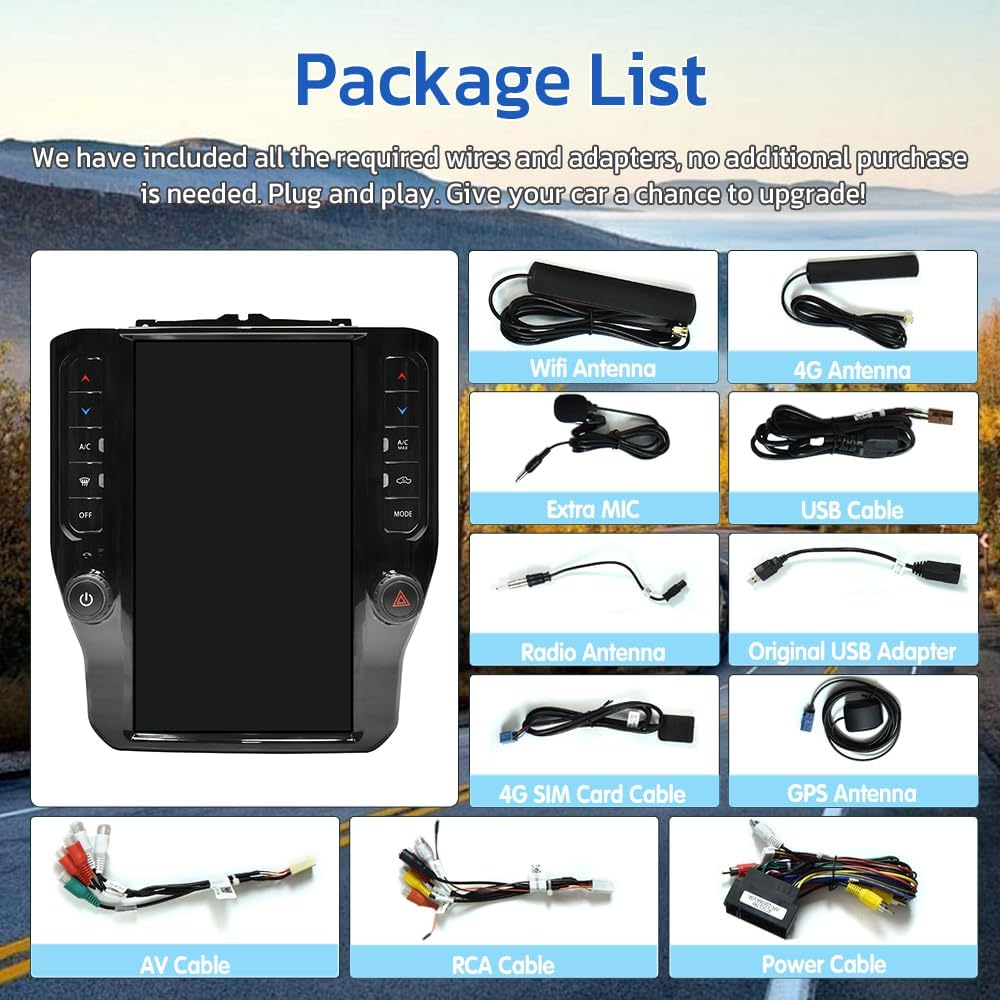
Image 3.1: Visual representation of all cables, adapters, and the main head unit included in the product package.
4. Setup and Installation
Installation of the aoonav car stereo involves replacing the factory display and climate control center. It is recommended that installation be performed by a qualified professional. Ensure the vehicle's power is disconnected before beginning installation.
4.1 Pre-Installation Check
- Confirm vehicle compatibility (refer to Section 2).
- Ensure all package contents are present.
- Gather necessary tools (e.g., trim removal tools, screwdrivers).
4.2 Installation Steps (General Overview)
- Carefully remove the existing factory radio and climate control panel.
- Connect the provided wiring harnesses from the new head unit to the vehicle's existing wiring. Ensure all connections are secure.
- Install the GPS antenna, WiFi antenna, and 4G antenna in suitable locations for optimal signal reception.
- Integrate the external microphone for hands-free calling.
- Mount the new aoonav head unit into the dashboard opening, ensuring it is securely fastened.
- Reconnect the vehicle's power and test all functions.

Image 4.1: A visual comparison showing the factory car stereo setup versus the aoonav unit installed, demonstrating the integrated climate control display.

Image 4.2: The aoonav stereo installed in a car dashboard, illustrating its compatibility with both manual and automatic air conditioning systems.
5. Operating Instructions
5.1 Basic Operation
- Power On/Off: Press and hold the power button on the unit or steering wheel controls.
- Volume Control: Adjust using the physical buttons on the unit or steering wheel controls.
- Touchscreen Interface: Navigate through menus and applications by tapping, swiping, and pinching on the 12.1-inch IPS capacitive touch screen.
- Day/Night Mode: The system supports automatic or manual switching between day and night display modes for optimal visibility.

Image 5.1: A split image demonstrating the visual difference between the day mode (brighter interface) and night mode (darker interface) on the car stereo display.
5.2 Wireless CarPlay and Android Auto
Connect your smartphone to the head unit via Bluetooth or a data line to access Apple CarPlay or Android Auto functionalities. This allows for integrated navigation, music, messaging, and calls.
- For iPhone users: Use Wireless CarPlay.
- For Android users: Use Wireless Android Auto.

Image 5.2: The aoonav car stereo displaying the CarPlay interface, with a smartphone connected wirelessly.
5.3 GPS Navigation
The unit features built-in GPS navigation. It supports both online and offline maps via Wi-Fi connectivity. Download preferred navigation applications from the app store.

Image 5.3: The aoonav car stereo displaying a map with a navigation route, indicating built-in GPS functionality.
5.4 Bluetooth Connectivity
Utilize Bluetooth 5.0 for stable connections to your mobile phone. This enables hands-free calling, audio streaming, and other Bluetooth-enabled functions.
- Pairing: Access the Bluetooth settings on the head unit and your mobile device to pair.
- Functions: Make/receive calls, play music, and access phone contacts.

Image 5.4: The aoonav car stereo displaying the Bluetooth connection screen, ready for device pairing.
5.5 On-Screen Climate Control
The unit integrates with your vehicle's climate control system, allowing you to manage heating, ventilation, and air conditioning directly from the touchscreen interface.
5.6 Rear View Camera Support
The system supports a rear view camera, which automatically activates when the vehicle is shifted into reverse. This feature assists in parking and reduces blind spots.

Image 5.5: The aoonav car stereo displaying the rear view camera feed with parking guidelines and an attention message.
6. Maintenance
To ensure the longevity and optimal performance of your aoonav car stereo, follow these maintenance guidelines:
- Screen Cleaning: Use a soft, lint-free cloth to gently wipe the touchscreen. For stubborn smudges, slightly dampen the cloth with water or a screen-safe cleaner. Avoid harsh chemicals or abrasive materials.
- Software Updates: Periodically check for and install software updates to ensure the system has the latest features and security patches.
- Environmental Conditions: Avoid exposing the unit to extreme temperatures, direct sunlight for prolonged periods, or excessive moisture.
- Cable Connections: Ensure all cables remain securely connected. Loose connections can lead to intermittent functionality.
7. Troubleshooting
If you encounter issues with your aoonav car stereo, refer to the following common problems and solutions:
| Problem | Possible Cause | Solution |
|---|---|---|
| Unit does not power on | Loose power connection, blown fuse, vehicle battery issue | Check power cable connections. Inspect vehicle fuses. Verify vehicle battery health. |
| No sound output | Volume too low, incorrect audio source, loose speaker wires | Increase volume. Select correct audio source. Check speaker wire connections. |
| GPS signal lost or inaccurate | GPS antenna obstruction, poor satellite reception | Ensure GPS antenna has a clear view of the sky. Check antenna connection. |
| Bluetooth device won't pair | Device not in pairing mode, incorrect password, interference | Ensure both devices are in pairing mode. Re-enter password. Move closer to the unit. |
| Touchscreen unresponsive | Software glitch, screen damage | Restart the unit. If issue persists, contact support. |
| Rear view camera not displaying | Camera connection issue, vehicle not in reverse | Check camera wiring. Ensure vehicle is in reverse gear. |
If the problem persists after attempting these solutions, please contact aoonav customer support for further assistance.
8. Specifications
Key technical specifications of the aoonav Android 11 Snapdragon 665 Car Stereo Radio:
- Operating System: Pure Android 11 OS
- Processor: Qualcomm QCM6125 (Snapdragon 665)
- RAM: 4GB
- ROM: 64GB
- Display Size: 12.1 Inches
- Display Type: IPS Capacitive Touch Screen
- Resolution: 1920*1080 (Note: Product specifications also list 720 x 1280, please refer to product packaging for definitive resolution)
- Image Processor: Mali-T860 (supports 4K video playback)
- Connectivity: Built-in 4G SIM card reader, Bluetooth 5.0, Wi-Fi, USB, AUX
- Features: Wireless CarPlay, Android Auto, GPS Navigation, FM/AM Radio, Music Player, Video Player, On-Screen Climate Control, Rear View Camera Support, Steering Wheel Control
- Item Weight: Approximately 7.54 pounds
- Product Dimensions: Approximately 6.97 x 2 x 12.1 inches

Image 8.1: An infographic detailing the core specifications of the aoonav car stereo, including 4GB RAM, 64GB ROM, Snapdragon 665 processor, and 4G LTE support.
9. Warranty and Support
aoonav is committed to providing quality products and customer service.
- Warranty: This product comes with a one-year warranty from the date of purchase.
- Returns & Replacements: A 30-day money-back guarantee and 12-month replacement policy are offered.
- Technical Support: Lifetime technical support is available for this product.
For any questions, installation assistance, or technical support, please contact aoonav customer service:
- Email: autostereo@163.com
- Response Time: Quick replies are typically provided within 16 hours.

Image 9.1: An image summarizing aoonav's customer service commitments, including 30-day returns, 12-month warranty, and lifetime technical support.