
Introduction
The NITECORE UMS2 is an intelligent dual-slot battery charger designed for various rechargeable battery types. It features a QC input for fast charging, delivering a total maximum output of 4,000 mA and a single slot maximum output of 3,000 mA. The integrated LCD display provides real-time charging information, and the charger is equipped with a USB-C charging port for versatile power input.
Safety Precautions
- Only charge rechargeable Li-ion, IMR, LiFePO4, Ni-MH, and Ni-Cd batteries. Charging other battery types may cause damage or explosion.
- Observe correct polarity when inserting batteries.
- Do not leave the charger unattended during operation.
- Keep the charger away from water, high humidity, and extreme temperatures.
- Do not attempt to disassemble or modify the charger.
- Ensure adequate ventilation during charging.
- Do not charge damaged or leaking batteries.
Product Features
- Intelligent dual-slot charger with QC input.
- Maximum total output of 4,000 mA; single slot maximum output of 3,000 mA.
- LCD display for real-time charging information including battery health, internal resistance, charging current, voltage, charged volume, and time.
- Automatic detection of battery power level and selection of appropriate charging mode (CC, CV, and -dV/dt).
- Manual charging parameter settings available.
- Optimized IMR battery charging program for extended battery lifespan.
- Compatible with 3.6V/3.7V Li-ion, 3.8V Li-ion, 1.2V Ni-MH/Ni-Cd, and 3.2V LiFePO4 batteries.
- Multiple safeguards: automatic battery internal resistance detection, anti-short circuiting, reverse polarity protection, overtime charging protection, over-discharged Li-ion battery activation, and over-discharged IMR battery restoration.
- Built-in temperature regulation system.
- USB-C input port compatible with various mobile power sources, solar panels, and USB adapters.
Setup
- Connect Power: Connect the NITECORE UMS2 charger to a power source using a USB-C cable. The charger supports QC (Quick Charge) input for faster charging.
- Initial Display: Upon connecting power, the LCD display will illuminate, indicating the charger is ready for use.
Operating Instructions
Battery Insertion and Automatic Detection
Insert one or two rechargeable batteries into the charging slots, observing the correct polarity. The UMS2 will automatically detect the battery type and capacity, then select the appropriate charging mode (CC, CV, or -dV/dt) and charging current.

Image: The Nitecore UMS2 charger with two batteries inserted, illustrating its Quick Charge (QC) input capability, which allows for a total maximum output of 4,000 mA and a single slot maximum output of 3,000 mA. This enables rapid charging, with a 3,500mAh battery reaching 80% charge in approximately 55 minutes.
Real-Time Charging Information
The LCD screen displays various real-time charging parameters. Short press the V button to cycle through different information screens, including:
- Battery Health (Good or Poor)
- Internal Resistance
- Charging Current
- Battery Voltage
- Charged Volume (mAh)
- Charging Time
- Charging Mode and Cut-off Voltage
- Battery Type

Image: The Nitecore UMS2 LCD display demonstrating its ability to show battery health (e.g., 'Good' or 'Poor') and internal resistance. It also illustrates the real-time charging information available, such as charged volume, charging time, charging current, and battery voltage, providing comprehensive monitoring during the charging process.
Intelligent Charging Mode Selection and Manual Settings
The UMS2 automatically selects the optimal charging mode. For specific needs, charging parameters can be set manually:
- Long press the C button to enter the Charging Setting Mode.
- Use the C button to select between Charging Voltage (3.7V/4.2V/4.3V) and Charging Current (100mA - 3,000mA).
- Use the V button to adjust the selected parameter.
- Once settings are confirmed, the charger will begin charging with the new parameters.

Image: The Nitecore UMS2 charger's display showing its intelligent charging mode selection, which automatically adapts to battery type and capacity. It also highlights the manual charging settings feature, allowing users to customize charging voltage and current to meet specific requirements.
IMR Battery Charging Program
The UMS2 incorporates an optimized charging program specifically for IMR batteries. This program monitors the entire charging process to ensure the cut-off voltage remains within safe limits, thereby extending the lifespan of IMR batteries.

Image: The Nitecore UMS2 charger with an IMR battery inserted, emphasizing its specially optimized charging program for IMR batteries. This program continuously monitors the charging process to maintain safe cut-off voltages, contributing to the longevity of the batteries.
Over-Discharged Battery Restoration and Activation
- IMR Battery Restoration: If an over-discharged IMR battery is inserted, the screen will display 'EE EE'. Long press the V button to enter Restoration Mode, and the charging process will continue.
- Li-ion Battery Activation: The UMS2 can activate over-discharged Li-ion batteries with a protective circuit. After battery installation, the charger will test and activate the battery. If a battery is detected as damaged, the screen will show 'EE EE'.
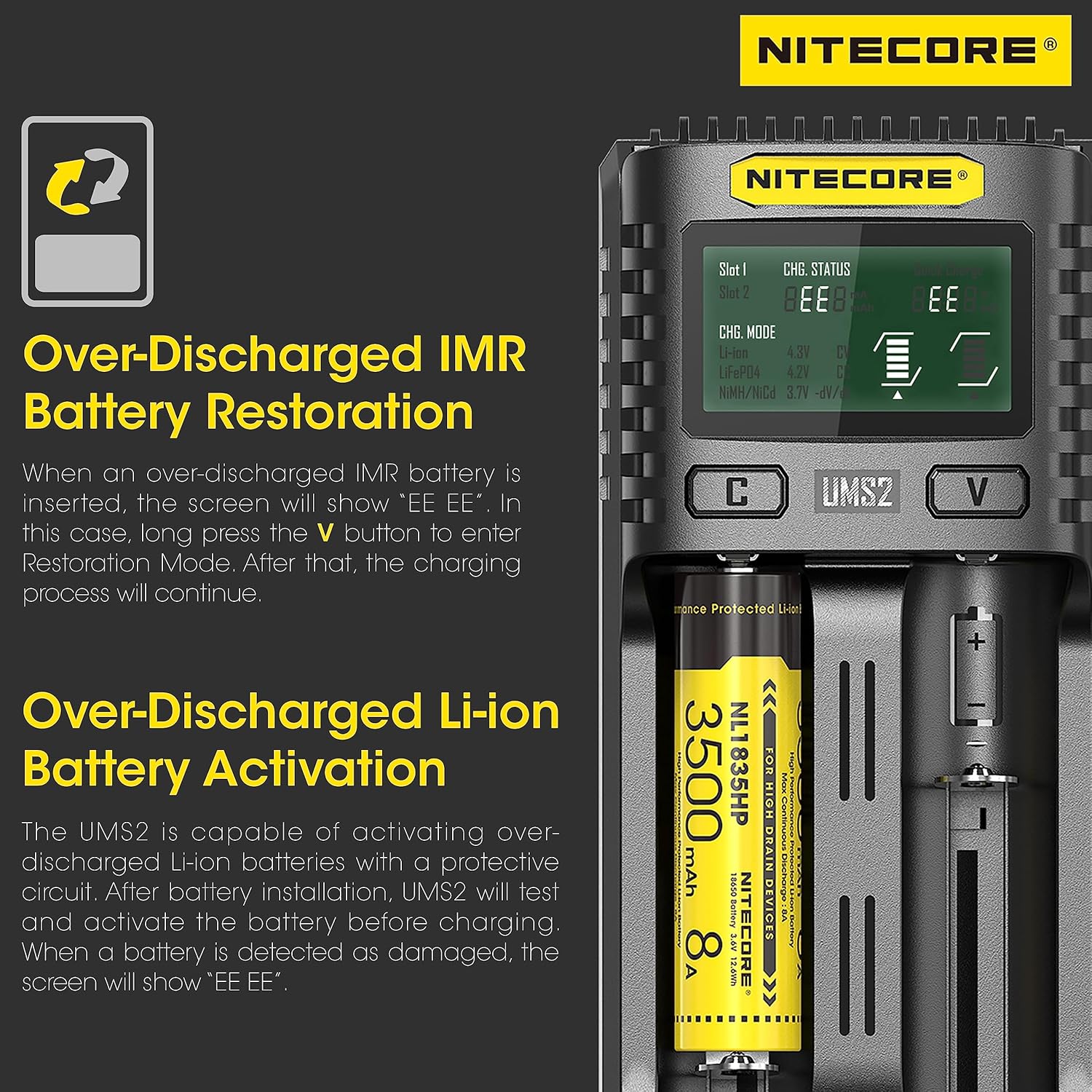
Image: The Nitecore UMS2 charger's display indicating the process for over-discharged IMR battery restoration and Li-ion battery activation. It shows the 'EE EE' error message for over-discharged batteries and explains the steps to restore or activate them, ensuring safe and effective charging.
Compatible Batteries
The NITECORE UMS2 is compatible with a wide range of rechargeable battery types and sizes, including:
- Li-ion / IMR / LiFePO4: 10440, 14500, 16340 (RCR123), 18350, 18490, 18650, 20700, 21700, 26650
- Ni-MH / Ni-Cd: AA, AAA, AAAA, C
Specifications
| Feature | Specification |
|---|---|
| Input Voltage | 5V |
| Output Voltage | 5V |
| Current Rating | 4 Amps (Total) |
| Amperage (Single Slot Max) | 3 Amps |
| Battery Charge Time | 55 minutes (for 80% of a 3,500mAh battery) |
| Product Dimensions | 1.6"D x 2.9"W x 6"H |
| Item Weight | 0.27 Kilograms |
| Number of Ports | 2 |
| Connector Type | USB-C |
| Compatible Devices | Devices with USB-C charging port or adapter, USB power banks, solar panels with USB output |
| Manufacturer Part Number | NIT-UMS2 |
Maintenance
- Cleaning: Use a soft, dry cloth to clean the charger. Do not use abrasive cleaners or solvents.
- Storage: Store the charger in a cool, dry place when not in use.
- Avoid Damage: Protect the charger from drops, impacts, and excessive force.
Troubleshooting
| Problem | Possible Cause | Solution |
|---|---|---|
| Charger not powering on | No power connection or faulty cable/adapter | Check USB-C cable connection and power source. Try a different cable or adapter. |
| Battery not charging | Incorrect battery insertion, incompatible battery, or damaged battery | Ensure correct polarity. Verify battery type is compatible. Check for 'EE EE' error for over-discharged batteries and attempt restoration. Replace damaged batteries. |
| 'EE EE' error displayed | Over-discharged IMR/Li-ion battery or damaged battery | For IMR, long press 'V' to enter Restoration Mode. For Li-ion, the charger attempts activation. If error persists, the battery may be damaged. |
| Charger overheating | Poor ventilation or environmental factors | Ensure charger is in a well-ventilated area. Avoid direct sunlight or enclosed spaces. |
Warranty Information
NITECORE products purchased from authorized dealers or distributors are covered by a warranty. The warranty period and terms are as follows:
- DOA / Defective Product: Can be exchanged for a replacement through a local distributor/dealer within 15 days of purchase.
- Free Repair: Defective/malfunctioning NITECORE products can be repaired free of charge for a period of 12 months (1 year) from the date of purchase.
- Limited Warranty: Beyond 12 months, a limited warranty applies, covering the cost of labor and maintenance, but not accessories or replacement parts.
The warranty is nullified if the product is:
- Broken down, reconstructed, and/or modified by unauthorized parties.
- Damaged from wrong operations (e.g., reverse polarity installation, installation of non-rechargeable batteries, or failure to obey warnings).
- Damaged by battery leakage.
To qualify for warranty service, ensure your product was purchased from an authorized source and refer to the 'IMPORTANT WARRANTY NOTICE' section on your product packaging or official NITECORE documentation for validation.
Support
For the latest information on NITECORE products and services, or for warranty claims and technical assistance, please contact your local NITECORE distributor or send an email to:
You can also visit the official Nitecore website for more resources and product updates.


