
OLEVS QBZ-S-G2889G
OLEVS Men's Stainless Steel Chronograph Watch Instruction Manual
Model: QBZ-S-G2889G
Introduction
This manual provides detailed instructions for the setup, operation, maintenance, and troubleshooting of your OLEVS Men's Stainless Steel Chronograph Watch, Model QBZ-S-G2889G. Please read these instructions carefully to ensure proper use and longevity of your timepiece.
Setup
1. Adjusting the Watch Band
To ensure a comfortable fit, you may need to adjust the length of the stainless steel bracelet. This typically involves removing links. A link adjustment tool is often provided with the watch.
Video Description: This video demonstrates the process of adjusting a stainless steel watch bracelet by removing links using a specialized tool. It shows how to align the tool with the pin holes and gently push out the pins to detach links, and then reassemble the band.
Steps for Link Adjustment:
- Identify the pins on the side of the watch band that can be removed. These are usually indicated by small arrows on the underside of the links.
- Place the watch band into the link adjustment tool, aligning the tool's pin with the watch band pin you wish to remove.
- Slowly turn the screw on the tool to push the pin out of the link.
- Remove the desired number of links.
- Reassemble the band by inserting the pin back into the links and gently tapping it into place.
2. Setting Time and Date
The watch features a crown (stem) with multiple positions for setting the time and date.
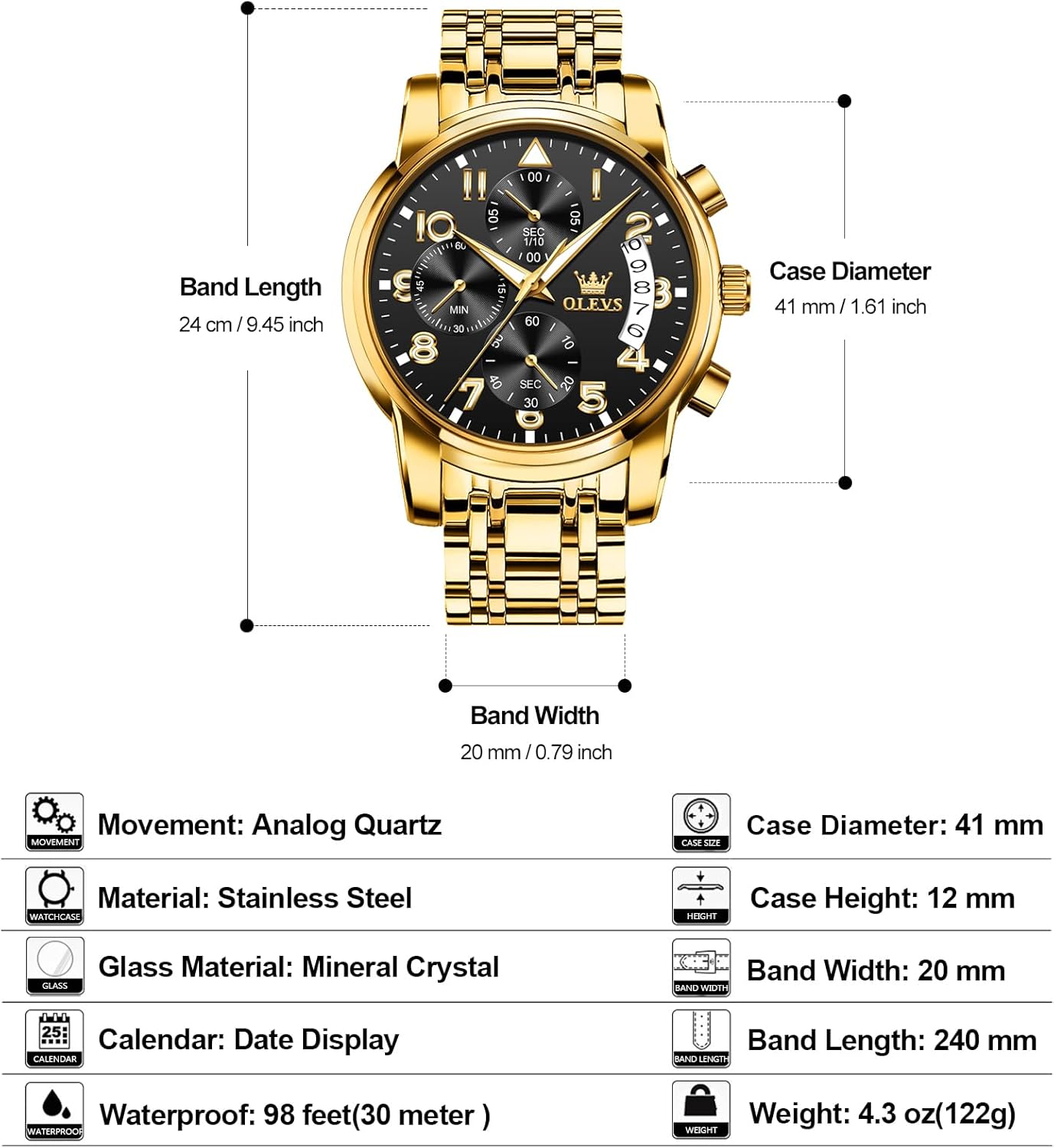
Image Description: A diagram illustrating the watch's crown (stem) and its three positions: Position 1 (pushed in), Position 2 (pulled out one click for date adjustment), and Position 3 (pulled out two clicks for time adjustment). It also shows the pushers for chronograph functions.
To Set Time:
- Pull the crown out to Position 3 (the outermost position).
- Turn the crown clockwise or counter-clockwise to adjust the hour and minute hands to the correct time.
- Push the crown back into Position 1 (the innermost position) to start the watch.
To Set Date:
- Pull the crown out to Position 2 (the middle position).
- Turn the crown clockwise or counter-clockwise to adjust the date.
- Push the crown back into Position 1 (the innermost position).
NOTE: Avoid changing the date setting when the current time is between 9:00 PM and 3:00 AM, as this can damage the movement.
Operating the Chronograph
Your OLEVS watch is equipped with a chronograph function for measuring elapsed time. The chronograph features 1/10 second, second, and minute subdials.

Image Description: A close-up diagram of the watch face highlighting the chronograph subdials for 1/10 seconds, seconds, and minutes. It also points out the 'Start/Stop' and 'Reset' pushers on the side of the watch case.
Chronograph Measurement:
- Press the top pusher (A) to start the chronograph timing.
- Press the top pusher (A) again to stop the chronograph timing.
- Press the bottom pusher (B) to reset the chronograph hands to zero.
Maintenance and Care
Proper care will help maintain the appearance and functionality of your OLEVS watch.
- Water Resistance: This watch is water-resistant up to 30 meters (98 feet). It is suitable for daily use, splashes, and brief immersion in water. It is not suitable for swimming, diving, or showering with hot water. Ensure the crown is fully pushed in before any contact with water.
- Scratch Resistance: The watch features a mineral crystal lens, which offers good resistance against scratches from everyday wear.
- Luminous Hands: The watch hands are luminous, allowing for readability in low-light conditions after exposure to light.
- Cleaning: Wipe the watch regularly with a soft, dry cloth to remove dust and smudges. For the stainless steel band, a slightly damp cloth can be used, followed by drying.
- Avoid Chemicals: Do not expose the watch to harsh chemicals, solvents, or detergents, as these can damage the case, band, or seals.
- Temperature Extremes: Avoid exposing the watch to extreme temperatures (hot or cold) or sudden temperature changes, which can affect its accuracy and water resistance.

Image Description: The OLEVS watch partially submerged in water, with text indicating "30M Waterproof," demonstrating its water resistance feature.

Image Description: A close-up image of the watch's crystal, emphasizing its scratch-resistant properties.

Image Description: The watch dial illuminated in a dark setting, showcasing the luminous hands and hour markers for visibility in low light.
Troubleshooting
| Problem | Possible Cause | Solution |
|---|---|---|
| Watch not running or stopping intermittently | Low battery or crown not fully pushed in. | Ensure the crown is fully pushed into Position 1. If the issue persists, the battery may need replacement by a professional watchmaker. |
| Date changes at noon instead of midnight | AM/PM setting is incorrect. | Advance the time by 12 hours. |
| Chronograph hands do not reset to zero | Requires calibration or internal issue. | Consult a professional watch repair service. |
| Water condensation inside the watch | Water ingress due to open crown or damaged seal. | Immediately take the watch to a professional watchmaker for inspection and repair to prevent further damage. |
Specifications

Image Description: A detailed diagram of the OLEVS watch with measurements for case diameter, case height, band width, and band length, alongside a list of key specifications.
- Model Number: QBZ-S-G2889G
- Movement: Analog Quartz
- Case Material: Stainless Steel
- Band Material: Stainless Steel
- Crystal: Mineral
- Case Diameter: 41 mm (1.61 inches)
- Case Thickness: 11 mm
- Band Width: 20 mm (0.79 inches)
- Band Length: 240 mm (9.45 inches)
- Water Resistance: 30 Meters (98 feet)
- Display: Analog
- Functions: Chronograph, Date Display, Luminous Hands
- Clasp Type: Foldover Clasp
- Weight: Approximately 5.9 ounces
Warranty Information
This OLEVS watch is covered by a seller warranty. For specific details regarding the warranty period and coverage, please refer to the documentation provided at the time of purchase or contact the seller directly.
Support and Contact
Should you require assistance or have questions regarding your OLEVS watch, please use the following methods to contact support:
- Before Purchase: On the product page, click on the seller's name (next to "Sold by") and select "Ask a Question."
- After Purchase: If you have already purchased the product, you can reach out by clicking "Get help" or "Get product support" on your order details page.
Related documentsQBZ-S-G2889G


Ask a question about this manual
Ask about setup, troubleshooting, compatibility, parts, safety, or missing instructions. Manuals+ will review the question and use this page’s manual context to help answer it.