
1. Product Overview
This A-MIND replacement kit provides an original LCD display and touch screen digitizer full assembly for compatible Samsung Galaxy M02 and M022 series smartphones. It is designed to address common screen malfunctions such as broken screens, liquid crystal ruptures, dead pixels, unresponsive touch, and display issues.

This image displays the A-MIND replacement LCD display and touch screen digitizer assembly for Samsung Galaxy M02/M022, alongside the included repair tools such as screwdrivers, pry tools, and suction cup.
1.1 Package Contents
- 1 x LCD Touch Digitizer Assembly
- 1 x Set of Repair Tools (uniform tools, may not open all phone models)
- 1 x Screen Protector
Note: The included toolset is a complimentary gift and its suitability for all phone models is not guaranteed.
2. Important Safety Information & Precautions
Installation of this screen replacement requires a certain level of technical skill and specialized equipment. For personal use or by non-professionals, it is strongly recommended to exercise caution or seek professional service to avoid damage to the product or device.
2.1 General Precautions
- The LCD is a fragile component. Handle with extreme care during installation.
- Glass fragments from an inadvertently broken screen may cause injury. Always take protective measures, such as wearing gloves and eye protection.
- Do not remove any protective films or labels from the new screen until testing is complete and successful.
- Pay close attention to electrostatic discharge (ESD) issues. Ground yourself using an ESD wrist strap to prevent static electricity from damaging the phone's electronic components.
2.2 Installation Specific Warnings
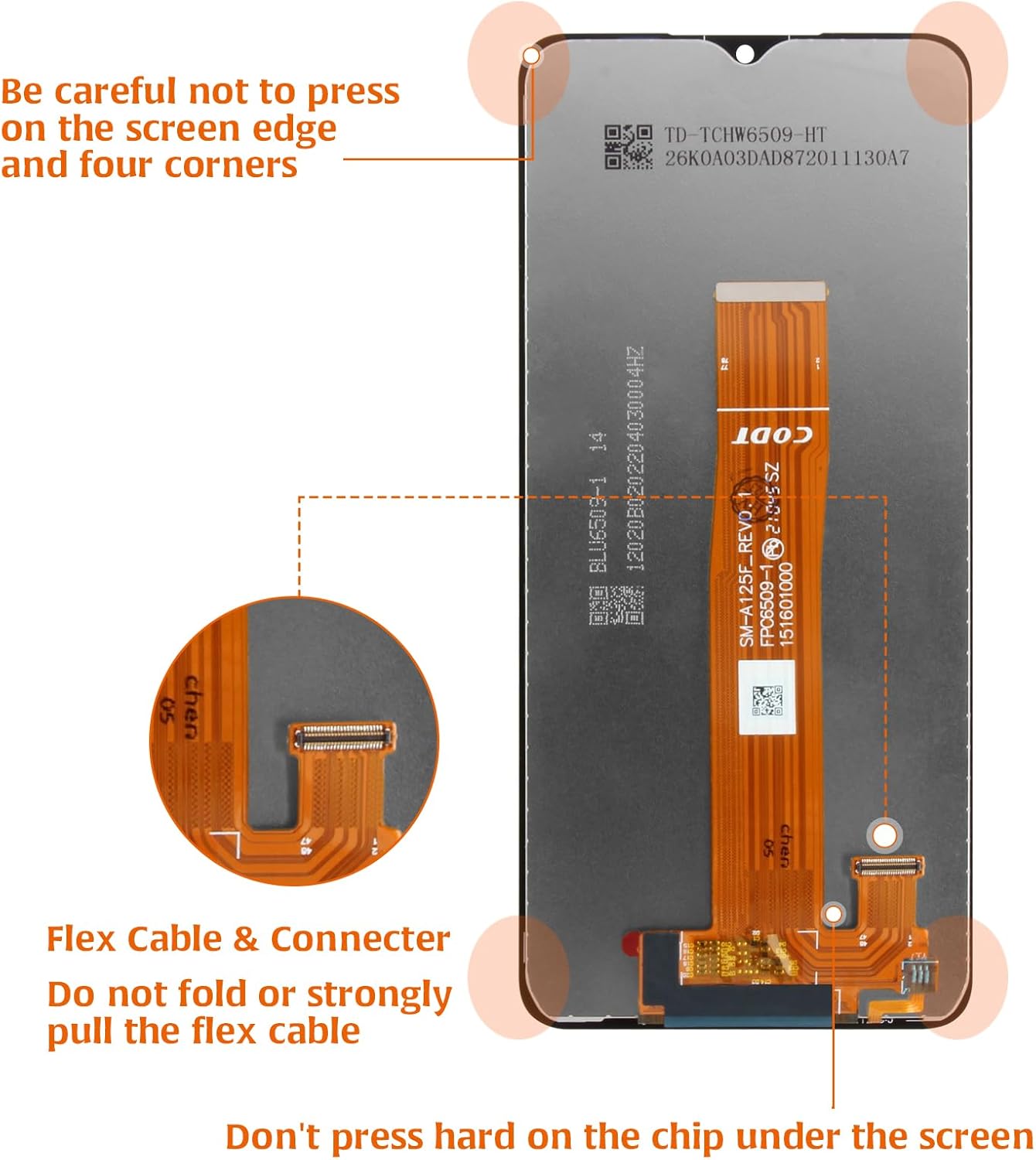
This image provides crucial warnings for screen installation: avoid pressing on screen edges and corners, do not fold or strongly pull the flex cable, and do not press hard on the chip located under the screen.
- Avoid Pressure Points: Be careful not to press on the screen edge and four corners.
- Flex Cable Handling: Do not fold or strongly pull the flex cable and its connector. Improper handling can cause irreversible damage.
- Chip Protection: Do not press hard on the chip located under the screen.
3. Setup and Pre-Installation Testing
Before proceeding with the full installation, it is crucial to perform a simulation test of the new screen to ensure it is fully functional. Damage caused during installation or after full installation due to an untested screen will not be covered under warranty.
3.1 Pre-Purchase Check
Before purchasing, confirm whether your phone's malfunction is specifically caused by the LCD or the touch panel. This product is a replacement for both.
3.2 Simulation Test Procedure
- Preparation: Ensure no protective films or labels are removed from the new screen. Ground yourself using an ESD wrist strap to prevent static damage.
- Disconnect Battery: Keep the phone's battery cable connector disconnected throughout the testing process.
- Connect New Screen: Carefully disassemble your phone and remove the old flex cable of the LCD display or Touch Screen from the motherboard. Connect the new screen's flex cable to the motherboard.
- Power On & Test: Plug in the charging cable (do not reconnect the battery yet) and attempt to turn on the phone. Check if the screen works normally, including display quality and touch responsiveness.
- Troubleshooting During Test: If any abnormality is observed during this test, immediately disconnect the screen and contact customer service with video or photo evidence. Do not proceed with full installation if issues are present.
3.3 Installation Guidance
This product does not come with a detailed installation manual. If you possess experience in phone repair and have the necessary equipment, you can find numerous installation tutorials on platforms like YouTube. If you are not confident in your ability to perform the installation, it is highly recommended to send your device to a professional repair store for service.
Parts damaged during the installation process will not be accepted for return or replacement.
4. Maintenance
Once installed, the replacement screen functions as the original. To ensure its longevity and optimal performance, follow general smartphone screen maintenance practices:
- Screen Protector: Utilize the included screen protector to guard against scratches and minor impacts.
- Cleanliness: Clean the screen regularly with a soft, lint-free cloth, avoiding harsh chemicals.
- Physical Protection: Avoid dropping the device or placing heavy objects on the screen. Do not apply excessive pressure to the screen surface.
5. Troubleshooting & Support
This section addresses common concerns and provides guidance on seeking support.
5.1 Common Issues and Solutions
- Screen Not Functioning After Test: If the screen does not work normally during the simulation test, ensure all flex cables are securely connected and that the battery cable is disconnected. If the issue persists, do not proceed with installation.
- Broken, Damaged, or Missing Items Upon Receipt: If you receive the product with any visible damage, breakage, or missing components, do not install it.
5.2 Contacting Support
For any issues encountered before or during the simulation test, or if you receive a damaged or incomplete product, please take photos or videos of the issue and email our customer service team immediately. Our staff is available to assist you with any questions or concerns.
6. Specifications
Detailed specifications for the A-MIND Samsung Galaxy M02/M022 Screen Replacement Kit.
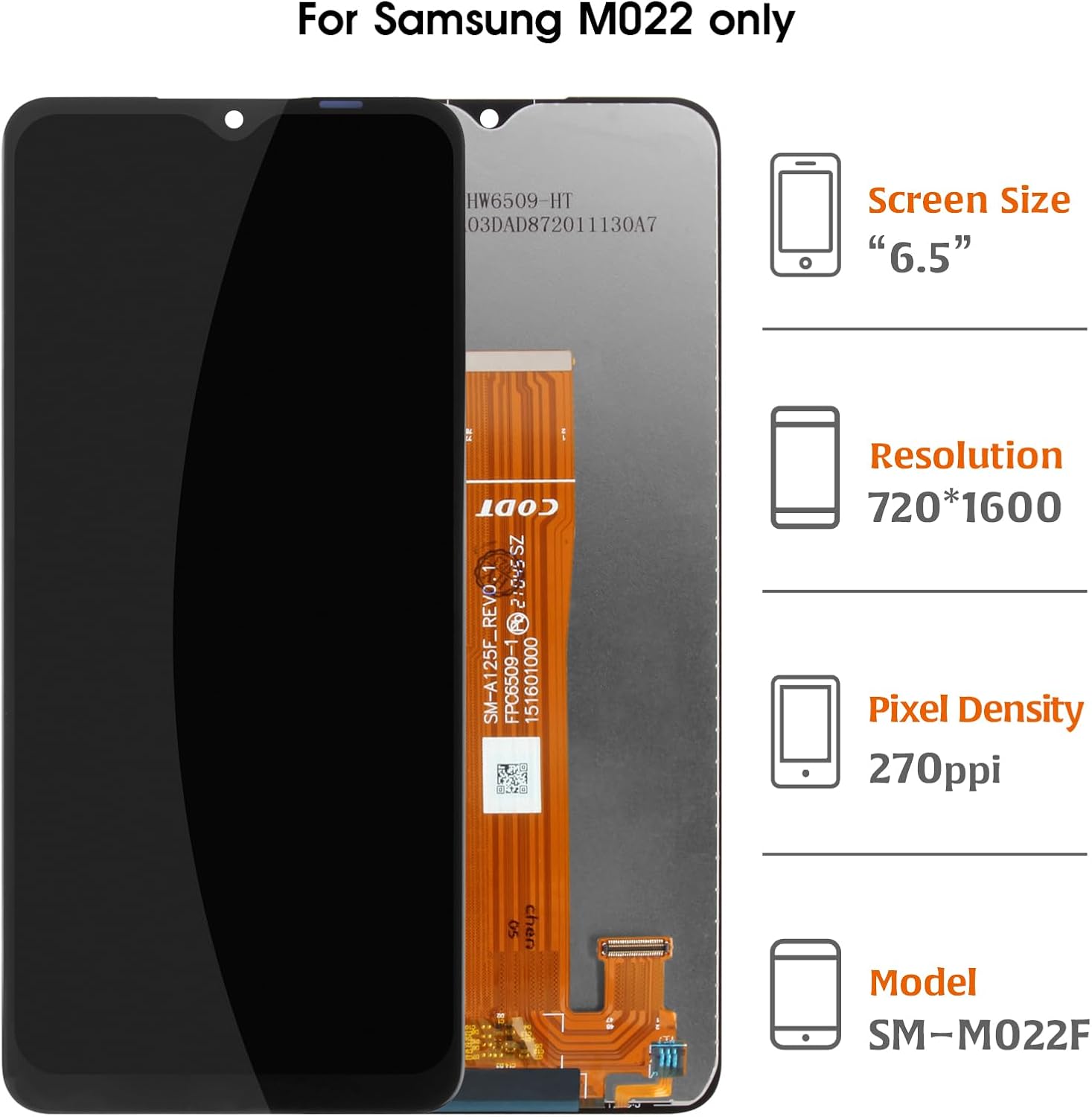
This diagram illustrates key specifications of the Samsung M022 screen, including a 6.5-inch screen size, 720x1600 resolution, and 270 PPI pixel density, confirming compatibility with model SM-M022F.
| Feature | Detail |
|---|---|
| Compatible Models | Samsung Galaxy M02, M022F, M022F/DS, M022G, M022G/DS |
| Screen Size | 6.5 inches |
| Resolution | 720 x 1600 pixels |
| Pixel Density | 270 ppi |
| Color | Black |
| Item Weight | 3.52 ounces |
| Package Dimensions | 1 x 1 x 0.79 inches |
6.1 Quality Assurance
All A-MIND products undergo strict quality inspection before shipment. Each unit is tested using real devices to ensure there are no scratches, dead pixels, or other defects in the LCD. Only A+ quality products are provided.

A detailed view of the screen's flex cable, emphasizing that each unit undergoes 100% testing before shipment to ensure functionality.
7. Warranty and After-Sales Service
A-MIND is committed to providing high-quality products and customer satisfaction.
7.1 Warranty Coverage
We offer a 3-month free replacement or refund coverage for non-human product damage and manufacturing faults. This warranty applies from the date of receipt.
7.2 Exclusions
The warranty does not cover any damages or malfunctions caused by incorrect installation work, misuse, or accidental damage by the user. Products damaged during installation will not be eligible for return or replacement.
7.3 Claims Process
If you encounter any issues covered by the warranty, or if you receive a broken, damaged, or missing item, please contact our customer service immediately via email with attached photos or videos of the issue. Do not attempt to install a damaged product.


