
TELESIN QHM-001
TELESIN Head Strap Mount with Cap Clip User Manual
Model: QHM-001
1. Introduction
This manual provides detailed instructions for the proper use and maintenance of your TELESIN Head Strap Mount with Cap Clip. This versatile accessory is designed for action cameras, offering multiple mounting options for various activities.
Key Features:
- Dual-purpose design: Functions as a head strap and a quick-release cap/backpack clip.
- Adjustable elastic nylon straps with non-slip rubber for a secure fit.
- Compatible with GoPro, Insta360, DJI, AKASO, and most action cameras.
2. Package Contents
Please verify that all items are present in your package:
- TELESIN Head Strap Mount
- Quick Release Cap Clip

Image: The TELESIN Head Strap Mount and the Quick Release Cap Clip, shown separately and assembled in various configurations (head mount, cap mount, wrist mount).
3. Setup and Assembly
3.1 Attaching Your Action Camera
The mount features a standard 3-prong adapter compatible with most action cameras.
- Align the camera's mounting tabs with the 3-prong adapter on the head strap or cap clip.
- Insert the thumb screw through the aligned holes.
- Tighten the thumb screw securely to prevent camera movement during use.

Image: A GoPro camera securely attached to the TELESIN head strap mount using the standard 3-prong adapter and thumb screw.
3.2 Converting Between Head Strap and Cap Clip
The quick-release design allows for easy conversion.
- To detach the quick-release base from the head strap:
- Locate the quick-release base on the head strap.
- Insert the head strap into the slot as indicated by the arrow.
- Lift the arrow upward and pull the base out from the opposite direction.
- To attach the quick-release base to the cap clip:
- Align the quick-release base with the slot on the cap clip.
- Slide the base into the clip until it clicks securely into place.
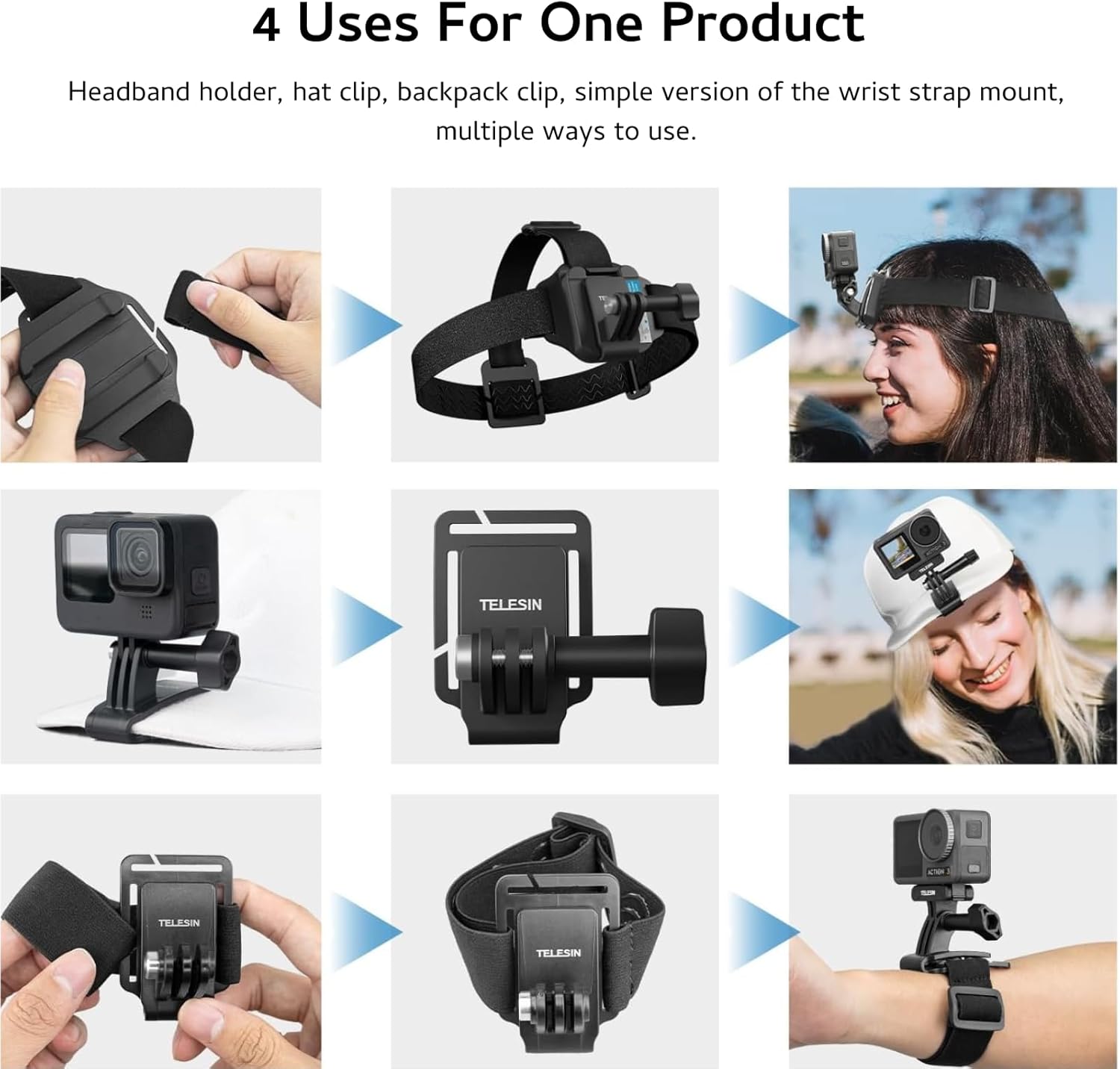
Image: A two-step diagram illustrating the quick-release mechanism. Step 1 shows inserting the head strap into a slot. Step 2 shows lifting an arrow and pulling the base out.
4. Operating Instructions
4.1 Using as a Head Strap Mount
- Place the head strap on your head or helmet with the camera mount positioned at the front.
- Adjust the elastic straps using the dual adjustment buckles to achieve a snug and comfortable fit. The wearable range is 55-65cm head circumference.
- Ensure the non-slip rubber on the inner side of the strap is in contact with your skin or helmet surface for enhanced stability.
- Adjust the camera angle as needed before securing the thumb screw tightly.

Image: A diagram illustrating the adjustable elasticity of the head strap, showing two adjustment buckles and a wearable range of 55-65cm.
4.2 Using as a Cap Clip or Backpack Clip
- Attach the quick-release base to the cap clip as described in Section 3.2.
- Open the cap clip and securely attach it to the brim of a cap, a backpack strap, or other suitable surfaces.
- Ensure the clip's anti-slip silicone pads and grooves provide a strong grip on the chosen surface.
- Adjust the camera angle as needed before securing the thumb screw tightly.

Image: An action camera mounted on the brim of a white cap using the TELESIN cap clip, highlighting the strong grip provided by the silicone pads.
5. Maintenance
- Cleaning: Wipe the mount and straps with a damp cloth. For stubborn dirt, use mild soap and water. Ensure all components are dry before storage.
- Strap Care: The elastic band is detachable and washable. Hand wash with mild detergent and air dry.
- Storage: Store the mount in a cool, dry place away from direct sunlight and extreme temperatures.
- Inspection: Regularly inspect the straps, buckles, and mounting points for any signs of wear or damage. Replace if necessary to ensure secure camera attachment.

Image: A hand demonstrating the detachment of the elastic band from the head strap mount, indicating its washable feature.
6. Troubleshooting
| Problem | Possible Cause | Solution |
|---|---|---|
| Camera feels loose or wobbly. | Thumb screw not tightened sufficiently. | Ensure the thumb screw is tightened firmly. |
| Head strap slips during activity. | Strap not adjusted tightly enough; non-slip rubber not properly positioned. | Adjust straps for a snug fit. Ensure non-slip rubber is against skin/helmet. |
| Cap clip does not grip securely. | Clip not fully engaged; surface too thin or slippery. | Ensure the clip is fully engaged. Use on thicker cap brims or backpack straps. |
7. Specifications
- Model: QHM-001
- Material: PC+ABS, Acrylic Fiber, Thai Latex Silk
- Weight: 95g (3.35 oz)
- Wearable Range (Head Strap): 55-65cm head circumference
- Compatibility: GoPro Max/Hero 13/12/11/10/9/8, Insta360 X5/X4/X3, DJI Osmo Nano Action 5 Pro/Action 4/3, AKASO, and most action cameras.
- Manufacturer: Adaptom
8. Warranty and Support
Your TELESIN Head Strap Mount with Cap Clip comes with a 2-year premium support warranty. For any product-related inquiries, technical assistance, or warranty claims, please contact our customer service team.
Customer Service: Refer to the contact information provided with your purchase or visit the official Adaptom/TELESIN website for support details.
We are committed to providing 24-hour after-sales service to ensure your satisfaction.
9. Product Videos
Watch these official product videos for visual guidance on setup and usage.
No official seller videos are available for embedding in this manual.
Ask a question about this manual
Ask about setup, troubleshooting, compatibility, parts, safety, or missing instructions. Manuals+ will review the question and use this page’s manual context to help answer it.